
用自定义消息替换错误
用自定义消息替换错误
提问于 2017-02-09 18:34:10
我的程序是关于图像处理的,它要求用户在运行时打开图像。但是,如果用户在不选择任何图像的情况下关闭窗口,我将得到以下错误:
Traceback (most recent call last):
  File "<string>", line 420, in run_nodebug
  File "E:\Projet Complet\Test 2.py", line 255, in <module>
    Ima1=Image.open(a)
  File "C:\EduPython\App\lib\site-packages\PIL\Image.py", line 2317, in open
    fp = io.BytesIO(fp.read())
AttributeError: 'str' object has no attribute 'read'我试图在打开的消息框中用自定义消息(如"You didn't choose any image" )替换该错误。我知道如何打开消息框,但不知道如何用它替换错误消息。我试过这样做:
main.withdraw()
try:
    a = filedialog.askopenfilename()
    main.deiconify()
except AttributeError:
    tkMessageBox.showinfo( "Image Error", "You didn't choose any image.")
    sys.exit()
但是它给了我上面的错误。以下是完整的代码:
from tkinter import*
import tkinter as Tkinter
from tkinter import filedialog, DISABLED, messagebox as tkMessageBox
import os
import ntpath
from PIL import Image, ImageTk, ImageFilter
import PIL
from collections import Counter
from random import randint
import random
import PIL.ImageOps


def EchelleDeGris():
    Ima2=Image.new("RGB",(z[0],z[1]))
    px=Ima1.load()
    px1=Ima2.load()
    for x in range(z[0]):
        for y in range(z[1]):
            p=px[x,y]
            if type(p)==int:
                p=(p,p,p)
            o=int((p[0]+p[1]+p[2])/3)
            px1[x,y]=(o,o,o)
    Ima2.save(""+dir_path+"\\Requirements\\ImageMod.png")
    im2 = ImageTk.PhotoImage(file=""+dir_path+"\\Requirements\\ImageMod.png")
    main.image = im2
    I2 = Tkinter.Label(main, image=im2)
    I2.grid(row=0, column=4, columnspan =4)

def SupprimerImage():
    I2 = Tkinter.Label(main, image=imt)
    I2.grid(row=0, column=4, columnspan =4)

def Luminosite():
    Ima2=Image.new("RGB",(z[0],z[1]))
    px=Ima1.load()
    px1=Ima2.load()
    for x in range(z[0]):
        for y in range(z[1]):
            p=px[x,y]
            if type(p)==int:
                p=(p,p,p)
            px1[x,y]=(p[0]+S1.get(),p[1]+S1.get(),p[2]+S1.get())
    Ima2.save(""+dir_path+"\\Requirements\\ImageMod.png")
    im2 = ImageTk.PhotoImage(file=""+dir_path+"\\Requirements\\ImageMod.png")
    main.image = im2
    I2 = Tkinter.Label(main, image=im2)
    I2.grid(row=0, column=4, columnspan =4)

def AnnulerModifications():
    I2 = Tkinter.Label(main, image=im1)
    I2.grid(row=0, column=4, columnspan =4)

def get_pixel(pixels, x, y):
    try:
        return pixels[x, y]
    except IndexError:
        return None


def get_neighbors(pixels, x, y):
    neighbors = list()
    neighbors.append(get_pixel(pixels, x, y - 1))
    neighbors.append(get_pixel(pixels, x, y + 1))
    neighbors.append(get_pixel(pixels, x - 1, y))
    neighbors.append(get_pixel(pixels, x + 1, y))
    neighbors.append(get_pixel(pixels, x - 1, y - 1))
    neighbors.append(get_pixel(pixels, x - 1, y + 1))
    neighbors.append(get_pixel(pixels, x + 1, y - 1))
    neighbors.append(get_pixel(pixels, x + 1, y + 1))
    return neighbors


def filter_art(pixels, size):
    indexes = dict()
    for x in range(size[0]):
        for y in range(size[1]):
            color = get_pixel(pixels, x, y)
            neighbors = get_neighbors(pixels, x, y)
            new_color = Counter(neighbors).most_common()[0][0]
            if new_color is not None:
                indexes[x, y] = new_color
    for x, y in indexes:
        pixels[x, y] = indexes[x, y]


def pop_art(path_orig, path_mod, coef):

    s=[]
    for i in range(9):

        r=(randint(0,255), randint(0,255), randint(0,255))
        g=(randint(0,255), randint(0,255), randint(0,255))
        b=(randint(0,255), randint(0,255), randint(0,255))

        image_orig = Image.open(path_orig)
        size = image_orig.size
        image_mod = Image.new("RGB",(size[0],size[1]))
        pixels_orig = image_orig.load()
        pixels_mod = image_mod.load()
        for x in range(size[0]):
            for y in range(size[1]):
                p = pixels_orig[x, y]
                if isinstance(p, int):
                    rgb = (p,p,p)
                elif isinstance(p, tuple) and len(p) in (3, 4):
                    rgb = p[:3]
                else:
                    raise TypeError('Unknown pallete')
                average_color = sum(rgb) / 3
                if average_color <= 85:
                    pixels_mod[x, y] = r
                elif 85 < average_color <= 170:
                    pixels_mod[x, y] = g
                elif average_color > 170:
                    pixels_mod[x, y] = b
        for _ in range(coef):
            filter_art(pixels_mod, size)
        image_mod.save(''+dir_path+'\\PopArt\\Modified Images\\result'+str(i)+'.png')
        Img=[None]*9
    for i in range(9):
        Img[i]=Image.open(""+dir_path+"\\PopArt\\Modified Images\\result"+str(i)+".png")
        basewidth = int(Img[i].size[1]/3)
        wpercent = (basewidth / float(Img[i].size[0]))
        hsize = int((float(Img[i].size[1]) * float(wpercent )))
        Img[i] = Img[i].resize((basewidth , hsize ), PIL.Image.ANTIALIAS)
        Img[i].save(''+dir_path+'\\PopArt\\Resized Images\\resized_image'+str(i)+'.png')


    Img1=[None]*9
    pixels1=[None]*9
    Imaz=Image.new("RGB",(basewidth*3,hsize*3))
    pixels=Imaz.load()
    for i in range(9):
        Img1[i]=Image.open(''+dir_path+'\\PopArt\\Resized Images\\resized_image'+str(i)+'.png')
        pixels1[i]=Img1[i].load()


    for x in range(0,basewidth):
        for y in range(0,hsize):
            pixels[x,y]=pixels1[0][x,y]
        for y in range(hsize,hsize*2):
            pixels[x,y]=pixels1[1][x,y-hsize]
        for y in range(hsize*2,hsize*3):
            pixels[x,y]=pixels1[2][x,y-hsize*2]

    for x in range(basewidth,basewidth*2):
        for y in range(0,hsize):
            pixels[x,y]=pixels1[3][x-basewidth,y]
        for y in range(hsize,hsize*2):
            pixels[x,y]=pixels1[4][x-basewidth,y-hsize]
        for y in range(hsize*2,hsize*3):
            pixels[x,y]=pixels1[5][x-basewidth,y-hsize*2]

    for x in range(basewidth*2,basewidth*3):
        for y in range(0,hsize):
            pixels[x,y]=pixels1[6][x-basewidth*2,y]
        for y in range(hsize,hsize*2):
            pixels[x,y]=pixels1[7][x-basewidth*2,y-hsize]
        for y in range(hsize*2,hsize*3):
            pixels[x,y]=pixels1[8][x-basewidth*2,y-hsize*2]
    Imaz = Imaz.resize((size[0] , size[1] ), PIL.Image.ANTIALIAS)
    Imaz.save(""+dir_path+"\\PopArt\\Result Image\\result.png")


def usepop():
    im2 = ImageTk.PhotoImage(file=""+dir_path+"\\Requirements\\traitement.png")
    main.image = im2
    I2 = Tkinter.Label(main, image=im2)
    I2.grid(row=0, column=4, columnspan =4)
    I2.update_idletasks()
    pop_art(a, None, coef=4)
    im2 = ImageTk.PhotoImage(file=""+dir_path+"\\PopArt\\Result Image\\result.png")
    main.image = im2
    I2 = Tkinter.Label(main, image=im2)
    I2.grid(row=0, column=4, columnspan =4)

def change_contrast(level):

    img = Image.open(a)
    img.load()

    factor = (259 * (level+255)) / (255 * (259-level))
    for x in range(img.size[0]):
        for y in range(img.size[1]):
            color = img.getpixel((x, y))
            if type(color) == int:
                color=(color,color,color)
                new_color = tuple(int(factor * (c-128) + 128) for c in color)
                new_color = new_color[0]
                img.putpixel((x, y), new_color)
            elif type(color) != int:
                new_color = tuple(int(factor * (c-128) + 128) for c in color)
                img.putpixel((x, y), new_color)
    return img

def use_contrast():
    result = change_contrast(S2.get())
    result.save(""+dir_path+"\\Requirements\\ImageMod.png")
    im2 = ImageTk.PhotoImage(file=""+dir_path+"\\Requirements\\ImageMod.png")
    main.image = im2
    I2 = Tkinter.Label(main, image=im2)
    I2.grid(row=0, column=4, columnspan =4)

def recherche_contours():
    Ima2=Image.new("RGB",(z[0],z[1]))
    px=Ima1.load()
    px1=Ima2.load()
    for x in range(z[0]):
        for y in range(z[1]):
            p=px[x,y]
            if type(p)==int:
                p=(p,p,p)
            o=int((p[0]+p[1]+p[2])/3)
            px1[x,y]=(o,o,o)
    Ima2 = Ima2.filter(ImageFilter.FIND_EDGES)
    image = Ima2
    if image.mode == 'RGBA':
        r,g,b,a = image.split()
        rgb_image = Image.merge('RGB', (r,g,b))

        inverted_image = PIL.ImageOps.invert(rgb_image)

        r2,g2,b2 = inverted_image.split()

        final_transparent_image = Image.merge('RGBA', (r2,g2,b2,a))

        final_transparent_image.save(""+dir_path+"\\Requirements\\ImageMod.png")

    else:
        inverted_image = PIL.ImageOps.invert(image)
        inverted_image.save(""+dir_path+"\\Requirements\\ImageMod.png")
    im2 = ImageTk.PhotoImage(file=""+dir_path+"\\Requirements\\ImageMod.png")
    main.image = im2
    I2 = Tkinter.Label(main, image=im2)
    I2.grid(row=0, column=4, columnspan =4)

main=Tk()

main.withdraw()
try:
    a = filedialog.askopenfilename()
    main.deiconify()
except AttributeError:
    tkMessageBox.showinfo( "Resolution Error", "The image is too big, please select a smaller one.")
    sys.exit()


dir_path = os.path.dirname(os.path.realpath("Test2.py"))

main.configure(background="#a1dbcd")
main.title("Photoshop Version.Megzari")
try:
    Ima1=Image.open(a)
    z=Ima1.size
    nux=Image.new("RGB",(z[0],z[1]))
    nuxy=nux.load()
    for x in range(z[0]):
        for y in range(z[1]):
            nuxy[x,y]=(255,255,255)
    nux.save(""+dir_path+"\\Requirements\\Blank.png")


    main.withdraw()
    a = filedialog.askopenfilename()
except AttributeError:
    tkMessageBox.showinfo( "Image Error", "You didn't choose any image.")
    sys.exit()
main.deiconify()

if z>(400,400):
    main.withdraw()
    tkMessageBox.showinfo( "Resolution Error", "The image is too big, please select a smaller one.")
    sys.exit()

elif z<(400,400):
    im1 = ImageTk.PhotoImage(file=a)
    I1 = Tkinter.Label(main, image=im1)
    I1.grid(row=0, column=1, columnspan =3)
    imt = ImageTk.PhotoImage(file=""+dir_path+"\\Requirements\\Blank.png")
    T1 = Tkinter.Label(main, image=imt)
    T1.grid(row=0, column=4, columnspan =4)
    B1 = Tkinter.Button(main, text ="Echelle de gris", command = EchelleDeGris, fg="#a1dbcd", bg="#383a39", state=NORMAL)
    B1.grid(padx=20, pady=20, row=1, column=0)
    B3 = Tkinter.Button(main, text ="Appliquer Luminosité", command = Luminosite, fg="#a1dbcd", bg="#383a39")
    B3.grid(padx=20, pady=20, row=1, column=1)
    S1 = Scale(main, from_=0, to=254, orient=HORIZONTAL, fg="#a1dbcd", bg="#383a39", length = 200)
    S1.grid(row=2, column=1)
    B2 = Tkinter.Button(main, text ="Supprimer Image", command = SupprimerImage, fg="#a1dbcd", bg="#383a39")
    B2.grid(padx=20, pady=20, row=1, column=7)
    B3 = Tkinter.Button(main, text ="Annuler Modifications", command = AnnulerModifications, fg="#a1dbcd", bg="#383a39")
    B3.grid(padx=20, pady=20, row=1, column=6)
    B4 = Tkinter.Button(main, text ="Pop Art", command = usepop, fg="#a1dbcd", bg="#383a39")
    B4.grid(padx=20, pady=20, row=1, column=3)
    S2 = Scale(main, from_=-258, to=258, orient=HORIZONTAL, fg="#a1dbcd", bg="#383a39", length = 200)
    S2.grid(row=2, column=4)
    B4 = Tkinter.Button(main, text ="Appliquer Contraste", command = use_contrast, fg="#a1dbcd", bg="#383a39")
    B4.grid(padx=20, pady=20, row=1, column=4)
    B5 = Tkinter.Button(main, text ="Trouver Contours", command = recherche_contours, fg="#a1dbcd", bg="#383a39")
    B5.grid(padx=20, pady=20, row=1, column=5)

    s=S1.get()
    s2=S2.get()


main.mainloop()EDIT1:我应用了@Juan的答案,它确实显示了消息,但是它没有关闭窗口,即使我启动了sys.exit()
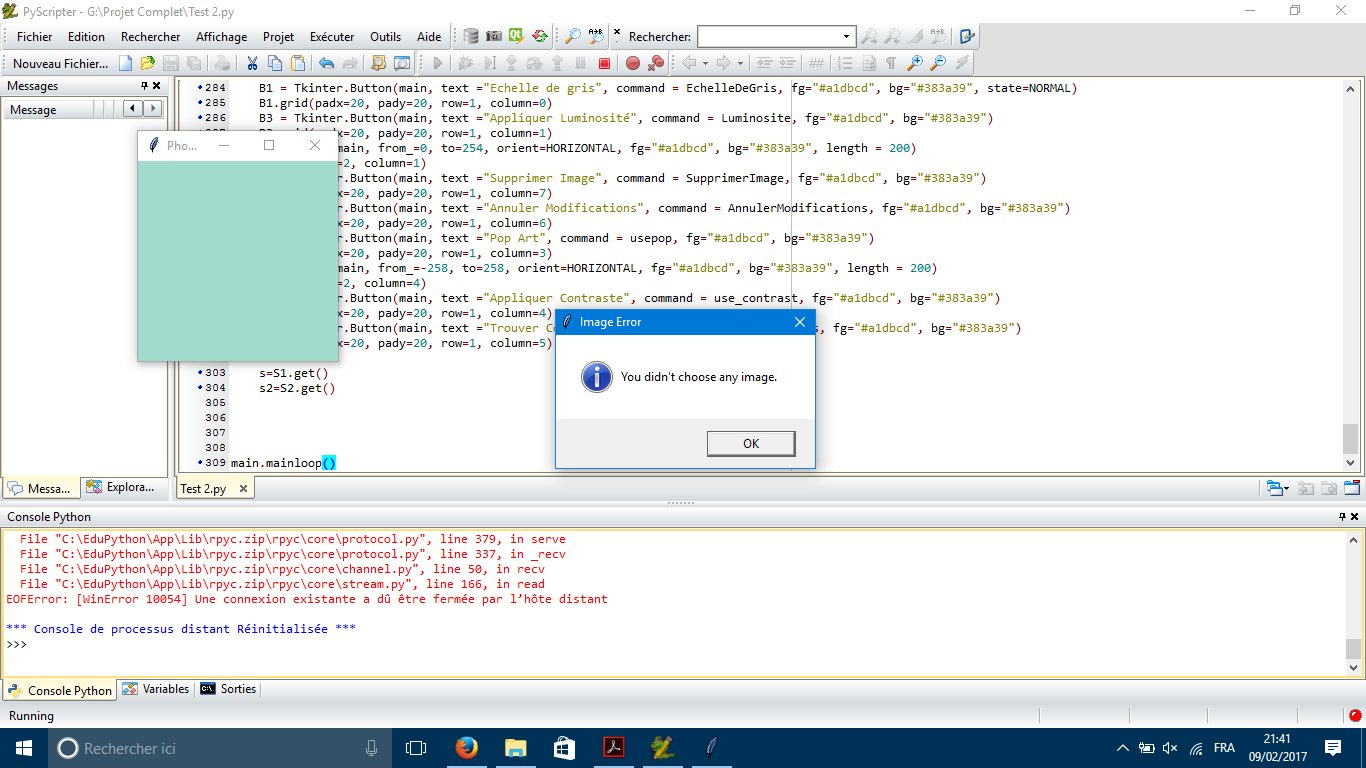
EDIT2:我发现了如何修复它,我所要做的就是在sys.exit()之前添加main.destroy()
EDIT3:现在,当我运行代码时,我选择了图像,它再次提示我输入图像。我要它提示它一次。
EDIT4:我修复了它,问题是我在导致问题的代码中隐藏了一个旧片段,现在一切都好了。
回答 1
Stack Overflow用户
回答已采纳
发布于 2017-02-09 18:55:27
如果你把try放在前面的话,它就能工作了。因此,与其:
Ima1=Image.open(a)
z=Ima1.size
...
nux.save(""+dir_path+"\\Requirements\\Blank.png")


main.withdraw()
try:
    a = filedialog.askopenfilename()
except AttributeError:
    tkMessageBox.showinfo( "Image Error", "You didn't choose any image.")
    sys.exit()
main.deiconify()
考虑:
try:
    Ima1=Image.open(a)
    z=Ima1.size
    ...
    nux.save(""+dir_path+"\\Requirements\\Blank.png")

    main.withdraw()

    a = filedialog.askopenfilename()
except AttributeError:
    tkMessageBox.showinfo( "Image Error", "You didn't choose any image.")
    sys.exit()
main.deiconify()页面原文内容由Stack Overflow提供。腾讯云小微IT领域专用引擎提供翻译支持
原文链接:
https://stackoverflow.com/questions/42144374
复制相关文章
相似问题
腾讯云开发者

Copyright © 2013 - 2026 Tencent Cloud. All Rights Reserved. 腾讯云 版权所有
深圳市腾讯计算机系统有限公司 ICP备案/许可证号:粤B2-20090059  粤公网安备44030502008569号
腾讯云计算(北京)有限责任公司 京ICP证150476号 | 京ICP备11018762号