
什么因素会导致jquery.ajax每次都认为响应是错误的
什么因素会导致jquery.ajax每次都认为响应是错误的
提问于 2017-05-16 00:29:18
前端:
<script type="text/javascript">
jQuery("#FormButtonRun").click(function(event){
    submitEmailForm();
});

var submitEmailForm = function ()  {
    var submitdata = {'Email':jQuery('#FormEmail').val(), 'fName':jQuery('#FormName1').val(), 'lName':jQuery('#FormName2').val(), 'listnews':"Yes"};

    jQuery.ajax({
        type:'POST',
        url:'https://dev.formserver.com/ajax.php',
        data:submitdata,
        success: submitwrkd,
        error: submitfaild,
        dataType:'json'
    });
}

var submitwrkd = function(response, more, xhr){
    alert("It worked!);
    alert(response.msg);
}

var submitfaild = function(response, more, xhr){
    alert("allegedly that failed");
}
后端: ajax.php:
<?php
header('Content-type:application/json');
echo json_encode(array('success'=>true, 'msg'=>'It was a success'));
?>
内容-控制-允许-原产地设置为*的内容-服务器和张贴-到服务器
完整标题:
POST /ajax.php HTTP/1.1
Host: dev.dataserver.org
User-Agent: Mozilla/5.0 (Macintosh; Intel Mac OS X 10.12; rv:51.0) Gecko/20100101 Firefox/51.0
Accept: application/json, text/javascript, */*; q=0.01
Accept-Language: en-US,en;q=0.5
Accept-Encoding: gzip, deflate, br
Content-Type: application/x-www-form-urlencoded; charset=UTF-8
Referer: https://dev.dataserver.org/popuptest
Content-Length: 127
Origin: https://dev.contentserver.org
Connection: keep-alive
Email={removed post data}
响应:
HTTP/1.1 200 OK
Server: nginx/1.8.1
Date: Tue, 16 May 2017 00:44:49 GMT
Content-Type: application/json
Transfer-Encoding: chunked
Connection: keep-alive
Access-Control-Allow-Origin: *
Access-Control-Allow-Methods: POST数据:{"success":true,"msg":"It was a success"}
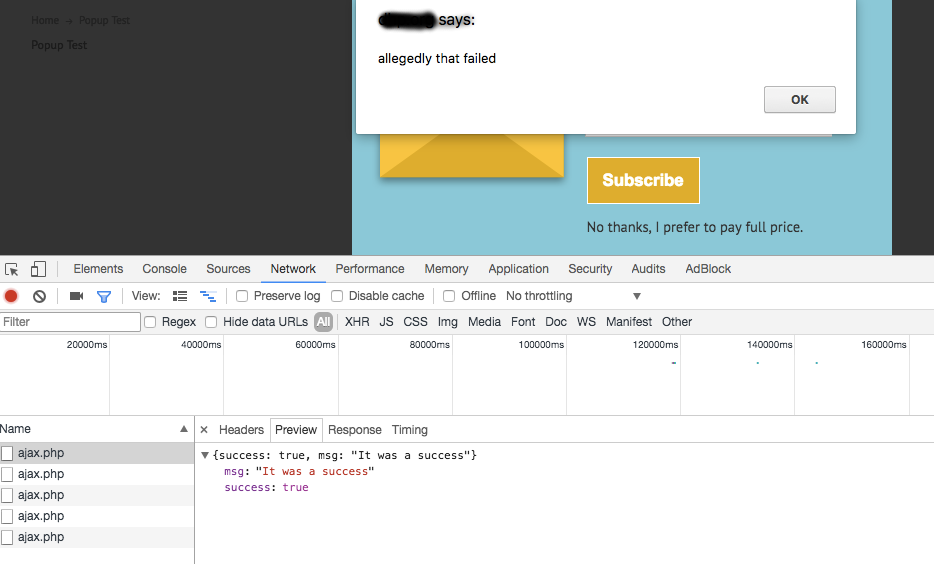
- 按钮成功触发提交。
- 目标服务器日志文件显示请求和响应
"POST /ajax.php HTTP/1.1" 200 67 "-" "Mozilla/5.0 ...。 - 浏览器开发工具显示响应: http代码:200,响应内容被识别为json:
success: true, msg: 'It was a success'。
javascript警报宣布:allegedly that failed
我已经检查了内容控制头( Access-Control-Allow-Origin: *; Access-Control-Allow-Methods: POST; )和它的遍历,数据类型,json错误,javascript错误(没有抛出),不同的浏览器。
如何让它在成功时运行定义的success函数,以及在出错时运行错误函数?
我可以回过头来看.done(),但是有一种强烈的偏好,那就是知道它有效。
回答 1
Stack Overflow用户
回答已采纳
发布于 2017-05-26 19:53:54
- 无效的ajax调用参数
- 在目标服务器或源服务器上缺少访问控制-允许源标头
- 目标或原点上的不正确访问控制标头
- 损坏的标头(例如:无效的域/源名称或
Access-Control-Allow-Origin: '*) - 来自目标服务器的无效响应头或内容流
- 加块源或目标域
- Javascipt是从第三台服务器CDN (CDN需要它的域标头设置,目标服务器设置为CDN作为源)上加载的。
- 使用过时的ajax框架(旧的jquery、脚本化或原型),该框架在当前浏览器Access-Control中不能正常工作。
页面原文内容由Stack Overflow提供。腾讯云小微IT领域专用引擎提供翻译支持
原文链接:
https://stackoverflow.com/questions/43990715
复制相关文章
相似问题
腾讯云开发者

Copyright © 2013 - 2026 Tencent Cloud. All Rights Reserved. 腾讯云 版权所有
深圳市腾讯计算机系统有限公司 ICP备案/许可证号:粤B2-20090059  粤公网安备44030502008569号
腾讯云计算(北京)有限责任公司 京ICP证150476号 | 京ICP备11018762号