
角4材料DatePicker没有在正确的位置打开
角4材料DatePicker没有在正确的位置打开
提问于 2017-06-05 20:39:24
我在我的应用程序中使用的是材料数据报警器组件(2.0.0-beta.6)。我可以正确地添加它,但是每当我打开它时,它就会在页面的左上角打开。理想情况下,它应该在datepicker组件旁边打开。
请看下面的代码。
Demo.html
    <div class="col col-2 col-spacing">
        <md-input-container>
          <input mdInput [mdDatepicker]="endDatepicker" placeholder="End Date:">
          <button mdSuffix [mdDatepickerToggle]="endDatepicker"></button>
        </md-input-container>
        <md-datepicker #endDatepicker></md-datepicker>
      </div>
    </div>
DemoModule.ts
import { BrowserAnimationsModule } from '@angular/platform-browser/animations';
import { NgModule } from '@angular/core';

import { DemoComponent} from './demo.component';
import { MaterialModule, MdNativeDateModule } from '@angular/material';

@NgModule({
  declarations: [DemoComponent],
  imports: [
    BrowserAnimationsModule,
    MaterialModule,
    MdNativeDateModule,
  ],
  bootstrap: [DemoComponent]
})
export class AppModule { }
DemoComponent.ts
import { Component } from '@angular/core';


@Component({
     selector: 'sbom-search-panel',
     templateUrl: './demo.component.html',
})

export class DemoComponent {}
请看截图。
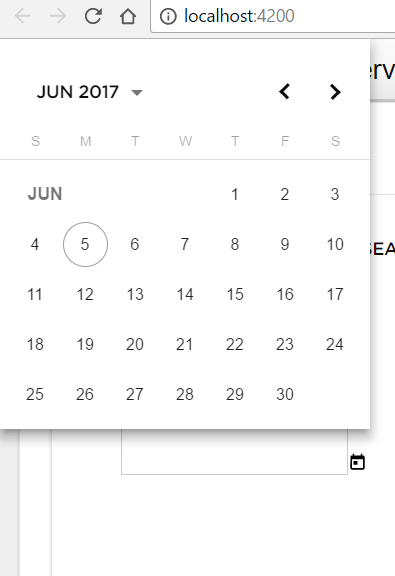
你的帮助将不胜感激。
回答 2
Stack Overflow用户
发布于 2017-06-20 20:37:21
尝试将[touchUi]="true"放在md-datepicker标记上。应该管用的!
Stack Overflow用户
发布于 2017-08-04 06:37:06
app.component.ts
import { Component } from '@angular/core';

@Component({
  selector: 'app-root',
  templateUrl: './app.component.html',
  styleUrls: ['./app.component.css']
})
export class AppComponent {
  title = 'app';
}
app.component.html
<md-input-container>
  <input mdInput [mdDatepicker]="picker" placeholder="Choose a date">
  <button mdSuffix [mdDatepickerToggle]="picker"></button>
</md-input-container>
<md-datepicker #picker></md-datepicker>
app.module.ts
import { BrowserModule } from '@angular/platform-browser';
import { NgModule } from '@angular/core';
import 'hammerjs';
import { AppComponent } from './app.component';
import {BrowserAnimationsModule} from '@angular/platform-browser/animations';
import {MdDatepickerModule, MdNativeDateModule, MdInputModule} from '@angular/material';

@NgModule({
  declarations: [
    AppComponent
  ],
  imports: [
    BrowserModule,
    BrowserAnimationsModule,
    MdInputModule,
    /*Datepickar */
    MdDatepickerModule,
    MdNativeDateModule
  ],
  providers: [],
  bootstrap: [AppComponent]
})
export class AppModule { }
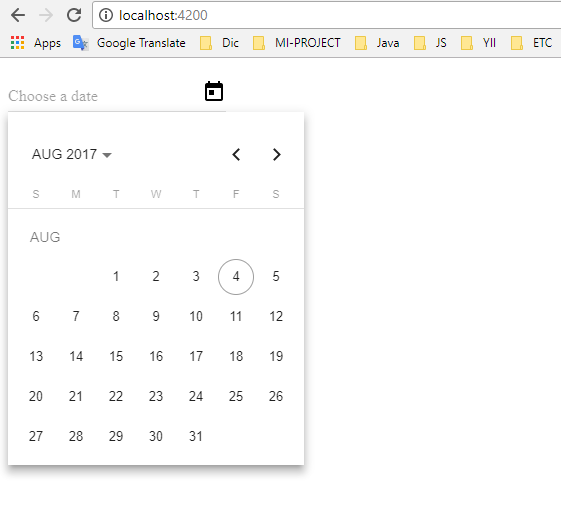
Demo
页面原文内容由Stack Overflow提供。腾讯云小微IT领域专用引擎提供翻译支持
原文链接:
https://stackoverflow.com/questions/44377312
复制相关文章
相似问题
腾讯云开发者

Copyright © 2013 - 2026 Tencent Cloud. All Rights Reserved. 腾讯云 版权所有
深圳市腾讯计算机系统有限公司 ICP备案/许可证号:粤B2-20090059  粤公网安备44030502008569号
腾讯云计算(北京)有限责任公司 京ICP证150476号 | 京ICP备11018762号