
didSelectRowAt indexPath不会在被点击时触发(但当单元格向任一方向滑动时就会触发)
didSelectRowAt indexPath不会在被点击时触发(但当单元格向任一方向滑动时就会触发)
提问于 2017-07-16 02:55:44
这是一个奇怪(但应该很简单)的例子。我只是尝试点击一个自定义UITableViewCell并触发一个segue转到另一个ViewController。当单元格被点击时,didSelectRowAt indexPath不会触发,但奇怪的是,当单元格从右向左或从左向右滑动时,它就会触发。
我的didSelectRowAt indexPath**:**
func tableView(_ tableView: UITableView, didSelectRowAt indexPath: IndexPath) {
   print("You selected cell number: \(indexPath.row)!")
   self.performSegue(withIdentifier: "mySegue", sender: self)
}My ViewController:
import UIKit

class myViewController: UIViewController, UITableViewDelegate, UITableViewDataSource, UIPickerViewDelegate {

    var myData = NSDictionary()

    override func viewDidLoad() {
        super.viewDidLoad()
        fetchMyData()

        self.tableView.delegate = self
        self.tableView.dataSource = self
        self.tableView.rowHeight = 100
    }

    override func didReceiveMemoryWarning() {
        super.didReceiveMemoryWarning()
    }

    func fetchMyData() {
        // ... fetches my data
    }


    ////////////////////////////////////////////////
    //Table view data source


    //set number of sections in table
    func numberOfSections(in tableView: UITableView) -> Int {
        return 1
    }

    //set number of rows in table
    func tableView(_ tableView: UITableView, numberOfRowsInSection section: Int) -> Int {
        return myData.count
    }

    //delegate information to cells in table rows
    func tableView(_ tableView: UITableView, cellForRowAt indexPath: IndexPath) -> UITableViewCell {
        print("running tableView(_ tableView: UITableView, cellForRowAt indexPath: IndexPath) -> UITableViewCell...")
        // Dequeue cell
        let cell = tableView.dequeueReusableCell(withIdentifier: "cell", for: indexPath) as! myCustomCell

        cell.cellAmount!.text = "Hello World"
        cell.cellTextField2!.text = "Some info"
        cell.cellTextField3!.text = "Some other info"
        cell.backgroundCardView.backgroundColor = UIColor.red
        cell.backgroundCardView.layer.cornerRadius = 8.0
        cell.backgroundCardView.layer.masksToBounds = false
        cell.backgroundCardView.layer.shadowColor = UIColor.black.withAlphaComponent(0.9).cgColor
        cell.backgroundCardView.layer.shadowOffset = CGSize(width: 0, height: 0)
        cell.backgroundCardView.layer.shadowOpacity = 0.9

        print("finished tableView(_ tableView: UITableView, cellForRowAt indexPath: IndexPath) -> UITableViewCell...")
        return cell
    }

    func tableView(_ tableView: UITableView, didSelectRowAt indexPath: IndexPath) {
        print("You selected cell number: \(indexPath.row)!")
        self.performSegue(withIdentifier: "mySegue", sender: self)
    }

    //    func tableView(_ tableView: UITableView,  editActionsForRowAt indexPath: IndexPath) -> [UITableViewRowAction]? {
    //        let delete = UITableViewRowAction(style: .destructive, title: "Delete") { (action, indexPath) in
    //            // delete item at indexPath
    //        }
    //        let share = UITableViewRowAction(style: .normal, title: "Disable") { (action, indexPath) in
    //            // share item at indexPath
    //        }
    //
    //        share.backgroundColor = UIColor.blue
    //
    //        return [delete, share]
    //    }

    func tableView(_ tableView: UITableView,  editActionsForRowAt indexPath: IndexPath) -> [UITableViewRowAction]? {
        return []
    }

    // Reload the table data when a change is made
    //    func controllerDidChangeContent(_ controller: NSFetchedResultsController<NSFetchRequestResult>) {
    //        self.tableView.reloadData()
    //    }

    /*
     // Override to support conditional editing of the table view.
     override func tableView(tableView: UITableView, canEditRowAtIndexPath indexPath: NSIndexPath) -> Bool {
     // Return false if you do not want the specified item to be editable.
     return true
     }
     */

    /*
     // Override to support rearranging the table view.
     override func tableView(tableView: UITableView, moveRowAtIndexPath fromIndexPath: NSIndexPath, toIndexPath: NSIndexPath) {

     }
     */

    /*
     // Override to support conditional rearranging of the table view.
     override func tableView(tableView: UITableView, canMoveRowAtIndexPath indexPath: NSIndexPath) -> Bool {
     // Return false if you do not want the item to be re-orderable.
     return true
     }
     */


    //Table view data source (end)
    ////////////////////////////////////////////////
}
我已经尝试过以下几种方法:
- -didSelectRowAtIndexPath: not being called
- How to detect Cell selection in UITableView - Swift
- Push segue from UITableViewCell to ViewController in Swift
- How to tap cell's buttons in UITableViewCell without actionning the cell's segue
- is it possible to segue from a UITableViewCell on a UIView to another view
- UITableView didSelectRowAt is not called iOS 10, but works for 9.3.5
- UITableViewCell确实有UIView和多个UITextFields,所以我确实确保了对于UIView和UITextFields没有检查
User Interaction Enabled。 - 编辑:--我还查看了
debugger navigator,并且可以看到当我点击一个单元格(
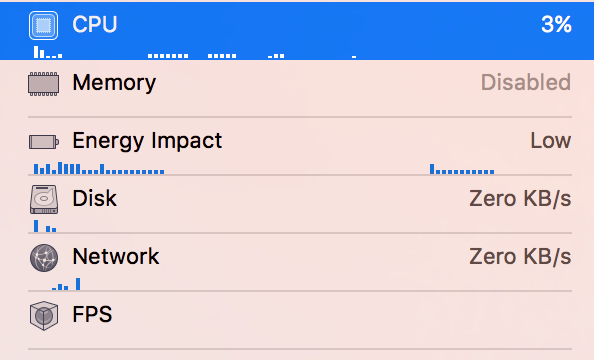
)。也许有一种更深一步的方法,看看为什么那个水龙头不会触发didSelectRowAt indexPath。
有人知道什么可能会导致didSelectRowAt indexPath 在被窃听时不会被触发吗?
回答 1
Stack Overflow用户
发布于 2017-08-19 23:03:07
我面临着同样的问题,并找到了一个适用于我的答案,here。我在viewWillAppear中有一段键盘解散代码:
self.view.addGestureRecognizer(UITapGestureRecognizer(target: self.view, action: #selector(UIView.endEditing(_:))))在评论完这句话后,点击开始工作!但现在,我必须找到更好的方法,键盘解散。)请检查您的出口,可能您使用了类似的解决方案键盘解散。
页面原文内容由Stack Overflow提供。腾讯云小微IT领域专用引擎提供翻译支持
原文链接:
https://stackoverflow.com/questions/45124540
复制相关文章
相似问题
腾讯云开发者

Copyright © 2013 - 2026 Tencent Cloud. All Rights Reserved. 腾讯云 版权所有
深圳市腾讯计算机系统有限公司 ICP备案/许可证号:粤B2-20090059  粤公网安备44030502008569号
腾讯云计算(北京)有限责任公司 京ICP证150476号 | 京ICP备11018762号