
WPF造型-代码中的材料设计GroupBox
经过颇多的摸索和尝试后,我必须寻求社会人士的帮助。我正在使用MaterialDesign框架开发一个WPF应用程序,该框架在App.xaml中定义了自定义颜色,如下所示:
<Application.Resources>
        <ResourceDictionary>
            <!-- primary -->
            <SolidColorBrush x:Key="PrimaryHueLightBrush" Color="#033059"/><!--5c5b5e-->
            <SolidColorBrush x:Key="PrimaryHueLightForegroundBrush" Color="#FFFFFF"/>
            <SolidColorBrush x:Key="PrimaryHueMidBrush" Color="DarkRed"/> <!--6134d9-->
            <SolidColorBrush x:Key="PrimaryHueMidForegroundBrush" Color="#FFFFFF"/>
            <SolidColorBrush x:Key="PrimaryHueDarkBrush" Color="#48545e"/> <!--4D1DCF-->
            <SolidColorBrush x:Key="PrimaryHueDarkForegroundBrush" Color="#FFFFFF"/>
            <!-- accent -->
            <SolidColorBrush x:Key="SecondaryAccentBrush" Color="#1266a7"/> <!--5c5b5e-->
            <SolidColorBrush x:Key="SecondaryAccentForegroundBrush" Color="#FFFFFF"/>

            <ResourceDictionary.MergedDictionaries>
                <ResourceDictionary Source="pack://application:,,,/MaterialDesignThemes.Wpf;component/Themes/MaterialDesignTheme.Light.xaml" />
                <ResourceDictionary Source="pack://application:,,,/MaterialDesignThemes.Wpf;component/Themes/MaterialDesignTheme.Defaults.xaml" />
                <!--<ResourceDictionary Source="pack://application:,,,/MaterialDesignColors;component/Themes/Recommended/Primary/MaterialDesignColor.Red.xaml" />
                <ResourceDictionary Source="pack://application:,,,/MaterialDesignColors;component/Themes/Recommended/Accent/MaterialDesignColor.Blue.xaml" />-->
                <ResourceDictionary Source="pack://application:,,,/MaterialDesignThemes.Wpf;component/Themes/MaterialDesignTheme.Button.xaml" />
                <ResourceDictionary Source="pack://application:,,,/MaterialDesignThemes.Wpf;component/Themes/MaterialDesignTheme.GroupBox.xaml" />
                <ResourceDictionary Source="pack://application:,,,/MaterialDesignThemes.Wpf;component/Themes/MaterialDesignTheme.DatePicker.xaml" />
                <ResourceDictionary Source="pack://application:,,,/MaterialDesignThemes.Wpf;component/Themes/MaterialDesignTheme.Calendar.xaml" />
                <ResourceDictionary Source="pack://application:,,,/MaterialDesignThemes.Wpf;component/Themes/MaterialDesignTheme.CheckBox.xaml" />


            </ResourceDictionary.MergedDictionaries>
        </ResourceDictionary>
    </Application.Resources>
需要以编程方式(在后面的代码中)呈现某些控件,其中一个控件是GroupBox。这个GroupBox呈现得很好,但是使用了在PrimaryHueMidBrush中定义的颜色。我想要完成的是将另一个(SecondaryAccentBrush)分配给GroupBox。在XAML中,这可以实现如下所示:
<Border BorderBrush="{DynamicResource SecondaryAccentBrush}" BorderThickness="2" Padding="10" Height="50" Width="300">
        <TextBlock Text="Material Design Test" />
</Border>

var childDef = new GroupBox()
            {
                Header = "Deficiencies",
                HorizontalAlignment = HorizontalAlignment.Right,
                VerticalAlignment = VerticalAlignment.Top,


                //Background = new SolidColorBrush(Colors.Red)
                //Foreground = new SolidColorBrush(Colors.Red),
                //OverridesDefaultStyle = true
                //Background = Brushes.DarkRed,
                //BorderThickness = new Thickness(1),
                //BorderBrush = new SolidColorBrush(Colors.Red)
            };

            //childDef.SetResourceReference(Control.BorderBrushProperty, "PrimaryHueDarkBrush");
            //childDef.SetResourceReference(Control., materialDesign:ColorZoneAssist.Mode="Accent");
问题是,我不知道如何通过代码实现这一点。我试过的东西似乎都没有用。我想不出如何超越BorderBrushProperty。
任何帮助都将不胜感激!
提前感谢
回答 2
Stack Overflow用户
发布于 2018-04-26 12:51:58
为了扩展Mikael的答案,当你不使用材料设计的时候,它的效果很好,我能够解决这个问题:
childDef.Style = Application.Current.FindResource("MaterialDesignGroupBox") as Style;我仍然在寻找一种在代码后面应用MaterialDesign:ColorZoneAssist.Mode=“重音”的方法,因为这似乎是应用应用程序的主MaterialDesign颜色以外的不同颜色的唯一方法。
Stack Overflow用户
发布于 2018-04-18 16:02:14
您可以从后面的代码中使用Application.Current.Resources:
childDef.BorderBrush = (Brush) Application.Current.Resources["SecondaryAccentBrush"];例如,要访问在SecondaryAccentBrush中定义的“App.xaml”画笔:
<Application.Resources>
     <ResourceDictionary>
         <SolidColorBrush x:Key="SecondaryAccentBrush" Color="#1266a7"/>
    </ResourceDictionary>
</Application.Resources>
您可以执行以下操作:
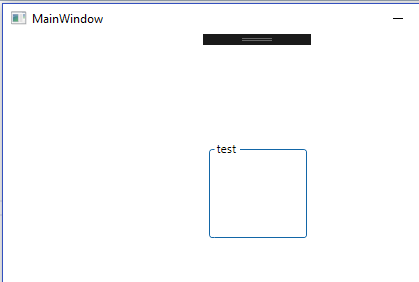
        var grp = new GroupBox
        {
            BorderBrush = (Brush) Application.Current.Resources["SecondaryAccentBrush"],
            Header = "test",
            Width = 100,
            Height = 100,
            HorizontalAlignment = HorizontalAlignment.Center,
            VerticalAlignment = VerticalAlignment.Center
        };

        this.MyGrid.Children.Add(grp);
其结果如下:
https://stackoverflow.com/questions/49904002
复制相似问题
腾讯云开发者

Copyright © 2013 - 2026 Tencent Cloud. All Rights Reserved. 腾讯云 版权所有
深圳市腾讯计算机系统有限公司 ICP备案/许可证号:粤B2-20090059  粤公网安备44030502008569号
腾讯云计算(北京)有限责任公司 京ICP证150476号 | 京ICP备11018762号