
TextInput垂直拼装
TextInput垂直拼装
提问于 2018-04-27 14:17:54
有人知道如何用自定义字体(内容和占位符)修复TextInput的垂直连接吗?我试过所有这些:
- justifyContent:“中心”,
- alignItems:“中心”,
- textAlign:“中心”,
- textAlignVertical:“中心”,
毫无办法!有什么建议吗?
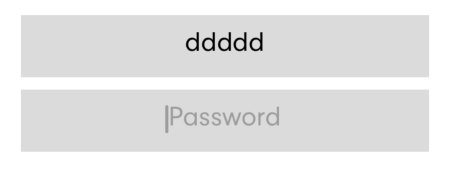
           <TextInput
            ref={ref => this.emailField = ref}
            placeholder="E-Mail"
            style={styles.loginInput}
            placeholderStyle={styles.loginInput}
            editable={true}
            maxLength={40}
            autoCorrect={false}
            selectionColor="#9D9D9D"
            placeholderTextColor="#9D9D9D"
            autoCapitalize="none"
            keyboardType="email-address"
            returnKeyType="next"
            keyboardAppearance="dark"
            textAlign="center"
            underlineColorAndroid="transparent"
            onSubmitEditing={() => this.passwordField.focus()}
            value={this.state.email}
            onChangeText={(text) => this.setState({ email: text })}
          />

  loginInput: {
    width: '70%',
    height: 40,
    marginBottom: 8,
    backgroundColor: '#dbdbdb',
    fontFamily: 'Neuzeit Grotesk Regular',
    fontSize: 18,
    justifyContent: 'center',
    alignItems: 'center',
    textAlign: 'center',
    textAlignVertical: 'center',
},回答 2
Stack Overflow用户
发布于 2019-08-22 08:03:25
我也有同样的问题。在我的例子中,TextInput有一个默认的填充。我将paddingTop: 0、paddingBottom: 0添加到TextInput样式中。
Stack Overflow用户
发布于 2019-08-22 08:09:49
请尝试删除marginBottom
页面原文内容由Stack Overflow提供。腾讯云小微IT领域专用引擎提供翻译支持
原文链接:
https://stackoverflow.com/questions/50064386
复制相关文章
相似问题
腾讯云开发者

Copyright © 2013 - 2026 Tencent Cloud. All Rights Reserved. 腾讯云 版权所有
深圳市腾讯计算机系统有限公司 ICP备案/许可证号:粤B2-20090059  粤公网安备44030502008569号
腾讯云计算(北京)有限责任公司 京ICP证150476号 | 京ICP备11018762号