
iOS 11 prefersLargeTitles在取向变化后不扩展
iOS 11 prefersLargeTitles在取向变化后不扩展
提问于 2018-08-24 11:54:26
我已经实现了prefersLargeTitles的iOS 11特性,它运行得很好。纵向模式正在按预期工作:

我知道大标题将永远保持崩溃(小)在景观模式,这对我来说很好。问题是,当我试图切换到景观,然后再转到肖像,大标题应该在默认情况下在纵向模式下展开(大),但它不会,直到我向下滚动一点:
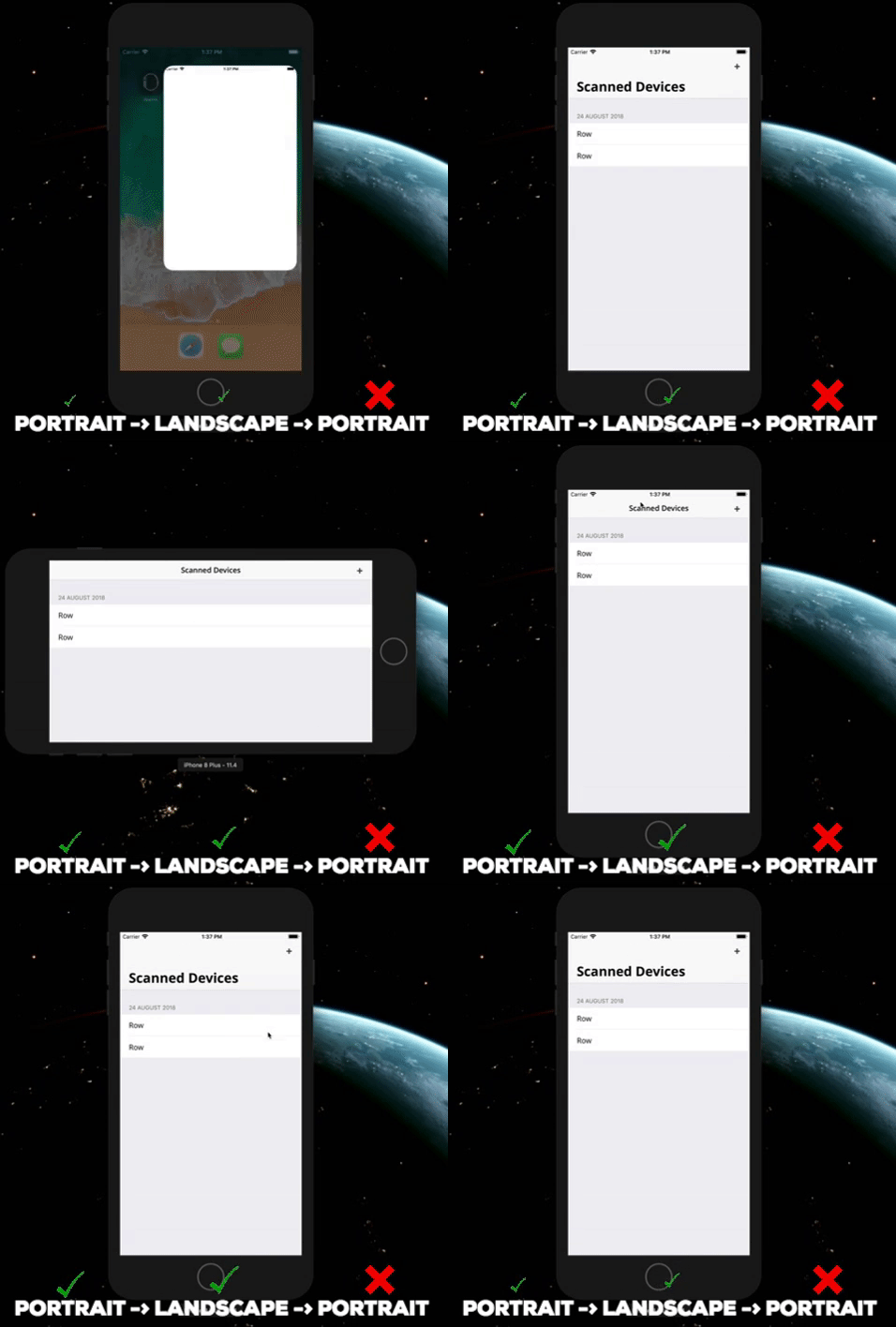
我的代码看起来很简单:
if #available(iOS 11.0, *) {
  navigationController?.navigationBar.prefersLargeTitles = true
  navigationItem.largeTitleDisplayMode = .always
}我还尝试在tableView.contentInsetAdjustmentBehavior,上使用不同的值,没有什么改变。到目前为止,我正在解决这个问题,在改变方向后,我会以编程的方式向下滚动表,但我认为这只是一个(不太好)的解决方法。
这应该像预期的那样起作用吗?在我的实施中还留下了什么吗?有更好的解决办法吗?
回答 2
Stack Overflow用户
发布于 2019-08-21 20:12:36
我也面临着同样的问题。这对我有用。
    override func viewWillTransition(to size: CGSize, with coordinator: UIViewControllerTransitionCoordinator) {
        navigationItem.largeTitleDisplayMode = .always
        coordinator.animate(alongsideTransition: { (_) in
            self.coordinator?.navigationController.navigationBar.sizeToFit()
        }, completion: nil)
}Stack Overflow用户
发布于 2019-08-04 20:33:06
一种方法可以是保存最大导航栏高度,并在旋转期间设置它。
就像这样:
var maximumHeight: CGFloat = 0

override func viewWillTransition(to size: CGSize, with coordinator: UIViewControllerTransitionCoordinator) {

        super.viewWillTransition(to: size, with: coordinator)

        guard let navigationController = navigationController else {
            return
        }

        if maximumHeight < navigationController.navigationBar.frame.height {
            maximumHeight = navigationController.navigationBar.frame.height
        }

        coordinator.animate(alongsideTransition: { (_) in

            navigationController.navigationBar.frame.size.height = self.maximumHeight

        }, completion: nil)
}
在景观中,系统知道它必须改变它的大小,所以你不必担心它。
“拉萨”
页面原文内容由Stack Overflow提供。腾讯云小微IT领域专用引擎提供翻译支持
原文链接:
https://stackoverflow.com/questions/52003937
复制相关文章
相似问题
腾讯云开发者

Copyright © 2013 - 2026 Tencent Cloud. All Rights Reserved. 腾讯云 版权所有
深圳市腾讯计算机系统有限公司 ICP备案/许可证号:粤B2-20090059  粤公网安备44030502008569号
腾讯云计算(北京)有限责任公司 京ICP证150476号 | 京ICP备11018762号