
html5画布工具提示仅对上次绘制的对象可见,而对以前的对象不可见
html5画布工具提示仅对上次绘制的对象可见,而对以前的对象不可见
提问于 2018-09-19 12:11:03
我到底想要实现的是
- 在画布上画物体
- 在鼠标上,在工具提示中显示相关数据。
here您可以查看代码。
var canvasBack;
var canvasLabel;
var canvasDraw;
var ctxBack;
var ctxLabel;
var ctxDraw;
var last_mousex = 0;
var last_mousey = 0;
var mousex = 0;
var mousey = 0;
var canWidth;
var canHeight;
var scaleParameter;
var radius;
var xVertex;
var yVertex;
var hotspots = [];

// initialization on loading of canvas
$('canvas').ready(function() {
  init();
});

// initialization function used for binding events, and inital logic implemented.
function init() {
  scaleParameter = 1;
  canvasBack = document.getElementById('backSpace');
  canvasLabel = document.getElementById('layerCanvas');
  canvasDraw = document.getElementById('drawSpace');
  ctxBack = canvasBack.getContext('2d');
  ctxLabel = canvasLabel.getContext('2d');
  ctxDraw = canvasDraw.getContext('2d');

  canWidth = parseInt($(canvasBack).attr('width'));
  canHeight = parseInt($(canvasBack).attr('height'));

  var canvasx = $(canvasBack).offset().left;
  var canvasy = $(canvasBack).offset().top
  var mousedown = false;

  //Mousedown
  $('canvas').on('mousedown', function(e) {
    $('#drawSpace').css('display', 'block');
    last_mousex = mousex = parseInt(e.clientX - canvasx);
    last_mousey = mousey = parseInt(e.clientY - canvasy);
    mousedown = true;
  });

  //Mouseup
  $('canvas').on('mouseup', function(e) {
    hotspots.push({
      x: xVertex,
      y: yVertex,
      radius: radius,
      tip: 'You are over ' + mousex + ',' + mousey
    });
    let cw = canvasBack.width;
    let ch = canvasBack.height;
    ctxBack.drawImage(canvasDraw, 0, 0, cw, ch);
    $('#drawSpace').css('display', 'none');
    mousedown = false;
  });

  //Mousemove
  $('canvas').on('mousemove', function(e) {
    mousex = parseInt(e.clientX - canvasx);
    mousey = parseInt(e.clientY - canvasy);
    if (mousedown) {
      // draw(mousedown);
      drawEllipse(last_mousex, last_mousey, mousex, mousey);
    } else {
      hoverTooltip();
    }
  });
}


function drawEllipse(x1, y1, x2, y2) {
  var leftScroll = $("#scrollParent").scrollLeft();
  var topScroll = $("#scrollParent").scrollTop();
  let cw = canvasBack.width;
  let ch = canvasBack.height;
  ctxDraw.clearRect(0, 0, cw, ch);
  var radiusX = x2 - x1,
    radiusY = y2 - y1,
    centerX = x1 + radiusX,
    centerY = y1 + radiusY,
    step = 0.01,
    a = step,
    pi2 = Math.PI * 2 - step;

  radius = Math.sqrt(radiusX * radiusX + radiusY * radiusY) / 2;

  ctxDraw.beginPath();
  ctxDraw.arc(centerX, centerY, radius, 0, 2 * Math.PI, true);
  ctxDraw.closePath();
  ctxDraw.fillStyle = 'green';
  ctxDraw.fill();
  ctxDraw.strokeStyle = '#000';
  ctxDraw.stroke();

  xVertex = centerX;
  yVertex = centerY;
}

// tooltip show on hover over objects
function hoverTooltip() {
  var leftScroll = $("#scrollParent").scrollLeft();
  var topScroll = $("#scrollParent").scrollTop();
  let cw = canvasBack.width;
  let ch = canvasBack.height;

  for (var i = 0; i < hotspots.length; i++) {
    var h = hotspots[i];
    var dx = mousex - h.x;
    var dy = mousey - h.y;
    if (dx * dx + dy * dy < h.radius * h.radius) {
      $('#console').text(h.tip);
      ctxLabel.clearRect(0, 0, cw, ch);
      ctxLabel.fillText(h.tip, mousex + leftScroll, mousey + topScroll);
    } else {
      ctxLabel.clearRect(0, 0, cw, ch);
    }
  }
}#scrollParent {
width: 644px;
height: 364px;
overflow: auto;
position: relative;
}
#scrollParent>canvas {
position: absolute;
left: 0;
top: 0;
border: 1px solid #ababab;
}
#backSpace {
z-index: 0;
}
#drawSpace {
display: none;
z-index: 1;
}
#layerCanvas {
z-index: 2;
}<script src="https://ajax.googleapis.com/ajax/libs/jquery/2.1.1/jquery.min.js"></script>
<div id="scrollParent">
<!-- actual canvas that is visible -->
<canvas width="640" height="360" id="backSpace"></canvas>
<!-- canvas used for drawing new objects -->
<canvas width="640" height="360" id="drawSpace"></canvas>
<!-- canvas used to display tooltip -->
<canvas width="640" height="360" id="layerCanvas"></canvas>
</div>
<div id="console"></div>
</div>
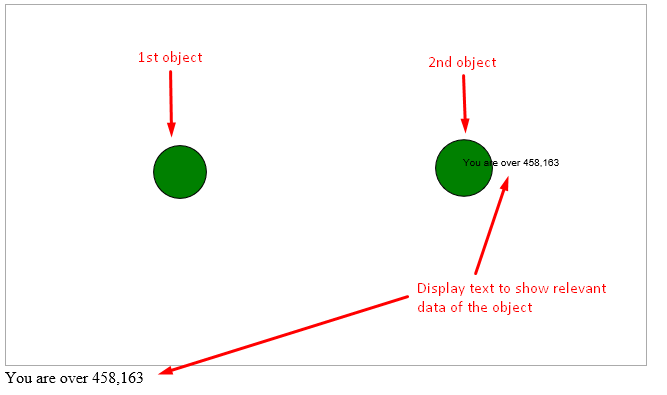
实际问题是在下面的图像中,工具提示在绘制第一个对象时工作得很好,但是一旦绘制了第二个对象,工具提示就只对第二个对象起作用,而不对以前绘制的对象起作用。
是什么导致了这个问题,以及如何解决它?
回答 2
Stack Overflow用户
回答已采纳
发布于 2018-09-19 13:27:41
在离开启示录时,移除否则不会移除标签。
一旦从数组中找到正确的中断,就需要退出循环。
function hoverTooltip() {
  var leftScroll = $("#scrollParent").scrollLeft();
  var topScroll = $("#scrollParent").scrollTop();
  let cw = canvasBack.width;
  let ch = canvasBack.height;

  for (var i = 0; i < hotspots.length; i++) {
    var h = hotspots[i];
    var dx = mousex - h.x;
    var dy = mousey - h.y;
    if (dx * dx + dy * dy < h.radius * h.radius) {
      $('#console').text(h.tip);
      ctxLabel.clearRect(0, 0, cw, ch);
      ctxLabel.fillText(h.tip, mousex + leftScroll, mousey + topScroll);
      break; // exit the loop
    } else {
       ctxLabel.clearRect(0, 0, cw, ch);
    }
  }
}
更新
我想,如果你在对方身上画两个物体,它就会表现不好。试试这个吧。它将显示最新的绘制点的信息。
function hoverTooltip() {
  var leftScroll = $("#scrollParent").scrollLeft();
  var topScroll = $("#scrollParent").scrollTop();
  let cw = canvasBack.width;
  let ch = canvasBack.height;

  var spots = hotspots.filter((h) => {
    var dx = mousex - h.x;
    var dy = mousey - h.y;
    return (dx * dx + dy * dy < h.radius * h.radius);
  })

  if (spots.length > 0) {
    var h = spots[spots.length - 1]; // latest drawn spot
    $('#console').text(h.tip);
    ctxLabel.clearRect(0, 0, cw, ch);
    ctxLabel.fillText(h.tip, mousex + leftScroll, mousey + topScroll);
  }
  else
  {
    ctxLabel.clearRect(0, 0, cw, ch);
  }
}Stack Overflow用户
发布于 2018-09-19 14:10:16
我看已经有几个答案了。这是我的:为了能够显示悬停上的每个圆圈的标签,您需要将所有的圆圈保存在am数组中:circles数组。我使用ctx.isPointInPath()方法来知道鼠标是否在圆圈上,如果是的话,我会画标签。
const canvas = document.querySelector("canvas");
const ctx = canvas.getContext("2d");
let cw = canvas.width = 640;
let ch = canvas.height = 360;

let found = false;//is a circle found?

const cText = document.querySelector("#text");
const ctxText = cText.getContext("2d");
cText.width = 640;
cText.height = 360;
ctxText.font="1em Verdana";


let drawing = false;

let circles = []


class Circle{
  constructor(x,y){
    this.x = x;
    this.y = y;
    this.r = 0;
  }

  updateR(m) {
    this.r = dist(this,m);
  }
  draw(){
     ctx.beginPath();
     ctx.arc(this.x,this.y,this.r,0,2*Math.PI);
   }
  paint(){
    ctx.fillStyle = "green";
    ctx.strokeStyle = "black";
    this.draw();
    ctx.stroke();
    ctx.fill();
  }

  label(m){
    this.draw();
    if (ctx.isPointInPath(m.x, m.y)) {
    ctx.beginPath();
    ctx.arc(this.x, this.y, 4, 0, 2 * Math.PI);

    ctxText.fillStyle = "black";
    ctxText.fillText(`you are over ${this.x},${this.y}`,m.x,m.y)
    found = true;
    }
}
}
let m = {}// mouse

cText.addEventListener("mousedown",(e)=>{
  drawing = true;
  m = oMousePos(canvas, e);
  let circle = new Circle(m.x,m.y)
  circles.push(circle);
})

cText.addEventListener("mouseup",(e)=>{
  drawing = false;

})


cText.addEventListener("mousemove",(e)=>{
  m = oMousePos(canvas, e);
  found = false;
  if(drawing){
    let circle = circles[circles.length-1];//the last circle in the circles arrey
    circle.updateR(m);
  }
  ctx.clearRect(0,0, cw,ch);
  ctxText.clearRect(0,0,cw,ch)
  circles.map((c) => {c.paint();});
  for(let i = circles.length-1; i >=0 ; i--){
    circles[i].label(m);
    if(found){break;}
  }


})


function oMousePos(canvas, evt) {
  var ClientRect = canvas.getBoundingClientRect();
  return { //objeto
    x: Math.round(evt.clientX - ClientRect.left),
    y: Math.round(evt.clientY - ClientRect.top)
  }
}

function dist(p1, p2) {
  let dx = p2.x - p1.x;
  let dy = p2.y - p1.y;
  return Math.sqrt(dx * dx + dy * dy);
}canvas{border:1px solid;position:absolute; top:0; left:0;}
#scrollParent{position:relative;}<div id="scrollParent">
<!-- actual canvas that is visible -->
<canvas width="640" height="360"></canvas>
<canvas width="640" height="360" id="text"></canvas>
</div>
我在@HelderSepu的注释中更新了代码
来自@HelderSepu的第二条消息的第二次更新。他希望看到“多条信息,但避免信息重叠”。
const canvas = document.querySelector("canvas");
const ctx = canvas.getContext("2d");
let cw = canvas.width = 640;
let ch = canvas.height = 360;

let text = "";

const cText = document.querySelector("#text");
const ctxText = cText.getContext("2d");
cText.width = 640;
cText.height = 360;
ctxText.font="1em Verdana";


let drawing = false;

let circles = []


class Circle{
  constructor(x,y){
    this.x = x;
    this.y = y;
    this.r = 0;
  }

  updateR(m) {
    this.r = dist(this,m);
  }
  draw(){
     ctx.beginPath();
     ctx.arc(this.x,this.y,this.r,0,2*Math.PI);
   }
  paint(){
    ctx.fillStyle = "green";
    ctx.strokeStyle = "black";
    this.draw();
    ctx.stroke();
    ctx.fill();
  }

  label(m){
    this.draw();
    if (ctx.isPointInPath(m.x, m.y)) {
    this.text = `[${this.x},${this.y}]`
  }else{
    this.text = "";
  }
}
}
let m = {}// mouse

cText.addEventListener("mousedown",(e)=>{
  drawing = true;
  m = oMousePos(canvas, e);
  let circle = new Circle(m.x,m.y)
  circles.push(circle);
})

cText.addEventListener("mouseup",(e)=>{
  drawing = false;

})


cText.addEventListener("mousemove",(e)=>{
  m = oMousePos(canvas, e);

  if(drawing){
    let circle = circles[circles.length-1];//the last circle in the circles arrey
    circle.updateR(m);
  }
  ctx.clearRect(0,0, cw,ch);
  ctxText.clearRect(0,0,cw,ch);
  text="";
  circles.map((c) => {c.paint();c.label(m);});
  circles.map((c) => {text += c.text;});
  ctxText.fillStyle = "black";
  ctxText.fillText(text,m.x,m.y)

})


function oMousePos(canvas, evt) {
  var ClientRect = canvas.getBoundingClientRect();
  return { //objeto
    x: Math.round(evt.clientX - ClientRect.left),
    y: Math.round(evt.clientY - ClientRect.top)
  }
}

function dist(p1, p2) {
  let dx = p2.x - p1.x;
  let dy = p2.y - p1.y;
  return Math.sqrt(dx * dx + dy * dy);
}canvas{border:1px solid;position:absolute; top:0; left:0;}
#scrollParent{position:relati<div id="scrollParent">
<!-- actual canvas that is visible -->
<canvas width="640" height="360"></canvas>
<canvas width="640" height="360" id="text"></canvas>
<div id="console"></div>
</div>
页面原文内容由Stack Overflow提供。腾讯云小微IT领域专用引擎提供翻译支持
原文链接:
https://stackoverflow.com/questions/52405577
复制相关文章
相似问题
腾讯云开发者

Copyright © 2013 - 2026 Tencent Cloud. All Rights Reserved. 腾讯云 版权所有
深圳市腾讯计算机系统有限公司 ICP备案/许可证号:粤B2-20090059  粤公网安备44030502008569号
腾讯云计算(北京)有限责任公司 京ICP证150476号 | 京ICP备11018762号