
QComboBox项目文本可以由2种颜色组成吗?
QComboBox项目文本可以由2种颜色组成吗?
提问于 2018-11-23 13:49:57
例如字符串"Elon Musk":
- "Elon“文字颜色为红色;
- “麝香”文字颜色为绿色;
谢谢您能提供的任何帮助。
回答 3
Stack Overflow用户
回答已采纳
发布于 2018-11-23 15:38:28
作为使用委托的另一种方法,我将使用带有富文本的QLabel (HTML编码)来为组合框项文本着色。我还需要实现一个事件过滤器来处理单击(选择)“自定义”项。下面的示例演示如何做到这一点:
class Filter : public QObject
{
public:
  Filter(QComboBox *combo)
    :
      m_combo(combo)
  {}
protected:
  bool eventFilter(QObject *watched, QEvent * event) override
  {
    auto lbl = qobject_cast<QLabel *>(watched);
    if (lbl && event->type() == QEvent::MouseButtonRelease)
    {
      // Set the current index
      auto model = m_combo->model();
      for (int r = 0; r < model->rowCount(); ++r)
      {
        if (m_combo->view()->indexWidget(model->index(r, 0)) == lbl)
        {
          m_combo->setCurrentIndex(r);
          break;
        }
      }
      m_combo->hidePopup();
    }
    return false;
  }

private:
  QComboBox *m_combo;
};
下面是如何在组合框中添加“有色”项并处理它们:
QComboBox box;
box.setEditable(true);
Filter filter(&box);

// Add two items: regular and colored.
box.addItem("A regular item");
box.addItem("Elon Musk");

// Handle the colored item. Color strings using HTML tags.
QLabel lbl("<font color=\"red\">Elon </font><font color=\"green\">Musk</font>", &box);
lbl.setAutoFillBackground(true);
lbl.installEventFilter(&filter);
box.view()->setIndexWidget(box.model()->index(1, 0), &lbl);

box.show();Stack Overflow用户
发布于 2018-11-23 14:22:09
是的,它可以。实际上,您可以使用QItemDelegate在那里做任何您想做的事情。在委托内部,您可以完成所有您想要的疯狂的事情,这不仅包括着色,还包括按钮和其他控件。
Stack Overflow用户
发布于 2018-11-23 14:23:34
您可以使用Qt::ItemDataRole来提供自定义。在这个特殊情况下-
#include <QApplication>
#include <QComboBox>
#include <QColor>

int main(int argc, char *argv[])
{
    QApplication a(argc, argv);

    QComboBox box;
    box.addItem("Elon");
    box.addItem("Musk");

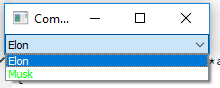
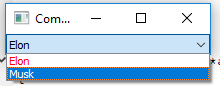
    box.setItemData(0, QColor(Qt::red), Qt::ForegroundRole);
    box.setItemData(1, QColor(Qt::green), Qt::ForegroundRole);

    box.show();

    return a.exec();
}
截图供参考-
页面原文内容由Stack Overflow提供。腾讯云小微IT领域专用引擎提供翻译支持
原文链接:
https://stackoverflow.com/questions/53447944
复制相关文章
相似问题
腾讯云开发者

Copyright © 2013 - 2026 Tencent Cloud. All Rights Reserved. 腾讯云 版权所有
深圳市腾讯计算机系统有限公司 ICP备案/许可证号:粤B2-20090059  粤公网安备44030502008569号
腾讯云计算(北京)有限责任公司 京ICP证150476号 | 京ICP备11018762号