
Laravel,TailwindCSS和PurgeCSS
第一次用拉拉混合,我肯定我错过了一些简单的东西。
我有一个项目,我试图使用Laravel编译尾风,然后使用清除删除任何未使用的css。
package.json
  "scripts": {
    "dev": "npm run development",
    "development": "cross-env NODE_ENV=development node_modules/webpack/bin/webpack.js --progress --hide-modules --config=node_modules/laravel-mix/setup/webpack.config.js",
    "watch": "npm run development -- --watch",
    "hot": "cross-env NODE_ENV=development node_modules/webpack-dev-server/bin/webpack-dev-server.js --inline --hot --config=node_modules/laravel-mix/setup/webpack.config.js",
    "prod": "npm run production",
    "production": "cross-env NODE_ENV=production node_modules/webpack/bin/webpack.js --no-progress --hide-modules --config=node_modules/laravel-mix/setup/webpack.config.js"
  },
  "repository": {
    "type": "git",
    "url": "git+ssh://*******************.git"
  },
  "author": "Sean Smith",
  "license": "ISC",
  "homepage": "**************",
  "devDependencies": {
    "cross-env": "^5.2.0",
    "laravel-mix": "^4.0.16",
    "laravel-mix-purgecss": "^4.1.0",
    "postcss-easy-import": "^3.0.0",
    "postcss-import": "^12.0.1",
    "postcss-nested": "^4.1.2",
    "postcss-preset-env": "^6.6.0",
    "tailwindcss": "^1.0.3"
  },
  "dependencies": {
    "cross-env": "^5.2.0",
    "laravel-mix-purgecss": "^4.1.0"
  }
}
webpack.mix.js:
// copied from https://gist.github.com/Log1x/8c1d63024cad15cfb05eec495c41a75b

const mix = require('laravel-mix')
require('laravel-mix-purgecss')

/*
 |--------------------------------------------------------------------------
 | Mix Asset Management
 |--------------------------------------------------------------------------
 |
 | Mix provides a clean, fluent API for defining some Webpack build steps
 | for your Sage application. By default, we are compiling the Sass file
 | for your application, as well as bundling up your JS files.
 |
 */

// Public Path
mix.setPublicPath('./public')

// Browsersync
// mix.browserSync('https://example.test')

/**
 * Custom PurgeCSS Extractor
 * https://github.com/FullHuman/purgecss
 * https://github.com/FullHuman/purgecss-webpack-plugin
 */
// Styles
mix.postCss('src/css/styles.css', 'public/assets/css', [
  require('postcss-import')(),
  require('tailwindcss')('./tailwind.config.js'),
  require('postcss-nested')(),
  require('postcss-preset-env')(),
]).purgeCss({
    enabled: mix.inProduction(),
    folders: ['src', 'templates'],
    extensions: ['twig','html','js','php', 'vue'],
    extractorPattern: [/[a-zA-Z0-9-:_/]+/g],
  })

// JavaScript
mix.js('src/js/app.js', 'public/assets/js')
  .extract()

// Source maps when not in production.
if (!mix.inProduction()) {
  mix.sourceMaps()
}

// Hash and version files in production.
if (mix.inProduction()) {
  mix.version()
}
当我运行npm的时候,推动一切看起来都是正确的。然而,在导出的styles.css中,只有来自顺风/底座的样式
styles.css
/* tailwind base; */
@import "tailwindcss/base";

/* tailwind components; */
@import "tailwindcss/components";

/* tailwind utilities; */
@import "tailwindcss/utilities";

/* all shared css here */
@import "./components/shared.css"
我的模板/index.twig文件中没有添加任何类,也没有在./components/shared.css文件中添加样式。
类同时存在于index.html和shared.css中,因此应该清除而不是。
当我移除purgeCSS时,输出css文件包括所有预期的内容。但是,当添加清除时,在中只输出顺风/基css。
请给我建议。
这是我的目录结构的屏幕截图
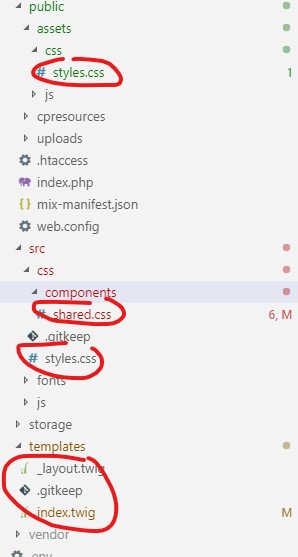
回答 2
Stack Overflow用户
发布于 2020-05-15 19:32:32
当您使用mix.postCss()或一个单独的postcss.config.js文件时,Mix会覆盖该插件添加的所有其他PostCSS插件,包括PurgeCSS实例。
要解决这个问题,请将PostCSS插件包含在mix.options()中
  const mix = require('laravel-mix');
  require('laravel-mix-purgecss');

  mix.js('resources/js/app.js', 'public/js')
     .postCss('resources/css/app.css', 'public/css')
     .options({
        postCss: [require('tailwindcss')]
      })
     .purgeCss({
        enabled: mix.inProduction(),
});Stack Overflow用户
发布于 2021-05-24 08:24:34
你能给我们看看你的tailwind.config.js文件吗?文件应该包含这样的内容:
module.exports = {
purge: [
    './vendor/laravel/jetstream/**/*.blade.php',
    './storage/framework/views/*.php',
    './resources/views/**/*.blade.php',
],

theme: {
    extend: {
        lineClamp: {
            10 :"10",
            12 : "12"
        },
        fontFamily: {
            sans: ['Nunito', ...defaultTheme.fontFamily.sans],
        },

    },
},

variants: {
    extend: {
        lineClamp : ["hover"],
        opacity: ['disabled'],
    },
},

plugins: [require("@tailwindcss/line-clamp"), require('@tailwindcss/forms'), require('@tailwindcss/typography')],
};
清除数组应该包含希望被清除的文件。
purge: [
'./vendor/laravel/jetstream/**/*.blade.php',
'./storage/framework/views/*.php',
'./resources/views/**/*.blade.php',
],在上面的示例中,命令清除/vendor/laravel/jetstream/和**的目录下的文件,这意味着查看jetstream下的所有子文件夹,最终*意味着应该清除jetstream文件夹和文件夹中具有.blade.php扩展名的所有文件。
https://stackoverflow.com/questions/56509951
复制相似问题
腾讯云开发者

Copyright © 2013 - 2026 Tencent Cloud. All Rights Reserved. 腾讯云 版权所有
深圳市腾讯计算机系统有限公司 ICP备案/许可证号:粤B2-20090059  粤公网安备44030502008569号
腾讯云计算(北京)有限责任公司 京ICP证150476号 | 京ICP备11018762号