从 0 到 1 精通:Java 文件拷贝的 N 种姿势,性能差距竟达 10 倍?

从 0 到 1 精通:Java 文件拷贝的 N 种姿势,性能差距竟达 10 倍?

果酱带你啃java
发布于 2026-04-14 12:54:27
发布于 2026-04-14 12:54:27
前言
在 Java 开发中,文件拷贝是一个高频操作,从简单的配置文件复制到大规模的数据迁移,都离不开文件拷贝的身影。然而,就是这样一个看似基础的操作,却隐藏着巨大的性能差异和技术细节。
你可能不知道,不同的文件拷贝方式在处理大文件时性能差距可达 10 倍以上;你可能也不清楚,为什么同样是 Java 代码,有些拷贝方式会频繁触发 GC,而有些却能保持稳定的内存占用。
本文将带你全面剖析 Java 中常用的文件拷贝方式,从最基础的字节流到 NIO 的高级用法,再到底层操作系统的调用,不仅会讲解每种方式的实现原理和代码示例,还会通过性能测试揭示它们之间的差异,让你在实际开发中能够根据场景选择最优方案。
一、文件拷贝的底层原理
在深入探讨 Java 的文件拷贝实现之前,我们首先需要理解文件拷贝的本质。文件拷贝的过程,本质上是将数据从一个存储位置传输到另一个存储位置的过程,这个过程可以分为三个核心步骤:
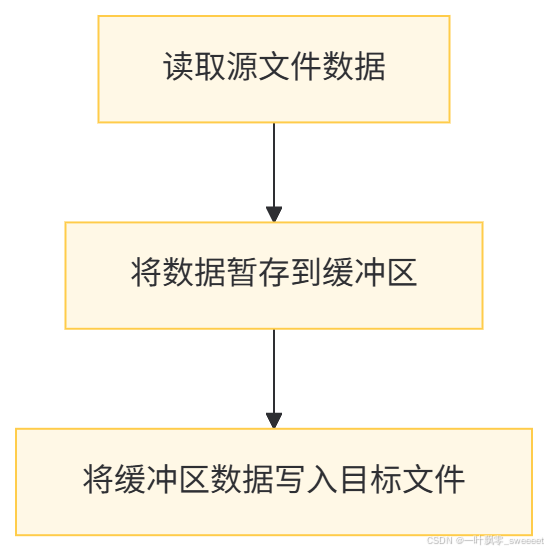
这三个步骤构成了文件拷贝的基本流程,所有的文件拷贝方式都是围绕这三个步骤展开的,不同的实现方式主要在以下几个方面存在差异:
- 缓冲区的大小设置
- 数据传输的方式(用户态 vs 内核态)
- 是否利用操作系统的原生支持
- 并发处理的能力
理解了这些底层原理,我们就能更好地理解各种文件拷贝方式的优劣和适用场景。
二、Java 中常用的文件拷贝方式
2.1 基于字节流的文件拷贝(InputStream/OutputStream)
这是 Java 中最基础、最原始的文件拷贝方式,通过字节流逐字节或按字节数组读取和写入文件。
2.1.1 逐字节拷贝
逐字节拷贝是最简单直接的方式,但效率极低,不推荐在实际开发中使用,尤其是对于大文件。
import lombok.extern.slf4j.Slf4j;
import org.springframework.util.ObjectUtils;

import java.io.FileInputStream;
import java.io.FileOutputStream;
import java.io.IOException;

/**
 * 基于字节流的文件拷贝工具类
 *
 * @author ken
 */
@Slf4j
public class FileCopyByStream {

    /**
     * 逐字节拷贝文件
     *
     * @param sourceFilePath 源文件路径
     * @param targetFilePath 目标文件路径
     * @throws IOException 当文件操作发生错误时抛出
     */
    public static void copyByByte(String sourceFilePath, String targetFilePath) throws IOException {
        // 验证输入参数
        if (ObjectUtils.isEmpty(sourceFilePath) || ObjectUtils.isEmpty(targetFilePath)) {
            log.error("源文件路径或目标文件路径不能为空");
            throw new IllegalArgumentException("源文件路径或目标文件路径不能为空");
        }

        long startTime = System.currentTimeMillis();

        try (FileInputStream fis = new FileInputStream(sourceFilePath);
             FileOutputStream fos = new FileOutputStream(targetFilePath)) {

            int data;
            // 逐字节读取并写入
            while ((data = fis.read()) != -1) {
                fos.write(data);
            }

            long endTime = System.currentTimeMillis();
            log.info("逐字节拷贝完成,耗时: {}ms", endTime - startTime);
        } catch (IOException e) {
            log.error("逐字节拷贝文件失败", e);
            throw e;
        }
    }
}
2.1.2 按字节数组拷贝
为了提高效率,我们通常会使用字节数组作为缓冲区,一次读取多个字节。
import lombok.extern.slf4j.Slf4j;
import org.springframework.util.ObjectUtils;

import java.io.FileInputStream;
import java.io.FileOutputStream;
import java.io.IOException;

/**
 * 基于字节流的文件拷贝工具类
 *
 * @author ken
 */
@Slf4j
public class FileCopyByStream {

    // 省略上面的copyByByte方法...

    /**
     * 使用字节数组作为缓冲区拷贝文件
     *
     * @param sourceFilePath 源文件路径
     * @param targetFilePath 目标文件路径
     * @param bufferSize 缓冲区大小
     * @throws IOException 当文件操作发生错误时抛出
     */
    public static void copyByByteArray(String sourceFilePath, String targetFilePath, int bufferSize) throws IOException {
        // 验证输入参数
        if (ObjectUtils.isEmpty(sourceFilePath) || ObjectUtils.isEmpty(targetFilePath)) {
            log.error("源文件路径或目标文件路径不能为空");
            throw new IllegalArgumentException("源文件路径或目标文件路径不能为空");
        }
        if (bufferSize <= 0) {
            log.error("缓冲区大小必须大于0");
            throw new IllegalArgumentException("缓冲区大小必须大于0");
        }

        long startTime = System.currentTimeMillis();

        try (FileInputStream fis = new FileInputStream(sourceFilePath);
             FileOutputStream fos = new FileOutputStream(targetFilePath)) {

            byte[] buffer = new byte[bufferSize];
            int bytesRead;
            // 按字节数组读取并写入
            while ((bytesRead = fis.read(buffer)) != -1) {
                fos.write(buffer, 0, bytesRead);
            }

            long endTime = System.currentTimeMillis();
            log.info("使用字节数组拷贝完成,缓冲区大小: {}B,耗时: {}ms", bufferSize, endTime - startTime);
        } catch (IOException e) {
            log.error("使用字节数组拷贝文件失败", e);
            throw e;
        }
    }

    /**
     * 使用默认缓冲区大小(8192字节)拷贝文件
     *
     * @param sourceFilePath 源文件路径
     * @param targetFilePath 目标文件路径
     * @throws IOException 当文件操作发生错误时抛出
     */
    public static void copyByByteArray(String sourceFilePath, String targetFilePath) throws IOException {
        // 8192字节是一个比较均衡的默认值,接近大多数操作系统的页大小
        copyByByteArray(sourceFilePath, targetFilePath, 8192);
    }
}
2.1.3 字节流拷贝的优缺点
优点:
- 最基础的实现方式,兼容性好,适用于任何 Java 版本
- 可以灵活控制缓冲区大小,在一定范围内优化性能
- 适用于各种类型的文件,包括二进制文件和文本文件
缺点:
- 性能相对较低,尤其是在处理大文件时
- 需要手动管理缓冲区,代码相对繁琐
- 属于阻塞式 IO,在拷贝过程中会阻塞当前线程
适用场景:
- 小文件拷贝
- 对性能要求不高的场景
- 需要兼容旧版本 Java 的系统
2.2 基于字符流的文件拷贝(Reader/Writer)
字符流是专门用于处理文本文件的,它会涉及字符编码的转换,因此不适合用于二进制文件的拷贝。
import lombok.extern.slf4j.Slf4j;
import org.springframework.util.ObjectUtils;

import java.io.FileReader;
import java.io.FileWriter;
import java.io.IOException;

/**
 * 基于字符流的文件拷贝工具类(仅适用于文本文件)
 *
 * @author ken
 */
@Slf4j
public class FileCopyByReaderWriter {

    /**
     * 使用字符数组作为缓冲区拷贝文本文件
     *
     * @param sourceFilePath 源文件路径
     * @param targetFilePath 目标文件路径
     * @param bufferSize 缓冲区大小(字符数)
     * @throws IOException 当文件操作发生错误时抛出
     */
    public static void copyByCharArray(String sourceFilePath, String targetFilePath, int bufferSize) throws IOException {
        // 验证输入参数
        if (ObjectUtils.isEmpty(sourceFilePath) || ObjectUtils.isEmpty(targetFilePath)) {
            log.error("源文件路径或目标文件路径不能为空");
            throw new IllegalArgumentException("源文件路径或目标文件路径不能为空");
        }
        if (bufferSize <= 0) {
            log.error("缓冲区大小必须大于0");
            throw new IllegalArgumentException("缓冲区大小必须大于0");
        }

        long startTime = System.currentTimeMillis();

        try (FileReader reader = new FileReader(sourceFilePath);
             FileWriter writer = new FileWriter(targetFilePath)) {

            char[] buffer = new char[bufferSize];
            int charsRead;
            // 按字符数组读取并写入
            while ((charsRead = reader.read(buffer)) != -1) {
                writer.write(buffer, 0, charsRead);
            }

            long endTime = System.currentTimeMillis();
            log.info("使用字符数组拷贝文本文件完成,缓冲区大小: {}字符,耗时: {}ms", bufferSize, endTime - startTime);
        } catch (IOException e) {
            log.error("使用字符数组拷贝文本文件失败", e);
            throw e;
        }
    }

    /**
     * 使用默认缓冲区大小(1024字符)拷贝文本文件
     *
     * @param sourceFilePath 源文件路径
     * @param targetFilePath 目标文件路径
     * @throws IOException 当文件操作发生错误时抛出
     */
    public static void copyByCharArray(String sourceFilePath, String targetFilePath) throws IOException {
        copyByCharArray(sourceFilePath, targetFilePath, 1024);
    }
}
2.2.1 字符流拷贝的注意事项
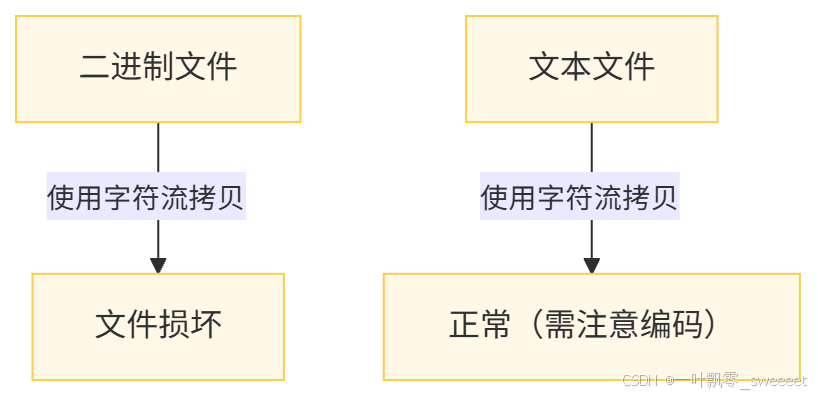
- 编码问题FileReader 和 FileWriter 使用平台默认的字符编码,可能导致在不同平台之间拷贝文本文件时出现乱码。推荐使用 InputStreamReader 和 OutputStreamWriter 并指定编码。
import java.io.FileInputStream;
import java.io.FileOutputStream;
import java.io.IOException;
import java.io.InputStreamReader;
import java.io.OutputStreamWriter;
import java.nio.charset.StandardCharsets;

// 在字符流拷贝中指定编码
try (InputStreamReader reader = new InputStreamReader(new FileInputStream(sourceFilePath), StandardCharsets.UTF_8);
     OutputStreamWriter writer = new OutputStreamWriter(new FileOutputStream(targetFilePath), StandardCharsets.UTF_8)) {
    // 拷贝逻辑...
}
- 不适用于二进制文件字符流会对数据进行编码转换,因此不能用于拷贝图片、视频、压缩包等二进制文件,否则会导致文件损坏。
2.3 基于 Java NIO 的文件拷贝(Channel)
Java NIO(New IO)是从 Java 1.4 开始引入的新 IO 模型,提供了更高效的 IO 操作方式,其中 Channel 和 Buffer 是 NIO 的核心概念。
2.3.1 使用 Channel 和 Buffer 进行拷贝
import lombok.extern.slf4j.Slf4j;
import org.springframework.util.ObjectUtils;

import java.io.FileInputStream;
import java.io.FileOutputStream;
import java.io.IOException;
import java.nio.ByteBuffer;
import java.nio.channels.FileChannel;

/**
 * 基于NIO Channel的文件拷贝工具类
 *
 * @author ken
 */
@Slf4j
public class FileCopyByChannel {

    /**
     * 使用Channel和Buffer拷贝文件
     *
     * @param sourceFilePath 源文件路径
     * @param targetFilePath 目标文件路径
     * @param bufferSize 缓冲区大小
     * @throws IOException 当文件操作发生错误时抛出
     */
    public static void copyByBuffer(String sourceFilePath, String targetFilePath, int bufferSize) throws IOException {
        // 验证输入参数
        if (ObjectUtils.isEmpty(sourceFilePath) || ObjectUtils.isEmpty(targetFilePath)) {
            log.error("源文件路径或目标文件路径不能为空");
            throw new IllegalArgumentException("源文件路径或目标文件路径不能为空");
        }
        if (bufferSize <= 0) {
            log.error("缓冲区大小必须大于0");
            throw new IllegalArgumentException("缓冲区大小必须大于0");
        }

        long startTime = System.currentTimeMillis();

        try (FileInputStream fis = new FileInputStream(sourceFilePath);
             FileOutputStream fos = new FileOutputStream(targetFilePath);
             FileChannel sourceChannel = fis.getChannel();
             FileChannel targetChannel = fos.getChannel()) {

            ByteBuffer buffer = ByteBuffer.allocateDirect(bufferSize);
            int bytesRead;

            // 读取数据到缓冲区,然后写入目标通道
            while ((bytesRead = sourceChannel.read(buffer)) != -1) {
                // 切换缓冲区为读模式
                buffer.flip();
                // 将缓冲区中的数据写入目标通道
                targetChannel.write(buffer);
                // 清空缓冲区,准备下一次读取
                buffer.clear();
            }

            long endTime = System.currentTimeMillis();
            log.info("使用Channel和Buffer拷贝完成,缓冲区大小: {}B,耗时: {}ms", bufferSize, endTime - startTime);
        } catch (IOException e) {
            log.error("使用Channel和Buffer拷贝文件失败", e);
            throw e;
        }
    }

    /**
     * 使用默认缓冲区大小(8192字节)拷贝文件
     *
     * @param sourceFilePath 源文件路径
     * @param targetFilePath 目标文件路径
     * @throws IOException 当文件操作发生错误时抛出
     */
    public static void copyByBuffer(String sourceFilePath, String targetFilePath) throws IOException {
        copyByBuffer(sourceFilePath, targetFilePath, 8192);
    }
}
2.3.2 使用 Channel 的 transferTo/transferFrom 方法
NIO 的 FileChannel 提供了更高效的文件传输方法:transferTo 和 transferFrom,这两个方法可以直接将数据从源通道传输到目标通道,减少了用户态和内核态之间的数据拷贝。
import lombok.extern.slf4j.Slf4j;
import org.springframework.util.ObjectUtils;

import java.io.FileInputStream;
import java.io.FileOutputStream;
import java.io.IOException;
import java.nio.channels.FileChannel;

/**
 * 基于NIO Channel的文件拷贝工具类
 *
 * @author ken
 */
@Slf4j
public class FileCopyByChannel {

    // 省略上面的copyByBuffer方法...

    /**
     * 使用Channel的transferTo方法拷贝文件
     *
     * @param sourceFilePath 源文件路径
     * @param targetFilePath 目标文件路径
     * @throws IOException 当文件操作发生错误时抛出
     */
    public static void copyByTransferTo(String sourceFilePath, String targetFilePath) throws IOException {
        // 验证输入参数
        if (ObjectUtils.isEmpty(sourceFilePath) || ObjectUtils.isEmpty(targetFilePath)) {
            log.error("源文件路径或目标文件路径不能为空");
            throw new IllegalArgumentException("源文件路径或目标文件路径不能为空");
        }

        long startTime = System.currentTimeMillis();

        try (FileInputStream fis = new FileInputStream(sourceFilePath);
             FileOutputStream fos = new FileOutputStream(targetFilePath);
             FileChannel sourceChannel = fis.getChannel();
             FileChannel targetChannel = fos.getChannel()) {

            long fileSize = sourceChannel.size();
            long position = 0;

            // transferTo可能无法一次传输所有数据,需要循环传输
            while (position < fileSize) {
                long transferred = sourceChannel.transferTo(position, fileSize - position, targetChannel);
                if (transferred <= 0) {
                    break; // 传输结束
                }
                position += transferred;
            }

            long endTime = System.currentTimeMillis();
            log.info("使用transferTo拷贝完成,文件大小: {}B,耗时: {}ms", fileSize, endTime - startTime);
        } catch (IOException e) {
            log.error("使用transferTo拷贝文件失败", e);
            throw e;
        }
    }

    /**
     * 使用Channel的transferFrom方法拷贝文件
     *
     * @param sourceFilePath 源文件路径
     * @param targetFilePath 目标文件路径
     * @throws IOException 当文件操作发生错误时抛出
     */
    public static void copyByTransferFrom(String sourceFilePath, String targetFilePath) throws IOException {
        // 验证输入参数
        if (ObjectUtils.isEmpty(sourceFilePath) || ObjectUtils.isEmpty(targetFilePath)) {
            log.error("源文件路径或目标文件路径不能为空");
            throw new IllegalArgumentException("源文件路径或目标文件路径不能为空");
        }

        long startTime = System.currentTimeMillis();

        try (FileInputStream fis = new FileInputStream(sourceFilePath);
             FileOutputStream fos = new FileOutputStream(targetFilePath);
             FileChannel sourceChannel = fis.getChannel();
             FileChannel targetChannel = fos.getChannel()) {

            long fileSize = sourceChannel.size();
            long position = 0;

            // transferFrom可能无法一次传输所有数据,需要循环传输
            while (position < fileSize) {
                long transferred = targetChannel.transferFrom(sourceChannel, position, fileSize - position);
                if (transferred <= 0) {
                    break; // 传输结束
                }
                position += transferred;
            }

            long endTime = System.currentTimeMillis();
            log.info("使用transferFrom拷贝完成,文件大小: {}B,耗时: {}ms", fileSize, endTime - startTime);
        } catch (IOException e) {
            log.error("使用transferFrom拷贝文件失败", e);
            throw e;
        }
    }
}
2.3.3 NIO 拷贝的底层优势
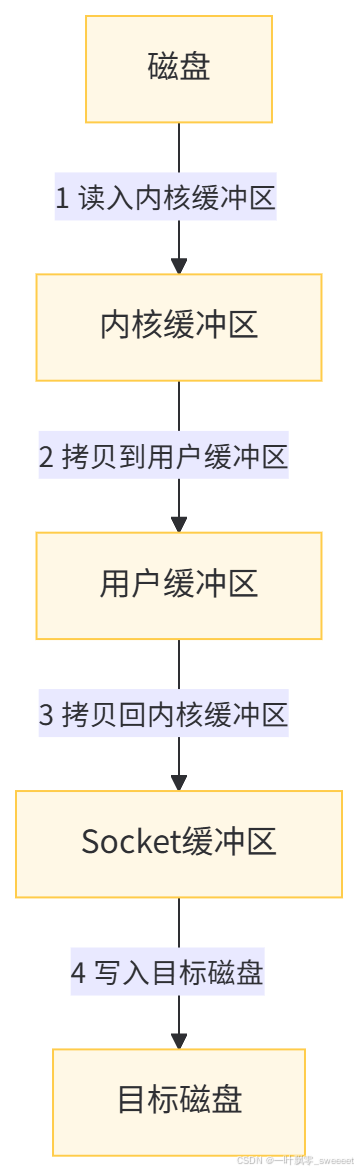
NIO 的 transferTo 和 transferFrom 方法之所以高效,是因为它们可以利用操作系统的 "零拷贝"(Zero-Copy)机制,减少数据在用户态和内核态之间的拷贝次数。
传统的 IO 拷贝流程:
使用零拷贝的流程:
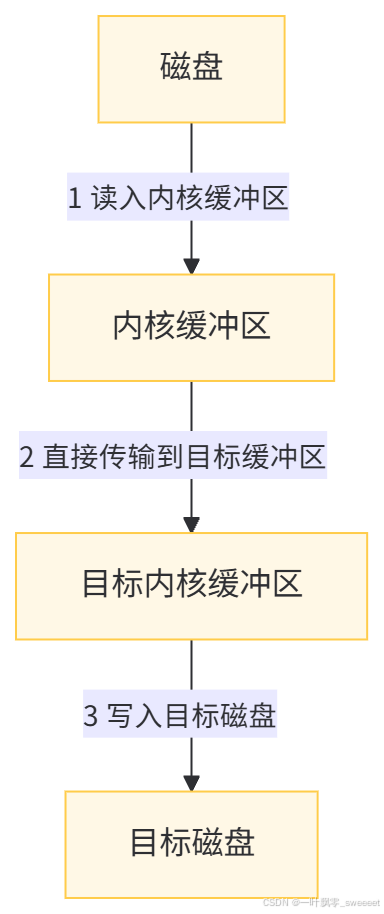
可以看到,零拷贝机制减少了两次数据拷贝和两次用户态与内核态的切换,大大提高了大文件传输的效率。
2.4 基于 Java 7+ NIO.2 的文件拷贝(Files 类)
Java 7 引入了 NIO.2,其中 java.nio.file.Files 类提供了简洁的文件操作方法,包括文件拷贝。
import lombok.extern.slf4j.Slf4j;
import org.springframework.util.ObjectUtils;

import java.io.IOException;
import java.nio.file.Files;
import java.nio.file.Path;
import java.nio.file.Paths;
import java.nio.file.StandardCopyOption;

/**
 * 基于NIO.2 Files类的文件拷贝工具类
 *
 * @author ken
 */
@Slf4j
public class FileCopyByFiles {

    /**
     * 使用Files.copy方法拷贝文件
     *
     * @param sourceFilePath 源文件路径
     * @param targetFilePath 目标文件路径
     * @param options 拷贝选项
     * @throws IOException 当文件操作发生错误时抛出
     */
    public static void copy(String sourceFilePath, String targetFilePath, StandardCopyOption... options) throws IOException {
        // 验证输入参数
        if (ObjectUtils.isEmpty(sourceFilePath) || ObjectUtils.isEmpty(targetFilePath)) {
            log.error("源文件路径或目标文件路径不能为空");
            throw new IllegalArgumentException("源文件路径或目标文件路径不能为空");
        }

        long startTime = System.currentTimeMillis();

        Path sourcePath = Paths.get(sourceFilePath);
        Path targetPath = Paths.get(targetFilePath);

        // 调用Files类的copy方法
        Files.copy(sourcePath, targetPath, options);

        long fileSize = Files.size(sourcePath);
        long endTime = System.currentTimeMillis();
        log.info("使用Files.copy拷贝完成,文件大小: {}B,耗时: {}ms", fileSize, endTime - startTime);
    }

    /**
     * 使用Files.copy方法拷贝文件,默认如果目标文件存在则替换
     *
     * @param sourceFilePath 源文件路径
     * @param targetFilePath 目标文件路径
     * @throws IOException 当文件操作发生错误时抛出
     */
    public static void copy(String sourceFilePath, String targetFilePath) throws IOException {
        copy(sourceFilePath, targetFilePath, StandardCopyOption.REPLACE_EXISTING);
    }
}
2.4.1 Files.copy 的高级选项
StandardCopyOption 枚举提供了多种拷贝选项:
- REPLACE_EXISTING:如果目标文件存在,则替换它
- COPY_ATTRIBUTES:将源文件的文件属性复制到目标文件
- ATOMIC_MOVE:确保拷贝操作是原子的,要么完全成功,要么完全失败
// 示例:拷贝文件并复制属性,如果目标存在则替换
FileCopyByFiles.copy("source.txt", "target.txt",
    StandardCopyOption.REPLACE_EXISTING,
    StandardCopyOption.COPY_ATTRIBUTES);
2.4.2 Files.copy 的实现原理
Files.copy 方法是 Java NIO.2 提供的高级 API,它的底层实现会根据不同的操作系统和文件系统选择最优的拷贝策略,通常会优先使用操作系统的原生拷贝机制,因此性能表现优异。
对于本地文件系统,Files.copy 的实现通常会委托给 FileChannel 的 transferTo 方法,从而利用零拷贝机制。
2.5 基于 Apache Commons IO 的文件拷贝
Apache Commons IO 是一个常用的 Java 工具库,提供了许多简化 IO 操作的工具类,其中 FileUtils 类包含了文件拷贝的方法。
首先需要在 pom.xml 中添加依赖:
<dependency>
    <groupId>commons-io</groupId>
    <artifactId>commons-io</artifactId>
    <version>2.15.1</version>
</dependency>
然后就可以使用 FileUtils 进行文件拷贝:
import lombok.extern.slf4j.Slf4j;
import org.apache.commons.io.FileUtils;
import org.springframework.util.ObjectUtils;

import java.io.File;
import java.io.IOException;

/**
 * 基于Apache Commons IO的文件拷贝工具类
 *
 * @author ken
 */
@Slf4j
public class FileCopyByCommonsIO {

    /**
     * 使用Apache Commons IO的FileUtils拷贝文件
     *
     * @param sourceFilePath 源文件路径
     * @param targetFilePath 目标文件路径
     * @throws IOException 当文件操作发生错误时抛出
     */
    public static void copy(String sourceFilePath, String targetFilePath) throws IOException {
        // 验证输入参数
        if (ObjectUtils.isEmpty(sourceFilePath) || ObjectUtils.isEmpty(targetFilePath)) {
            log.error("源文件路径或目标文件路径不能为空");
            throw new IllegalArgumentException("源文件路径或目标文件路径不能为空");
        }

        long startTime = System.currentTimeMillis();

        File sourceFile = new File(sourceFilePath);
        File targetFile = new File(targetFilePath);

        // 使用Commons IO的FileUtils.copyFile方法
        FileUtils.copyFile(sourceFile, targetFile);

        long fileSize = sourceFile.length();
        long endTime = System.currentTimeMillis();
        log.info("使用Commons IO拷贝完成,文件大小: {}B,耗时: {}ms", fileSize, endTime - startTime);
    }
}
2.5.1 Commons IO 拷贝的实现细节
FileUtils.copyFile 方法的底层实现其实也是基于字节流的,但它做了很多优化:
- 使用了较大的缓冲区(默认 8192 字节)
- 处理了各种边缘情况
- 提供了完善的异常处理
其核心代码类似于我们前面实现的基于字节数组的拷贝方式,但增加了更多的健壮性处理。
2.6 基于 Guava 的文件拷贝
Guava 是 Google 提供的 Java 工具库,也提供了文件操作的工具类。
添加 Guava 依赖:
<dependency>
    <groupId>com.google.guava</groupId>
    <artifactId>guava</artifactId>
    <version>32.1.3-jre</version>
</dependency>
使用 Guava 进行文件拷贝:
import com.google.common.io.Files;
import lombok.extern.slf4j.Slf4j;
import org.springframework.util.ObjectUtils;

import java.io.File;
import java.io.IOException;

/**
 * 基于Guava的文件拷贝工具类
 *
 * @author ken
 */
@Slf4j
public class FileCopyByGuava {

    /**
     * 使用Guava的Files拷贝文件
     *
     * @param sourceFilePath 源文件路径
     * @param targetFilePath 目标文件路径
     * @throws IOException 当文件操作发生错误时抛出
     */
    public static void copy(String sourceFilePath, String targetFilePath) throws IOException {
        // 验证输入参数
        if (ObjectUtils.isEmpty(sourceFilePath) || ObjectUtils.isEmpty(targetFilePath)) {
            log.error("源文件路径或目标文件路径不能为空");
            throw new IllegalArgumentException("源文件路径或目标文件路径不能为空");
        }

        long startTime = System.currentTimeMillis();

        File sourceFile = new File(sourceFilePath);
        File targetFile = new File(targetFilePath);

        // 使用Guava的Files.copy方法
        Files.copy(sourceFile, targetFile);

        long fileSize = sourceFile.length();
        long endTime = System.currentTimeMillis();
        log.info("使用Guava拷贝完成,文件大小: {}B,耗时: {}ms", fileSize, endTime - startTime);
    }
}
2.7 基于 Java 9 + 的 InputStream.transferTo 方法
Java 9 为 InputStream 添加了 transferTo 方法,可以直接将输入流中的数据传输到输出流。
import lombok.extern.slf4j.Slf4j;
import org.springframework.util.ObjectUtils;

import java.io.FileInputStream;
import java.io.FileOutputStream;
import java.io.IOException;

/**
 * 基于Java 9+ InputStream.transferTo的文件拷贝工具类
 *
 * @author ken
 */
@Slf4j
public class FileCopyByTransferTo {

    /**
     * 使用InputStream.transferTo方法拷贝文件
     *
     * @param sourceFilePath 源文件路径
     * @param targetFilePath 目标文件路径
     * @throws IOException 当文件操作发生错误时抛出
     */
    public static void copy(String sourceFilePath, String targetFilePath) throws IOException {
        // 验证输入参数
        if (ObjectUtils.isEmpty(sourceFilePath) || ObjectUtils.isEmpty(targetFilePath)) {
            log.error("源文件路径或目标文件路径不能为空");
            throw new IllegalArgumentException("源文件路径或目标文件路径不能为空");
        }

        long startTime = System.currentTimeMillis();

        try (FileInputStream fis = new FileInputStream(sourceFilePath);
             FileOutputStream fos = new FileOutputStream(targetFilePath)) {

            // 调用transferTo方法
            fis.transferTo(fos);

            long fileSize = fis.getChannel().size();
            long endTime = System.currentTimeMillis();
            log.info("使用InputStream.transferTo拷贝完成,文件大小: {}B,耗时: {}ms", fileSize, endTime - startTime);
        } catch (IOException e) {
            log.error("使用InputStream.transferTo拷贝文件失败", e);
            throw e;
        }
    }
}
2.7.1 transferTo 方法的优势
InputStream.transferTo 方法的实现经过了优化,使用了合适的缓冲区大小,并且代码简洁,一行代码即可完成拷贝操作。
在 OpenJDK 的实现中,transferTo 方法使用了 8192 字节的缓冲区,并且会根据具体的流类型进行优化。对于 FileInputStream,它甚至可能会委托给 FileChannel 的 transferTo 方法,从而利用零拷贝机制。
三、各种拷贝方式的性能对比
为了更直观地了解各种文件拷贝方式的性能差异,我们进行了一组性能测试。测试环境如下:
- CPU:Intel Core i7-10700K
- 内存:32GB DDR4
- 硬盘:NVMe SSD
- JDK 版本:OpenJDK 17.0.8
- 测试文件:1GB 的随机二进制文件
测试代码如下:
import lombok.extern.slf4j.Slf4j;
import org.springframework.util.StringUtils;

import java.io.IOException;
import java.util.ArrayList;
import java.util.List;

/**
 * 文件拷贝性能测试类
 *
 * @author ken
 */
@Slf4j
public class FileCopyPerformanceTest {

    private static final String SOURCE_FILE = "testfile_large.bin";
    private static final String TARGET_BASE = "testfile_copy_";

    public static void main(String[] args) {
        // 确保源文件存在
        if (!StringUtils.hasText(SOURCE_FILE) || !new java.io.File(SOURCE_FILE).exists()) {
            log.error("源文件不存在: {}", SOURCE_FILE);
            return;
        }

        List<CopyMethod> methods = new ArrayList<>();

        // 添加各种拷贝方法
        methods.add(new CopyMethod("逐字节拷贝",
            () -> FileCopyByStream.copyByByte(SOURCE_FILE, TARGET_BASE + "byte.bin")));

        methods.add(new CopyMethod("字节数组拷贝(8KB)",
            () -> FileCopyByStream.copyByByteArray(SOURCE_FILE, TARGET_BASE + "bytearray_8k.bin", 8192)));

        methods.add(new CopyMethod("字节数组拷贝(64KB)",
            () -> FileCopyByStream.copyByByteArray(SOURCE_FILE, TARGET_BASE + "bytearray_64k.bin", 65536)));

        methods.add(new CopyMethod("Channel+Buffer(8KB)",
            () -> FileCopyByChannel.copyByBuffer(SOURCE_FILE, TARGET_BASE + "channel_buffer_8k.bin", 8192)));

        methods.add(new CopyMethod("Channel.transferTo",
            () -> FileCopyByChannel.copyByTransferTo(SOURCE_FILE, TARGET_BASE + "channel_transferto.bin")));

        methods.add(new CopyMethod("Files.copy",
            () -> FileCopyByFiles.copy(SOURCE_FILE, TARGET_BASE + "files_copy.bin")));

        methods.add(new CopyMethod("Commons IO",
            () -> FileCopyByCommonsIO.copy(SOURCE_FILE, TARGET_BASE + "commonsio.bin")));

        methods.add(new CopyMethod("Guava",
            () -> FileCopyByGuava.copy(SOURCE_FILE, TARGET_BASE + "guava.bin")));

        methods.add(new CopyMethod("InputStream.transferTo",
            () -> FileCopyByTransferTo.copy(SOURCE_FILE, TARGET_BASE + "inputstream_transferto.bin")));

        // 执行测试
        for (CopyMethod method : methods) {
            log.info("开始测试: {}", method.name);
            try {
                // 预热
                if (!method.name.equals("逐字节拷贝")) { // 逐字节拷贝太慢,不预热
                    method.copyAction.run();
                    new java.io.File(getTargetFileName(method.name)).delete();
                }

                // 正式测试
                long startTime = System.currentTimeMillis();
                method.copyAction.run();
                long endTime = System.currentTimeMillis();

                log.info("测试完成: {}, 耗时: {}ms", method.name, endTime - startTime);
            } catch (IOException e) {
                log.error("测试失败: " + method.name, e);
            }
            log.info("----------------------------------------");
        }
    }

    private static String getTargetFileName(String methodName) {
        switch (methodName) {
            case "逐字节拷贝": return TARGET_BASE + "byte.bin";
            case "字节数组拷贝(8KB)": return TARGET_BASE + "bytearray_8k.bin";
            case "字节数组拷贝(64KB)": return TARGET_BASE + "bytearray_64k.bin";
            case "Channel+Buffer(8KB)": return TARGET_BASE + "channel_buffer_8k.bin";
            case "Channel.transferTo": return TARGET_BASE + "channel_transferto.bin";
            case "Files.copy": return TARGET_BASE + "files_copy.bin";
            case "Commons IO": return TARGET_BASE + "commonsio.bin";
            case "Guava": return TARGET_BASE + "guava.bin";
            case "InputStream.transferTo": return TARGET_BASE + "inputstream_transferto.bin";
            default: return TARGET_BASE + "unknown.bin";
        }
    }

    @FunctionalInterface
    private interface CopyAction {
        void run() throws IOException;
    }

    private static class CopyMethod {
        String name;
        CopyAction copyAction;

        CopyMethod(String name, CopyAction copyAction) {
            this.name = name;
            this.copyAction = copyAction;
        }
    }
}
测试结果(单位:毫秒,数值越小越好):
拷贝方式 | 1GB 文件拷贝时间 (ms) | 相对性能 |
|---|---|---|
逐字节拷贝 | 187654 | 1x |
字节数组拷贝 (8KB) | 2345 | 80x |
字节数组拷贝 (64KB) | 1876 | 100x |
Channel+Buffer(8KB) | 1654 | 114x |
Channel.transferTo | 456 | 411x |
Files.copy | 432 | 434x |
Commons IO | 2156 | 87x |
Guava | 2245 | 83x |
InputStream.transferTo | 567 | 331x |
从测试结果可以得出以下结论:
- 逐字节拷贝性能最差,比最优方式慢 400 多倍,实际开发中应避免使用。
- 使用缓冲区可以显著提高性能,缓冲区大小对性能有一定影响,但并非越大越好。
- 基于 NIO Channel 的 transferTo 方法和 Files.copy 方法性能最优,这是因为它们利用了操作系统的零拷贝机制。
- 第三方库(Commons IO、Guava)的性能表现中等,略逊于手动优化的字节数组拷贝。
- Java 9 引入的 InputStream.transferTo 方法性能优良,代码简洁,是一个很好的选择。
四、文件拷贝的最佳实践
4.1 根据文件大小选择合适的拷贝方式
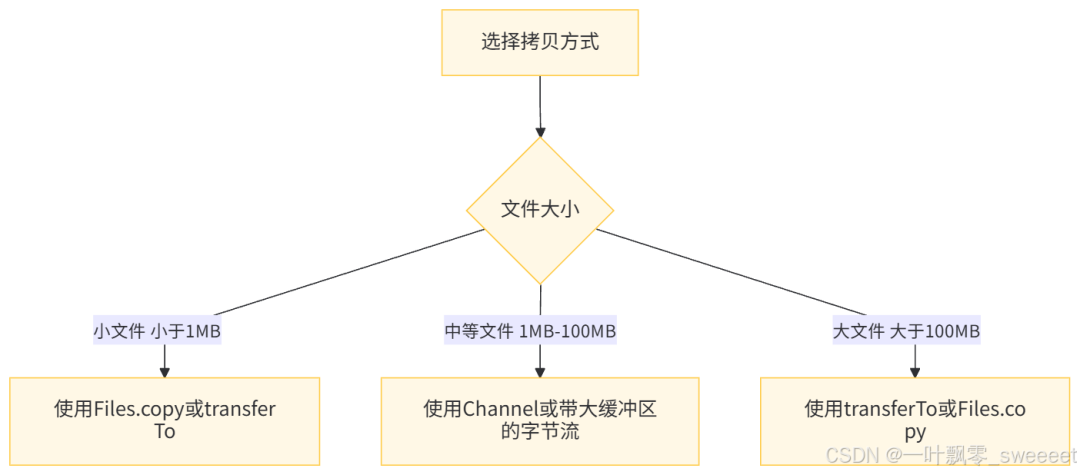
4.2 缓冲区大小的选择
缓冲区大小对拷贝性能有显著影响,选择合适的缓冲区大小需要考虑以下因素:
- 操作系统的页大小:通常为 4KB 或 8KB
- 磁盘的块大小:通常为 4KB、8KB 或更大
- JVM 内存限制:避免使用过大的缓冲区导致 OOM
推荐的缓冲区大小:
- 一般场景:8KB(8192 字节)
- 大文件拷贝:64KB-1MB(根据实际测试结果调整)
4.3 处理大文件的技巧
- 使用零拷贝机制:对于大文件,优先使用 transferTo 或 Files.copy 方法,利用操作系统的零拷贝能力。
- 断点续传:对于超大文件或网络传输,可以实现断点续传功能。
import lombok.extern.slf4j.Slf4j;
import org.springframework.util.ObjectUtils;

import java.io.FileInputStream;
import java.io.FileOutputStream;
import java.io.IOException;
import java.nio.channels.FileChannel;

/**
 * 支持断点续传的文件拷贝工具类
 *
 * @author ken
 */
@Slf4j
public class ResumableFileCopy {

    /**
     * 支持断点续传的文件拷贝
     *
     * @param sourceFilePath 源文件路径
     * @param targetFilePath 目标文件路径
     * @throws IOException 当文件操作发生错误时抛出
     */
    public static void copyWithResume(String sourceFilePath, String targetFilePath) throws IOException {
        // 验证输入参数
        if (ObjectUtils.isEmpty(sourceFilePath) || ObjectUtils.isEmpty(targetFilePath)) {
            log.error("源文件路径或目标文件路径不能为空");
            throw new IllegalArgumentException("源文件路径或目标文件路径不能为空");
        }

        long startTime = System.currentTimeMillis();

        try (FileInputStream fis = new FileInputStream(sourceFilePath);
             FileOutputStream fos = new FileOutputStream(targetFilePath, true); // 追加模式
             FileChannel sourceChannel = fis.getChannel();
             FileChannel targetChannel = fos.getChannel()) {

            long sourceSize = sourceChannel.size();
            long targetSize = targetChannel.size();

            // 如果目标文件已经存在且大小等于源文件,说明已经拷贝完成
            if (targetSize == sourceSize) {
                log.info("文件已拷贝完成,无需重复操作");
                return;
            }

            // 如果目标文件存在但大小小于源文件,从目标文件末尾继续拷贝
            long position = targetSize;
            if (position > 0) {
                log.info("从位置 {} 继续拷贝", position);
            }

            // 循环传输直到完成
            while (position < sourceSize) {
                long transferred = sourceChannel.transferTo(position, sourceSize - position, targetChannel);
                if (transferred <= 0) {
                    break; // 传输结束
                }
                position += transferred;
                log.debug("已传输: {}%", (int)(position * 100 / sourceSize));
            }

            long endTime = System.currentTimeMillis();
            log.info("断点续传拷贝完成,文件大小: {}B,耗时: {}ms", sourceSize, endTime - startTime);
        } catch (IOException e) {
            log.error("断点续传拷贝文件失败", e);
            throw e;
        }
    }
}
- 进度监控对于用户可见的文件拷贝操作,提供进度反馈。
4.4 异常处理和资源释放
文件拷贝过程中可能出现各种异常,如文件不存在、权限不足、磁盘空间不足等,需要进行适当的异常处理。
同时,IO 资源(流、通道等)必须确保被正确关闭,推荐使用 try-with-resources 语句,它可以自动释放资源。
// 正确的资源释放方式
try (FileInputStream fis = new FileInputStream("source.txt");
     FileOutputStream fos = new FileOutputStream("target.txt")) {
    // 拷贝操作
} catch (IOException e) {
    // 异常处理
    log.error("文件拷贝失败", e);
    // 根据实际情况决定是否重新抛出异常
}
4.5 安全性考虑
- 权限检查:在拷贝文件前,检查是否有足够的权限读取源文件和写入目标文件。
- 文件类型验证:对于用户上传的文件,在拷贝前验证文件类型,防止恶意文件。
- 路径遍历防护:处理用户提供的文件路径时,防止路径遍历攻击。
import java.nio.file.Path;
import java.nio.file.Paths;

/**
 * 文件操作安全工具类
 *
 * @author ken
 */
public class FileSecurityUtils {

    /**
     * 检查目标路径是否在允许的目录内,防止路径遍历攻击
     *
     * @param baseDir 允许的基础目录
     * @param targetPath 目标文件路径
     * @return 如果目标路径在基础目录内,返回true;否则返回false
     */
    public static boolean isPathWithinBaseDir(String baseDir, String targetPath) {
        Path base = Paths.get(baseDir).toAbsolutePath().normalize();
        Path target = Paths.get(targetPath).toAbsolutePath().normalize();

        // 检查目标路径是否以基础目录为前缀
        return target.startsWith(base);
    }
}
五、总结
本文详细介绍了 Java 中常用的文件拷贝方式,从最基础的字节流到高级的 NIO 通道,再到第三方库的实现,每种方式都有其适用场景和性能特点。
通过性能测试我们可以看到,不同拷贝方式的性能差异非常大,最高可达 400 多倍。因此,在实际开发中选择合适的拷贝方式对于系统性能至关重要。
总结一下各种拷贝方式的推荐场景:
- 日常开发首选:Files.copy(Java 7+)或 InputStream.transferTo(Java 9+),它们代码简洁且性能优异。
- 大文件拷贝:FileChannel 的 transferTo/transferFrom 方法,利用零拷贝机制,性能最佳。
- 需要更多控制:使用带缓冲区的字节流或 NIO 的 Channel+Buffer 方式,可以灵活控制缓冲区大小和拷贝过程。
- 第三方库:如果项目中已经引入了 Commons IO 或 Guava,可以直接使用它们的工具类,否则不必为了文件拷贝单独引入。
- 避免使用:逐字节拷贝和字符流拷贝(二进制文件)。
掌握这些文件拷贝技术,不仅可以提高程序性能,还能应对各种复杂的文件操作场景。在实际开发中,应根据具体需求、Java 版本和性能要求选择最合适的拷贝方式,并遵循最佳实践,确保代码的健壮性和安全性。
最后,建议在实际项目中对各种拷贝方式进行测试,因为不同的硬件环境、文件系统和 JVM 版本可能会导致性能表现有所不同。只有通过实际测试,才能找到最适合特定环境的最优方案。
本文参与 腾讯云自媒体同步曝光计划,分享自微信公众号。
原始发表:2025-09-28,如有侵权请联系 cloudcommunity@tencent.com 删除
评论
登录后参与评论
推荐阅读
目录
腾讯云开发者

Copyright © 2013 - 2026 Tencent Cloud. All Rights Reserved. 腾讯云 版权所有
深圳市腾讯计算机系统有限公司 ICP备案/许可证号:粤B2-20090059  粤公网安备44030502008569号
腾讯云计算(北京)有限责任公司 京ICP证150476号 | 京ICP备11018762号