Java 接口性能优化:从 “500ms” 到 “50ms” 的 10 个实战技巧

Java 接口性能优化:从 “500ms” 到 “50ms” 的 10 个实战技巧

果酱带你啃java
发布于 2026-04-14 13:16:39
发布于 2026-04-14 13:16:39
引言:性能优化的价值与挑战
在当今互联网时代,接口性能直接影响用户体验和业务转化。想象一下,当用户在秒杀活动中点击购买按钮,却要等待半秒以上才能得到响应,这可能导致用户流失和销售额下降。根据亚马逊的研究,页面加载时间每增加 1 秒,转化率就会下降 7%。
本文将分享 10 个经过实战检验的 Java 接口性能优化技巧,这些技巧曾帮助我们将核心接口响应时间从 500ms 优化到 50ms 以内,系统吞吐量提升 10 倍以上。无论你是面临性能瓶颈的开发工程师,还是希望提前规避性能问题的架构师,这些实战技巧都将为你提供切实可行的优化思路和实施方法。
一、性能优化方法论
在开始具体的优化实践之前,我们需要建立一套科学的性能优化方法论。盲目优化不仅可能收效甚微,还可能引入新的问题。
1.1 性能优化流程
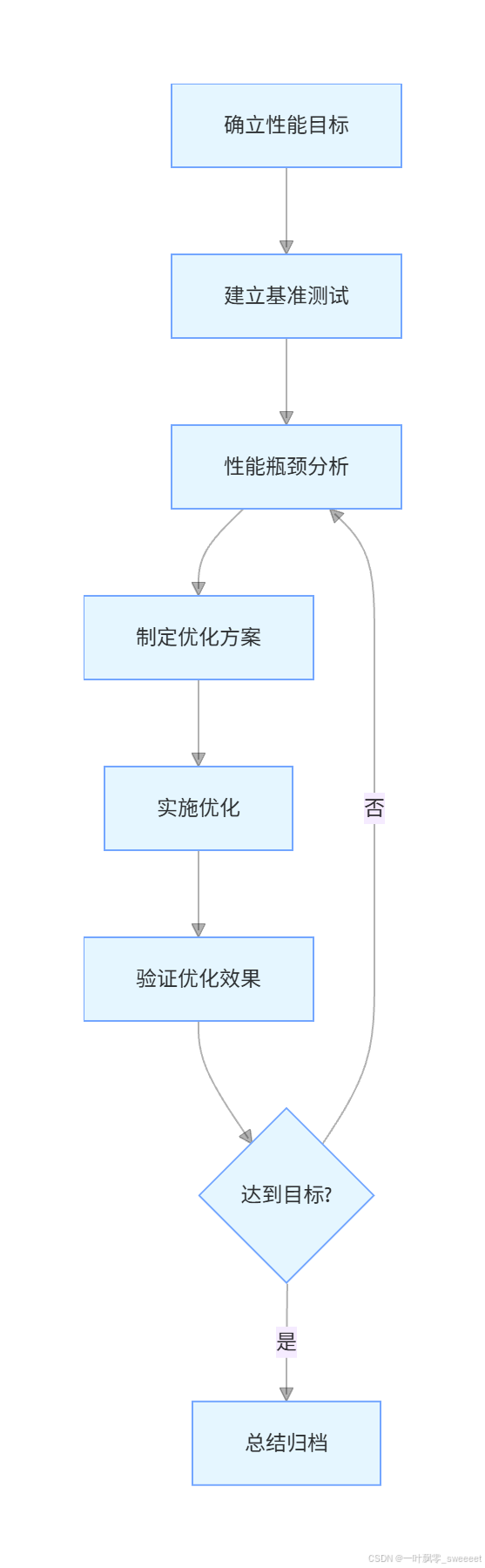
- 确立性能目标:根据业务需求明确性能指标,如响应时间 <50ms,TPS>1000 等
- 建立基准测试:使用 JMeter、Gatling 等工具建立稳定的性能测试环境和用例
- 性能瓶颈分析:通过监控工具和 profiling 工具定位性能瓶颈
- 制定优化方案:针对瓶颈制定具体的优化方案,明确优先级和实施步骤
- 实施优化:小步快跑,每次只做少量改动,便于定位问题
- 验证优化效果:通过基准测试验证优化是否达到预期
- 持续迭代:重复以上步骤,直到达到性能目标
1.2 关键性能指标
- 响应时间(Response Time):从请求发出到收到响应的总时间,通常关注平均响应时间、P95、P99 分位值
- 吞吐量(Throughput):单位时间内处理的请求数(TPS/QPS)
- 并发用户数(Concurrent Users):系统同时处理的用户数
- 错误率(Error Rate):请求失败的比例
- 资源利用率(Resource Utilization):CPU、内存、磁盘 IO、网络等资源的使用率
二、10 个实战优化技巧
技巧 1:优化数据库访问
数据库通常是性能瓶颈的重灾区,优化数据库访问往往能带来显著的性能提升。
1.1 SQL 优化
问题示例:未优化的查询语句
/**
 * 查询用户订单列表(未优化版本)
 */
@Override
public List<OrderVO> getUserOrders(Long userId) {
    log.info("查询用户订单,userId: {}", userId);
    // 未指定查询字段,返回所有字段
    LambdaQueryWrapper<Order> queryWrapper = new LambdaQueryWrapper<>();
    queryWrapper.eq(Order::getUserId, userId)
                .orderByDesc(Order::getCreateTime);

    List<Order> orders = orderMapper.selectList(queryWrapper);
    if (CollectionUtils.isEmpty(orders)) {
        return Lists.newArrayList();
    }

    // 循环查询订单详情,导致N+1问题
    return orders.stream().map(order -> {
        OrderVO orderVO = new OrderVO();
        BeanUtils.copyProperties(order, orderVO);

        List<OrderItem> items = orderItemMapper.selectByOrderId(order.getId());
        orderVO.setItems(items.stream().map(item -> {
            OrderItemVO itemVO = new OrderItemVO();
            BeanUtils.copyProperties(item, itemVO);
            return itemVO;
        }).collect(Collectors.toList()));

        return orderVO;
    }).collect(Collectors.toList());
}
优化方案:
- 只查询需要的字段
- 使用 JOIN 查询避免 N+1 问题
- 添加合适的索引
- 分页查询大量数据
优化后代码:
/**
 * 查询用户订单列表(优化版本)
 */
@Override
public Page<OrderVO> getUserOrders(Long userId, Integer pageNum, Integer pageSize) {
    log.info("查询用户订单,userId: {}, pageNum: {}, pageSize: {}", userId, pageNum, pageSize);

    // 1. 分页查询订单主表,只查询需要的字段
    Page<Order> orderPage = new Page<>(pageNum, pageSize);
    LambdaQueryWrapper<Order> queryWrapper = new LambdaQueryWrapper<>();
    queryWrapper.eq(Order::getUserId, userId)
                .orderByDesc(Order::getCreateTime)
                .select(Order::getId, Order::getOrderNo, Order::getTotalAmount,
                        Order::getStatus, Order::getCreateTime);

    Page<Order> resultPage = orderMapper.selectPage(orderPage, queryWrapper);
    if (CollectionUtils.isEmpty(resultPage.getRecords())) {
        return new Page<>(pageNum, pageSize);
    }

    // 2. 一次性查询所有订单的详情,避免N+1问题
    List<Long> orderIds = resultPage.getRecords().stream()
            .map(Order::getId)
            .collect(Collectors.toList());

    // 使用MyBatis-Plus的in查询,一次性获取所有订单明细
    List<OrderItemVO> allItems = orderItemMapper.selectOrderItemsByOrderIds(orderIds);

    // 3. 组装结果
    Page<OrderVO> orderVOPage = new Page<>();
    BeanUtils.copyProperties(resultPage, orderVOPage);

    List<OrderVO> orderVOList = resultPage.getRecords().stream().map(order -> {
        OrderVO orderVO = new OrderVO();
        BeanUtils.copyProperties(order, orderVO);

        // 从已查询的所有明细中筛选当前订单的明细
        List<OrderItemVO> items = allItems.stream()
                .filter(item -> order.getId().equals(item.getOrderId()))
                .collect(Collectors.toList());

        orderVO.setItems(items);
        return orderVO;
    }).collect(Collectors.toList());

    orderVOPage.setRecords(orderVOList);
    return orderVOPage;
}
对应的 Mapper 方法和 SQL:
/**
 * 一次性查询多个订单的明细
 */
List<OrderItemVO> selectOrderItemsByOrderIds(@Param("orderIds") List<Long> orderIds);
<select id="selectOrderItemsByOrderIds" resultType="com.example.vo.OrderItemVO">
    SELECT
        id, order_id, product_id, product_name,
        product_price, quantity, total_price
    FROM order_item
    WHERE order_id IN
    <foreach collection="orderIds" item="id" open="(" separator="," close=")">
        #{id}
    </foreach>
</select>
添加合适的索引:
-- 订单表添加用户ID索引
CREATE INDEX idx_order_user_id ON order (user_id);

-- 订单明细表添加订单ID索引
CREATE INDEX idx_order_item_order_id ON order_item (order_id);
1.2 连接池优化
数据库连接池配置不当会导致性能问题,以下是优化的连接池配置:
spring:
  datasource:
    hikari:
      # 最大连接数,根据CPU核心数设置,一般为 (CPU核心数 * 2) + 1
      maximum-pool-size: 17
      # 最小空闲连接数
      minimum-idle: 5
      # 连接超时时间
      connection-timeout: 30000
      # 空闲连接超时时间
      idle-timeout: 600000
      # 连接最大存活时间
      max-lifetime: 1800000
      # 连接测试查询
      connection-test-query: SELECT 1
技巧 2:合理使用缓存
缓存是提升接口性能的利器,但不当使用会导致缓存一致性问题和内存浪费。
2.1 多级缓存策略

实现代码:
@Service
@Slf4j
public class ProductServiceImpl implements ProductService {

    private final ProductMapper productMapper;
    private final StringRedisTemplate redisTemplate;
    private final LoadingCache<Long, ProductVO> localCache;

    @Autowired
    public ProductServiceImpl(ProductMapper productMapper, StringRedisTemplate redisTemplate) {
        this.productMapper = productMapper;
        this.redisTemplate = redisTemplate;

        // 初始化本地缓存,使用Caffeine
        this.localCache = Caffeine.newBuilder()
                // 最大缓存数量
                .maximumSize(1000)
                // 写入后30分钟过期
                .expireAfterWrite(30, TimeUnit.MINUTES)
                // 缓存加载器,当缓存未命中时调用
                .build(this::loadProductFromDb);
    }

    /**
     * 查询商品详情(多级缓存实现)
     */
    @Override
    public ProductVO getProductDetail(Long productId) {
        if (ObjectUtils.isEmpty(productId)) {
            log.error("商品ID为空");
            throw new BusinessException(ErrorCodeEnum.PARAM_ERROR);
        }

        ProductVO productVO = null;
        String cacheKey = "product:detail:" + productId;

        try {
            // 1. 先查本地缓存
            productVO = localCache.get(productId);
            if (!ObjectUtils.isEmpty(productVO)) {
                log.debug("从本地缓存获取商品信息,productId: {}", productId);
                return productVO;
            }

            // 2. 本地缓存未命中,查询Redis
            String productJson = redisTemplate.opsForValue().get(cacheKey);
            if (StringUtils.hasText(productJson)) {
                productVO = JSON.parseObject(productJson, ProductVO.class);
                log.debug("从Redis缓存获取商品信息,productId: {}", productId);

                // 更新本地缓存
                localCache.put(productId, productVO);
                return productVO;
            }

            // 3. Redis未命中,查询数据库并更新缓存
            productVO = loadProductFromDb(productId);
            if (!ObjectUtils.isEmpty(productVO)) {
                // 写入Redis,设置1小时过期
                redisTemplate.opsForValue().set(cacheKey, JSON.toJSONString(productVO), 1, TimeUnit.HOURS);
                // 写入本地缓存
                localCache.put(productId, productVO);
            }
        } catch (Exception e) {
            log.error("查询商品详情异常,productId: {}", productId, e);
            // 缓存异常时,直接查询数据库,保证功能可用
            productVO = loadProductFromDb(productId);
        }

        return productVO;
    }

    /**
     * 从数据库加载商品信息
     */
    private ProductVO loadProductFromDb(Long productId) {
        log.debug("从数据库加载商品信息,productId: {}", productId);
        Product product = productMapper.selectById(productId);
        if (ObjectUtils.isEmpty(product)) {
            return null;
        }

        ProductVO productVO = new ProductVO();
        BeanUtils.copyProperties(product, productVO);

        // 查询商品详情
        List<ProductDetail> details = productDetailMapper.selectByProductId(productId);
        productVO.setDetails(details);

        // 查询商品图片
        List<String> images = productImageMapper.selectUrlsByProductId(productId);
        productVO.setImages(images);

        return productVO;
    }

    /**
     * 更新商品信息,同时更新缓存
     */
    @Override
    @Transactional(rollbackFor = Exception.class)
    public boolean updateProduct(ProductDTO productDTO) {
        // 1. 更新数据库
        Product product = new Product();
        BeanUtils.copyProperties(productDTO, product);
        int rows = productMapper.updateById(product);
        if (rows <= 0) {
            return false;
        }

        // 2. 更新缓存(先删除旧缓存,下次查询时自动加载新数据)
        Long productId = product.getId();
        String cacheKey = "product:detail:" + productId;

        // 删除Redis缓存
        redisTemplate.delete(cacheKey);
        log.debug("删除Redis缓存,productId: {}", productId);

        // 移除本地缓存
        localCache.invalidate(productId);
        log.debug("移除本地缓存,productId: {}", productId);

        return true;
    }
}
2.2 缓存穿透、击穿、雪崩解决方案
- 缓存穿透:查询不存在的数据,导致每次都访问数据库
- 解决方案:缓存空值、布隆过滤器
/**
 * 使用布隆过滤器解决缓存穿透
 */
@Component
public class ProductBloomFilter {

    private final BloomFilter<Long> bloomFilter;
    private final ProductMapper productMapper;

    @Autowired
    public ProductBloomFilter(ProductMapper productMapper) {
        this.productMapper = productMapper;
        // 预计数据量100万,误判率0.01
        this.bloomFilter = BloomFilter.create(Funnels.longFunnel(), 1000000, 0.01);
        // 初始化布隆过滤器
        init();
    }

    /**
     * 初始化布隆过滤器,加载所有商品ID
     */
    private void init() {
        log.info("开始初始化商品布隆过滤器");
        // 分页查询所有商品ID
        int pageSize = 1000;
        int pageNum = 1;
        while (true) {
            Page<Product> page = new Page<>(pageNum, pageSize);
            LambdaQueryWrapper<Product> queryWrapper = new LambdaQueryWrapper<>();
            queryWrapper.select(Product::getId);
            Page<Product> productPage = productMapper.selectPage(page, queryWrapper);

            productPage.getRecords().forEach(product ->
                bloomFilter.put(product.getId()));

            if (productPage.getCurrent() >= productPage.getPages()) {
                break;
            }
            pageNum++;
        }
        log.info("商品布隆过滤器初始化完成");
    }

    /**
     * 判断商品ID是否可能存在
     */
    public boolean mightContain(Long productId) {
        if (ObjectUtils.isEmpty(productId)) {
            return false;
        }
        return bloomFilter.mightContain(productId);
    }
}
在查询前使用布隆过滤器判断:
/**
 * 使用布隆过滤器防止缓存穿透
 */
@Override
public ProductVO getProductDetail(Long productId) {
    if (ObjectUtils.isEmpty(productId)) {
        log.error("商品ID为空");
        throw new BusinessException(ErrorCodeEnum.PARAM_ERROR);
    }

    // 布隆过滤器判断,如果不存在直接返回
    if (!productBloomFilter.mightContain(productId)) {
        log.debug("布隆过滤器判断商品不存在,productId: {}", productId);
        return null;
    }

    // 后续查询逻辑不变...
}
- 缓存击穿:热点 key 过期瞬间,大量请求穿透到数据库
- 解决方案:互斥锁、热点 key 永不过期
- 缓存雪崩:大量缓存同时过期,导致数据库压力骤增
- 解决方案:过期时间加随机值、缓存集群、服务降级
技巧 3:异步化处理
将不需要同步返回的操作异步化,减少接口响应时间。
3.1 使用 Spring 的 @Async 注解
/**
 * 异步任务配置
 */
@Configuration
@EnableAsync
public class AsyncConfig {

    @Bean(name = "taskExecutor")
    public Executor taskExecutor() {
        // 核心线程数
        int corePoolSize = Runtime.getRuntime().availableProcessors() * 2;
        // 最大线程数
        int maxPoolSize = corePoolSize * 2;
        // 队列容量
        int queueCapacity = 1000;
        // 线程活跃时间(秒)
        int keepAliveSeconds = 60;

        ThreadPoolTaskExecutor executor = new ThreadPoolTaskExecutor();
        executor.setCorePoolSize(corePoolSize);
        executor.setMaxPoolSize(maxPoolSize);
        executor.setQueueCapacity(queueCapacity);
        executor.setKeepAliveSeconds(keepAliveSeconds);
        // 线程名称前缀
        executor.setThreadNamePrefix("async-task-");
        // 拒绝策略:由调用线程处理
        executor.setRejectedExecutionHandler(new ThreadPoolExecutor.CallerRunsPolicy());
        // 初始化
        executor.initialize();

        return executor;
    }
}
异步服务实现:
/**
 * 异步任务服务
 */
@Service
@Slf4j
public class AsyncTaskService {

    private final OrderLogMapper orderLogMapper;
    private final NotifyService notifyService;
    private final StatisticService statisticService;

    @Autowired
    public AsyncTaskService(OrderLogMapper orderLogMapper,
                           NotifyService notifyService,
                           StatisticService statisticService) {
        this.orderLogMapper = orderLogMapper;
        this.notifyService = notifyService;
        this.statisticService = statisticService;
    }

    /**
     * 异步记录订单日志
     */
    @Async("taskExecutor")
    public CompletableFuture<Void> recordOrderLogAsync(Order order) {
        try {
            log.info("开始异步记录订单日志,orderNo: {}", order.getOrderNo());

            OrderLog log = new OrderLog();
            log.setOrderId(order.getId());
            log.setOrderNo(order.getOrderNo());
            log.setUserId(order.getUserId());
            log.setAction("CREATE_ORDER");
            log.setContent("订单创建成功");
            log.setCreateTime(LocalDateTime.now());

            orderLogMapper.insert(log);
            log.info("异步记录订单日志完成,orderNo: {}", order.getOrderNo());
        } catch (Exception e) {
            log.error("异步记录订单日志失败,orderNo: {}", order.getOrderNo(), e);
        }
        return CompletableFuture.completedFuture(null);
    }

    /**
     * 异步发送订单通知
     */
    @Async("taskExecutor")
    public CompletableFuture<Void> sendOrderNotifyAsync(Order order, User user) {
        try {
            log.info("开始异步发送订单通知,orderNo: {}", order.getOrderNo());
            notifyService.sendOrderCreatedNotify(order, user);
            log.info("异步发送订单通知完成,orderNo: {}", order.getOrderNo());
        } catch (Exception e) {
            log.error("异步发送订单通知失败,orderNo: {}", order.getOrderNo(), e);
        }
        return CompletableFuture.completedFuture(null);
    }

    /**
     * 异步更新统计数据
     */
    @Async("taskExecutor")
    public CompletableFuture<Void> updateStatisticAsync(Order order) {
        try {
            log.info("开始异步更新统计数据,orderNo: {}", order.getOrderNo());
            statisticService.increaseOrderCount(order.getUserId(), order.getTotalAmount());
            log.info("异步更新统计数据完成,orderNo: {}", order.getOrderNo());
        } catch (Exception e) {
            log.error("异步更新统计数据失败,orderNo: {}", order.getOrderNo(), e);
        }
        return CompletableFuture.completedFuture(null);
    }
}在业务接口中使用:
/**
 * 创建订单(使用异步处理非核心流程)
 */
@Override
@Transactional(rollbackFor = Exception.class)
public OrderVO createOrder(OrderCreateDTO orderDTO) {
    // 参数校验
    validateOrderParams(orderDTO);

    // 获取用户信息
    User user = userService.getUserById(orderDTO.getUserId());
    if (ObjectUtils.isEmpty(user)) {
        throw new BusinessException(ErrorCodeEnum.USER_NOT_FOUND);
    }

    // 1. 创建订单(核心流程,同步执行)
    Order order = new Order();
    // 设置订单属性...
    orderMapper.insert(order);

    // 创建订单项
    List<OrderItem> orderItems = createOrderItems(order, orderDTO.getItems());
    orderItemMapper.batchInsert(orderItems);

    // 2. 非核心流程异步执行
    // 记录订单日志
    asyncTaskService.recordOrderLogAsync(order);

    // 发送订单通知
    asyncTaskService.sendOrderNotifyAsync(order, user);

    // 更新统计数据
    asyncTaskService.updateStatisticAsync(order);

    // 3. 组装并返回结果
    OrderVO orderVO = assembleOrderVO(order, orderItems);
    return orderVO;
}
3.2 使用消息队列解耦
对于更复杂的异步场景,使用消息队列可以提高系统的可靠性和可扩展性。
/**
 * 订单消息生产者
 */
@Service
@Slf4j
public class OrderMessageProducer {

    private final RabbitTemplate rabbitTemplate;

    @Autowired
    public OrderMessageProducer(RabbitTemplate rabbitTemplate) {
        this.rabbitTemplate = rabbitTemplate;
    }

    /**
     * 发送订单创建消息
     */
    public void sendOrderCreatedMessage(Order order) {
        try {
            String messageId = UUID.randomUUID().toString();
            CorrelationData correlationData = new CorrelationData(messageId);

            OrderMessageDTO message = new OrderMessageDTO();
            message.setOrderId(order.getId());
            message.setOrderNo(order.getOrderNo());
            message.setUserId(order.getUserId());
            message.setCreateTime(LocalDateTime.now());

            rabbitTemplate.convertAndSend(
                MqConstants.ORDER_EXCHANGE,
                MqConstants.ORDER_CREATED_ROUTING_KEY,
                JSON.toJSONString(message),
                correlationData
            );

            log.info("发送订单创建消息成功,orderNo: {}, messageId: {}", order.getOrderNo(), messageId);
        } catch (Exception e) {
            log.error("发送订单创建消息失败,orderNo: {}", order.getOrderNo(), e);
            // 消息发送失败,可以记录到本地消息表,后续重试
        }
    }
}
消息消费者:
/**
 * 订单消息消费者
 */
@Component
@Slf4j
public class OrderMessageConsumer {

    private final OrderLogService orderLogService;
    private final NotifyService notifyService;
    private final StatisticService statisticService;

    @Autowired
    public OrderMessageConsumer(OrderLogService orderLogService,
                               NotifyService notifyService,
                               StatisticService statisticService) {
        this.orderLogService = orderLogService;
        this.notifyService = notifyService;
        this.statisticService = statisticService;
    }

    /**
     * 处理订单创建消息
     */
    @RabbitListener(queues = MqConstants.ORDER_CREATED_QUEUE)
    public void handleOrderCreatedMessage(String message, Channel channel, Message amqpMessage) throws IOException {
        log.info("收到订单创建消息: {}", message);

        try {
            OrderMessageDTO messageDTO = JSON.parseObject(message, OrderMessageDTO.class);

            // 1. 记录订单日志
            orderLogService.recordOrderLog(messageDTO.getOrderId(), messageDTO.getOrderNo(),
                                          messageDTO.getUserId(), "CREATE_ORDER", "订单创建成功");

            // 2. 发送订单通知
            notifyService.sendOrderCreatedNotify(messageDTO.getOrderNo(), messageDTO.getUserId());

            // 3. 更新统计数据
            statisticService.increaseOrderCount(messageDTO.getUserId());

            // 确认消息已处理
            channel.basicAck(amqpMessage.getMessageProperties().getDeliveryTag(), false);
            log.info("订单创建消息处理完成,orderNo: {}", messageDTO.getOrderNo());
        } catch (Exception e) {
            log.error("处理订单创建消息失败", e);
            // 消息处理失败,拒绝消息并重新入队
            channel.basicNack(amqpMessage.getMessageProperties().getDeliveryTag(), false, true);
        }
    }
}
技巧 4:对象复用与减少创建
频繁创建和销毁对象会导致 GC 压力增大,合理复用对象可以减少 GC 开销。
4.1 使用对象池
对于创建成本高的对象(如数据库连接、线程等),使用对象池进行复用。
/**
 * 自定义对象池示例(订单DTO对象池)
 */
@Component
public class OrderDTOObjectPool {

    private final GenericObjectPool<OrderDTO> objectPool;

    public OrderDTOObjectPool() {
        // 配置对象池
        GenericObjectPoolConfig<OrderDTO> config = new GenericObjectPoolConfig<>();
        // 最大对象数
        config.setMaxTotal(100);
        // 最大空闲对象数
        config.setMaxIdle(20);
        // 最小空闲对象数
        config.setMinIdle(5);
        // 获取对象时的最大等待时间
        config.setMaxWait(Duration.ofMillis(100));

        // 创建对象工厂
        BasePooledObjectFactory<OrderDTO> factory = new BasePooledObjectFactory<>() {
            @Override
            public OrderDTO create() {
                return new OrderDTO();
            }

            @Override
            public PooledObject<OrderDTO> wrap(OrderDTO obj) {
                return new DefaultPooledObject<>(obj);
            }

            // 对象归还到池之前的操作
            @Override
            public void passivateObject(PooledObject<OrderDTO> p) {
                OrderDTO orderDTO = p.getObject();
                // 重置对象状态
                orderDTO.setId(null);
                orderDTO.setOrderNo(null);
                orderDTO.setUserId(null);
                orderDTO.setItems(null);
                orderDTO.setTotalAmount(null);
                orderDTO.setCreateTime(null);
            }
        };

        this.objectPool = new GenericObjectPool<>(factory, config);
    }

    /**
     * 从池中获取对象
     */
    public OrderDTO borrowObject() throws Exception {
        return objectPool.borrowObject();
    }

    /**
     * 将对象归还给池
     */
    public void returnObject(OrderDTO orderDTO) {
        if (orderDTO != null) {
            objectPool.returnObject(orderDTO);
        }
    }
}
使用对象池:
/**
 * 自定义对象池示例(订单DTO对象池)
 */
@Component
public class OrderDTOObjectPool {

    private final GenericObjectPool<OrderDTO> objectPool;

    public OrderDTOObjectPool() {
        // 配置对象池
        GenericObjectPoolConfig<OrderDTO> config = new GenericObjectPoolConfig<>();
        // 最大对象数
        config.setMaxTotal(100);
        // 最大空闲对象数
        config.setMaxIdle(20);
        // 最小空闲对象数
        config.setMinIdle(5);
        // 获取对象时的最大等待时间
        config.setMaxWait(Duration.ofMillis(100));

        // 创建对象工厂
        BasePooledObjectFactory<OrderDTO> factory = new BasePooledObjectFactory<>() {
            @Override
            public OrderDTO create() {
                return new OrderDTO();
            }

            @Override
            public PooledObject<OrderDTO> wrap(OrderDTO obj) {
                return new DefaultPooledObject<>(obj);
            }

            // 对象归还到池之前的操作
            @Override
            public void passivateObject(PooledObject<OrderDTO> p) {
                OrderDTO orderDTO = p.getObject();
                // 重置对象状态
                orderDTO.setId(null);
                orderDTO.setOrderNo(null);
                orderDTO.setUserId(null);
                orderDTO.setItems(null);
                orderDTO.setTotalAmount(null);
                orderDTO.setCreateTime(null);
            }
        };

        this.objectPool = new GenericObjectPool<>(factory, config);
    }

    /**
     * 从池中获取对象
     */
    public OrderDTO borrowObject() throws Exception {
        return objectPool.borrowObject();
    }

    /**
     * 将对象归还给池
     */
    public void returnObject(OrderDTO orderDTO) {
        if (orderDTO != null) {
            objectPool.returnObject(orderDTO);
        }
    }
}
4.2 避免自动装箱拆箱
/**
 * 优化前:频繁的自动装箱拆箱
 */
public BigDecimal calculateTotalPrice(List<OrderItem> items) {
    BigDecimal total = BigDecimal.ZERO;
    for (OrderItem item : items) {
        // 每次循环都会自动装箱
        total = total.add(new BigDecimal(item.getPrice()).multiply(new BigDecimal(item.getQuantity())));
    }
    return total;
}

/**
 * 优化后:减少装箱操作
 */
public BigDecimal calculateTotalPrice(List<OrderItem> items) {
    BigDecimal total = BigDecimal.ZERO;
    // 复用BigDecimal对象
    BigDecimal price = BigDecimal.ZERO;
    BigDecimal quantity = BigDecimal.ZERO;

    for (OrderItem item : items) {
        // 手动设置值,避免创建新对象
        price = price.setScale(2).setValue(item.getPrice());
        quantity = quantity.setValue(item.getQuantity());
        total = total.add(price.multiply(quantity));
    }
    return total;
}
技巧 5:JVM 参数优化
合理的 JVM 参数设置可以显著提升应用性能,减少 GC 停顿时间。
5.1 推荐的 JVM 参数配置
# JDK17 推荐配置
-server
# 堆内存设置,根据服务器内存调整
-Xms4g
-Xmx4g
# 新生代大小,一般为堆内存的1/3到1/2
-XX:NewRatio=2
-XX:SurvivorRatio=8
# 使用G1收集器
-XX:+UseG1GC
# 设置最大GC停顿时间目标
-XX:MaxGCPauseMillis=200
# 启动并发GC线程数
-XX:ConcGCThreads=4
# 并行GC线程数
-XX:ParallelGCThreads=8
# 当整个Java堆的使用率达到这个值时,开始并发标记阶段
-XX:InitiatingHeapOccupancyPercent=70
# 启用字符串去重
-XX:+UseStringDeduplication
# 打印GC日志
-XX:+PrintGCDetails
-XX:+PrintGCDateStamps
-XX:+PrintHeapAtGC
-XX:+PrintTenuringDistribution
-XX:+PrintGCApplicationStoppedTime
-Xloggc:./gc.log
# 启用GC日志滚动
-XX:+UseGCLogFileRotation
-XX:NumberOfGCLogFiles=5
-XX:GCLogFileSize=10M
# 关闭显式GC
-XX:+DisableExplicitGC
# OOM时生成堆转储文件
-XX:+HeapDumpOnOutOfMemoryError
-XX:HeapDumpPath=./heapdump.hprof
# 启用类数据共享
-XX:+UseAppCDS
# 应用类数据共享存档路径
-XX:SharedArchiveFile=./app-cds.jsa
5.2 针对不同场景的 JVM 调优
- 响应时间优先:
- 使用 G1 或 ZGC 收集器
- 设置较小的 MaxGCPauseMillis 目标
- 适当增加新生代大小
- 吞吐量优先:
- 使用 ParallelGC 收集器
- 增大堆内存
- 调整新生代和老年代比例
- 大内存场景:
- 使用 ZGC 或 Shenandoah 收集器
- 启用 Large Pages
- 调整 GC 线程数
技巧 6:使用 CompletableFuture 进行并行处理
对于可以并行执行的任务,使用 CompletableFuture 提高处理效率。
/**
 * 并行查询商品信息
 */
@Override
public ProductDetailVO getProductDetail(Long productId) {
    if (ObjectUtils.isEmpty(productId)) {
        log.error("商品ID为空");
        throw new BusinessException(ErrorCodeEnum.PARAM_ERROR);
    }

    try {
        // 1. 并行查询商品基本信息
        CompletableFuture<Product> productFuture = CompletableFuture.supplyAsync(() ->
            productMapper.selectById(productId)
        );

        // 2. 并行查询商品详情
        CompletableFuture<List<ProductDetail>> detailsFuture = CompletableFuture.supplyAsync(() ->
            productDetailMapper.selectByProductId(productId)
        );

        // 3. 并行查询商品图片
        CompletableFuture<List<String>> imagesFuture = CompletableFuture.supplyAsync(() ->
            productImageMapper.selectUrlsByProductId(productId)
        );

        // 4. 并行查询商品评价
        CompletableFuture<List<ProductReviewVO>> reviewsFuture = CompletableFuture.supplyAsync(() ->
            productReviewService.getLatestReviews(productId, 5)
        );

        // 5. 等待所有并行任务完成
        CompletableFuture.allOf(productFuture, detailsFuture, imagesFuture, reviewsFuture).join();

        // 6. 获取结果并组装
        Product product = productFuture.get();
        if (ObjectUtils.isEmpty(product)) {
            return null;
        }

        ProductDetailVO detailVO = new ProductDetailVO();
        BeanUtils.copyProperties(product, detailVO);
        detailVO.setDetails(detailsFuture.get());
        detailVO.setImages(imagesFuture.get());
        detailVO.setReviews(reviewsFuture.get());

        return detailVO;
    } catch (Exception e) {
        log.error("查询商品详情异常,productId: {}", productId, e);
        throw new BusinessException(ErrorCodeEnum.SYSTEM_ERROR);
    }
}
技巧 7:接口返回数据优化
减少不必要的数据传输,压缩响应体,提高传输效率。
7.1 按需返回字段
使用 Jackson 的 @JsonView 注解实现按需返回字段:
/**
 * 定义不同的视图
 */
public class View {
    // 基础视图,返回少量核心字段
    public interface Basic {}

    // 详情视图,返回更多字段
    public interface Detail extends Basic {}

    // 管理员视图,返回所有字段
    public interface Admin extends Detail {}
}

/**
 * 商品VO,使用@JsonView指定不同视图返回的字段
 */
@Data
public class ProductVO {
    @JsonView(View.Basic.class)
    private Long id;

    @JsonView(View.Basic.class)
    private String name;

    @JsonView(View.Basic.class)
    private BigDecimal price;

    @JsonView(View.Detail.class)
    private String description;

    @JsonView(View.Detail.class)
    private Integer stock;

    @JsonView(View.Admin.class)
    private String supplier;

    @JsonView(View.Admin.class)
    private BigDecimal costPrice;
}

/**
 * 控制器中指定视图
 */
@RestController
@RequestMapping("/api/product")
@Slf4j
public class ProductController {

    private final ProductService productService;

    @Autowired
    public ProductController(ProductService productService) {
        this.productService = productService;
    }

    /**
     * 公开接口,只返回基础字段
     */
    @GetMapping("/{id}")
    @JsonView(View.Basic.class)
    @Operation(summary = "查询商品基本信息")
    public Result<ProductVO> getProductBasicInfo(@PathVariable Long id) {
        ProductVO productVO = productService.getProductById(id);
        return Result.success(productVO);
    }

    /**
     * 详情接口,返回详细字段
     */
    @GetMapping("/{id}/detail")
    @JsonView(View.Detail.class)
    @Operation(summary = "查询商品详细信息")
    public Result<ProductVO> getProductDetail(@PathVariable Long id) {
        ProductVO productVO = productService.getProductById(id);
        return Result.success(productVO);
    }

    /**
     * 管理员接口,返回所有字段
     */
    @GetMapping("/{id}/admin")
    @JsonView(View.Admin.class)
    @Operation(summary = "查询商品管理员信息")
    @PreAuthorize("hasRole('ADMIN')")
    public Result<ProductVO> getProductAdminInfo(@PathVariable Long id) {
        ProductVO productVO = productService.getProductById(id);
        return Result.success(productVO);
    }
}
7.2 启用 GZIP 压缩
# Spring Boot 配置启用GZIP压缩
server:
  compression:
    enabled: true
    # 压缩的MIME类型
    mime-types: application/json,application/xml,text/html,text/xml,text/plain,application/javascript,text/css
    # 触发压缩的最小响应大小,单位KB
    min-response-size: 1024
技巧 8:使用 NIO 提升 IO 性能
对于文件 IO 和网络 IO 密集型操作,使用 NIO(Non-blocking IO)可以显著提升性能。
8.1 使用 NIO 读取大文件
/**
 * 使用NIO高效读取大文件
 */
@Service
@Slf4j
public class LargeFileService {

    /**
     * 读取大文件并解析
     */
    public List<ProductData> readLargeProductFile(String filePath) {
        if (StringUtils.isEmpty(filePath)) {
            log.error("文件路径为空");
            return Lists.newArrayList();
        }

        List<ProductData> result = Lists.newArrayList();
        Path path = Paths.get(filePath);

        try (SeekableByteChannel channel = Files.newByteChannel(path);
             BufferedReader reader = Files.newBufferedReader(path, StandardCharsets.UTF_8)) {

            String line;
            // 跳过表头
            reader.readLine();

            // 批量处理,减少内存占用
            List<ProductData> batch = Lists.newArrayListWithCapacity(1000);

            while ((line = reader.readLine()) != null) {
                // 解析一行数据
                ProductData data = parseProductLine(line);
                if (!ObjectUtils.isEmpty(data)) {
                    batch.add(data);

                    // 每1000条数据处理一次
                    if (batch.size() >= 1000) {
                        result.addAll(batch);
                        batch.clear();
                    }
                }
            }

            // 处理剩余数据
            if (!batch.isEmpty()) {
                result.addAll(batch);
            }

            log.info("读取大文件完成,文件路径: {}, 记录数: {}", filePath, result.size());
        } catch (IOException e) {
            log.error("读取大文件异常,文件路径: {}", filePath, e);
            throw new BusinessException(ErrorCodeEnum.FILE_READ_ERROR);
        }

        return result;
    }

    /**
     * 解析一行商品数据
     */
    private ProductData parseProductLine(String line) {
        try {
            if (StringUtils.isEmpty(line)) {
                return null;
            }

            String[] fields = line.split(",");
            if (fields.length < 5) {
                log.warn("数据格式不正确: {}", line);
                return null;
            }

            ProductData data = new ProductData();
            data.setId(Long.parseLong(fields[0]));
            data.setName(fields[1]);
            data.setPrice(new BigDecimal(fields[2]));
            data.setStock(Integer.parseInt(fields[3]));
            data.setCategory(fields[4]);

            return data;
        } catch (Exception e) {
            log.error("解析数据异常,line: {}", line, e);
            return null;
        }
    }
}
技巧 9:使用索引和分页优化查询
9.1 合理设计索引
-- 为常用查询条件创建联合索引
CREATE INDEX idx_order_user_time ON `order` (user_id, create_time);

-- 为排序字段创建索引
CREATE INDEX idx_product_price ON product (price);

-- 为JOIN字段创建索引
CREATE INDEX idx_order_item_order_id ON order_item (order_id);

-- 避免创建不必要的索引,特别是更新频繁的字段
9.2 分页查询优化
对于大数据量的分页查询,使用 "延迟关联" 或 "书签" 方式优化:
/**
 * 优化的分页查询
 */
@Override
public Page<OrderVO> queryOrders(OrderQueryDTO queryDTO) {
    Page<OrderVO> resultPage = new Page<>(queryDTO.getPageNum(), queryDTO.getPageSize());

    // 1. 先查询符合条件的订单ID,减少数据传输
    LambdaQueryWrapper<Order> idQueryWrapper = buildOrderQueryWrapper(queryDTO);
    idQueryWrapper.select(Order::getId);

    Page<Order> idPage = new Page<>(queryDTO.getPageNum(), queryDTO.getPageSize());
    Page<Order> idResultPage = orderMapper.selectPage(idPage, idQueryWrapper);

    if (CollectionUtils.isEmpty(idResultPage.getRecords())) {
        return resultPage;
    }

    // 设置总记录数
    resultPage.setTotal(idResultPage.getTotal());

    // 2. 根据ID查询完整订单信息
    List<Long> orderIds = idResultPage.getRecords().stream()
            .map(Order::getId)
            .collect(Collectors.toList());

    LambdaQueryWrapper<Order> detailQueryWrapper = new LambdaQueryWrapper<>();
    detailQueryWrapper.in(Order::getId, orderIds)
                     .orderByDesc(Order::getCreateTime);

    List<Order> orders = orderMapper.selectList(detailQueryWrapper);

    // 3. 组装结果
    List<OrderVO> orderVOList = orders.stream()
            .map(this::convertToOrderVO)
            .collect(Collectors.toList());

    resultPage.setRecords(orderVOList);
    return resultPage;
}

/**
 * 构建查询条件
 */
private LambdaQueryWrapper<Order> buildOrderQueryWrapper(OrderQueryDTO queryDTO) {
    LambdaQueryWrapper<Order> queryWrapper = new LambdaQueryWrapper<>();

    if (!ObjectUtils.isEmpty(queryDTO.getUserId())) {
        queryWrapper.eq(Order::getUserId, queryDTO.getUserId());
    }

    if (queryDTO.getStatus() != null) {
        queryWrapper.eq(Order::getStatus, queryDTO.getStatus());
    }

    if (!ObjectUtils.isEmpty(queryDTO.getStartTime())) {
        queryWrapper.ge(Order::getCreateTime, queryDTO.getStartTime());
    }

    if (!ObjectUtils.isEmpty(queryDTO.getEndTime())) {
        queryWrapper.le(Order::getCreateTime, queryDTO.getEndTime());
    }

    queryWrapper.orderByDesc(Order::getCreateTime);

    return queryWrapper;
}
技巧 10:代码层面的优化
10.1 减少循环嵌套和复杂逻辑
/**
 * 优化前:多重循环嵌套
 */
public Map<Long, List<OrderVO>> getUserOrdersMap(List<Long> userIds) {
    Map<Long, List<OrderVO>> resultMap = Maps.newHashMap();

    for (Long userId : userIds) {
        List<Order> orders = orderMapper.selectByUserId(userId);
        List<OrderVO> orderVOList = Lists.newArrayList();

        for (Order order : orders) {
            OrderVO orderVO = new OrderVO();
            BeanUtils.copyProperties(order, orderVO);

            List<OrderItem> items = orderItemMapper.selectByOrderId(order.getId());
            List<OrderItemVO> itemVOList = Lists.newArrayList();

            for (OrderItem item : items) {
                OrderItemVO itemVO = new OrderItemVO();
                BeanUtils.copyProperties(item, itemVO);
                itemVOList.add(itemVO);
            }

            orderVO.setItems(itemVOList);
            orderVOList.add(orderVO);
        }

        resultMap.put(userId, orderVOList);
    }

    return resultMap;
}

/**
 * 优化后:减少循环嵌套,使用批量查询
 */
public Map<Long, List<OrderVO>> getUserOrdersMap(List<Long> userIds) {
    if (CollectionUtils.isEmpty(userIds)) {
        return Maps.newHashMap();
    }

    // 1. 批量查询所有用户的订单
    List<Order> allOrders = orderMapper.selectByUserIds(userIds);
    if (CollectionUtils.isEmpty(allOrders)) {
        return Maps.newHashMap();
    }

    // 2. 按用户ID分组
    Map<Long, List<Order>> userOrdersMap = allOrders.stream()
            .collect(Collectors.groupingBy(Order::getUserId));

    // 3. 批量查询所有订单的明细
    List<Long> orderIds = allOrders.stream()
            .map(Order::getId)
            .collect(Collectors.toList());

    List<OrderItem> allItems = orderItemMapper.selectByOrderIds(orderIds);

    // 4. 按订单ID分组
    Map<Long, List<OrderItem>> orderItemsMap = allItems.stream()
            .collect(Collectors.groupingBy(OrderItem::getOrderId));

    // 5. 组装结果
    Map<Long, List<OrderVO>> resultMap = Maps.newHashMap();

    for (Map.Entry<Long, List<Order>> entry : userOrdersMap.entrySet()) {
        Long userId = entry.getKey();
        List<Order> orders = entry.getValue();

        List<OrderVO> orderVOList = orders.stream().map(order -> {
            OrderVO orderVO = new OrderVO();
            BeanUtils.copyProperties(order, orderVO);

            // 获取当前订单的明细
            List<OrderItem> items = orderItemsMap.getOrDefault(order.getId(), Lists.newArrayList());
            List<OrderItemVO> itemVOList = items.stream()
                    .map(item -> {
                        OrderItemVO itemVO = new OrderItemVO();
                        BeanUtils.copyProperties(item, itemVO);
                        return itemVO;
                    })
                    .collect(Collectors.toList());

            orderVO.setItems(itemVOList);
            return orderVO;
        }).collect(Collectors.toList());

        resultMap.put(userId, orderVOList);
    }

    // 确保所有用户ID都在结果集中,即使没有订单
    for (Long userId : userIds) {
        resultMap.putIfAbsent(userId, Lists.newArrayList());
    }

    return resultMap;
}
10.2 使用高效的集合工具类
/**
 * 使用Google Guava优化集合操作
 */
public class CollectionOptimizationExample {

    /**
     * 优化前:传统方式创建和操作集合
     */
    public Map<String, List<Long>> traditionalCollectionHandling(List<Order> orders) {
        Map<String, List<Long>> result = new HashMap<>();

        for (Order order : orders) {
            String status = order.getStatus();
            if (!result.containsKey(status)) {
                result.put(status, new ArrayList<>());
            }
            result.get(status).add(order.getId());
        }

        return result;
    }

    /**
     * 优化后:使用Guava工具类
     */
    public Map<String, List<Long>> guavaCollectionHandling(List<Order> orders) {
        // 使用Maps.newHashMapWithExpectedSize指定初始容量
        Map<String, List<Long>> result = Maps.newHashMapWithExpectedSize(orders.size() / 5);

        for (Order order : orders) {
            String status = order.getStatus();
            // 使用Lists.newArrayList()创建列表
            List<Long> orderIds = result.computeIfAbsent(status, k -> Lists.newArrayList());
            orderIds.add(order.getId());
        }

        return result;
    }

    /**
     * 使用Guava的集合转换功能
     */
    public List<OrderSummaryVO> convertOrders(List<Order> orders) {
        if (CollectionUtils.isEmpty(orders)) {
            return Lists.newArrayList();
        }

        // 使用Lists.transform进行集合转换
        return Lists.transform(orders, order -> {
            OrderSummaryVO summary = new OrderSummaryVO();
            summary.setOrderId(order.getId());
            summary.setOrderNo(order.getOrderNo());
            summary.setTotalAmount(order.getTotalAmount());
            summary.setCreateTime(order.getCreateTime());
            return summary;
        });
    }
}
三、性能测试与验证
优化效果需要通过严格的性能测试来验证,以下是性能测试的关键步骤和工具。
3.1 JMeter 性能测试示例
- 创建测试计划:
- 线程组:设置并发用户数、循环次数
- HTTP 请求:配置接口 URL、方法、参数
- 断言:验证响应结果
- 监听器:聚合报告、响应时间曲线、吞吐量曲线
- 测试场景设计:
- 基准测试:50 用户并发
- 负载测试:100、200、500 用户并发
- 压力测试:逐步增加用户数直到系统崩溃
- 耐久测试:100 用户并发持续运行 24 小时
- 测试结果分析:
- 响应时间:平均响应时间、P95、P99 分位值
- 吞吐量:每秒处理的请求数
- 错误率:失败请求的比例
- 资源利用率:CPU、内存、数据库连接等
3.2 Java 代码性能测试(JMH)
/**
 * 使用JMH进行代码性能测试
 */
@BenchmarkMode(Mode.AverageTime)
@OutputTimeUnit(TimeUnit.MILLISECONDS)
@Warmup(iterations = 3, time = 1)
@Measurement(iterations = 5, time = 1)
@Threads(10)
@Fork(2)
@State(Scope.Benchmark)
public class OrderProcessingBenchmark {

    private OrderService orderService;
    private List<Long> userIds;

    @Setup(Level.Trial)
    public void setup() {
        // 初始化Spring上下文
        ApplicationContext context = new AnnotationConfigApplicationContext(AppConfig.class);
        orderService = context.getBean(OrderService.class);

        // 准备测试数据
        userIds = Lists.newArrayList();
        for (long i = 1; i <= 1000; i++) {
            userIds.add(i);
        }
    }

    @Benchmark
    public void testTraditionalOrderProcessing() {
        orderService.traditionalGetUserOrdersMap(userIds);
    }

    @Benchmark
    public void testOptimizedOrderProcessing() {
        orderService.optimizedGetUserOrdersMap(userIds);
    }

    public static void main(String[] args) throws RunnerException {
        Options options = new OptionsBuilder()
                .include(OrderProcessingBenchmark.class.getSimpleName())
                .output("order-processing-benchmark-result.txt")
                .build();

        new Runner(options).run();
    }
}
四、总结与展望
本文介绍了 10 个实战有效的 Java 接口性能优化技巧,从数据库优化、缓存策略、异步处理到代码层面的优化,全方位提升接口性能。这些技巧不是孤立的,实际应用中需要根据具体场景组合使用,才能达到最佳效果。
性能优化是一个持续迭代的过程,没有一劳永逸的解决方案。随着业务的发展和用户量的增长,新的性能瓶颈会不断出现。因此,我们需要建立完善的性能监控体系,及时发现问题,并持续优化。
未来,随着 Java 技术的不断发展,如虚拟线程(Virtual Threads)、ZGC 等新技术的成熟,将会有更多高效的性能优化手段可供选择。作为开发者,我们需要不断学习和实践,才能构建出高性能、高可用的 Java 应用。
希望本文介绍的优化技巧能帮助你解决实际工作中的性能问题,让你的接口从 "500ms" 飞跃到 "50ms",为用户提供更流畅的体验。
附录:推荐的性能监控工具
- 应用性能监控:
- Spring Boot Actuator + Prometheus + Grafana
- SkyWalking
- Pinpoint
- New Relic
- JVM 监控:
- JConsole
- VisualVM
- JProfiler
- Arthas
- 数据库监控:
- MySQL Workbench
- Percona Monitoring and Management
- Navicat Monitor
- 日志分析:
- ELK Stack (Elasticsearch, Logstash, Kibana)
- Graylog
- Splunk
本文参与 腾讯云自媒体同步曝光计划,分享自微信公众号。
原始发表:2025-09-13,如有侵权请联系 cloudcommunity@tencent.com 删除
评论
登录后参与评论
推荐阅读
目录
腾讯云开发者

Copyright © 2013 - 2026 Tencent Cloud. All Rights Reserved. 腾讯云 版权所有
深圳市腾讯计算机系统有限公司 ICP备案/许可证号:粤B2-20090059  粤公网安备44030502008569号
腾讯云计算(北京)有限责任公司 京ICP证150476号 | 京ICP备11018762号