从 0 到 1 精通 Elasticsearch:企业级复杂查询实战指南,性能提升 100 倍的秘诀

从 0 到 1 精通 Elasticsearch:企业级复杂查询实战指南,性能提升 100 倍的秘诀

果酱带你啃java
发布于 2026-04-14 13:25:52
发布于 2026-04-14 13:25:52
引言:为什么 Elasticsearch 成为企业级查询的首选
在当今数据爆炸的时代,企业面临着前所未有的数据处理挑战。传统关系型数据库在面对海量数据的复杂查询时,往往显得力不从心。想象一下,当你在电商平台搜索 "价格在 500-1000 元之间、用户评分 4.5 星以上、支持次日达的红色连衣裙" 时,背后是怎样的查询逻辑?如果使用传统数据库,这样的多条件组合查询可能需要多次关联表、复杂的索引优化,甚至会导致查询超时。
Elasticsearch(简称 ES)的出现,正是为了解决这类复杂查询的性能问题。作为一个分布式、RESTful 风格的搜索和数据分析引擎,ES 以其卓越的全文检索能力、实时分析性能和灵活的查询 DSL,成为企业级复杂查询的首选方案。
本文将带你从基础到进阶,全面掌握 Elasticsearch 的企业级复杂查询技巧。无论你是刚接触 ES 的新手,还是有一定经验想提升的开发者,都能从本文中获得实用的知识和实战经验,让你的查询性能实现质的飞跃。
一、Elasticsearch 核心概念与工作原理
在深入复杂查询之前,我们首先需要理解 Elasticsearch 的核心概念和工作原理,这是掌握高级查询的基础。
1.1 核心概念解析
Elasticsearch 有几个核心概念,与传统数据库有所不同:

- 索引 (Index):类似于关系型数据库中的数据库或表,是存储文档的集合。
- 文档 (Document):类似于关系型数据库中的行,是 ES 中的基本数据单元,以 JSON 格式存储。
- 字段 (Field):类似于关系型数据库中的列,是文档中的属性。
- 映射 (Mapping):类似于关系型数据库中的表结构,定义了文档中字段的类型、分词器等属性。
- 分片 (Shard):索引的分片,ES 将索引数据分散到多个分片上,实现水平扩展。
- 副本 (Replica):分片的副本,用于提高查询性能和容灾能力。
1.2 倒排索引:ES 高性能的秘密
Elasticsearch 之所以能实现高性能的全文检索,核心在于其采用了倒排索引(Inverted Index)数据结构。
倒排索引与传统数据库的正向索引不同:
- 正向索引:文档 → 包含的词语(从文档找词语)
- 倒排索引:词语 → 包含该词语的文档(从词语找文档)
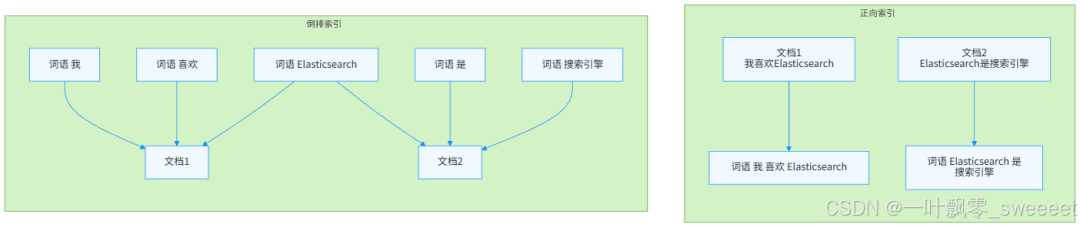
倒排索引的结构通常包括:
- 词项(Term):从文档中提取的词语
- 文档 ID 列表:包含该词项的所有文档 ID
- 词频(TF):词项在文档中出现的次数
- 位置(Position):词项在文档中的位置
- 偏移量(Offset):词项在文档中的起始和结束位置
这种结构使得 ES 能够快速定位包含特定词语的所有文档,大大提高了全文检索的效率。
1.3 分词器:文本处理的关键
分词(Tokenization)是将文本拆分为词项(Term)的过程,是全文检索的基础。Elasticsearch 的分词器(Analyzer)由三部分组成:
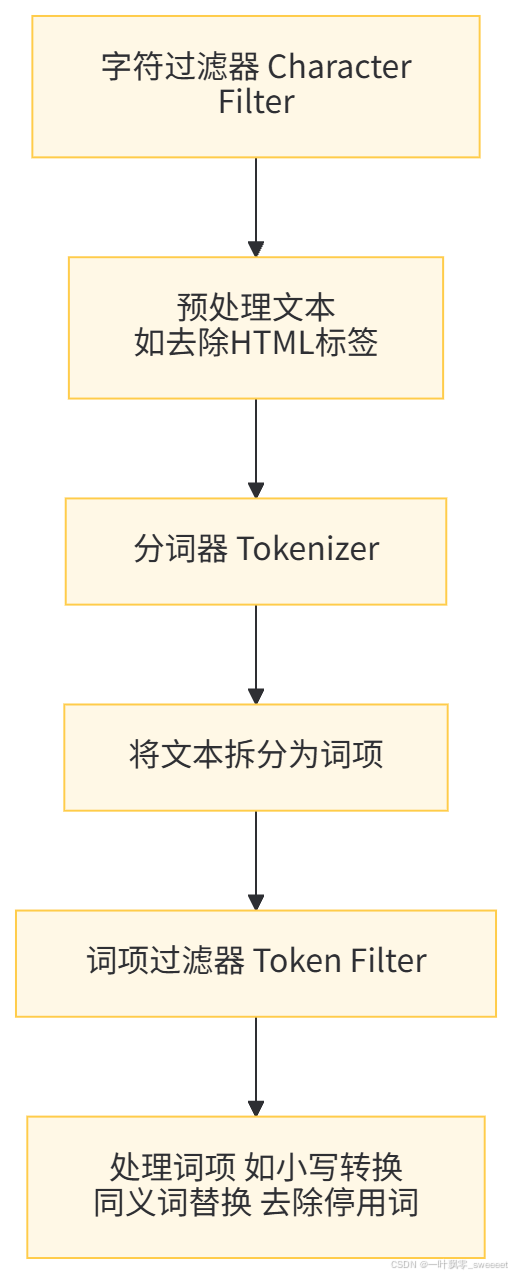
常用的分词器包括:
- Standard Analyzer:ES 默认分词器,适用于大多数语言
- IK Analyzer:中文分词器,支持细粒度和粗粒度分词
- Keyword Analyzer:不进行分词,将整个文本作为一个词项
- Whitespace Analyzer:按空格分词
选择合适的分词器对中文处理尤为重要,错误的分词可能导致查询结果不准确。
二、环境搭建与基础操作
在开始复杂查询之前,我们需要搭建 Elasticsearch 环境,并熟悉基本的操作。
2.1 环境搭建
2.1.1 Elasticsearch 安装
推荐使用 Docker 快速部署 Elasticsearch 8.x(当前最新稳定版本):
# 拉取Elasticsearch镜像
docker pull elasticsearch:8.11.3

# 启动Elasticsearch容器
docker run --name es01 -p 9200:9200 -p 9300:9300 -e "discovery.type=single-node" -e "xpack.security.enabled=false" -d elasticsearch:8.11.3验证是否启动成功:
验证是否启动成功:
curl http://localhost:9200
成功响应应包含类似以下内容:
{
  "name" : "f3f3a7d3b8a9",
  "cluster_name" : "docker-cluster",
  "cluster_uuid" : "XqQl9Z19R4y5YJ5Z7X7X7A",
  "version" : {
    "number" : "8.11.3",
    "build_flavor" : "default",
    "build_type" : "docker",
    "build_hash" : "f229ed3f893a515d590d0f8dac7174f7b09c9d1",
    "build_date" : "2023-12-08T11:33:53.634478451Z",
    "build_snapshot" : false,
    "lucene_version" : "9.8.0",
    "minimum_wire_compatibility_version" : "7.17.0",
    "minimum_index_compatibility_version" : "7.0.0"
  },
  "tagline" : "You Know, for Search"
}
2.1.2 Kibana 安装(可选)
Kibana 是 ES 的可视化工具,便于执行查询和管理 ES:
# 拉取Kibana镜像
docker pull kibana:8.11.3

# 启动Kibana容器,链接到ES
docker run --name kib01 --link es01:elasticsearch -p 5601:5601 -d kibana:8.11.3访问http://localhost:5601即可打开 Kibana 界面。
2.2 Spring Boot 集成 Elasticsearch
我们将使用 Spring Data Elasticsearch 来集成 ES,这是 Spring 官方提供的 ES 集成框架,简化了 ES 的操作。
2.2.1 添加依赖
在 pom.xml 中添加以下依赖:
<?xml version="1.0" encoding="UTF-8"?>
<project xmlns="http://maven.apache.org/POM/4.0.0" xmlns:xsi="http://www.w3.org/2001/XMLSchema-instance"
         xsi:schemaLocation="http://maven.apache.org/POM/4.0.0 https://maven.apache.org/xsd/maven-4.0.0.xsd">
    <modelVersion>4.0.0</modelVersion>
    <parent>
        <groupId>org.springframework.boot</groupId>
        <artifactId>spring-boot-starter-parent</artifactId>
        <version>3.2.0</version>
        <relativePath/>
    </parent>
    <groupId>com.example</groupId>
    <artifactId>es-query-demo</artifactId>
    <version>0.0.1-SNAPSHOT</version>
    <name>es-query-demo</name>
    <description>Demo project for Elasticsearch complex queries</description>

    <properties>
        <java.version>17</java.version>
        <elasticsearch.version>8.11.3</elasticsearch.version>
    </properties>

    <dependencies>
        <dependency>
            <groupId>org.springframework.boot</groupId>
            <artifactId>spring-boot-starter-data-elasticsearch</artifactId>
        </dependency>
        <dependency>
            <groupId>org.springframework.boot</groupId>
            <artifactId>spring-boot-starter-web</artifactId>
        </dependency>
        <dependency>
            <groupId>org.projectlombok</groupId>
            <artifactId>lombok</artifactId>
            <version>1.18.30</version>
            <scope>provided</scope>
        </dependency>
        <dependency>
            <groupId>com.baomidou</groupId>
            <artifactId>mybatis-plus-boot-starter</artifactId>
            <version>3.5.5</version>
        </dependency>
        <dependency>
            <groupId>mysql</groupId>
            <artifactId>mysql-connector-java</artifactId>
            <scope>runtime</scope>
        </dependency>
        <dependency>
            <groupId>org.springdoc</groupId>
            <artifactId>springdoc-openapi-starter-webmvc-ui</artifactId>
            <version>2.2.0</version>
        </dependency>
        <dependency>
            <groupId>com.alibaba.fastjson2</groupId>
            <artifactId>fastjson2</artifactId>
            <version>2.0.32</version>
        </dependency>
        <dependency>
            <groupId>com.google.guava</groupId>
            <artifactId>guava</artifactId>
            <version>32.1.3-jre</version>
        </dependency>

        <dependency>
            <groupId>org.springframework.boot</groupId>
            <artifactId>spring-boot-starter-test</artifactId>
            <scope>test</scope>
        </dependency>
    </dependencies>

    <build>
        <plugins>
            <plugin>
                <groupId>org.springframework.boot</groupId>
                <artifactId>spring-boot-maven-plugin</artifactId>
                <configuration>
                    <excludes>
                        <exclude>
                            <groupId>org.projectlombok</groupId>
                            <artifactId>lombok</artifactId>
                        </exclude>
                    </excludes>
                </configuration>
            </plugin>
        </plugins>
    </build>
</project>
2.2.2 配置 ES 连接
在 application.yml 中配置 ES 连接信息:
spring:
  elasticsearch:
    uris: http://localhost:9200
    connection-timeout: 10s
    socket-timeout: 30s
  datasource:
    driver-class-name: com.mysql.cj.jdbc.Driver
    url: jdbc:mysql://localhost:3306/es_demo?useUnicode=true&characterEncoding=utf8&useSSL=false&serverTimezone=Asia/Shanghai
    username: root
    password: root

mybatis-plus:
  mapper-locations: classpath*:mapper/**/*.xml
  global-config:
    db-config:
      id-type: auto
      logic-delete-field: deleted
      logic-delete-value: 1
      logic-not-delete-value: 0

logging:
  level:
    org.elasticsearch.client: WARN
    com.example.esquerydemo: INFO

springdoc:
  api-docs:
    path: /api-docs
  swagger-ui:
    path: /swagger-ui.html
2.3 基础操作示例
我们将以电商商品为例,展示 ES 的基础操作。
2.3.1 创建商品实体类
package com.example.esquerydemo.entity;

import com.fasterxml.jackson.annotation.JsonFormat;
import lombok.Data;
import org.springframework.data.annotation.Id;
import org.springframework.data.elasticsearch.annotations.DateFormat;
import org.springframework.data.elasticsearch.annotations.Document;
import org.springframework.data.elasticsearch.annotations.Field;
import org.springframework.data.elasticsearch.annotations.FieldType;

import java.math.BigDecimal;
import java.time.LocalDateTime;
import java.util.List;

/**
 * 商品实体类,对应ES中的文档
 *
 * @author ken
 */
@Data
@Document(indexName = "product")
public class Product {

    /**
     * 商品ID
     */
    @Id
    private Long id;

    /**
     * 商品名称,分词索引
     */
    @Field(type = FieldType.Text, analyzer = "ik_max_word", searchAnalyzer = "ik_smart")
    private String name;

    /**
     * 商品编码,精确匹配
     */
    @Field(type = FieldType.Keyword)
    private String code;

    /**
     * 商品描述,分词索引
     */
    @Field(type = FieldType.Text, analyzer = "ik_max_word", searchAnalyzer = "ik_smart")
    private String description;

    /**
     * 商品价格
     */
    @Field(type = FieldType.Double)
    private BigDecimal price;

    /**
     * 商品分类ID
     */
    @Field(type = FieldType.Long)
    private Long categoryId;

    /**
     * 商品分类名称
     */
    @Field(type = FieldType.Keyword)
    private String categoryName;

    /**
     * 商品标签
     */
    @Field(type = FieldType.Keyword)
    private List<String> tags;

    /**
     * 商品销量
     */
    @Field(type = FieldType.Integer)
    private Integer sales;

    /**
     * 用户评分
     */
    @Field(type = FieldType.Float)
    private Float score;

    /**
     * 库存数量
     */
    @Field(type = FieldType.Integer)
    private Integer stock;

    /**
     * 是否上架
     */
    @Field(type = FieldType.Boolean)
    private Boolean isOnSale;

    /**
     * 创建时间
     */
    @JsonFormat(pattern = "yyyy-MM-dd HH:mm:ss")
    @Field(type = FieldType.Date, format = DateFormat.date_hour_minute_second)
    private LocalDateTime createTime;

    /**
     * 更新时间
     */
    @JsonFormat(pattern = "yyyy-MM-dd HH:mm:ss")
    @Field(type = FieldType.Date, format = DateFormat.date_hour_minute_second)
    private LocalDateTime updateTime;
}
2.3.2 创建 Repository 接口
package com.example.esquerydemo.repository;

import com.example.esquerydemo.entity.Product;
import org.springframework.data.elasticsearch.repository.ElasticsearchRepository;
import org.springframework.stereotype.Repository;

/**
 * 商品ES操作Repository
 *
 * @author ken
 */
@Repository
public interface ProductRepository extends ElasticsearchRepository<Product, Long> {
}
2.3.3 创建 Service 层
package com.example.esquerydemo.service;

import com.example.esquerydemo.entity.Product;
import org.springframework.data.domain.Page;
import org.springframework.data.domain.Pageable;
import java.util.List;
import java.util.Optional;

/**
 * 商品服务接口
 *
 * @author ken
 */
public interface ProductService {

    /**
     * 创建或更新商品
     *
     * @param product 商品信息
     * @return 保存后的商品信息
     */
    Product save(Product product);

    /**
     * 批量创建或更新商品
     *
     * @param products 商品列表
     * @return 保存后的商品列表
     */
    Iterable<Product> saveAll(List<Product> products);

    /**
     * 根据ID查询商品
     *
     * @param id 商品ID
     * @return 商品信息,不存在则返回空
     */
    Optional<Product> findById(Long id);

    /**
     * 查询所有商品
     *
     * @return 商品列表
     */
    Iterable<Product> findAll();

    /**
     * 分页查询所有商品
     *
     * @param pageable 分页参数
     * @return 分页商品列表
     */
    Page<Product> findAll(Pageable pageable);

    /**
     * 根据ID删除商品
     *
     * @param id 商品ID
     */
    void deleteById(Long id);

    /**
     * 检查商品是否存在
     *
     * @param id 商品ID
     * @return 是否存在
     */
    boolean existsById(Long id);

    /**
     * 查询商品总数
     *
     * @return 商品总数
     */
    long count();
}
package com.example.esquerydemo.service.impl;

import com.example.esquerydemo.entity.Product;
import com.example.esquerydemo.repository.ProductRepository;
import com.example.esquerydemo.service.ProductService;
import lombok.RequiredArgsConstructor;
import lombok.extern.slf4j.Slf4j;
import org.springframework.data.domain.Page;
import org.springframework.data.domain.Pageable;
import org.springframework.stereotype.Service;
import org.springframework.util.ObjectUtils;

import java.util.List;
import java.util.Optional;

/**
 * 商品服务实现类
 *
 * @author ken
 */
@Service
@Slf4j
@RequiredArgsConstructor
public class ProductServiceImpl implements ProductService {

    private final ProductRepository productRepository;

    /**
     * 创建或更新商品
     *
     * @param product 商品信息
     * @return 保存后的商品信息
     */
    @Override
    public Product save(Product product) {
        log.info("保存商品: {}", product.getId());

        if (ObjectUtils.isEmpty(product)) {
            log.error("商品信息不能为空");
            throw new IllegalArgumentException("商品信息不能为空");
        }

        return productRepository.save(product);
    }

    /**
     * 批量创建或更新商品
     *
     * @param products 商品列表
     * @return 保存后的商品列表
     */
    @Override
    public Iterable<Product> saveAll(List<Product> products) {
        log.info("批量保存商品,数量: {}", products.size());

        if (ObjectUtils.isEmpty(products)) {
            log.error("商品列表不能为空");
            throw new IllegalArgumentException("商品列表不能为空");
        }

        return productRepository.saveAll(products);
    }

    /**
     * 根据ID查询商品
     *
     * @param id 商品ID
     * @return 商品信息,不存在则返回空
     */
    @Override
    public Optional<Product> findById(Long id) {
        log.info("查询商品,ID: {}", id);

        if (ObjectUtils.isEmpty(id)) {
            log.error("商品ID不能为空");
            return Optional.empty();
        }

        return productRepository.findById(id);
    }

    /**
     * 查询所有商品
     *
     * @return 商品列表
     */
    @Override
    public Iterable<Product> findAll() {
        log.info("查询所有商品");
        return productRepository.findAll();
    }

    /**
     * 分页查询所有商品
     *
     * @param pageable 分页参数
     * @return 分页商品列表
     */
    @Override
    public Page<Product> findAll(Pageable pageable) {
        log.info("分页查询所有商品,页码: {}, 每页大小: {}", pageable.getPageNumber(), pageable.getPageSize());
        return productRepository.findAll(pageable);
    }

    /**
     * 根据ID删除商品
     *
     * @param id 商品ID
     */
    @Override
    public void deleteById(Long id) {
        log.info("删除商品,ID: {}", id);

        if (ObjectUtils.isEmpty(id)) {
            log.error("商品ID不能为空");
            throw new IllegalArgumentException("商品ID不能为空");
        }

        productRepository.deleteById(id);
    }

    /**
     * 检查商品是否存在
     *
     * @param id 商品ID
     * @return 是否存在
     */
    @Override
    public boolean existsById(Long id) {
        log.info("检查商品是否存在,ID: {}", id);

        if (ObjectUtils.isEmpty(id)) {
            log.error("商品ID不能为空");
            return false;
        }

        return productRepository.existsById(id);
    }

    /**
     * 查询商品总数
     *
     * @return 商品总数
     */
    @Override
    public long count() {
        log.info("查询商品总数");
        return productRepository.count();
    }
}
2.3.4 创建测试数据
为了后续的查询演示,我们需要创建一些测试数据:
package com.example.esquerydemo.service.impl;

import com.example.esquerydemo.entity.Product;
import com.example.esquerydemo.service.ProductService;
import lombok.RequiredArgsConstructor;
import lombok.extern.slf4j.Slf4j;
import org.springframework.boot.CommandLineRunner;
import org.springframework.stereotype.Component;

import java.math.BigDecimal;
import java.time.LocalDateTime;
import java.util.ArrayList;
import java.util.Arrays;
import java.util.List;
import java.util.Random;

/**
 * 初始化测试数据
 *
 * @author ken
 */
@Component
@Slf4j
@RequiredArgsConstructor
public class DataInitializer implements CommandLineRunner {

    private final ProductService productService;
    private final Random random = new Random();

    /**
     * 应用启动时执行,初始化测试数据
     *
     * @param args 命令行参数
     */
    @Override
    public void run(String... args) {
        log.info("开始初始化商品测试数据");

        // 如果已经存在数据,则不再初始化
        if (productService.count() > 0) {
            log.info("已存在商品数据,跳过初始化");
            return;
        }

        List<Product> products = new ArrayList<>();

        // 生成100个测试商品
        for (long i = 1; i <= 100; i++) {
            Product product = new Product();
            product.setId(i);
            product.setName(generateProductName(i));
            product.setCode("PROD" + String.format("%06d", i));
            product.setDescription(generateDescription(i));
            product.setPrice(new BigDecimal(50 + random.nextInt(950))); // 50-1000元
            product.setCategoryId((long) (1 + random.nextInt(5))); // 1-5分类
            product.setCategoryName(generateCategoryName(product.getCategoryId()));
            product.setTags(generateTags(i));
            product.setSales(random.nextInt(10000)); // 0-10000销量
            product.setScore(3 + random.nextFloat() * 2); // 3-5分
            product.setStock(random.nextInt(1000)); // 0-1000库存
            product.setIsOnSale(random.nextBoolean()); // 随机上架状态
            product.setCreateTime(LocalDateTime.now().minusDays(random.nextInt(365)));
            product.setUpdateTime(product.getCreateTime().plusDays(random.nextInt(30)));

            products.add(product);
        }

        // 批量保存
        productService.saveAll(products);

        log.info("商品测试数据初始化完成,共生成 {} 个商品", products.size());
    }

    /**
     * 生成商品名称
     */
    private String generateProductName(long id) {
        String[] prefixes = {"高级", "智能", "新款", "经典", "豪华", "迷你", "便携", "专业"};
        String[] mainNames = {"手机", "电脑", "手表", "耳机", "音箱", "相机", "平板", "电视"};
        String[] suffixes = {"Pro", "Max", "Mini", "Plus", "Ultra", "", "", ""};

        return prefixes[random.nextInt(prefixes.length)] +
               mainNames[random.nextInt(mainNames.length)] +
               suffixes[random.nextInt(suffixes.length)] +
               (id % 10 == 0 ? " " + id : "");
    }

    /**
     * 生成商品描述
     */
    private String generateDescription(long id) {
        String[] descriptions = {
            "高性能产品,适合各种场景使用",
            "全新设计,时尚美观,功能强大",
            "性价比极高,用户评价良好",
            "专业级配置,满足高端需求",
            "轻便易携,随时随地使用",
            "长效续航,无需频繁充电",
            "高清显示,色彩还原真实",
            "快速响应,操作流畅"
        };

        return descriptions[random.nextInt(descriptions.length)] +
               ",商品ID: " + id + ",欢迎选购!";
    }

    /**
     * 生成分类名称
     */
    private String generateCategoryName(Long categoryId) {
        switch (categoryId.intValue()) {
            case 1: return "智能手机";
            case 2: return "笔记本电脑";
            case 3: return "智能穿戴";
            case 4: return "音频设备";
            case 5: return "家用电器";
            default: return "其他分类";
        }
    }

    /**
     * 生成商品标签
     */
    private List<String> generateTags(long id) {
        String[] allTags = {"新品", "热销", "促销", "限量", "爆款", "推荐", "优惠", "品质", "正品", "耐用"};
        List<String> tags = new ArrayList<>();

        // 随机选择2-4个标签
        int tagCount = 2 + random.nextInt(3);
        for (int i = 0; i < tagCount; i++) {
            int index = random.nextInt(allTags.length);
            if (!tags.contains(allTags[index])) {
                tags.add(allTags[index]);
            }
        }

        return tags;
    }
}
三、Elasticsearch 查询基础
在掌握复杂查询之前,我们需要先了解 Elasticsearch 的查询基础,包括查询类型和基本语法。
3.1 查询类型概述
Elasticsearch 提供了丰富的查询类型,主要分为两大类:
- 叶子查询(Leaf Queries):在特定字段上进行查询,如匹配、范围、术语查询等。
- 复合查询(Compound Queries):组合多个叶子查询或其他复合查询,如布尔查询、嵌套查询等。

3.2 基本查询示例
我们通过 Service 层的方法来演示各种基本查询:
package com.example.esquerydemo.service;

import com.example.esquerydemo.entity.Product;
import org.springframework.data.domain.Page;
import org.springframework.data.domain.Pageable;
import java.math.BigDecimal;
import java.time.LocalDateTime;
import java.util.List;

/**
 * 商品查询服务接口
 *
 * @author ken
 */
public interface ProductQueryService {

    /**
     * 匹配查询:搜索商品名称或描述中包含指定关键词的商品
     *
     * @param keyword 关键词
     * @param pageable 分页参数
     * @return 商品分页列表
     */
    Page<Product> searchByKeyword(String keyword, Pageable pageable);

    /**
     * 术语查询:精确匹配商品分类
     *
     * @param categoryId 分类ID
     * @param pageable 分页参数
     * @return 商品分页列表
     */
    Page<Product> searchByCategoryId(Long categoryId, Pageable pageable);

    /**
     * 范围查询:查询价格在指定范围内的商品
     *
     * @param minPrice 最低价格
     * @param maxPrice 最高价格
     * @param pageable 分页参数
     * @return 商品分页列表
     */
    Page<Product> searchByPriceRange(BigDecimal minPrice, BigDecimal maxPrice, Pageable pageable);

    /**
     * 前缀查询:查询商品编码以指定前缀开头的商品
     *
     * @param prefix 前缀
     * @param pageable 分页参数
     * @return 商品分页列表
     */
    Page<Product> searchByCodePrefix(String prefix, Pageable pageable);

    /**
     * 通配符查询:查询商品名称符合通配符模式的商品
     *
     * @param pattern 通配符模式
     * @param pageable 分页参数
     * @return 商品分页列表
     */
    Page<Product> searchByNameWildcard(String pattern, Pageable pageable);

    /**
     * 模糊查询:查询商品名称与指定关键词相似的商品
     *
     * @param keyword 关键词
     * @param fuzziness 模糊度
     * @param pageable 分页参数
     * @return 商品分页列表
     */
    Page<Product> searchByNameFuzzy(String keyword, String fuzziness, Pageable pageable);

    /**
     * 范围查询:查询指定时间范围内创建的商品
     *
     * @param start 开始时间
     * @param end 结束时间
     * @param pageable 分页参数
     * @return 商品分页列表
     */
    Page<Product> searchByCreateTimeRange(LocalDateTime start, LocalDateTime end, Pageable pageable);
}
package com.example.esquerydemo.service.impl;

import com.example.esquerydemo.entity.Product;
import com.example.esquerydemo.repository.ProductRepository;
import com.example.esquerydemo.service.ProductQueryService;
import lombok.RequiredArgsConstructor;
import lombok.extern.slf4j.Slf4j;
import org.springframework.data.domain.Page;
import org.springframework.data.domain.Pageable;
import org.springframework.data.elasticsearch.client.elc.NativeQuery;
import org.springframework.data.elasticsearch.client.elc.NativeQueryBuilder;
import org.springframework.data.elasticsearch.core.ElasticsearchOperations;
import org.springframework.data.elasticsearch.core.SearchHit;
import org.springframework.data.elasticsearch.core.SearchHits;
import org.springframework.data.elasticsearch.core.query.Query;
import org.springframework.stereotype.Service;
import org.springframework.util.ObjectUtils;
import org.springframework.util.StringUtils;

import java.math.BigDecimal;
import java.time.LocalDateTime;
import java.util.List;
import java.util.stream.Collectors;

import static org.elasticsearch.index.query.QueryBuilders.*;

/**
 * 商品查询服务实现类
 *
 * @author ken
 */
@Service
@Slf4j
@RequiredArgsConstructor
public class ProductQueryServiceImpl implements ProductQueryService {

    private final ElasticsearchOperations elasticsearchOperations;
    private final ProductRepository productRepository;

    /**
     * 匹配查询:搜索商品名称或描述中包含指定关键词的商品
     *
     * @param keyword 关键词
     * @param pageable 分页参数
     * @return 商品分页列表
     */
    @Override
    public Page<Product> searchByKeyword(String keyword, Pageable pageable) {
        log.info("搜索商品,关键词: {}", keyword);

        if (!StringUtils.hasText(keyword)) {
            log.error("关键词不能为空");
            throw new IllegalArgumentException("关键词不能为空");
        }

        // 创建匹配查询,同时搜索name和description字段
        NativeQuery query = new NativeQueryBuilder()
                .withQuery(multiMatchQuery(keyword, "name", "description")
                        .type("best_fields") // 最佳字段匹配
                        .operator(Operator.OR) // 关键词之间是OR关系
                        .fuzziness("AUTO")) // 自动模糊匹配
                .withPageable(pageable)
                .build();

        SearchHits<Product> searchHits = elasticsearchOperations.search(query, Product.class);

        // 转换为Page对象
        List<Product> products = searchHits.stream()
                .map(SearchHit::getContent)
                .collect(Collectors.toList());

        return new org.springframework.data.domain.PageImpl<>(
                products,
                pageable,
                searchHits.getTotalHits()
        );
    }

    /**
     * 术语查询:精确匹配商品分类
     *
     * @param categoryId 分类ID
     * @param pageable 分页参数
     * @return 商品分页列表
     */
    @Override
    public Page<Product> searchByCategoryId(Long categoryId, Pageable pageable) {
        log.info("按分类查询商品,分类ID: {}", categoryId);

        if (ObjectUtils.isEmpty(categoryId)) {
            log.error("分类ID不能为空");
            throw new IllegalArgumentException("分类ID不能为空");
        }

        // 创建术语查询,精确匹配categoryId
        NativeQuery query = new NativeQueryBuilder()
                .withQuery(termQuery("categoryId", categoryId))
                .withPageable(pageable)
                .build();

        SearchHits<Product> searchHits = elasticsearchOperations.search(query, Product.class);

        List<Product> products = searchHits.stream()
                .map(SearchHit::getContent)
                .collect(Collectors.toList());

        return new org.springframework.data.domain.PageImpl<>(
                products,
                pageable,
                searchHits.getTotalHits()
        );
    }

    /**
     * 范围查询:查询价格在指定范围内的商品
     *
     * @param minPrice 最低价格
     * @param maxPrice 最高价格
     * @param pageable 分页参数
     * @return 商品分页列表
     */
    @Override
    public Page<Product> searchByPriceRange(BigDecimal minPrice, BigDecimal maxPrice, Pageable pageable) {
        log.info("按价格范围查询商品,最低价格: {}, 最高价格: {}", minPrice, maxPrice);

        if (ObjectUtils.isEmpty(minPrice) && ObjectUtils.isEmpty(maxPrice)) {
            log.error("最低价格和最高价格不能同时为空");
            throw new IllegalArgumentException("最低价格和最高价格不能同时为空");
        }

        // 创建范围查询
        RangeQueryBuilder rangeQuery = rangeQuery("price");

        if (!ObjectUtils.isEmpty(minPrice)) {
            rangeQuery.gte(minPrice); // 大于等于最低价格
        }
        if (!ObjectUtils.isEmpty(maxPrice)) {
            rangeQuery.lte(maxPrice); // 小于等于最高价格
        }

        NativeQuery query = new NativeQueryBuilder()
                .withQuery(rangeQuery)
                .withPageable(pageable)
                .build();

        SearchHits<Product> searchHits = elasticsearchOperations.search(query, Product.class);

        List<Product> products = searchHits.stream()
                .map(SearchHit::getContent)
                .collect(Collectors.toList());

        return new org.springframework.data.domain.PageImpl<>(
                products,
                pageable,
                searchHits.getTotalHits()
        );
    }

    /**
     * 前缀查询:查询商品编码以指定前缀开头的商品
     *
     * @param prefix 前缀
     * @param pageable 分页参数
     * @return 商品分页列表
     */
    @Override
    public Page<Product> searchByCodePrefix(String prefix, Pageable pageable) {
        log.info("按编码前缀查询商品,前缀: {}", prefix);

        if (!StringUtils.hasText(prefix)) {
            log.error("前缀不能为空");
            throw new IllegalArgumentException("前缀不能为空");
        }

        // 创建前缀查询
        NativeQuery query = new NativeQueryBuilder()
                .withQuery(prefixQuery("code", prefix))
                .withPageable(pageable)
                .build();

        SearchHits<Product> searchHits = elasticsearchOperations.search(query, Product.class);

        List<Product> products = searchHits.stream()
                .map(SearchHit::getContent)
                .collect(Collectors.toList());

        return new org.springframework.data.domain.PageImpl<>(
                products,
                pageable,
                searchHits.getTotalHits()
        );
    }

    /**
     * 通配符查询:查询商品名称符合通配符模式的商品
     *
     * @param pattern 通配符模式
     * @param pageable 分页参数
     * @return 商品分页列表
     */
    @Override
    public Page<Product> searchByNameWildcard(String pattern, Pageable pageable) {
        log.info("按名称通配符查询商品,模式: {}", pattern);

        if (!StringUtils.hasText(pattern)) {
            log.error("通配符模式不能为空");
            throw new IllegalArgumentException("通配符模式不能为空");
        }

        // 创建通配符查询
        // ? 匹配任意单个字符
        // * 匹配零个或多个字符
        NativeQuery query = new NativeQueryBuilder()
                .withQuery(wildcardQuery("name", pattern))
                .withPageable(pageable)
                .build();

        SearchHits<Product> searchHits = elasticsearchOperations.search(query, Product.class);

        List<Product> products = searchHits.stream()
                .map(SearchHit::getContent)
                .collect(Collectors.toList());

        return new org.springframework.data.domain.PageImpl<>(
                products,
                pageable,
                searchHits.getTotalHits()
        );
    }

    /**
     * 模糊查询:查询商品名称与指定关键词相似的商品
     *
     * @param keyword 关键词
     * @param fuzziness 模糊度
     * @param pageable 分页参数
     * @return 商品分页列表
     */
    @Override
    public Page<Product> searchByNameFuzzy(String keyword, String fuzziness, Pageable pageable) {
        log.info("按名称模糊查询商品,关键词: {}, 模糊度: {}", keyword, fuzziness);

        if (!StringUtils.hasText(keyword)) {
            log.error("关键词不能为空");
            throw new IllegalArgumentException("关键词不能为空");
        }

        // 创建模糊查询
        FuzzyQueryBuilder fuzzyQuery = fuzzyQuery("name", keyword);

        // 设置模糊度,可选值:0, 1, 2, "AUTO"
        if (StringUtils.hasText(fuzziness)) {
            fuzzyQuery.fuzziness(fuzziness);
        } else {
            fuzzyQuery.fuzziness("AUTO"); // 默认自动模糊度
        }

        // 设置前缀长度,前n个字符必须精确匹配
        fuzzyQuery.prefixLength(1);

        NativeQuery query = new NativeQueryBuilder()
                .withQuery(fuzzyQuery)
                .withPageable(pageable)
                .build();

        SearchHits<Product> searchHits = elasticsearchOperations.search(query, Product.class);

        List<Product> products = searchHits.stream()
                .map(SearchHit::getContent)
                .collect(Collectors.toList());

        return new org.springframework.data.domain.PageImpl<>(
                products,
                pageable,
                searchHits.getTotalHits()
        );
    }

    /**
     * 范围查询:查询指定时间范围内创建的商品
     *
     * @param start 开始时间
     * @param end 结束时间
     * @param pageable 分页参数
     * @return 商品分页列表
     */
    @Override
    public Page<Product> searchByCreateTimeRange(LocalDateTime start, LocalDateTime end, Pageable pageable) {
        log.info("按创建时间范围查询商品,开始时间: {}, 结束时间: {}", start, end);

        if (ObjectUtils.isEmpty(start) && ObjectUtils.isEmpty(end)) {
            log.error("开始时间和结束时间不能同时为空");
            throw new IllegalArgumentException("开始时间和结束时间不能同时为空");
        }

        // 创建时间范围查询
        RangeQueryBuilder rangeQuery = rangeQuery("createTime");

        if (!ObjectUtils.isEmpty(start)) {
            rangeQuery.gte(start); // 大于等于开始时间
        }
        if (!ObjectUtils.isEmpty(end)) {
            rangeQuery.lte(end); // 小于等于结束时间
        }

        NativeQuery query = new NativeQueryBuilder()
                .withQuery(rangeQuery)
                .withPageable(pageable)
                .build();

        SearchHits<Product> searchHits = elasticsearchOperations.search(query, Product.class);

        List<Product> products = searchHits.stream()
                .map(SearchHit::getContent)
                .collect(Collectors.toList());

        return new org.springframework.data.domain.PageImpl<>(
                products,
                pageable,
                searchHits.getTotalHits()
        );
    }
}
3.3 常用查询语法解析
- 匹配查询(Match Query):
- 最常用的全文查询,会对查询字符串进行分词
- 支持多字段查询(multi_match)
- 可以指定匹配方式(operator:OR/AND)
- 术语查询(Term Query):
- 精确匹配,不会对查询字符串进行分词
- 适用于 keyword 类型的字段
- 对于数字、日期等类型字段,也是精确匹配
- 范围查询(Range Query):
- 用于查询指定范围内的值
- 支持的操作符:gt (>)、gte (>=)、lt (<)、lte (<=)
- 适用于数字、日期、字符串等类型
- 前缀查询(Prefix Query):
- 匹配以指定前缀开头的词项
- 适用于 keyword 类型字段或不分词的 text 字段
- 通配符查询(Wildcard Query):
- 支持通配符:?(匹配单个字符)、*(匹配多个字符)
- 性能相对较差,尤其是通配符在开头时
- 模糊查询(Fuzzy Query):
- 用于匹配与查询字符串相似的词项
- 基于编辑距离(Levenshtein distance)算法
- 可以通过 fuzziness 参数控制模糊程度
四、企业级复杂查询实战
企业级应用中的查询往往不是单一条件的查询,而是多条件组合、排序、聚合等复杂操作的结合。本节将介绍几种典型的企业级复杂查询场景及实现方式。
4.1 布尔查询:多条件组合查询
布尔查询(Boolean Query)是最常用的复合查询,它允许我们组合多个查询条件,通过 must、should、must_not 等逻辑关系来构建复杂查询。
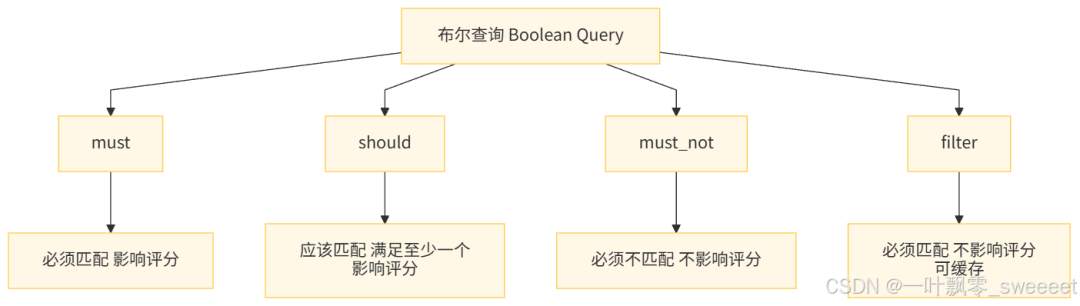
示例:查询 "价格在 500-1000 元之间、分类为智能手机、评分 4.5 以上、名称或描述包含 ' 高级 ' 或' 智能 '、且标签包含 ' 热销 ' 或' 爆款 ' 的上架商品"
/**
 * 复杂布尔查询示例
 *
 * @param pageable 分页参数
 * @return 商品分页列表
 */
public Page<Product> complexBooleanQuery(Pageable pageable) {
    log.info("执行复杂布尔查询");

    // 构建布尔查询
    BoolQueryBuilder boolQuery = boolQuery();

    // 必须匹配:价格在500-1000元之间(过滤条件,不影响评分)
    boolQuery.filter(rangeQuery("price").gte(500).lte(1000));

    // 必须匹配:分类为智能手机(ID=1)
    boolQuery.filter(termQuery("categoryId", 1));

    // 必须匹配:评分4.5以上
    boolQuery.filter(rangeQuery("score").gte(4.5));

    // 必须匹配:商品上架
    boolQuery.filter(termQuery("isOnSale", true));

    // 应该匹配:名称或描述包含'高级'或'智能'(至少满足一个)
    BoolQueryBuilder shouldQuery = boolQuery();
    shouldQuery.should(matchQuery("name", "高级").boost(2.0f)); // 提升权重
    shouldQuery.should(matchQuery("name", "智能").boost(2.0f));
    shouldQuery.should(matchQuery("description", "高级"));
    shouldQuery.should(matchQuery("description", "智能"));
    shouldQuery.minimumShouldMatch(1); // 至少匹配一个

    boolQuery.must(shouldQuery);

    // 应该匹配:标签包含'热销'或'爆款'(至少满足一个)
    BoolQueryBuilder tagQuery = boolQuery();
    tagQuery.should(termQuery("tags", "热销"));
    tagQuery.should(termQuery("tags", "爆款"));
    tagQuery.minimumShouldMatch(1);

    boolQuery.should(tagQuery).boost(1.5f); // 提升权重

    // 构建查询
    NativeQuery query = new NativeQueryBuilder()
            .withQuery(boolQuery)
            .withPageable(pageable)
            .build();

    SearchHits<Product> searchHits = elasticsearchOperations.search(query, Product.class);

    List<Product> products = searchHits.stream()
            .map(SearchHit::getContent)
            .collect(Collectors.toList());

    return new org.springframework.data.domain.PageImpl<>(
            products,
            pageable,
            searchHits.getTotalHits()
    );
}
4.2 排序与分页:精准控制查询结果
在实际应用中,我们通常需要对查询结果进行排序,并实现分页功能。
/**
 * 带排序和分页的查询
 *
 * @param keyword 关键词
 * @param page 页码(从0开始)
 * @param size 每页大小
 * @param sortField 排序字段
 * @param sortDir 排序方向(asc/desc)
 * @return 商品分页列表
 */
public Page<Product> searchWithSortAndPage(
        String keyword,
        int page,
        int size,
        String sortField,
        String sortDir) {

    log.info("带排序和分页的查询,关键词: {}, 页码: {}, 每页大小: {}, 排序字段: {}, 排序方向: {}",
            keyword, page, size, sortField, sortDir);

    if (!StringUtils.hasText(keyword)) {
        log.error("关键词不能为空");
        throw new IllegalArgumentException("关键词不能为空");
    }

    if (page < 0) {
        page = 0;
    }
    if (size <= 0 || size > 100) {
        size = 20; // 限制每页大小,防止过大
    }

    // 验证排序字段是否合法
    List<String> validSortFields = Arrays.asList(
            "price", "sales", "score", "createTime", "updateTime"
    );
    if (!StringUtils.hasText(sortField) || !validSortFields.contains(sortField)) {
        sortField = "score"; // 默认按评分排序
    }

    // 排序方向
    Sort.Direction direction = "desc".equalsIgnoreCase(sortDir) ?
            Sort.Direction.DESC : Sort.Direction.ASC;

    // 创建分页和排序参数
    Pageable pageable = PageRequest.of(
            page,
            size,
            Sort.by(direction, sortField)
    );

    // 创建查询
    NativeQuery query = new NativeQueryBuilder()
            .withQuery(multiMatchQuery(keyword, "name", "description"))
            .withPageable(pageable)
            .build();

    SearchHits<Product> searchHits = elasticsearchOperations.search(query, Product.class);

    List<Product> products = searchHits.stream()
            .map(SearchHit::getContent)
            .collect(Collectors.toList());

    return new org.springframework.data.domain.PageImpl<>(
            products,
            pageable,
            searchHits.getTotalHits()
    );
}
4.3 聚合查询:数据分析与统计
Elasticsearch 的聚合查询(Aggregation)功能非常强大,可以实现复杂的数据分析和统计功能,类似于 SQL 中的 GROUP BY、SUM、AVG 等操作。
常见的聚合类型包括:
- 桶聚合(Bucket Aggregation):将文档分组到不同的桶中
- 指标聚合(Metric Aggregation):计算桶内文档的统计指标
- 管道聚合(Pipeline Aggregation):对其他聚合的结果进行再聚合
示例:按分类统计商品数量、平均价格、最高评分,并按数量降序排列
/**
 * 按分类聚合统计商品信息
 *
 * @return 聚合统计结果
 */
public Map<String, Object> aggregateByCategory() {
    log.info("按分类聚合统计商品信息");

    // 1. 按分类ID和分类名称分组
    TermsAggregationBuilder categoryAgg = AggregationBuilders
            .terms("by_category")
            .field("categoryId")
            .size(10) // 最多返回10个分类
            .order(BucketOrder.count(false)); // 按数量降序

    // 2. 在每个分类桶中,获取分类名称(取第一个即可)
    categoryAgg.subAggregation(AggregationBuilders
            .terms("category_name")
            .field("categoryName")
            .size(1));

    // 3. 计算每个分类的商品数量(内置,不需要额外定义)

    // 4. 计算每个分类的平均价格
    categoryAgg.subAggregation(AggregationBuilders
            .avg("avg_price")
            .field("price"));

    // 5. 计算每个分类的最高评分
    categoryAgg.subAggregation(AggregationBuilders
            .max("max_score")
            .field("score"));

    // 6. 计算每个分类的总销量
    categoryAgg.subAggregation(AggregationBuilders
            .sum("total_sales")
            .field("sales"));

    // 构建查询(只需要聚合结果,不需要查询文档)
    NativeQuery query = new NativeQueryBuilder()
            .withQuery(matchAllQuery()) // 匹配所有文档
            .withAggregations(categoryAgg)
            .withPageable(PageRequest.of(0, 0)) // 不返回文档
            .build();

    SearchHits<Product> searchHits = elasticsearchOperations.search(query, Product.class);

    // 解析聚合结果
    Map<String, Object> result = Maps.newHashMap();
    List<Map<String, Object>> categoryStats = Lists.newArrayList();

    ParsedTerms byCategory = searchHits.getAggregations().get("by_category");
    for (Terms.Bucket bucket : byCategory.getBuckets()) {
        Map<String, Object> categoryStat = Maps.newHashMap();

        // 分类ID
        categoryStat.put("categoryId", bucket.getKeyAsString());

        // 商品数量
        categoryStat.put("productCount", bucket.getDocCount());

        // 分类名称
        ParsedTerms categoryNameAgg = bucket.getAggregations().get("category_name");
        if (!CollectionUtils.isEmpty(categoryNameAgg.getBuckets())) {
            categoryStat.put("categoryName",
                    categoryNameAgg.getBuckets().get(0).getKeyAsString());
        }

        // 平均价格
        ParsedAvg avgPrice = bucket.getAggregations().get("avg_price");
        categoryStat.put("avgPrice", avgPrice.getValue());

        // 最高评分
        ParsedMax maxScore = bucket.getAggregations().get("max_score");
        categoryStat.put("maxScore", maxScore.getValue());

        // 总销量
        ParsedSum totalSales = bucket.getAggregations().get("total_sales");
        categoryStat.put("totalSales", totalSales.getValue());

        categoryStats.add(categoryStat);
    }

    result.put("categoryStats", categoryStats);
    result.put("totalCategories", categoryStats.size());

    return result;
}
4.4 高亮查询:提升搜索体验
高亮查询可以将查询结果中与关键词匹配的部分进行特殊标记(如 HTML 标签),方便前端高亮显示,提升用户体验。
/**
 * 高亮查询:高亮显示匹配的关键词
 *
 * @param keyword 关键词
 * @param pageable 分页参数
 * @return 带高亮信息的商品分页列表
 */
public Page<Map<String, Object>> searchWithHighlight(String keyword, Pageable pageable) {
    log.info("高亮查询,关键词: {}", keyword);

    if (!StringUtils.hasText(keyword)) {
        log.error("关键词不能为空");
        throw new IllegalArgumentException("关键词不能为空");
    }

    // 创建高亮配置
    HighlightBuilder highlightBuilder = new HighlightBuilder();

    // 对name字段进行高亮
    HighlightBuilder.Field nameHighlight = new HighlightBuilder.Field("name");
    nameHighlight.preTags("<em style='color:red'>"); // 高亮前缀
    nameHighlight.postTags("</em>"); // 高亮后缀
    nameHighlight.fragmentSize(100); // 片段长度
    highlightBuilder.field(nameHighlight);

    // 对description字段进行高亮
    HighlightBuilder.Field descHighlight = new HighlightBuilder.Field("description");
    descHighlight.preTags("<em style='color:red'>");
    descHighlight.postTags("</em>");
    descHighlight.fragmentSize(200);
    highlightBuilder.field(descHighlight);

    // 创建查询
    NativeQuery query = new NativeQueryBuilder()
            .withQuery(multiMatchQuery(keyword, "name", "description"))
            .withHighlightBuilder(highlightBuilder)
            .withPageable(pageable)
            .build();

    SearchHits<Product> searchHits = elasticsearchOperations.search(query, Product.class);

    // 处理高亮结果
    List<Map<String, Object>> resultList = Lists.newArrayList();

    for (SearchHit<Product> hit : searchHits) {
        Product product = hit.getContent();
        Map<String, Object> productMap = JSON.parseObject(JSON.toJSONString(product), Map.class);

        // 获取高亮字段
        Map<String, List<String>> highlightFields = hit.getHighlightFields();

        // 如果有name字段的高亮结果,替换原name
        if (highlightFields.containsKey("name") && !highlightFields.get("name").isEmpty()) {
            productMap.put("name", highlightFields.get("name").get(0));
        }

        // 如果有description字段的高亮结果,替换原description
        if (highlightFields.containsKey("description") && !highlightFields.get("description").isEmpty()) {
            productMap.put("description", highlightFields.get("description").get(0));
        }

        // 添加评分信息
        productMap.put("score", hit.getScore());

        resultList.add(productMap);
    }

    return new org.springframework.data.domain.PageImpl<>(
            resultList,
            pageable,
            searchHits.getTotalHits()
    );
}
4.5 函数评分查询:自定义排序规则
函数评分查询(Function Score Query)允许我们通过自定义函数来计算文档的评分,实现复杂的排序需求。
示例:搜索手机相关商品,按以下规则排序:
- 名称中包含 "手机" 的商品权重最高
- 销量高的商品权重次之
- 评分高的商品权重也较高
- 新上架的商品有一定权重加成
/**
 * 函数评分查询:自定义排序规则
 *
 * @param pageable 分页参数
 * @return 商品分页列表
 */
public Page<Product> searchWithFunctionScore(Pageable pageable) {
    log.info("执行函数评分查询");

    // 基础查询:匹配与手机相关的商品
    MatchQueryBuilder baseQuery = matchQuery("name", "手机").operator(Operator.OR);

    // 函数评分查询构建器
    FunctionScoreQueryBuilder functionScoreQuery = QueryBuilders.functionScoreQuery(
            baseQuery,
            new FunctionScoreQueryBuilder.FilterFunctionBuilder[] {
                    // 1. 名称中精确包含"手机"的商品,权重提升
                    new FunctionScoreQueryBuilder.FilterFunctionBuilder(
                            termQuery("name", "手机"),
                            ScoreFunctionBuilders.weightFactorFunction(3.0f) // 权重因子
                    ),
                    // 2. 销量高的商品权重高(线性函数)
                    new FunctionScoreQueryBuilder.FilterFunctionBuilder(
                            ScoreFunctionBuilders.fieldValueFactorFunction("sales")
                                    .modifier(FieldValueFactorFunction.Modifier.LOG1P) // 对数平滑
                                    .factor(0.1f) // 因子
                    ),
                    // 3. 评分高的商品权重高
                    new FunctionScoreQueryBuilder.FilterFunctionBuilder(
                            ScoreFunctionBuilders.fieldValueFactorFunction("score")
                                    .modifier(FieldValueFactorFunction.Modifier.NONE)
                                    .factor(1.0f)
                    ),
                    // 4. 新上架的商品有时间衰减加成
                    new FunctionScoreQueryBuilder.FilterFunctionBuilder(
                            ScoreFunctionBuilders.expDecayFunction(
                                    "createTime", // 时间字段
                                    new DateHistogramInterval("30d"), // 衰减尺度:30天
                                    0.5 // 衰减因子
                            ).origin("now") // 原点:当前时间
                    )
            }
    ).boostMode(CombineFunction.MULTIPLY); // 评分组合方式:相乘

    // 构建查询
    NativeQuery query = new NativeQueryBuilder()
            .withQuery(functionScoreQuery)
            .withPageable(pageable)
            .build();

    SearchHits<Product> searchHits = elasticsearchOperations.search(query, Product.class);

    List<Product> products = searchHits.stream()
            .map(SearchHit::getContent)
            .collect(Collectors.toList());

    return new org.springframework.data.domain.PageImpl<>(
            products,
            pageable,
            searchHits.getTotalHits()
    );
}
4.6 嵌套查询:处理复杂对象结构
当文档中包含嵌套对象(nested object)时,需要使用嵌套查询(Nested Query)来正确查询这些对象。
假设我们的商品实体有一个嵌套的评论列表:
/**
 * 商品评论嵌套对象
 *
 * @author ken
 */
@Data
public class ProductComment {
    /**
     * 评论ID
     */
    private Long id;

    /**
     * 用户ID
     */
    private Long userId;

    /**
     * 用户名
     */
    private String username;

    /**
     * 评论内容
     */
    @Field(type = FieldType.Text, analyzer = "ik_max_word")
    private String content;

    /**
     * 评分
     */
    @Field(type = FieldType.Float)
    private Float score;

    /**
     * 评论时间
     */
    @Field(type = FieldType.Date, format = DateFormat.date_hour_minute_second)
    private LocalDateTime commentTime;
}

// 在Product实体中添加:
/**
 * 商品评论列表(嵌套对象)
 */
@Field(type = FieldType.Nested)
private List<ProductComment> comments;
查询示例:查找有用户评论 "性价比高" 且评论评分在 4 分以上的商品
/**
 * 嵌套查询:查询包含特定评论的商品
 *
 * @param pageable 分页参数
 * @return 商品分页列表
 */
public Page<Product> searchWithNestedQuery(Pageable pageable) {
    log.info("执行嵌套查询,查找有优质评论的商品");

    // 创建嵌套查询:查询评论内容包含"性价比高"且评分>=4的商品
    NestedQueryBuilder nestedQuery = nestedQuery(
            "comments", // 嵌套字段名
            boolQuery()
                    .must(matchQuery("comments.content", "性价比高"))
                    .must(rangeQuery("comments.score").gte(4.0)),
            ScoreMode.None // 不使用嵌套文档的分数
    );

    // 构建查询
    NativeQuery query = new NativeQueryBuilder()
            .withQuery(nestedQuery)
            .withPageable(pageable)
            .build();

    SearchHits<Product> searchHits = elasticsearchOperations.search(query, Product.class);

    List<Product> products = searchHits.stream()
            .map(SearchHit::getContent)
            .collect(Collectors.toList());

    return new org.springframework.data.domain.PageImpl<>(
            products,
            pageable,
            searchHits.getTotalHits()
    );
}
五、查询性能优化策略
即使是最先进的搜索引擎,不恰当的使用也会导致性能问题。本节将介绍 Elasticsearch 查询性能的优化策略。
5.1 索引设计优化
索引设计是 ES 性能的基础,合理的索引设计可以显著提升查询性能。
- 合理设置字段类型:
- 字符串:区分 text 和 keyword 类型,不需要分词的字段用 keyword
- 数字:选择合适的精度(byte, short, integer, long)
- 日期:使用 date 类型而非 string
- 布尔值:使用 boolean 类型
- 谨慎使用分词器:
- 只为需要全文检索的字段设置分词器
- 选择合适的分词器,避免过度分词
- 考虑使用自定义分词器,优化特定场景
- 合理设置分片和副本:
- 分片数量:通常设置为节点数量的 1-3 倍,过多会导致 overhead
- 副本数量:根据可用性需求设置,至少 1 个,过多会影响写入性能
- 使用索引模板:
- 预先定义索引模板,确保相同类型的索引有一致的设置
- 示例:
/**
 * 索引模板配置
 *
 * @author ken
 */
@Configuration
public class ElasticsearchIndexTemplateConfig {

    @Bean
    public IndexOperations productIndexOperations(ElasticsearchOperations elasticsearchOperations) {
        return elasticsearchOperations.indexOps(Product.class);
    }

    /**
     * 初始化商品索引模板
     */
    @PostConstruct
    public void initProductIndexTemplate(IndexOperations indexOperations) {
        log.info("初始化商品索引模板");

        // 如果索引不存在,则创建
        if (!indexOperations.exists()) {
            // 创建索引映射
            Document mapping = indexOperations.createMapping(Product.class);

            // 设置索引设置
            IndexSettings indexSettings = new IndexSettings();
            indexSettings.setNumberOfShards("3"); // 3个主分片
            indexSettings.setNumberOfReplicas("1"); // 1个副本

            // 创建索引
            boolean created = indexOperations.create(indexSettings, mapping);
            log.info("商品索引创建结果: {}", created);
        }
    }
}
5.2 查询语句优化
- 使用 filter 代替 must:
- filter 查询的结果可以被缓存,不影响评分
- must 查询会影响评分,且结果不缓存
- 减少返回字段:
- 使用_source 指定需要返回的字段,减少数据传输
- 示例:
// 只返回id、name、price字段
NativeQuery query = new NativeQueryBuilder()
        .withQuery(matchQuery("name", "手机"))
        .withSourceFilter(new FetchSourceFilter(
                new String[]{"id", "name", "price"}, // 需要返回的字段
                null // 需要排除的字段
        ))
        .build();
- 避免使用通配符开头的查询:
- 如
*phone或?phone,会导致全索引扫描 - 如必须使用,考虑使用 n-gram 分词器预先处理
- 如
- 控制查询范围:
- 使用 range 查询限制时间范围,减少扫描文档数量
- 对于时间序列数据,使用索引生命周期管理 (ILM)
- 合理设置分页深度:
- 避免深度分页(如 from=10000),使用 scroll 或 search after 替代
- 示例:使用 search after 分页
/**
 * 使用search after进行高效分页
 *
 * @param keyword 关键词
 * @param size 每页大小
 * @param sortValues 上一页最后一条记录的排序值
 * @return 商品列表和下一页的排序值
 */
public Map<String, Object> searchWithSearchAfter(
        String keyword,
        int size,
        List<Object> sortValues) {

    log.info("使用search after分页查询,关键词: {}, 每页大小: {}", keyword, size);

    if (!StringUtils.hasText(keyword)) {
        log.error("关键词不能为空");
        throw new IllegalArgumentException("关键词不能为空");
    }

    if (size <= 0 || size > 100) {
        size = 20;
    }

    // 创建排序条件(必须包含唯一字段,如id)
    List<SortOrder> sorts = Lists.newArrayList();
    sorts.add(new SortOrder("score", SortOrder.Direction.DESC));
    sorts.add(new SortOrder("id", SortOrder.Direction.ASC));

    // 创建查询
    NativeQueryBuilder queryBuilder = new NativeQueryBuilder()
            .withQuery(matchQuery("name", keyword))
            .withPageable(PageRequest.of(0, size)) // from必须为0
            .withSorts(sorts);

    // 如果有上一页的排序值,设置search after
    if (!CollectionUtils.isEmpty(sortValues)) {
        queryBuilder.withSearchAfter(sortValues);
    }

    SearchHits<Product> searchHits = elasticsearchOperations.search(
            queryBuilder.build(), Product.class);

    List<Product> products = searchHits.stream()
            .map(SearchHit::getContent)
            .collect(Collectors.toList());

    // 获取下一页的排序值(最后一条记录的排序值)
    List<Object> nextSortValues = null;
    if (!CollectionUtils.isEmpty(searchHits.getSearchHits()) &&
            searchHits.getSearchHits().size() == size) {
        SearchHit<Product> lastHit = searchHits.getSearchHits().get(searchHits.getSearchHits().size() - 1);
        nextSortValues = lastHit.getSortValues();
    }

    Map<String, Object> result = Maps.newHashMap();
    result.put("products", products);
    result.put("nextSortValues", nextSortValues);
    result.put("hasMore", nextSortValues != null);

    return result;
}
5.3 缓存策略
Elasticsearch 提供了多种缓存机制,可以有效提升查询性能:
- 分片查询缓存(Shard Query Cache):
- 缓存 filter 查询的结果
- 默认启用,可通过 index.query.bool.filter.cache.enabled 设置
- 适用于不经常变化的 filter 查询
- 字段数据缓存(Field Data Cache):
- 缓存用于排序、聚合的字段数据
- 延迟加载,首次使用时加载到内存
- 可通过 indices.fielddata.cache.size 限制大小
- 索引缓存(Indexing Buffer):
- 用于缓存待写入的文档
- 满了之后会写入磁盘
- 可通过 indices.memory.index_buffer_size 设置大小
- 应用层缓存:
- 对于高频且变化不频繁的查询结果,可在应用层缓存
- 如使用 Redis 缓存热门商品搜索结果
/**
 * 带缓存的查询服务
 *
 * @author ken
 */
@Service
@Slf4j
@RequiredArgsConstructor
public class CachedProductQueryService {

    private final ProductQueryService productQueryService;
    private final StringRedisTemplate redisTemplate;

    /**
     * 缓存前缀
     */
    private static final String CACHE_PREFIX = "product:search:";

    /**
     * 缓存过期时间(分钟)
     */
    private static final long CACHE_EXPIRE_MINUTES = 30;

    /**
     * 带缓存的关键词搜索
     *
     * @param keyword 关键词
     * @param pageable 分页参数
     * @return 商品分页列表
     */
    public Page<Product> searchWithCache(String keyword, Pageable pageable) {
        log.info("带缓存的关键词搜索,关键词: {}", keyword);

        if (!StringUtils.hasText(keyword)) {
            log.error("关键词不能为空");
            throw new IllegalArgumentException("关键词不能为空");
        }

        // 生成缓存键
        String cacheKey = generateCacheKey(keyword, pageable);

        // 尝试从缓存获取
        String cachedJson = redisTemplate.opsForValue().get(cacheKey);
        if (StringUtils.hasText(cachedJson)) {
            log.info("从缓存获取查询结果,缓存键: {}", cacheKey);
            return JSON.parseObject(cachedJson,
                    new TypeReference<PageImpl<Product>>() {});
        }

        // 缓存未命中,执行查询
        Page<Product> result = productQueryService.searchByKeyword(keyword, pageable);

        // 存入缓存
        redisTemplate.opsForValue().set(
                cacheKey,
                JSON.toJSONString(result),
                CACHE_EXPIRE_MINUTES,
                TimeUnit.MINUTES
        );
        log.info("查询结果存入缓存,缓存键: {}", cacheKey);

        return result;
    }

    /**
     * 生成缓存键
     */
    private String generateCacheKey(String keyword, Pageable pageable) {
        return CACHE_PREFIX + DigestUtils.md5DigestAsHex((
                keyword + "_" +
                pageable.getPageNumber() + "_" +
                pageable.getPageSize() + "_" +
                pageable.getSort().toString()
        ).getBytes(StandardCharsets.UTF_8));
    }

    /**
     * 清除查询缓存
     *
     * @param keyword 关键词,为空则清除所有缓存
     */
    public void clearCache(String keyword) {
        log.info("清除查询缓存,关键词: {}", keyword);

        if (StringUtils.hasText(keyword)) {
            // 清除特定关键词的缓存
            Set<String> keys = redisTemplate.keys(CACHE_PREFIX + "*" +
                    DigestUtils.md5DigestAsHex(keyword.getBytes(StandardCharsets.UTF_8)) + "*");
            if (!CollectionUtils.isEmpty(keys)) {
                redisTemplate.delete(keys);
                log.info("清除了 {} 个缓存键", keys.size());
            }
        } else {
            // 清除所有缓存
            Set<String> keys = redisTemplate.keys(CACHE_PREFIX + "*");
            if (!CollectionUtils.isEmpty(keys)) {
                redisTemplate.delete(keys);
                log.info("清除了所有 {} 个查询缓存", keys.size());
            }
        }
    }
}
5.4 硬件与集群优化
- 合理分配内存:
- 为 ES 节点分配足够的内存,建议机器内存的 50%,但不超过 32GB
- 内存是 ES 性能的关键,尤其是对于聚合和排序操作
- 使用 SSD 存储:
- ES 是 IO 密集型应用,SSD 相比 HDD 能显著提升读写性能
- 尤其是对于频繁查询和写入的场景
- 合理规划集群:
- 分离主节点和数据节点
- 根据负载情况添加协调节点
- 避免单点故障,至少 3 个主节点
- 监控与调优:
- 使用 Kibana 监控 ES 集群状态
- 关注慢查询日志,优化性能差的查询
- 根据监控数据调整堆内存、线程池等参数
六、企业级应用场景案例
6.1 电商平台商品搜索
电商平台的商品搜索是 ES 最典型的应用场景之一,需要支持复杂的过滤、排序和聚合分析。
核心需求:
- 全文检索:支持商品名称、描述的关键词搜索
- 多条件筛选:价格区间、分类、品牌、评分等
- 个性化排序:综合考虑相关性、销量、价格、评分等
- 热门搜索:统计热门关键词
- 搜索推荐:根据输入推荐相关商品或关键词
实现示例:
package com.example.esquerydemo.service;

import com.example.esquerydemo.entity.Product;
import com.example.esquerydemo.vo.ProductSearchParam;
import com.example.esquerydemo.vo.ProductSearchResult;
import org.springframework.data.domain.Page;

/**
 * 电商商品搜索服务
 *
 * @author ken
 */
public interface EcommerceSearchService {

    /**
     * 商品高级搜索
     *
     * @param param 搜索参数
     * @return 搜索结果,包含商品列表和筛选条件统计
     */
    ProductSearchResult advancedSearch(ProductSearchParam param);

    /**
     * 获取热门搜索关键词
     *
     * @param topN 前N名
     * @return 热门关键词列表
     */
    List<String> getHotSearchKeywords(int topN);

    /**
     * 根据输入推荐搜索关键词
     *
     * @param prefix 关键词前缀
     * @return 推荐的关键词列表
     */
    List<String> suggestKeywords(String prefix);
}
package com.example.esquerydemo.service.impl;
import com.example.esquerydemo.entity.Product;
import com.example.esquerydemo.service.EcommerceSearchService;
import com.example.esquerydemo.vo.FilterOption;
import com.example.esquerydemo.vo.ProductSearchParam;
import com.example.esquerydemo.vo.ProductSearchResult;
import com.google.common.collect.Lists;
import com.google.common.collect.Maps;
import lombok.RequiredArgsConstructor;
import lombok.extern.slf4j.Slf4j;
import org.apache.lucene.search.join.ScoreMode;
import org.elasticsearch.action.search.SearchRequest;
import org.elasticsearch.action.search.SearchResponse;
import org.elasticsearch.client.RequestOptions;
import org.elasticsearch.client.RestHighLevelClient;
import org.elasticsearch.common.geo.GeoDistance;
import org.elasticsearch.common.unit.DistanceUnit;
import org.elasticsearch.index.query.BoolQueryBuilder;
import org.elasticsearch.index.query.QueryBuilders;
import org.elasticsearch.index.query.functionscore.FunctionScoreQueryBuilder;
import org.elasticsearch.index.query.functionscore.ScoreFunctionBuilders;
import org.elasticsearch.search.aggregations.AggregationBuilders;
import org.elasticsearch.search.aggregations.bucket.range.RangeAggregationBuilder;
import org.elasticsearch.search.aggregations.bucket.terms.TermsAggregationBuilder;
import org.elasticsearch.search.builder.SearchSourceBuilder;
import org.elasticsearch.search.fetch.subphase.highlight.HighlightBuilder;
import org.elasticsearch.search.sort.GeoDistanceSortBuilder;
import org.elasticsearch.search.sort.SortOrder;
import org.springframework.data.domain.Page;
import org.springframework.data.domain.PageImpl;
import org.springframework.data.domain.PageRequest;
import org.springframework.data.domain.Pageable;
import org.springframework.data.elasticsearch.client.elc.NativeQuery;
import org.springframework.data.elasticsearch.client.elc.NativeQueryBuilder;
import org.springframework.data.elasticsearch.core.ElasticsearchOperations;
import org.springframework.data.elasticsearch.core.SearchHit;
import org.springframework.data.elasticsearch.core.SearchHits;
import org.springframework.data.elasticsearch.core.query.Query;
import org.springframework.stereotype.Service;
import org.springframework.util.CollectionUtils;
import org.springframework.util.StringUtils;
import java.io.IOException;
import java.math.BigDecimal;
import java.util.*;
import java.util.stream.Collectors;
import static org.elasticsearch.index.query.QueryBuilders.*;
/**
* 电商商品搜索服务实现类
*
* @author ken
*/
@Service
@Slf4j
@RequiredArgsConstructor
public class EcommerceSearchServiceImpl implements EcommerceSearchService {
private final ElasticsearchOperations elasticsearchOperations;
private final RestHighLevelClient restHighLevelClient;
/**
* 商品高级搜索
*
* @param param 搜索参数
* @return 搜索结果,包含商品列表和筛选条件统计
*/
@Override
public ProductSearchResult advancedSearch(ProductSearchParam param) {
log.info("电商商品高级搜索,参数: {}", param);
// 参数校验和默认值设置
int pageNum = param.getPageNum() <= 0 ? 1 : param.getPageNum();
int pageSize = param.getPageSize() <= 0 || param.getPageSize() > 100 ? 20 : param.getPageSize();
Pageable pageable = PageRequest.of(pageNum - 1, pageSize);
// 1. 构建查询条件
BoolQueryBuilder boolQuery = boolQuery();
// 关键词查询
if (StringUtils.hasText(param.getKeyword())) {
boolQuery.must(multiMatchQuery(param.getKeyword(), "name", "description", "categoryName")
.type("best_fields")
.operator(QueryBuilders.Operator.OR)
.fuzziness("AUTO"));
} else {
boolQuery.must(matchAllQuery()); // 无关键词时匹配所有
}
// 分类筛选
if (!CollectionUtils.isEmpty(param.getCategoryIds())) {
boolQuery.filter(termsQuery("categoryId", param.getCategoryIds()));
}
// 价格范围筛选
if (param.getMinPrice() != null || param.getMaxPrice() != null) {
BoolQueryBuilder priceBool = boolQuery();
if (param.getMinPrice() != null) {
priceBool.filter(rangeQuery("price").gte(param.getMinPrice()));
}
if (param.getMaxPrice() != null) {
priceBool.filter(rangeQuery("price").lte(param.getMaxPrice()));
}
boolQuery.filter(priceBool);
}
// 评分筛选
if (param.getMinScore() != null) {
boolQuery.filter(rangeQuery("score").gte(param.getMinScore()));
}
// 标签筛选
if (!CollectionUtils.isEmpty(param.getTags())) {
boolQuery.filter(termsQuery("tags", param.getTags()));
}
// 上架状态筛选
if (param.getIsOnSale() != null) {
boolQuery.filter(termQuery("isOnSale", param.getIsOnSale()));
}
// 2. 构建排序条件
List<org.springframework.data.domain.Sort.Order> sortOrders = Lists.newArrayList();
// 处理排序参数
if (StringUtils.hasText(param.getSortField())) {
String sortDir = StringUtils.hasText(param.getSortDir()) ? param.getSortDir() : "desc";
SortOrder order = "asc".equalsIgnoreCase(sortDir) ? SortOrder.ASC : SortOrder.DESC;
// 支持的排序字段
Set<String> validSortFields = new HashSet<>(Arrays.asList(
"price", "sales", "score", "createTime"
));
if (validSortFields.contains(param.getSortField())) {
sortOrders.add(new org.springframework.data.domain.Sort.Order(
org.springframework.data.domain.Sort.Direction.fromString(sortDir),
param.getSortField()
));
}
}
// 默认排序:如果没有指定排序,使用综合评分
if (CollectionUtils.isEmpty(sortOrders)) {
// 使用函数评分查询实现综合排序
FunctionScoreQueryBuilder functionScoreQuery = QueryBuilders.functionScoreQuery(
boolQuery,
new FunctionScoreQueryBuilder.FilterFunctionBuilder[] {
// 销量高的商品权重高
new FunctionScoreQueryBuilder.FilterFunctionBuilder(
ScoreFunctionBuilders.fieldValueFactorFunction("sales")
.modifier(FieldValueFactorFunction.Modifier.LOG1P)
.factor(0.1f)
),
// 评分高的商品权重高
new FunctionScoreQueryBuilder.FilterFunctionBuilder(
ScoreFunctionBuilders.fieldValueFactorFunction("score")
.modifier(FieldValueFactorFunction.Modifier.NONE)
.factor(1.0f)
)
}
).boostMode(CombineFunction.MULTIPLY);
// 构建查询
NativeQueryBuilder queryBuilder = new NativeQueryBuilder()
.withQuery(functionScoreQuery)
.withPageable(pageable);
// 添加高亮
if (StringUtils.hasText(param.getKeyword())) {
HighlightBuilder highlightBuilder = new HighlightBuilder();
highlightBuilder.field(new HighlightBuilder.Field("name"))
.preTags("<em style='color:red'>")
.postTags("</em>");
highlightBuilder.field(new HighlightBuilder.Field("description"))
.preTags("<em style='color:red'>")
.postTags("</em>");
queryBuilder.withHighlightBuilder(highlightBuilder);
}
// 执行查询
SearchHits<Product> searchHits = elasticsearchOperations.search(
queryBuilder.build(), Product.class);
// 处理查询结果
List<Product> products = searchHits.stream()
.map(hit -> {
Product product = hit.getContent();
// 处理高亮结果
Map<String, List<String>> highlightFields = hit.getHighlightFields();
if (highlightFields.containsKey("name") && !highlightFields.get("name").isEmpty()) {
product.setName(highlightFields.get("name").get(0));
}
if (highlightFields.containsKey("description") && !highlightFields.get("description").isEmpty()) {
product.setDescription(highlightFields.get("description").get(0));
}
return product;
})
.collect(Collectors.toList());
Page<Product> productPage = new PageImpl<>(
products,
pageable,
searchHits.getTotalHits()
);
// 3. 构建聚合查询,获取筛选条件统计
Map<String, List<FilterOption>> filterOptions = buildFilterOptions(boolQuery);
// 4. 构建返回结果
ProductSearchResult result = new ProductSearchResult();
result.setProducts(productPage);
result.setFilterOptions(filterOptions);
result.setTotalHits(searchHits.getTotalHits());
return result;
}
// 如果有指定排序字段,使用普通查询
NativeQueryBuilder queryBuilder = new NativeQueryBuilder()
.withQuery(boolQuery)
.withPageable(pageable)
.withSorts(org.springframework.data.domain.Sort.by(sortOrders));
// 添加高亮
if (StringUtils.hasText(param.getKeyword())) {
HighlightBuilder highlightBuilder = new HighlightBuilder();
highlightBuilder.field(new HighlightBuilder.Field("name"))
.preTags("<em style='color:red'>")
.postTags("</em>");
highlightBuilder.field(new HighlightBuilder.Field("description"))
.preTags("<em style='color:red'>")
.postTags("</em>");
queryBuilder.withHighlightBuilder(highlightBuilder);
}
// 执行查询
SearchHits<Product> searchHits = elasticsearchOperations.search(
queryBuilder.build(), Product.class);
// 处理查询结果
List<Product> products = searchHits.stream()
.map(hit -> {
Product product = hit.getContent();
// 处理高亮结果
Map<String, List<String>> highlightFields = hit.getHighlightFields();
if (highlightFields.containsKey("name") && !highlightFields.get("name").isEmpty()) {
product.setName(highlightFields.get("name").get(0));
}
if (highlightFields.containsKey("description") && !highlightFields.get("description").isEmpty()) {
product.setDescription(highlightFields.get("description").get(0));
}
return product;
})
.collect(Collectors.toList());
Page<Product> productPage = new PageImpl<>(
products,
pageable,
searchHits.getTotalHits()
);
// 构建聚合查询,获取筛选条件统计
Map<String, List<FilterOption>> filterOptions = buildFilterOptions(boolQuery);
// 构建返回结果
ProductSearchResult result = new ProductSearchResult();
result.setProducts(productPage);
result.setFilterOptions(filterOptions);
result.setTotalHits(searchHits.getTotalHits());
return result;
}
/**
* 构建筛选条件统计
*/
private Map<String, List<FilterOption>> buildFilterOptions(BoolQueryBuilder baseQuery) {
log.info("构建筛选条件统计");
Map<String, List<FilterOption>> filterOptions = Maps.newHashMap();
// 1. 分类聚合
TermsAggregationBuilder categoryAgg = AggregationBuilders
.terms("by_category")
.field("categoryId")
.size(20);
// 子聚合:分类名称
categoryAgg.subAggregation(AggregationBuilders
.terms("category_name")
.field("categoryName")
.size(1));
// 2. 价格区间聚合
RangeAggregationBuilder priceRangeAgg = AggregationBuilders
.range("price_ranges")
.field("price")
.addRange(0, 100)
.addRange(100, 300)
.addRange(300, 500)
.addRange(500, 1000)
.addRange(1000, Double.MAX_VALUE);
// 3. 评分区间聚合
RangeAggregationBuilder scoreRangeAgg = AggregationBuilders
.range("score_ranges")
.field("score")
.addRange(0, 3)
.addRange(3, 4)
.addRange(4, 5)
.addRange(5, 5);
// 4. 标签聚合
TermsAggregationBuilder tagAgg = AggregationBuilders
.terms("by_tag")
.field("tags")
.size(20);
// 构建聚合查询
SearchSourceBuilder sourceBuilder = new SearchSourceBuilder();
sourceBuilder.query(baseQuery);
sourceBuilder.size(0); // 不返回文档
sourceBuilder.aggregation(categoryAgg);
sourceBuilder.aggregation(priceRangeAgg);
sourceBuilder.aggregation(scoreRangeAgg);
sourceBuilder.aggregation(tagAgg);
SearchRequest searchRequest = new SearchRequest("product");
searchRequest.source(sourceBuilder);
try {
SearchResponse response = restHighLevelClient.search(searchRequest, RequestOptions.DEFAULT);
// 解析分类聚合结果
List<FilterOption> categoryOptions = Lists.newArrayList();
ParsedTerms categoryTerms = response.getAggregations().get("by_category");
for (Terms.Bucket bucket : categoryTerms.getBuckets()) {
FilterOption option = new FilterOption();
option.setValue(bucket.getKeyAsString());
option.setCount(bucket.getDocCount());
// 获取分类名称
ParsedTerms nameTerms = bucket.getAggregations().get("category_name");
if (!CollectionUtils.isEmpty(nameTerms.getBuckets())) {
option.setLabel(nameTerms.getBuckets().get(0).getKeyAsString());
} else {
option.setLabel("未知分类");
}
categoryOptions.add(option);
}
filterOptions.put("category", categoryOptions);
// 解析价格区间聚合结果
List<FilterOption> priceOptions = Lists.newArrayList();
ParsedRange priceRanges = response.getAggregations().get("price_ranges");
for (Range.Bucket bucket : priceRanges.getBuckets()) {
if (bucket.getDocCount() > 0) {
FilterOption option = new FilterOption();
option.setValue(bucket.getKeyAsString());
option.setCount(bucket.getDocCount());
// 构建显示标签
Double from = (Double) bucket.getFrom();
Double to = (Double) bucket.getTo();
String label;
if (from == 0 && to == 100) {
label = "¥0-¥100";
} else if (from == 100 && to == 300) {
label = "¥100-¥300";
} else if (from == 300 && to == 500) {
label = "¥300-¥500";
} else if (from == 500 && to == 1000) {
label = "¥500-¥1000";
} else if (from == 1000) {
label = "¥1000以上";
} else {
label = bucket.getKeyAsString();
}
option.setLabel(label);
priceOptions.add(option);
}
}
filterOptions.put("price", priceOptions);
// 解析评分区间聚合结果
List<FilterOption> scoreOptions = Lists.newArrayList();
ParsedRange scoreRanges = response.getAggregations().get("score_ranges");
for (Range.Bucket bucket : scoreRanges.getBuckets()) {
if (bucket.getDocCount() > 0) {
FilterOption option = new FilterOption();
option.setValue(bucket.getKeyAsString());
option.setCount(bucket.getDocCount());
// 构建显示标签
Double from = (Double) bucket.getFrom();
Double to = (Double) bucket.getTo();
String label;
if (from == 0 && to == 3) {
label = "3分以下";
} else if (from == 3 && to == 4) {
label = "3-4分";
} else if (from == 4 && to == 5) {
label = "4-5分";
} else if (from == 5) {
label = "5分";
} else {
label = bucket.getKeyAsString();
}
option.setLabel(label);
scoreOptions.add(option);
}
}
filterOptions.put("score", scoreOptions);
// 解析标签聚合结果
List<FilterOption> tagOptions = Lists.newArrayList();
ParsedTerms tagTerms = response.getAggregations().get("by_tag");
for (Terms.Bucket bucket : tagTerms.getBuckets()) {
FilterOption option = new FilterOption();
option.setValue(bucket.getKeyAsString());
option.setLabel(bucket.getKeyAsString());
option.setCount(bucket.getDocCount());
tagOptions.add(option);
}
filterOptions.put("tag", tagOptions);
} catch (IOException e) {
log.error("聚合查询失败: {}", e.getMessage(), e);
}
return filterOptions;
}
/**
* 获取热门搜索关键词
*
* @param topN 前N名
* @return 热门关键词列表
*/
@Override
public List<String> getHotSearchKeywords(int topN) {
log.info("获取热门搜索关键词,前 {} 名", topN);
if (topN <= 0) {
topN = 10;
}
// 实际应用中,这里应该查询存储的搜索日志,按搜索次数排序
// 这里简化处理,返回示例数据
List<String> hotKeywords = Arrays.asList(
"智能手机", "笔记本电脑", "无线耳机", "智能手表", "平板电脑",
"游戏手机", "机械键盘", "蓝牙耳机", "智能音箱", "移动电源"
);
return hotKeywords.stream()
.limit(topN)
.collect(Collectors.toList());
}
/**
* 根据输入推荐搜索关键词
*
* @param prefix 关键词前缀
* @return 推荐的关键词列表
*/
@Override
public List<String> suggestKeywords(String prefix) {
log.info("根据前缀推荐搜索关键词,前缀: {}", prefix);
if (!StringUtils.hasText(prefix)) {
return Lists.newArrayList();
}
// 实际应用中,这里可以使用ES的Completion Suggester或Phrase Suggester
// 这里简化处理,返回示例数据
List<String> allKeywords = Arrays.asList(
"智能手机", "智能手表", "智能音箱", "智能电视",
"笔记本电脑", "游戏笔记本", "轻薄笔记本",
"无线耳机", "蓝牙耳机", "降噪耳机"
);
// 过滤出以prefix开头的关键词
return allKeywords.stream()
.filter(keyword -> keyword.startsWith(prefix))
.collect(Collectors.toList());
}
}
6.2 日志分析与检索
ES 在日志分析领域也有广泛应用,能够快速检索和分析海量日志数据。
核心需求:
- 多条件检索:按时间、级别、来源、关键词等检索日志
- 日志聚合:按级别、来源统计日志数量
- 趋势分析:分析日志数量随时间的变化趋势
- 异常检测:发现异常日志模式
实现示例:
package com.example.esquerydemo.service;

import com.example.esquerydemo.vo.LogQueryParam;
import com.example.esquerydemo.vo.LogStatisticResult;
import com.example.esquerydemo.vo.LogSearchResult;

/**
 * 日志检索与分析服务
 *
 * @author ken
 */
public interface LogAnalysisService {

    /**
     * 检索日志
     *
     * @param param 日志查询参数
     * @return 日志检索结果
     */
    LogSearchResult searchLogs(LogQueryParam param);

    /**
     * 统计日志数据
     *
     * @param param 日志查询参数
     * @return 日志统计结果
     */
    LogStatisticResult statisticLogs(LogQueryParam param);
}
七、总结与展望
Elasticsearch 作为一款强大的搜索引擎,在处理企业级复杂查询方面展现出了卓越的能力。本文从基础概念出发,详细介绍了 ES 的核心原理、查询类型、复杂查询实战、性能优化策略以及企业级应用场景。
希望本文能为你在 Elasticsearch 的学习和实践道路上提供有益的指导,祝你在构建企业级复杂查询系统时取得成功!
附录:参考资料
- Elasticsearch 官方文档:https://www.elastic.co/guide/en/elasticsearch/reference/current/index.html
- Spring Data Elasticsearch 官方文档:https://docs.spring.io/spring-data/elasticsearch/docs/current/reference/html/
- Elasticsearch 中文社区:https://elasticsearch.cn/
本文参与 腾讯云自媒体同步曝光计划,分享自微信公众号。
原始发表:2025-09-22,如有侵权请联系 cloudcommunity@tencent.com 删除
评论
登录后参与评论
推荐阅读
目录
腾讯云开发者

Copyright © 2013 - 2026 Tencent Cloud. All Rights Reserved. 腾讯云 版权所有
深圳市腾讯计算机系统有限公司 ICP备案/许可证号:粤B2-20090059  粤公网安备44030502008569号
腾讯云计算(北京)有限责任公司 京ICP证150476号 | 京ICP备11018762号