华为DHCP Snooping 防止 DHCP Server 仿冒攻击配置案例

华为DHCP Snooping 防止 DHCP Server 仿冒攻击配置案例

知孤云出岫
发布于 2026-04-14 19:48:07
发布于 2026-04-14 19:48:07

🚀 华为DHCP Snooping 防止 DHCP Server 仿冒攻击配置案例
📌 一、组网拓扑
图1 DHCP Snooping 防攻击组网图 (👉 可在实际发布时插入拓扑图)
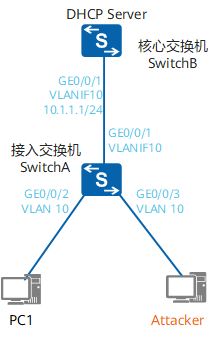
📖 二、DHCP Snooping 简介
在 DHCP 客户端动态获取 IP 地址过程中,DHCP Snooping 会对客户端与服务器之间的 DHCP 报文进行检测与过滤,从而实现:
✅ 阻止非法 DHCP Server ✅ 防止 IP 地址欺骗 ✅ 提升网络安全性
⚠️ 常见攻击场景
在以下场景中建议启用 DHCP Snooping:
- 🖥 Windows Server(如 2003 / 2008)误开启 DHCP 服务
- 📡 用户私接无线路由器(自带 DHCP)
- 🧑💻 恶意用户伪造 DHCP Server
💡 部署建议
- ✅ 建议部署在接入层交换机
- ✅ 每个端口尽量只接入一台终端
- ⚠️ 避免使用 Hub(会绕过 Snooping 检测)
⚠️ 三、配置注意事项
- ❌ S2700-SI(V100R006C05)不支持 DHCP Snooping
- ✅ 其他设备版本基本支持
🎯 四、组网需求
- SwitchA(接入层)
- PC 通过 DHCP 获取 IP
- SwitchB(核心层)
- 提供 DHCP Server 功能
👉 目标:
防止非法 DHCP Server 接入,确保 IP 地址由合法服务器分配
🧠 五、配置思路
1️⃣ 在核心交换机 SwitchB 上配置 DHCP Server 2️⃣ 在接入交换机 SwitchA 上:
- 启用 DHCP Snooping
- 用户接口 → 非信任端口
- 上联接口 → 信任端口
🛠 六、操作步骤
🔹 1. 配置 DHCP Server(SwitchB)
<HUAWEI> system-view
[HUAWEI] sysname SwitchB

[SwitchB] vlan batch 10

[SwitchB] interface gigabitethernet 0/0/1
[SwitchB-GE0/0/1] port link-type trunk
[SwitchB-GE0/0/1] port trunk allow-pass vlan 10
[SwitchB-GE0/0/1] quit

[SwitchB] dhcp enable

[SwitchB] interface vlanif 10
[SwitchB-Vlanif10] ip address 10.1.1.1 255.255.255.0
[SwitchB-Vlanif10] dhcp select interface
[SwitchB-Vlanif10] quit
🔹 2. 配置 DHCP Snooping(SwitchA)
<HUAWEI> system-view
[HUAWEI] sysname SwitchA

[SwitchA] vlan batch 10

# 上联接口
[SwitchA] interface gigabitethernet 0/0/1
[SwitchA-GE0/0/1] port link-type trunk
[SwitchA-GE0/0/1] port trunk allow-pass vlan 10
[SwitchA-GE0/0/1] quit

# 用户接口
[SwitchA] interface gigabitethernet 0/0/2
[SwitchA-GE0/0/2] port link-type access
[SwitchA-GE0/0/2] port default vlan 10
[SwitchA-GE0/0/2] quit

[SwitchA] interface gigabitethernet 0/0/3
[SwitchA-GE0/0/3] port link-type access
[SwitchA-GE0/0/3] port default vlan 10
[SwitchA-GE0/0/3] quit

# 开启 DHCP Snooping
[SwitchA] dhcp enable
[SwitchA] dhcp snooping enable ipv4

# 用户端口启用 Snooping
[SwitchA] interface gigabitethernet 0/0/2
[SwitchA-GE0/0/2] dhcp snooping enable
[SwitchA-GE0/0/2] quit

[SwitchA] interface gigabitethernet 0/0/3
[SwitchA-GE0/0/3] dhcp snooping enable
[SwitchA-GE0/0/3] quit

# 上联端口设为信任
[SwitchA] interface gigabitethernet 0/0/1
[SwitchA-GE0/0/1] dhcp snooping trusted
[SwitchA-GE0/0/1] quit
🔍 七、验证配置
✅ 查看 DHCP Snooping 状态
display dhcp snooping configuration
✅ 查看 DHCP 地址池
display ip pool interface vlanif10 used
✅ 查看绑定表(核心重点)
display dhcp snooping user-bind all
📌 输出示例:
IP Address       MAC Address     VLAN  Interface
10.1.1.254       xxxx-xxxx-xxxx  10    GE0/0/2
👉 表示绑定成功,DHCP Snooping 正常工作
📁 八、完整配置文件
📄 SwitchA(接入层)
sysname SwitchA

vlan batch 10

dhcp enable
dhcp snooping enable ipv4

interface GigabitEthernet0/0/1
 port link-type trunk
 port trunk allow-pass vlan 10
 dhcp snooping trusted

interface GigabitEthernet0/0/2
 port link-type access
 port default vlan 10
 dhcp snooping enable

interface GigabitEthernet0/0/3
 port link-type access
 port default vlan 10
 dhcp snooping enable
📄 SwitchB(核心层)
sysname SwitchB

vlan batch 10

dhcp enable

interface Vlanif10
 ip address 10.1.1.1 255.255.255.0
 dhcp select interface

interface GigabitEthernet0/0/1
 port link-type trunk
 port trunk allow-pass vlan 10
🎯 九、总结
项目 | 说明 |
|---|---|
核心功能 | 防止 DHCP 仿冒攻击 |
部署位置 | 接入层交换机 |
信任端口 | 上联接口 |
非信任端口 | 用户接入接口 |
核心机制 | 绑定表(IP + MAC + 接口) |
本文参与 腾讯云自媒体同步曝光计划,分享自微信公众号。
原始发表:2026-04-08,如有侵权请联系 cloudcommunity@tencent.com 删除
目录
腾讯云开发者

Copyright © 2013 - 2026 Tencent Cloud. All Rights Reserved. 腾讯云 版权所有
深圳市腾讯计算机系统有限公司 ICP备案/许可证号:粤B2-20090059  粤公网安备44030502008569号
腾讯云计算(北京)有限责任公司 京ICP证150476号 | 京ICP备11018762号