分子动力学--非标残基的处理三(配体)
原创
分子动力学--非标残基的处理三(配体)
原创
追风少年i
发布于 2026-05-05 09:17:38
发布于 2026-05-05 09:17:38
作者,Evil Genius
五一假期这就算结束了,大家过的开心么?
科研的压力通常是很大的,最近通报了一批学术不端事件,包括南开大学生命科学学院的院长、四川大学研究员等,当然还有合工大的学生盗用别人的作品获奖等等。局外人看,学术造假、剽窃肯定是零容忍,几千万的经费做出来的东西是假的,是个人都无法接受;但是具体来看,可见科研压力巨大,长时间无法出成果,无形中毕业、升职称等的压力,迫使人会铤而走险。
我只是个小硕士,接触不到这么高的内容;真正的科研体系工作人员,基本都是博士,不过我所认识的博士,很少有走真正的纯科研;而同水平的硕士,科研圈子的人员好像都挺穷的,和其他同水平专业的同学比(高中同学、例如都是211硕士,但是专业不同),收入差距好像呈现越拉越大的趋势。
今天我们继续处理配体分子。
在前面的内容中,分子动力学--非标残基的处理一(配体)、分子动力学--非标残基的处理二(配体),我们知道了为什么要用Gaussian 16处理配体分子以及核心参数,包括我们采用win系统实现了具体的分析,但是在实际情况中,所有的分析都是在服务器上进行的,我们必须用服务器来实现。
这个过程需要分3步实现
第一步:格式转化,我们通常拿到的配体分子是PDB格式或者mol2格式,这里以PDB格式为例,mol2也一样,采用openbable进行格式转化。
首先看一下配体分子,我之前处理过,已经加了氢原子。
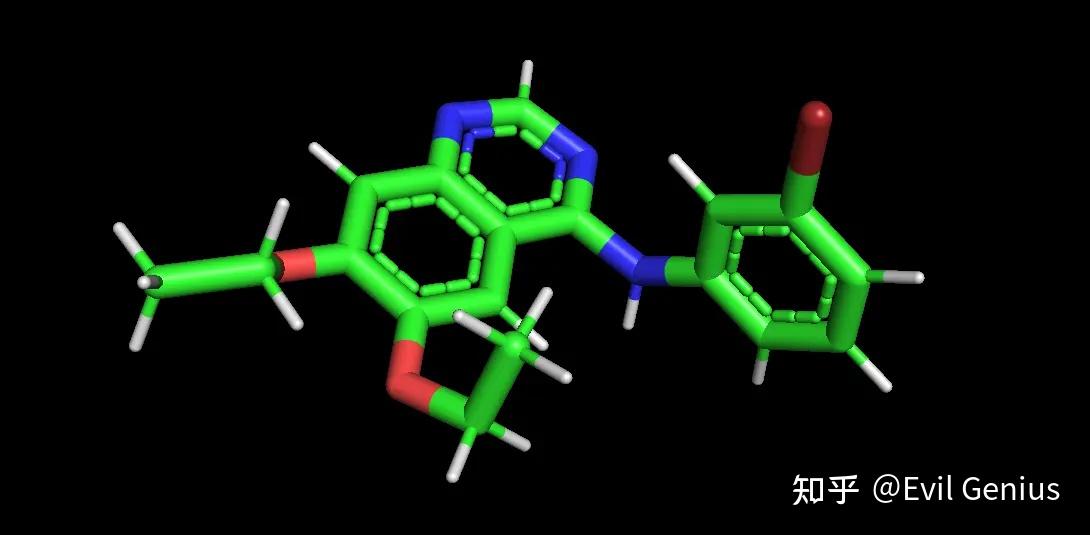
转化的命令是,
obabel input.pdb -ogjf -O output.gjf --gen3D -h关于openbable的使用,大家可以参考文章虚拟筛选之化合物批量处理.
为了方面我们写入关键的参数,一般会直接写入“初筛版”关键词,生成gjf格式文件。
obabel 9.pdb -ogjf -O 9.gjf --gen3D -h -xk "#P B3LYP/6-31G(d) opt freq"第二步:写入关键的计算参数,这个在分子动力学--非标残基的处理二(配体)已经有了详细的介绍,参数千万不要瞎写,不懂的话先明白参数的意义再根据课题写参数。
我们逐一来写
计算资源,Link 0 部分:此行以百分号%开头,位于文件顶部,位于#关键词行之前。
%chk=ligand.chk    # 指定计算结果存储文件的名称
%nprocshared=8       # 指定使用8个CPU核心进行计算
%mem=16GB            # 指定使用16GB的内存
理论方法与任务类型,Route Section #行:这是Gaussian输入文件的核心指令行。
#P B3LYP/6-31G(d) opt freq SCRF=(SMD, Solvent=Water)体系电荷与自旋多重度:坐标部分的第一行用于定义体系状态
0 1 # 格式为:净电荷 自旋多重度对于大多数中性有机分子(如简单的配体),0 1是正确配置。
如果配体带一个正电荷 → 1 1
如果配体是一个中性自由基 → 0 2
计算静电式
Pop=MK IOp(6/33=2) IOp(6/42=6) IOp(6/50=1)书写完最终的格式
%chk=ligand.chk
%nprocshared=8
%mem=16384MB

#P B3LYP/6-31G(d) opt freq SCRF=(SMD, Solvent=Water) Pop=MK IOp(6/33=2) IOp(6/42=6) IOp(6/50=1)

Title: ligand.pdb

0 1
Br         -1.41808        -3.40237        -2.35105
O           4.68725        -0.14473         4.41003
O           7.53782         0.25274         3.90488
N           3.21339        -2.51671         0.04448
N           7.35642        -2.47520         0.13790
N           5.30833        -3.09637        -0.90452
C           5.28155        -1.97812         1.22860
C           6.67341        -1.92346         1.14695
C           5.33471        -0.73999         3.35912
C           4.63052        -1.41572         2.35526
C           6.71662        -0.58837         3.19913
....

ligand.gesp
当然,在使用openbable生成gjf之前,可以使用--minimize --ff UFF来优化一下3D结构。
obabel input.pdb -ogjf -O output.gjf --gen3D -h --minimize --ff UFF -p7.4第三步:运行Gaussian 16
# 设置高斯安装根目录,这里请替换为你的实际安装路径
export g16root=/path/to/gaussian/installation
# 设置临时文件存放目录,推荐使用节点的本地高速硬盘(如 /scratch, /tmp)
export GAUSS_SCRDIR=/path/to/scratch/folder
# 加载高斯的环境设置脚本
source $g16root/g16/bsd/g16.profile

g16 < your_input_file.gjf > your_output_file.log
运行时间较长,最后生成我们配体处理第一步需要的ligand.gesp文件。
生活很好,有你更好。
原创声明:本文系作者授权腾讯云开发者社区发表,未经许可,不得转载。
如有侵权,请联系 cloudcommunity@tencent.com 删除。
原创声明:本文系作者授权腾讯云开发者社区发表,未经许可,不得转载。
如有侵权,请联系 cloudcommunity@tencent.com 删除。
评论
登录后参与评论
推荐阅读
目录
腾讯云开发者

Copyright © 2013 - 2026 Tencent Cloud. All Rights Reserved. 腾讯云 版权所有
深圳市腾讯计算机系统有限公司 ICP备案/许可证号:粤B2-20090059  粤公网安备44030502008569号
腾讯云计算(北京)有限责任公司 京ICP证150476号 | 京ICP备11018762号