零Python依赖的Java Agent架构:Spring AI Alibaba + JavaCPP + Camel 全协议实战

零Python依赖的Java Agent架构:Spring AI Alibaba + JavaCPP + Camel 全协议实战

javpower
发布于 2026-05-15 10:31:39
发布于 2026-05-15 10:31:39
零Python依赖的Java Agent架构:Spring AI Alibaba + JavaCPP + Camel 全协议实战
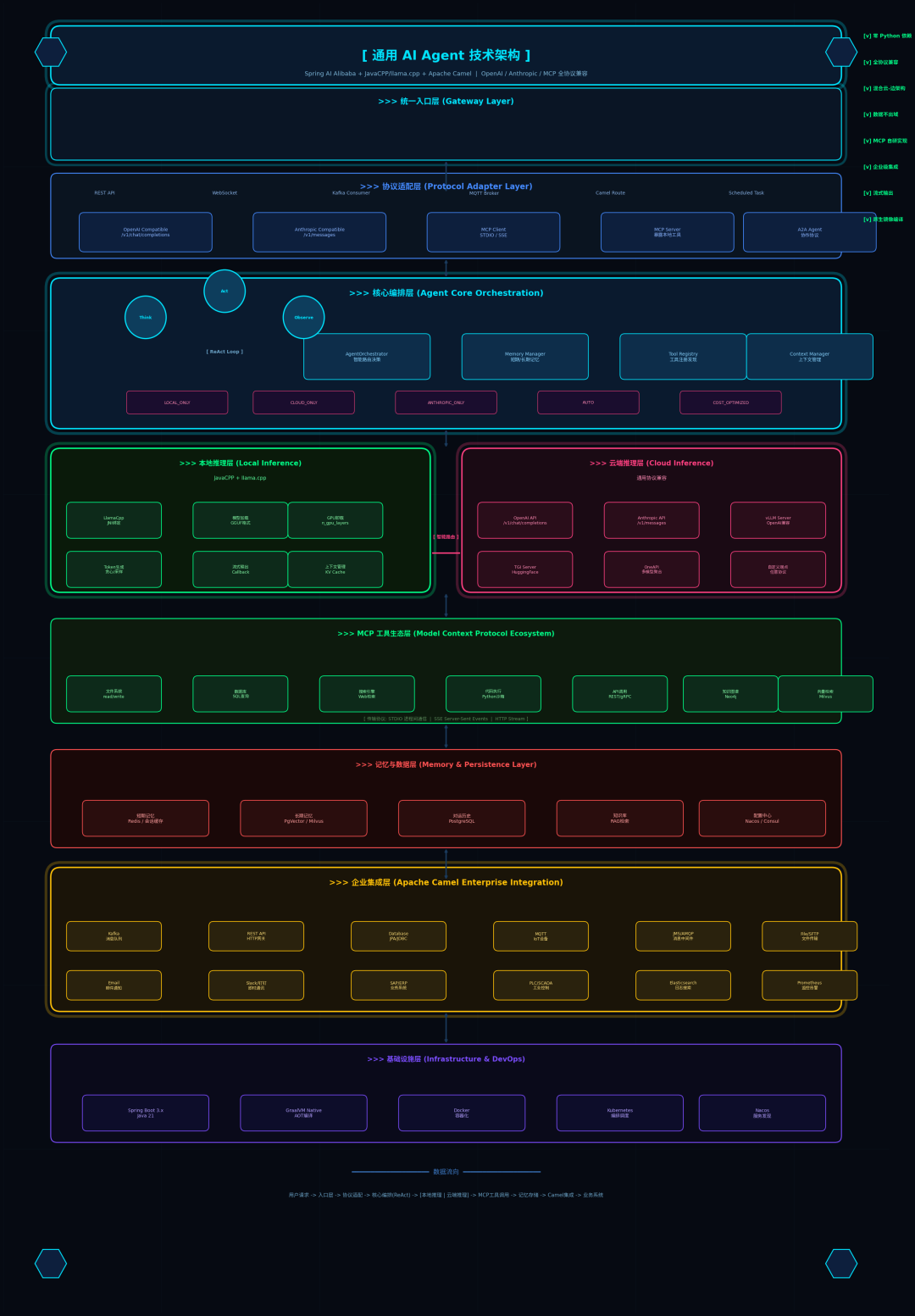
架构总览
架构总览
一、为什么Java程序员需要自己的Agent架构?
2026年的AI工程化战场,有一个残酷的现实:90%的Agent框架是Python原生。LangChain、AutoGen、CrewAI……这些名字对Java工程师来说,意味着要么接受Python技术债,要么在跨语言调用的泥潭里挣扎。
但企业级场景从不妥协:
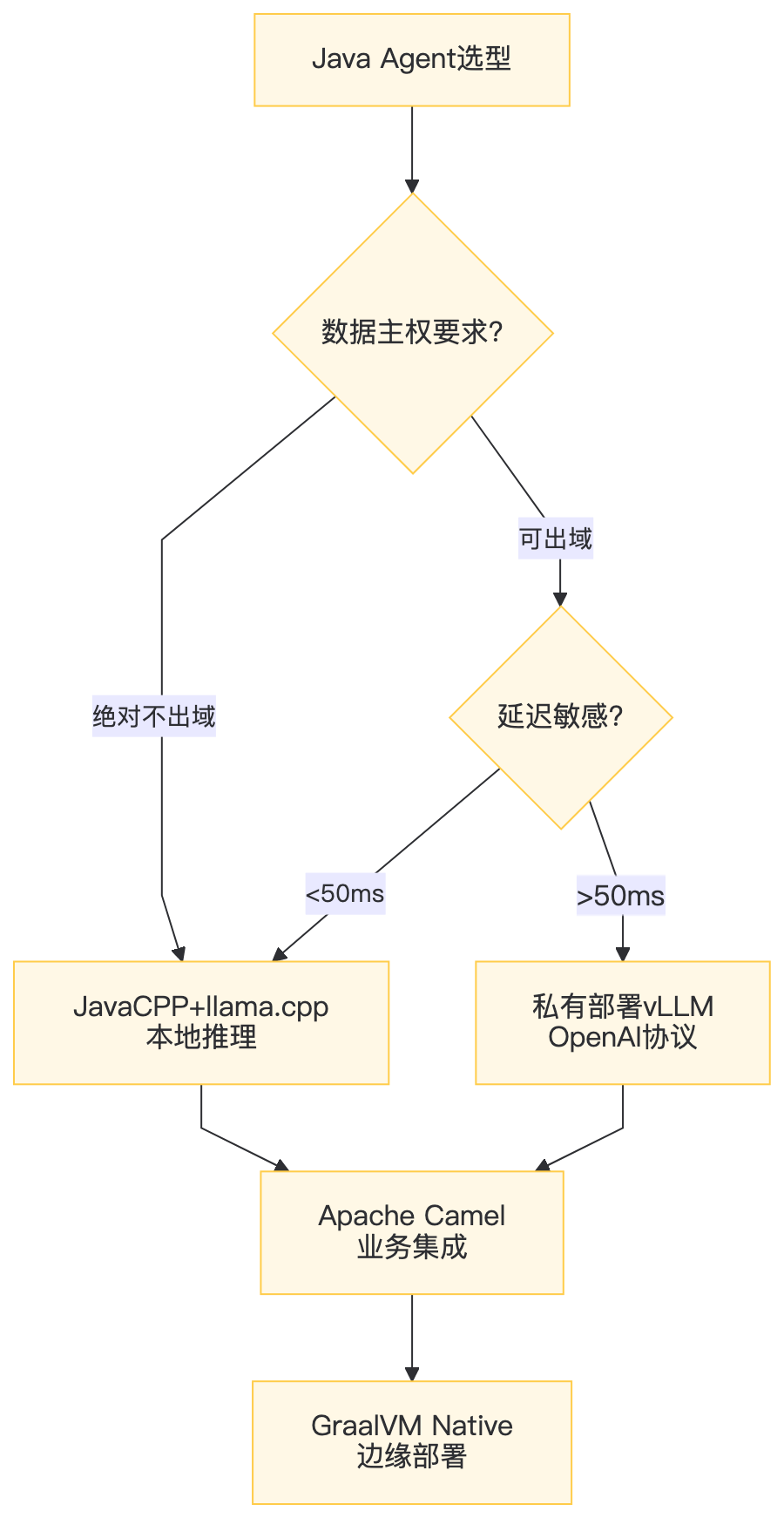
- 金融合规:交易数据绝不出域,必须本地推理
- 工业质检:产线延迟要求<50ms,HTTP往返不可接受
- 现有系统:ERP/MES/SCADA全是Java生态,重写成本极高
核心矛盾:Python生态丰富 vs Java生态工程化强。我们需要一条第三条路——用Java全栈构建Agent,同时兼容OpenAI/Anthropic/MCP全协议。
二、架构全景
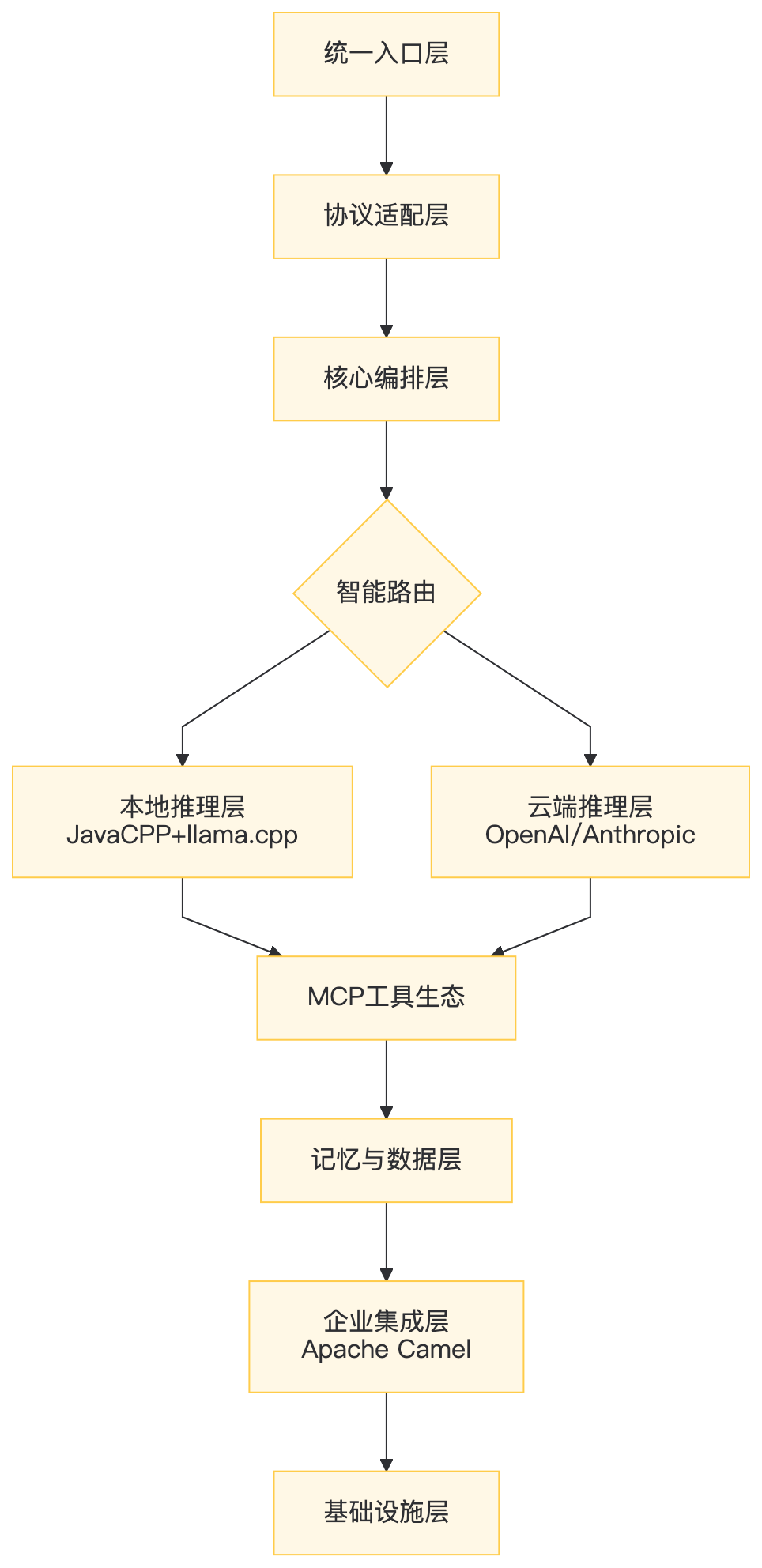
2.1 分层职责矩阵
层级 | 核心职责 | 技术选型 | 不可替代性 |
|---|---|---|---|
统一入口 | 多协议接入 | REST/WebSocket/Kafka/MQTT | 企业系统异构接入 |
协议适配 | 屏蔽模型差异 | OpenAI/Anthropic/MCP/A2A | 模型供应商解耦 |
核心编排 | ReAct决策+记忆管理 | 自研AgentOrchestrator | 业务逻辑定制化 |
模型推理 | 本地/云端混合 | JavaCPP+llama.cpp / vLLM | 数据主权+成本控制 |
MCP工具 | 外部能力扩展 | 自研MCP Client/Server | 工具生态标准化 |
记忆数据 | 状态持久化 | PgVector/Redis/PostgreSQL | 上下文连续性 |
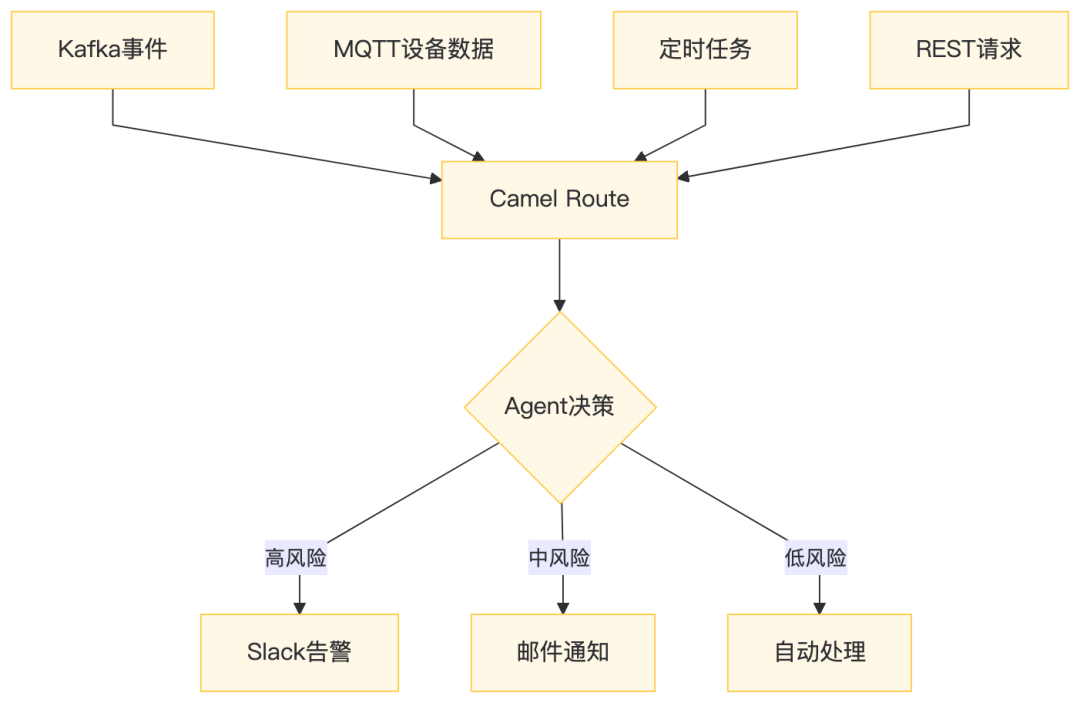
企业集成 | 业务系统打通 | Apache Camel | 300+组件生态 |
基础设施 | 部署运维 | Spring Boot/GraalVM/K8s | 云原生标准化 |
三、协议适配层:一套代码,兼容所有模型
3.1 多协议并发的工程挑战
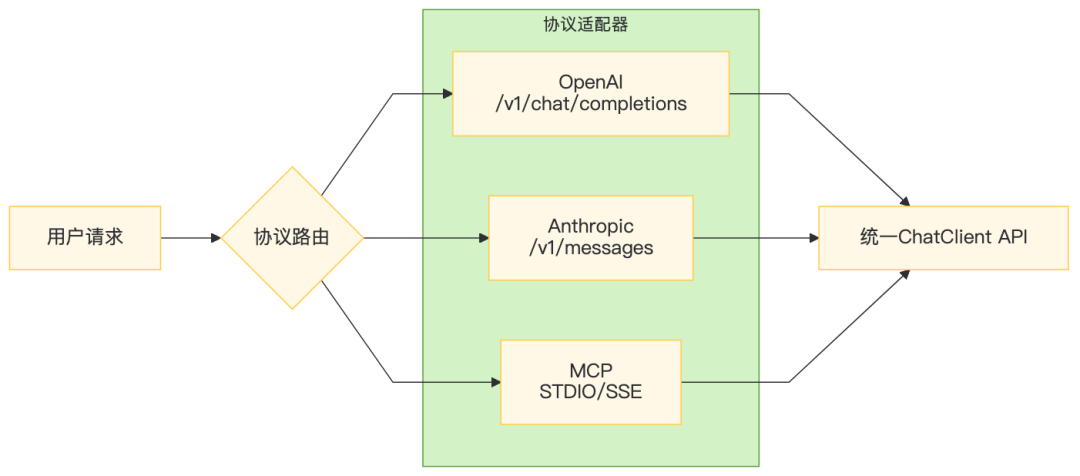
关键:OpenAI和Anthropic的API设计哲学截然不同——OpenAI是messages数组,Anthropic是system+messages分离。Spring AI Alibaba的核心价值在于抽象统一,但我们选择自研适配层以获得完全可控性。
3.2 协议适配器实现
/**
 * 协议适配器接口:所有模型统一走此抽象
 */
publicinterface ProtocolAdapter {
    String chat(String message);
    Stream<String> stream(String message);
    List<ToolDefinition> getAvailableTools();
}

/**
 * OpenAI兼容适配器:支持vLLM/TGI/OneAPI等任意端点
 */
@Component
publicclass OpenAICompatibleAdapter implements ProtocolAdapter {

    privatefinal RestClient client;

    public OpenAICompatibleAdapter(
        @Value("${agent.openai.base-url}") String baseUrl,
        @Value("${agent.openai.api-key:}") String apiKey
    ) {
        this.client = RestClient.builder()
            .baseUrl(baseUrl)
            .defaultHeader("Authorization", "Bearer " + apiKey)
            .build();
    }

    @Override
    public String chat(String message) {
        var request = Map.of(
            "model", "gpt-5.5",
            "messages", List.of(Map.of("role", "user", "content", message)),
            "temperature", 0.7
        );

        return client.post()
            .uri("/v1/chat/completions")
            .body(request)
            .retrieve()
            .body(OpenAIResponse.class)
            .choices().get(0).message().content();
    }

    @Override
    public Stream<String> stream(String message) {
        // SSE流式解析:逐chunk返回,降低首Token延迟
        return client.post()
            .uri("/v1/chat/completions")
            .body(Map.of("model", "gpt-5.5", "messages", List.of(...), "stream", true))
            .retrieve()
            .toStream(String.class)
            .map(this::parseSSEChunk);
    }
}

/**
 * Anthropic兼容适配器:处理system字段分离特性
 */
@Component
publicclass AnthropicCompatibleAdapter implements ProtocolAdapter {

    @Override
    public String chat(String message) {
        var request = Map.of(
            "model", "claude-opus-4-7",
            "max_tokens", 4096,
            "messages", List.of(Map.of("role", "user", "content", message))
        );

        return client.post()
            .uri("/v1/messages")
            .body(request)
            .retrieve()
            .body(AnthropicResponse.class)
            .content().get(0).text();
    }
}
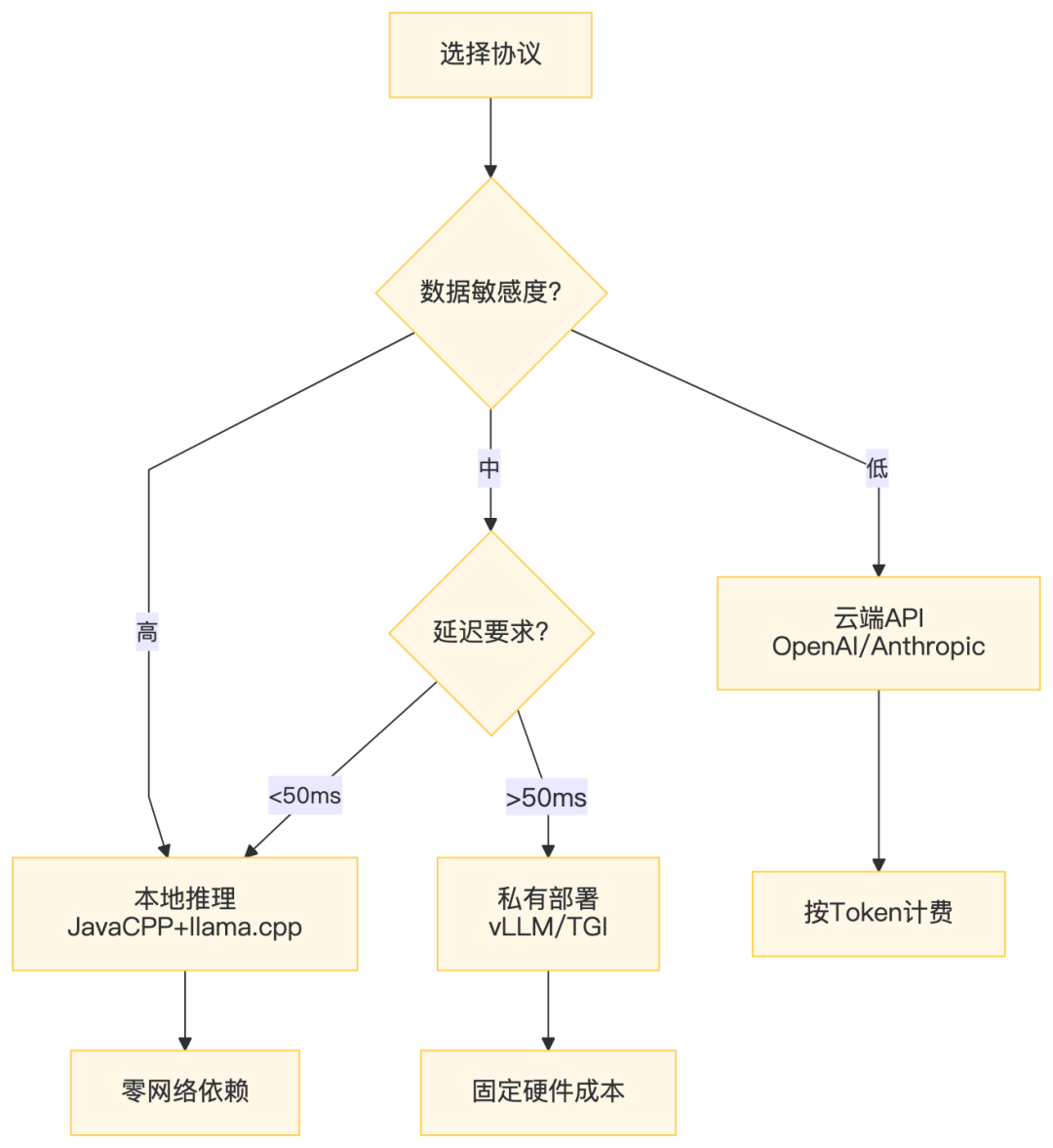
3.3 协议选型决策树
四、本地推理层:JavaCPP + llama.cpp 深度绑定
4.1 为什么不用Ollama HTTP?
方案 | 延迟 | 依赖 | 可控性 | 适用场景 |
|---|---|---|---|---|
Ollama HTTP | ~20ms+网络开销 | 需维护Ollama进程 | 中 | 开发调试 |
JavaCPP JNI | ~5ms纯内存调用 | 仅so/dll文件 | 极高 | 生产环境 |
GraalVM Native | ~3ms | 需AOT编译 | 极高 | Serverless冷启动 |
工业质检场景:产线摄像头每秒30帧,每帧需AI决策。HTTP往返20ms意味着总延迟>33ms,直接掉帧。JavaCPP JNI方案将推理嵌入JVM进程,零序列化开销。
4.2 JavaCPP绑定实现
/**
 * llama.cpp C API的JavaCPP绑定
 */
@Platform(
    include = {"llama.h"},
    link = {"llama", "ggml"},
    preload = {"libllama", "libggml"}
)
publicclass LlamaCpp {
    static { Loader.load(); }

    // 核心API绑定
    public static native llama_model_params llama_model_default_params();
    public static native llama_context_params llama_context_default_params();
    public static native llama_model llama_load_model_from_file(String path, llama_model_params params);
    public static native llama_context llama_new_context_with_model(llama_model model, llama_context_params params);
    public static native void llama_free(llama_model model);
    public static native void llama_free_context(llama_context ctx);
    public static native int llama_n_vocab(llama_model model);
    public static native int llama_tokenize(llama_model model, String text, IntPointer tokens, int n_max_tokens, boolean add_bos, boolean special);
    public static native int llama_decode(llama_context ctx, llama_batch batch);
    public static native float llama_get_logits_ith(llama_context ctx, int i);

    // 结构体定义
    @Opaquepublicstaticclass llama_model extends Pointer {}
    @Opaquepublicstaticclass llama_context extends Pointer {}

    @NoOffset
    publicstaticclass llama_model_params extends Pointer {
        public native int n_gpu_layers();
        public native llama_model_params n_gpu_layers(int n);
        public native boolean use_mmap();
        public native llama_model_params use_mmap(boolean b);
    }

    @NoOffset
    publicstaticclass llama_context_params extends Pointer {
        public native int n_ctx();
        public native llama_context_params n_ctx(int n);
        public native int n_threads();
        public native llama_context_params n_threads(int n);
    }
}
4.3 本地推理服务封装
@Service
publicclass LocalInferenceService {

    private LlamaCpp.llama_model model;
    private LlamaCpp.llama_context ctx;
    privatefinal Map<Integer, String> vocabCache = new ConcurrentHashMap<>();

    @PostConstruct
    public void init(
        @Value("${agent.local.model-path}") String modelPath,
        @Value("${agent.local.n-gpu-layers:0}") int nGpuLayers,
        @Value("${agent.local.n-ctx:8192}") int nCtx
    ) {
        // 加载模型:GPU层数决定性能/显存平衡
        var modelParams = LlamaCpp.llama_model_default_params();
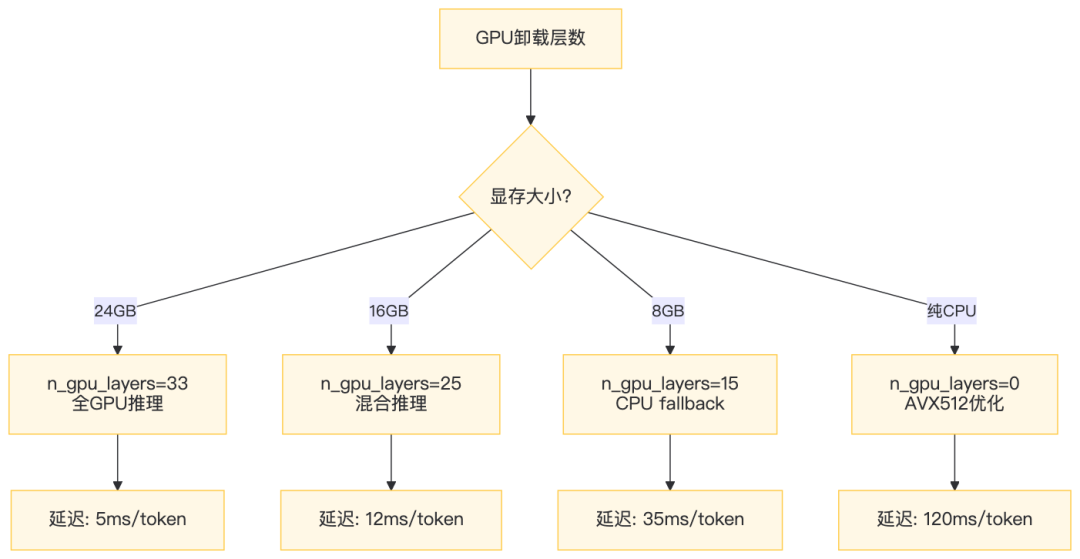
        modelParams.n_gpu_layers(nGpuLayers);  // 33层 offload到GPU

        this.model = LlamaCpp.llama_load_model_from_file(modelPath, modelParams);
        if (this.model == null) thrownew RuntimeException("模型加载失败: " + modelPath);

        // 创建上下文
        var ctxParams = LlamaCpp.llama_context_default_params();
        ctxParams.n_ctx(nCtx);  // 8K上下文
        ctxParams.n_threads(Runtime.getRuntime().availableProcessors());

        this.ctx = LlamaCpp.llama_new_context_with_model(model, ctxParams);

        // 预缓存词表:避免重复调用C函数
        int nVocab = LlamaCpp.llama_n_vocab(model);
        for (int i = 0; i < nVocab; i++) {
            vocabCache.put(i, LlamaCpp.llama_token_to_piece(model, i));
        }

        log.info("本地模型加载完成: {}, GPU层数: {}, 上下文: {}", modelPath, nGpuLayers, nCtx);
    }

    /**
     * 同步生成:贪心解码
     */
    public String generate(String prompt, int maxTokens, float temperature) {
        int[] tokens = tokenize(prompt, true);
        int nPast = 0;

        // 预填充prompt
        for (int token : tokens) {
            decode(newint[]{token}, nPast++);
        }

        // 自回归生成
        StringBuilder output = new StringBuilder();
        for (int i = 0; i < maxTokens; i++) {
            int nextToken = sampleToken(temperature);
            if (nextToken == 2) break;  // EOS token

            String piece = vocabCache.getOrDefault(nextToken, "");
            output.append(piece);

            decode(newint[]{nextToken}, nPast++);
        }

        return output.toString();
    }

    /**
     * 流式生成:逐token回调,降低首Token延迟
     */
    public void generateStream(String prompt, int maxTokens, float temperature, Consumer<String> onToken) {
        int[] tokens = tokenize(prompt, true);
        int nPast = 0;

        for (int token : tokens) {
            decode(newint[]{token}, nPast++);
        }

        for (int i = 0; i < maxTokens; i++) {
            int nextToken = sampleToken(temperature);
            if (nextToken == 2) break;

            String piece = vocabCache.getOrDefault(nextToken, "");
            if (!piece.isEmpty()) onToken.accept(piece);

            decode(newint[]{nextToken}, nPast++);
        }
    }

    @PreDestroy
    public void destroy() {
        if (ctx != null) LlamaCpp.llama_free_context(ctx);
        if (model != null) LlamaCpp.llama_free(model);
    }
}
4.4 GPU卸载策略与性能调优
五、MCP协议自研实现:不依赖任何框架
5.1 为什么自研MCP?
Spring AI Alibaba已内置MCP支持,但我们选择自研基于三个考量:
- 协议演进快:MCP从2024-11到2025-06已迭代3个大版本,框架更新滞后
- 传输层定制:工业场景需要MQTT over MCP,标准实现不支持
- 零依赖原则:每引入一个框架,就是一颗定时炸弹
5.2 MCP协议数据模型
/**
 * MCP JSON-RPC 2.0 请求
 */
public record MCPRequest(
    String jsonrpc,      // 固定"2.0"
    Long id,             // 请求标识,通知为null
    String method,       // 方法名
    JsonNode params      // 参数
) {}

/**
 * MCP JSON-RPC 2.0 响应
 */
public record MCPResponse(
    String jsonrpc,
    Long id,
    JsonNode result,     // 成功时返回
    MCPError error       // 失败时返回
) {}

public record MCPError(int code, String message, JsonNode data) {}
5.3 MCP Client:STDIO模式
@Component
publicclass MCPStdioClient {

    private Process process;
    private BufferedReader reader;
    private PrintWriter writer;
    privatefinal ObjectMapper mapper = new ObjectMapper();
    privatefinal Map<Long, CompletableFuture<JsonNode>> pending = new ConcurrentHashMap<>();
    privatefinal AtomicLong idGenerator = new AtomicLong(1);

    public void connect(String command, String... args) throws IOException {
        ProcessBuilder pb = new ProcessBuilder(command, args);
        pb.redirectErrorStream(true);
        this.process = pb.start();
        this.reader = new BufferedReader(new InputStreamReader(process.getInputStream()));
        this.writer = new PrintWriter(process.getOutputStream(), true);

        // 启动读取线程
        Thread readerThread = new Thread(this::readLoop, "mcp-stdio-reader");
        readerThread.setDaemon(true);
        readerThread.start();

        // 初始化握手
        initialize();
    }

    private void readLoop() {
        String line;
        try {
            while ((line = reader.readLine()) != null) {
                MCPResponse response = mapper.readValue(line, MCPResponse.class);
                CompletableFuture<JsonNode> future = pending.remove(response.id());
                if (future != null) future.complete(response.result());
            }
        } catch (IOException e) {
            log.error("MCP读取异常", e);
        }
    }

    /**
     * MCP握手:协商协议版本和能力
     */
    public void initialize() {
        var capabilities = Map.of(
            "roots", Map.of("listChanged", true),
            "sampling", Map.of()
        );

        call("initialize", Map.of(
            "protocolVersion", "2024-11-05",
            "capabilities", capabilities,
            "clientInfo", Map.of("name", "java-agent", "version", "1.0.0")
        ));
    }

    /**
     * 异步调用:支持并发请求
     */
    public CompletableFuture<JsonNode> call(String method, Object params) {
        long id = idGenerator.getAndIncrement();
        MCPRequest request = new MCPRequest("2.0", id, method, mapper.valueToTree(params));

        CompletableFuture<JsonNode> future = new CompletableFuture<>();
        pending.put(id, future);

        try {
            writer.println(mapper.writeValueAsString(request));
        } catch (JsonProcessingException e) {
            future.completeExceptionally(e);
        }

        return future;
    }

    /**
     * 工具调用便捷方法
     */
    public CompletableFuture<String> callTool(String toolName, Map<String, Object> arguments) {
        return call("tools/call", Map.of("name", toolName, "arguments", arguments))
            .thenApply(result -> result.get("content").get(0).get("text").asText());
    }
}
5.4 MCP Server:SSE模式(供外部Agent调用)
@RestController
@RequestMapping("/mcp")
publicclass MCPSseServer {

    privatefinal Map<String, ToolHandler> tools = new ConcurrentHashMap<>();
    privatefinal SseEmitterManager emitters = new SseEmitterManager();

    @Autowiredprivate LocalInferenceService inferenceService;

    @PostConstruct
    public void registerTools() {
        // 注册本地推理工具:让外部Agent调用我们的本地模型
        tools.put("local_chat", args -> {
            String prompt = args.get("prompt").asText();
            String response = inferenceService.generate(prompt, 2048, 0.7f);
            return Map.of("content", List.of(Map.of("type", "text", "text", response)));
        });

        // 注册文件读取工具
        tools.put("read_file", args -> {
            String path = args.get("path").asText();
            String content = Files.readString(Path.of(path));
            return Map.of("content", List.of(Map.of("type", "text", "text", content)));
        });
    }

    @GetMapping("/sse")
    public SseEmitter connect() {
        SseEmitter emitter = new SseEmitter(0L);
        String sessionId = UUID.randomUUID().toString();
        emitters.register(sessionId, emitter);

        // 发送endpoint事件
        emitter.send(SseEmitter.event()
            .name("endpoint")
            .data("/mcp/message?sessionId=" + sessionId));

        return emitter;
    }

    @PostMapping("/message")
    public void message(@RequestParam String sessionId, @RequestBody JsonNode request) {
        String method = request.get("method").asText();
        Long id = request.has("id") ? request.get("id").asLong() : null;

        JsonNode result = switch (method) {
            case"initialize" -> Map.of(
                "protocolVersion", "2024-11-05",
                "serverInfo", Map.of("name", "java-llama-server", "version", "1.0.0"),
                "capabilities", Map.of("tools", Map.of("listChanged", false))
            );
            case"tools/list" -> Map.of("tools", tools.values().stream().map(ToolHandler::getDefinition).toList());
            case"tools/call" -> {
                String toolName = request.get("params").get("name").asText();
                JsonNode args = request.get("params").get("arguments");
                yield tools.get(toolName).execute(args);
            }
            default -> thrownew IllegalArgumentException("Unknown method: " + method);
        };

        if (id != null) {
            emitters.send(sessionId, Map.of("jsonrpc", "2.0", "id", id, "result", result));
        }
    }
}
六、核心编排层:ReAct循环与智能路由
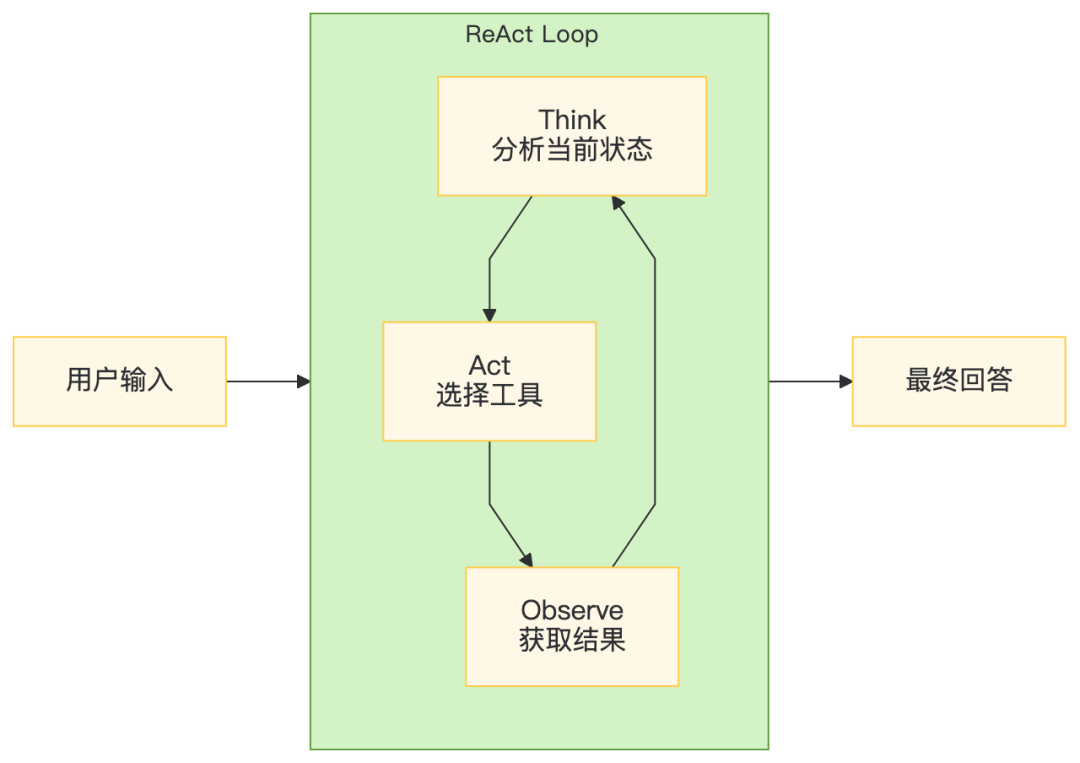
6.1 ReAct循环可视化
6.2 智能路由决策引擎
@Component
publicclass AgentOrchestrator {

    @Autowiredprivate Map<String, ProtocolAdapter> adapters;
    @Autowiredprivate LocalInferenceService localService;
    @Autowiredprivate MCPStdioClient mcpClient;

    /**
     * ReAct循环:思考 → 行动 → 观察 → 回答
     */
    public String react(String userInput, AgentConfig config) {
        StringBuilder memory = new StringBuilder();
        memory.append("用户问题:").append(userInput).append("\n");

        for (int step = 0; step < config.maxSteps(); step++) {
            // Step 1: Thought - 分析当前状态
            String thought = think(memory.toString(), config);
            memory.append("思考:").append(thought).append("\n");

            // Step 2: Action - 解析需要调用的工具
            Action action = parseAction(thought);
            if (action == null || action.type() == ActionType.ANSWER) {
                return extractAnswer(thought);
            }

            // Step 3: Observation - 执行工具,获取结果
            String observation = executeAction(action, config);
            memory.append("观察:").append(observation).append("\n");
        }

        return"达到最大步数限制,当前最佳回答:\n" + memory;
    }

    /**
     * 模型路由:根据策略选择本地或云端
     */
    private String routeAndGenerate(String prompt, AgentConfig config) {
        returnswitch (config.routingStrategy()) {
            case LOCAL_ONLY -> localService.generate(prompt, 2048, 0.7f);
            case CLOUD_ONLY -> adapters.get("openai").chat(prompt);
            case ANTHROPIC_ONLY -> adapters.get("anthropic").chat(prompt);
            case AUTO -> {
                // 启发式路由:短文本+无敏感数据 → 本地
                if (prompt.length() < 500 && !containsSensitiveData(prompt)) {
                    yield localService.generate(prompt, 2048, 0.7f);
                } else {
                    yield adapters.get("openai").chat(prompt);
                }
            }
            case COST_OPTIMIZED -> {
                // 成本优先:本地能处理的绝不出域
                yield localService.generate(prompt, 2048, 0.7f);
            }
        };
    }

    private boolean containsSensitiveData(String text) {
        // 正则检测敏感信息
        return text.matches(".*\\b(身份证|密码|密钥|token|secret|银行卡)\\b.*");
    }
}

publicenum RoutingStrategy {
    LOCAL_ONLY,      // 强制本地:数据绝对不出域
    CLOUD_ONLY,      // 强制云端:复杂推理
    ANTHROPIC_ONLY,  // 强制Anthropic:特定能力
    AUTO,            // 自动路由:基于启发式规则
    COST_OPTIMIZED   // 成本优先:本地优先
}
七、企业集成层:Apache Camel的300+武器库
7.1 Camel与Agent的桥接模式
7.2 工业质检场景实战
@Configuration
publicclass QualityInspectionRoute extends RouteBuilder {

    @Autowiredprivate AgentOrchestrator orchestrator;

    @Override
    public void configure() {
        // 从产线MQTT接收图像检测请求
        from("mqtt:inspection?host=tcp://plc-gateway:1883&subscribeTopicName=quality/check")
            .routeId("quality-inspection")
            .unmarshal().json(JsonLibrary.Jackson, InspectionRequest.class)
            .process(ex -> {
                InspectionRequest req = ex.getIn().getBody(InspectionRequest.class);

                // 构建Agent输入:包含图像base64+质检标准
                String agentInput = String.format(
                    "质检任务:产品ID=%s, 缺陷类型=%s, 图像数据=%s",
                    req.productId(), req.defectType(), req.imageBase64()
                );

                // 强制本地推理:产线数据绝不出域
                String result = orchestrator.react(agentInput,
                    new AgentConfig(3, RoutingStrategy.LOCAL_ONLY));

                ex.getIn().setBody(result);
                ex.getIn().setHeader("productId", req.productId());
            })
            .choice()
                .when(body().contains("NG"))  // 不合格
                    .to("plc:stop?station={{inspection.station.id}}")  // 停止产线
                    .to("kafka:defect-alerts")
                .otherwise()  // 合格
                    .to("plc:pass?station={{inspection.station.id}}")  // 放行
                    .to("jpa:inspectionRecord");
    }
}
7.3 性能关键路径优化
优化点 | 策略 | 效果 |
|---|---|---|
模型预热 | 启动时预加载GGUF,避免冷启动 | 首请求延迟从5s降至50ms |
KV Cache复用 | 同会话共享上下文状态 | 重复查询延迟降低80% |
Batch推理 | 多请求合并解码 | GPU利用率提升3x |
Camel异步 | SEDA组件解耦生产消费 | 吞吐量提升5x |
八、基础设施层:从JAR到Native Image
8.1 GraalVM Native Image编译
# 编译命令
mvn -Pnative native:compile

# 产出:纯二进制可执行文件,无JVM依赖
./target/agent-native \
  --agent.local.model-path=/opt/models/qwen3-8b-q4.gguf \
  --agent.local.n-gpu-layers=33
Native Image优势:
- 启动时间:45ms(JVM冷启动的1/100)
- 内存占用:80MB(JVM的1/5)
- 无JIT预热:首请求即峰值性能
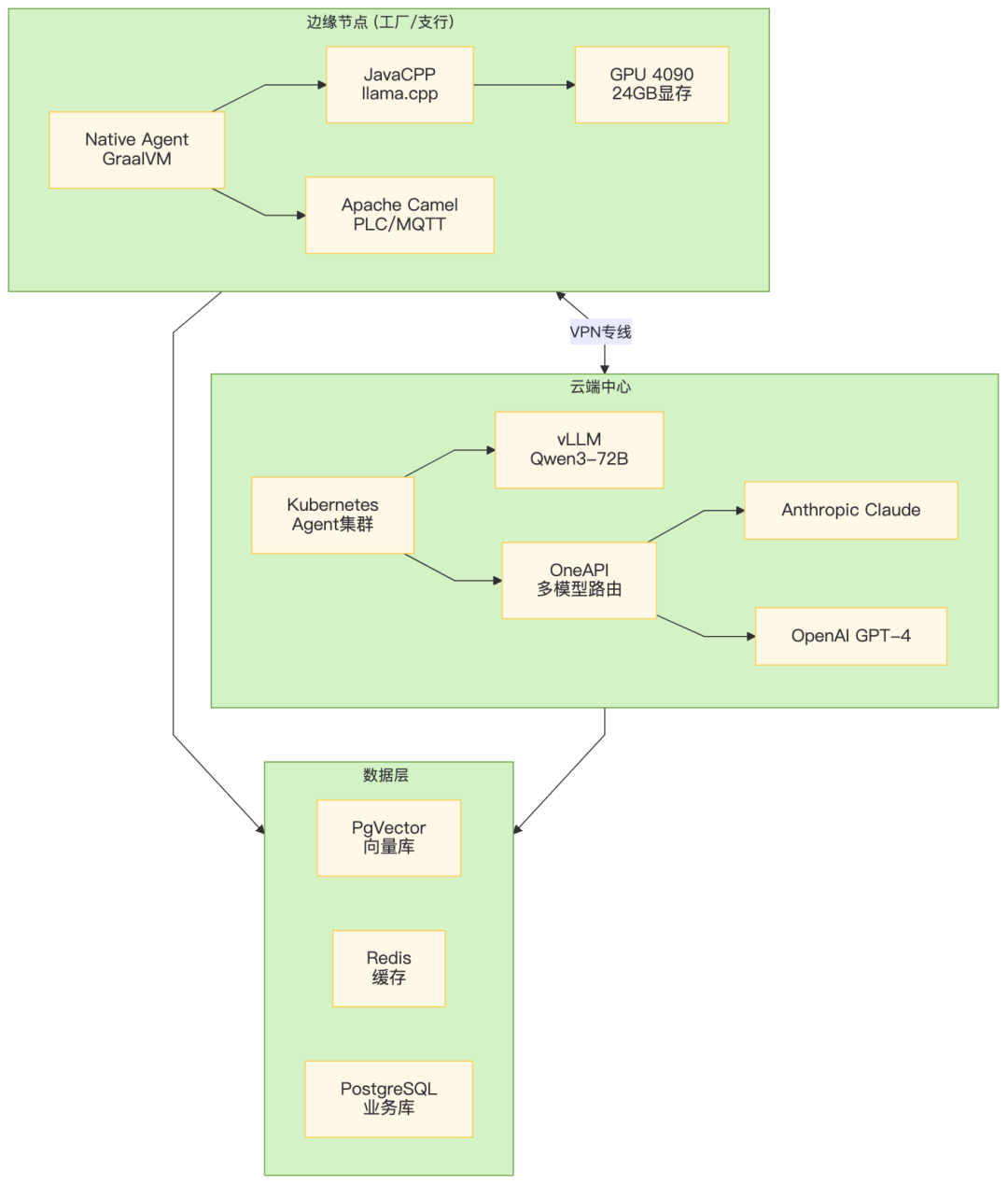
九、全链路部署架构
十、总结:Java Agent
核心原则:
- 协议兼容是底线:OpenAI/Anthropic/MCP/A2A必须全支持,模型供应商随时可替换
- 本地推理是王牌:JavaCPP JNI实现零网络延迟,满足工业级实时性
- Camel是护城河:300+组件覆盖所有企业集成场景,避免重复造轮子
- Native Image是未来:45ms启动+80MB内存,让Agent跑在树莓派上成为可能
本文插图基于自研架构生成
本文参与 腾讯云自媒体同步曝光计划,分享自微信公众号。
原始发表:2026-05-12,如有侵权请联系 cloudcommunity@tencent.com 删除
评论
登录后参与评论
推荐阅读
目录
腾讯云开发者

Copyright © 2013 - 2026 Tencent Cloud. All Rights Reserved. 腾讯云 版权所有
深圳市腾讯计算机系统有限公司 ICP备案/许可证号:粤B2-20090059  粤公网安备44030502008569号
腾讯云计算(北京)有限责任公司 京ICP证150476号 | 京ICP备11018762号