DBA效率翻倍的postgres_dba必备神器


DBA效率翻倍的postgres_dba必备神器
postgres_dba 是什么 ?
postgres_dba[1] 是一个postgresql 的工具,就像作者描述的一样是具有 34 个 PostgreSQL 的诊断报告,就在psql里。 , 特点是没有代理,没有守护进程,没有外部依赖,只有直接可执行的 SQL,可以查看膨胀估计、索引健康、锁树、真空监控、查询分析、损坏检查、缓冲区缓存检查等功能。使用方法在 psql 的中断中输入:dba即可使用,简单便捷。
部署方式
使用两行命令完成部署,在 psql 的命令行中完成执行,一个命令操作完成后,也可以继续操作可操作的命令。
postgres_dba 部署
git clone https://github.com/NikolayS/postgres_dba.git
cd postgres_dba
bash -c "echo \"\\set dba '\\\\\\\\i $(pwd)/start.psql'\" >> ~/.psqlrc"
通过 psql 连接到任何 postgres 服务器,并输入类型 :dba。 例如:
[postgres@mdw ~]$ psql
psql (17.5)
Type "help" for help.

postgres=# :dba
Menu:
   0 – Node and current database information: primary/replica, lag, database size, temporary files, etc.
   1 – Databases: size, stats
   2 – Tables: table/index/TOAST size, number of rows
   3 – Load profile
  a1 – Current activity: count of current connections grouped by database, username, state
  b1 – Table bloat (estimated)
  b2 – B-tree index bloat (estimated)
  b3 – Table bloat (requires pgstattuple; expensive)
  b4 – B-tree indexes bloat (requires pgstattuple; expensive)
  b5 – Tables and columns without stats (so bloat cannot be estimated)
  c1 – Corruption: quick index check — btree + GIN (PG18+). Safe for production, fast.
  c2 – Corruption: indexes + heap/TOAST check. Safe for production but reads all data.
  c3 – Corruption: B-tree parent check — detects glibc/collation corruption (ShareLock, use on clones)
  c4 – Corruption: FULL check — heapallindexed + parent + heap (SLOW + ShareLock, use on clones)
  e1 – Extensions installed in current database
  i1 – Unused and rarely used indexes
  i2 – Redundant indexes
  i3 – Foreign keys with missing or bad indexes
  i4 – Invalid indexes
  i5 – Cleanup unused and redundant indexes – DO & UNDO migration DDL
  l1 – Lock trees (lightweight)
  l2 – Lock trees, detailed (based on pg_blocking_pids())
  m1 – Buffer cache contents (requires pg_buffercache; expensive on large shared_buffers)
  p1 – Index (re)creation progress (CREATE INDEX / REINDEX)
  r1 – Create user with random password (interactive)
  r2 – Alter user with random password (interactive)
  s1 – Slowest queries, by total time (requires pg_stat_statements)
  s2 – Slowest queries report (requires pg_stat_statements)
  s3 – Workload profile by query type (requires pg_stat_statements)
  t1 – Postgres parameters tuning
  t2 – Objects with custom storage parameters
  v1 – Vacuum: running operations (detailed progress)
  v2 – Vacuum: autovacuum queue and pending tables
  x1 – [EXP] Alignment padding: how many bytes can be saved if columns are reordered?
   q – Quit

Type your choice and press <Enter>:
支持的报告如下
常规 (0–3)
ID | Report |
|---|---|
0 | 节点信息:主节点/备节点、复制延迟、数据库大小、临时文件、预写日志、复制槽 |
1 | 数据库大小与统计信息 |
2 | 表和索引大小、行数 |
3 | 负载概况 |
活动与锁()
ID | Report |
|---|---|
a1 | 按数据库、用户、状态分组的当前连接数 |
l1 | 锁树(轻量级) |
l2 | 带等待时间的锁树(PG14+ pg_locks.waitstart) |
膨胀
ID | Report |
|---|---|
b1 | 表膨胀估算 |
b2 | B-tree 引膨胀估算 |
b3 | 通过pgstattuple查看表膨胀(耗时) |
b4 | 通过pgstattuple查看B树索引膨胀(开销较大) |
b5 | 无统计信息的表(无法估算表膨胀) |
损坏检查(amcheck)
ID | Report |
|---|---|
c1 | 访问共享锁 |
c2 | 访问共享锁 |
c3 | B-tree parent check , 可检测glibc/排序规则损坏。适用于克隆副本。 |
c4 | 完整:heapallindexed + 父节点 + 堆。证明每个元组都已建立索引。 |
内存
ID | Report |
|---|---|
m1 | 缓冲区缓存内容(pg_buffercache,开销较大) |
索引
ID | Report |
|---|---|
i1 | 未使用和极少使用的索引 |
i2 | 冗余索引 |
i3 | 缺少索引的外键 |
i4 | 无效索引 |
i5 | 索引清理 DDL 生成器(执行与撤销) |
清理
ID | Report |
|---|---|
v1 | Vacuum: current activity |
v2 | Autovacuum progress and queue |
进度
ID | Report |
|---|---|
p1 | CREATE INDEX / REINDEX 进度 |
语句 (pg_stat_statements)
ID | Report |
|---|---|
s1 | 按总耗时排序的最慢查询 |
s2 | 完整查询性能报告 |
s3 | 按查询类型划分的工作负载概况 |
调优与配置
ID | Report |
|---|---|
t1 | 参数调优 |
t2 | 自定义存储参数的对象 |
e1 | 已安装的扩展 |
x1 | 对齐填充分析(实验性) |
r1 | 使用随机密码创建用户 |
r2 | 使用随机密码修改用户 |
可选扩展
部分报告可借助额外扩展功能提升效果:
Extension | Reports | Install |
|---|---|---|
pg_stat_statements | s1, s2, s3 | shared_preload_libraries = 'pg_stat_statements' |
amcheck | c1, c2, c3, c4 | CREATE EXTENSION amcheck; |
pgstattuple | b3, b4 | CREATE EXTENSION pgstattuple; |
pg_buffercache | m1 | CREATE EXTENSION pg_buffercache; |
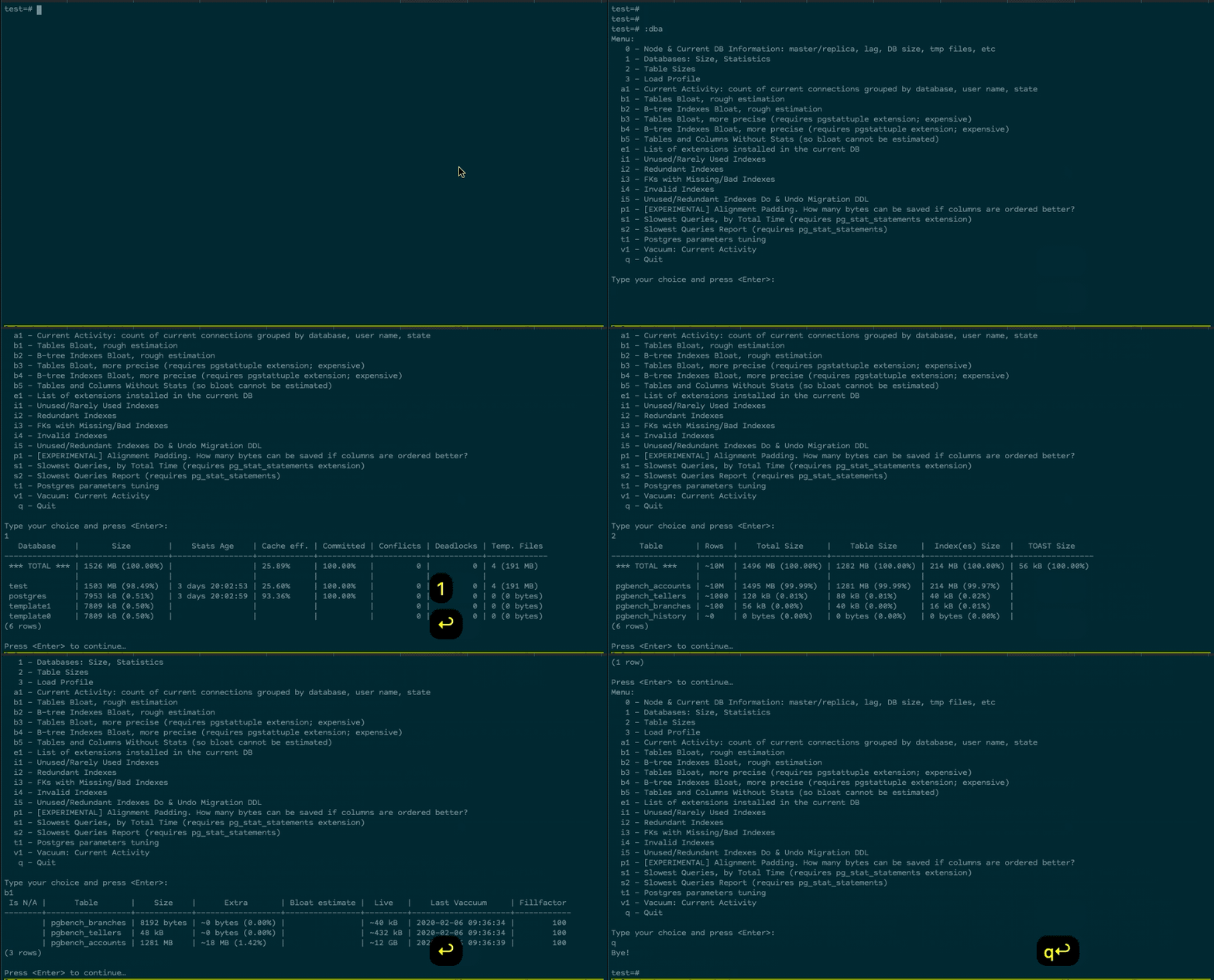
演示图
演示图
引用链接
[1] postgres_dba: https://github.com/NikolayS/postgres_dba
本文参与 腾讯云自媒体同步曝光计划,分享自微信公众号。
原始发表:2026-06-01,如有侵权请联系 cloudcommunity@tencent.com 删除
目录
腾讯云开发者

Copyright © 2013 - 2026 Tencent Cloud. All Rights Reserved. 腾讯云 版权所有
深圳市腾讯计算机系统有限公司 ICP备案/许可证号:粤B2-20090059  粤公网安备44030502008569号
腾讯云计算(北京)有限责任公司 京ICP证150476号 | 京ICP备11018762号