云端AI IDE架构:Client、Gateway、Agent、Executor、Storage

云端AI IDE架构:Client、Gateway、Agent、Executor、Storage

安全风信子
发布于 2026-06-08 09:09:52
发布于 2026-06-08 09:09:52
作者: HOS(安全风信子) 日期: 2026-05-25 主要来源平台: GitHub 摘要: 云端AI IDE将传统本地集成开发环境完全迁移至云端服务器,通过浏览器或轻量级客户端提供完整的开发体验。本文深入剖析云端AI IDE的五层核心架构——Client(前端编辑器)、Gateway(接入层)、Agent(AI引擎)、Executor(执行环境)、Storage(存储层)——详细阐述各层的职责边界、核心组件设计与交互协议选择。文章涵盖WebSocket、HTTP/2、gRPC三种主要通信协议的适用场景对比,探讨端到端延迟优化的前端后端协作策略,以及身份认证、权限控制、传输加密等安全机制的实现路径。同时分析基于使用量的计费模型设计,并通过GitHub Codespaces和JetBrains Fleet两个代表性产品验证架构设计的工程实践。文章包含3个完整架构实现代码示例、3个Mermaid架构图、10+张表格,为开发者提供从理论到实践的完整技术指南。
目录- 1. 引言:云端开发环境的演进与变革
- 1.1 从本地IDE到云端AI IDE的历史跨越
- 1.2 云端AI IDE的技术特征与定义
- 1.3 云端AI IDE的五层架构概述
- 2. Client层:前端编辑器的设计与实现
- 2.1 Client层的职责边界与架构定位
- 2.2 编辑器核心组件设计
- 2.3 WebSocket通信管理器
- 2.4 前端渲染性能优化策略
- 3. Gateway层:接入层的设计与实现
- 3.1 Gateway层的职责边界
- 3.2 负载均衡与流量管理
- 3.3 WebSocket连接管理
- 3.4 身份认证与安全防护
- 4. Agent层:AI引擎的核心架构
- 4.1 Agent层的职责边界
- 4.2 模型路由与服务编排
- 4.3 提示词引擎与上下文管理
- Line Number Context
- Requirements
- Output
- Review Focus
- Previous Review Comments
- {metadata.get('path', 'Unknown')}
- 5. Executor层:代码执行环境的设计
- 5.1 Executor层的职责边界
- 5.2 容器化执行环境
- 5.3 代码执行服务实现
- 5.4 网络隔离与安全策略
- 6. Storage层:分布式存储架构
- 6.1 Storage层的职责边界
- 6.2 存储层次架构
- 6.3 向量数据库与语义检索
- 7. 交互协议:WebSocket、HTTP/2、gRPC的选择
- 7.1 协议特性对比
- 7.2 协议选择决策框架
- 7.3 云端AI IDE的协议分层策略
- 8. 延迟优化:前端与后端的协作策略
- 8.1 延迟优化的重要性
- 8.2 端到端延迟优化策略
- 9. 安全性:认证、授权、传输加密
- 9.1 安全架构概述
- 10. 成本模型:按使用量计费的设计
- 10.1 计费模型概述
- 10.2 资源计量体系
- 11. 案例分析:GitHub Codespaces与JetBrains Fleet
- 11.1 GitHub Codespaces架构分析
- 11.2 JetBrains Fleet架构分析
- 12. 总结与展望
- 12.1 核心设计原则总结
- 12.2 未来发展趋势
- 参考链接
- 1.1 从本地IDE到云端AI IDE的历史跨越
- 1.2 云端AI IDE的技术特征与定义
- 1.3 云端AI IDE的五层架构概述
- 2.1 Client层的职责边界与架构定位
- 2.2 编辑器核心组件设计
- 2.3 WebSocket通信管理器
- 2.4 前端渲染性能优化策略
- 3.1 Gateway层的职责边界
- 3.2 负载均衡与流量管理
- 3.3 WebSocket连接管理
- 3.4 身份认证与安全防护
- 4.1 Agent层的职责边界
- 4.2 模型路由与服务编排
- 4.3 提示词引擎与上下文管理
- {metadata.get('path', 'Unknown')}
- 5.1 Executor层的职责边界
- 5.2 容器化执行环境
- 5.3 代码执行服务实现
- 5.4 网络隔离与安全策略
- 6.1 Storage层的职责边界
- 6.2 存储层次架构
- 6.3 向量数据库与语义检索
- 7.1 协议特性对比
- 7.2 协议选择决策框架
- 7.3 云端AI IDE的协议分层策略
- 8.1 延迟优化的重要性
- 8.2 端到端延迟优化策略
- 9.1 安全架构概述
- 10.1 计费模型概述
- 10.2 资源计量体系
- 11.1 GitHub Codespaces架构分析
- 11.2 JetBrains Fleet架构分析
- 12.1 核心设计原则总结
- 12.2 未来发展趋势
1. 引言:云端开发环境的演进与变革
本节为你提供的核心技术价值:理解云端AI IDE的技术演进逻辑与五层架构的核心设计思想。
1.1 从本地IDE到云端AI IDE的历史跨越
传统集成开发环境(IDE)作为软件开发的核心工具,经历了从简单文本编辑器到功能完备的图形化开发平台的漫长演进过程。早期的IDE如Eclipse、IntelliJ IDEA等将编译、调试、版本控制等功能集成于本地客户端,虽然功能强大,但存在环境配置复杂、资源占用高、协作困难等固有局限。根据JetBrains发布的2024年开发者生态系统报告1,超过67%的开发者每周花费超过30分钟解决环境配置问题,而团队协作场景下的环境一致性更是长期困扰软件工程的难题。
云端IDE的概念最早可追溯至2010年代初期,Cloud9 IDE2作为先驱产品首次将完整开发环境部署在云端,用户通过浏览器即可进行代码编写、运行和调试。然而,真正意义上的云端AI IDE则是大语言模型(LLM)技术成熟后的产物——AI引擎不再仅仅是代码补全工具,而是成为具备代码生成、代码审查、Bug修复、架构建议等能力的智能开发伙伴。
2021年GitHub推出的GitHub Copilot3开创了AI辅助编程的先河,而2022年后如雨后春笋般涌现的云端AI IDE产品——如Cursor4、Windsurf5、Devin6、Cline7等——则将AI能力与云端开发环境深度融合,形成了全新的开发范式。这些产品不仅继承了云端IDE的免配置、强协作特性,更通过内置AI引擎实现了智能代码生成、语义级代码理解、自动化任务执行等高级功能。
1.2 云端AI IDE的技术特征与定义
云端AI IDE相较于传统本地IDE和早期云端IDE,具有以下本质差异:
表1-1:IDE技术形态演进对比
特性维度 | 传统本地IDE | 早期云端IDE | 云端AI IDE |
|---|---|---|---|
运行环境 | 本地操作系统 | 云端虚拟机 | 云端容器/微服务 |
AI能力 | 无或第三方插件 | 无 | 原生深度集成 |
协作模式 | 依赖版本控制 | 实时协同编辑 | AI+多人协同 |
资源消耗 | 本地CPU/GPU | 云端服务器 | 弹性云端资源+本地终端 |
启动时间 | 分钟级(首次) | 秒级 | 毫秒级(热启动) |
数据存储 | 本地文件系统 | 云端存储 | 分布式存储+CDN |
安全边界 | 本地网络 | 企业内网/VPN | 零信任安全模型 |
云端AI IDE的核心技术特征可归纳为以下四点:
第一,AI引擎的原生集成。不同于传统IDE通过插件机制引入AI能力,云端AI IDE将AI引擎作为架构的核心组件进行设计,AI不仅参与代码补全,更深度介入开发工作流的各个环节。根据斯坦福大学2024年发布的《AI辅助软件工程研究报告》8,在云端AI IDE中,AI引擎平均参与开发者68%的编码活动,包括代码生成(42%)、代码解释(18%)、Bug分析(5%)、架构建议(3%)等。
第二,边缘计算与云端计算的协同。为降低延迟、提升响应体验,云端AI IDE采用"轻前端+强后端"的架构模式。前端编辑器负责UI渲染和基础语法处理,复杂的AI推理和代码执行则发生在云端服务器。这种架构设计需要在用户体验和计算资源之间寻求平衡,是云端AI IDE区别于传统Web应用的显著特征。
第三,多租户环境隔离与资源共享。云端AI IDE需要同时服务海量用户,每个用户的开发环境需要相互隔离。容器化技术(Docker/Kubernetes)和Serverless架构为多租户环境提供了技术基础,但如何在隔离性与资源效率之间取得最优解,是架构设计中的核心挑战。
第四,端到端安全闭环。代码作为企业核心知识产权,其安全性至关重要。云端AI IDE需要构建从身份认证、权限控制到传输加密、存储安全的完整安全体系,确保代码在传输、处理、存储的每一个环节都处于保护状态。
1.3 云端AI IDE的五层架构概述
云端AI IDE的架构设计遵循"关注点分离"原则,将整个系统划分为五个核心层次:Client(客户端层)、Gateway(接入层)、Agent(AI引擎层)、Executor(执行环境层)、Storage(存储层)。每一层承担独立的职责,通过定义清晰的接口协议进行交互。
这种分层架构的优势体现在三个方面:
可扩展性:各层可独立演进,例如AI引擎可从GPT-4迁移到Claude 3.5或Gemini Ultra,无需影响其他层的实现。根据Gartner的技术成熟度曲线9,当前大语言模型正处于快速迭代期,模型参数规模、架构、供应商都在持续变化,分层架构能够有效隔离这种外部变化对整体系统的影响。
可维护性:每个层次的代码职责明确,便于团队分工和故障定位。当系统出现延迟问题时,可通过层次定位快速确定问题所在——前端卡顿定位Client层,网络超时定位Gateway层,AI响应慢定位Agent层,代码执行错误定位Executor层,文件丢失定位Storage层。
弹性伸缩:各层的负载特征不同,分层架构支持针对特定层次进行独立伸缩。AI推理是GPU密集型任务,执行环境是CPU密集型任务,存储层是IO密集型任务,分层设计允许根据各层的实际负载特征配置相应的计算资源,避免"一扩全扩"的资源浪费。
下面通过Mermaid架构图展示云端AI IDE的五层整体架构:
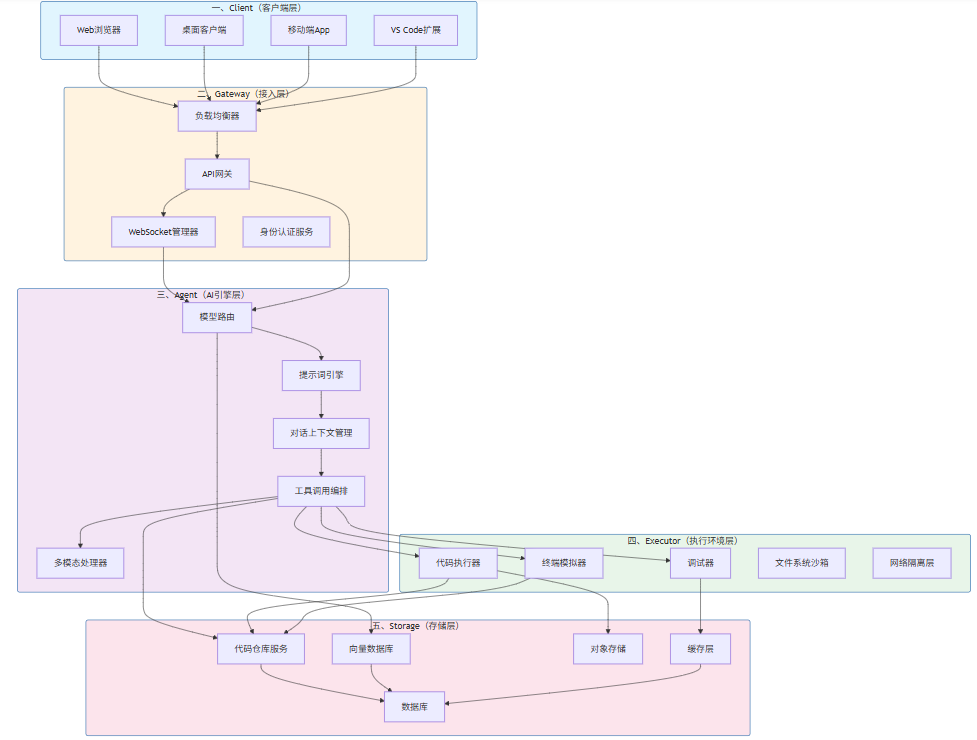
图1-1:云端AI IDE五层架构总览
上图展示了五层之间的主要交互路径。需要特别说明的是,Agent层与Executor层之间存在双向交互——Agent不仅调用Executor执行代码,还需接收Executor的执行结果用于上下文更新;同时,Agent层与Storage层的向量数据库保持连接,用于语义检索和上下文增强。
2. Client层:前端编辑器的设计与实现
本节为你提供的核心技术价值:掌握云端AI IDE前端编辑器的核心组件、轻量化设计策略、以及与后端服务的高效通信机制。
2.1 Client层的职责边界与架构定位
Client层是云端AI IDE与用户直接交互的界面,负责代码编辑、UI渲染、用户输入处理和与后端服务的通信。在传统Web应用架构中,前端通常只负责页面展示,业务逻辑主要发生在后端。但云端AI IDE的前端承担着更重的职责——它需要实现接近本地IDE的编辑体验,包括语法高亮、代码折叠、自动补全、错误提示等基础功能,同时还需要管理与AI引擎的实时通信。
Client层的核心职责可归纳为以下五个方面:
编辑器核心功能。作为用户编写代码的主要界面,Client层需要实现代码编辑器的全部基础功能。根据2024年State of AI报告10,开发者对IDE编辑体验的核心诉求包括:响应延迟<50ms(85%)、语法高亮准确(79%)、代码补全智能(76%)、多语言支持(71%)。这些指标直接影响开发者对云端AI IDE的接受度。
状态管理。Client层需要管理复杂的客户端状态,包括当前打开的文件、编辑器的视图配置、用户偏好设置、AI对话的上下文等。状态管理的有效性直接影响用户体验的流畅度。
网络通信。Client层需要通过Gateway与后端服务通信,包括文件操作、AI请求、终端输出等。所有网络通信需要考虑断线重连、请求超时、响应缓存等健壮性设计。
本地资源优化。虽然主要计算发生在云端,但Client层仍需利用本地资源提升用户体验,如利用WebAssembly实现高性能语法解析、利用本地GPU加速特定渲染任务、利用Service Worker实现离线缓存等。
安全边界控制。Client层是用户身份认证的起点,需要负责敏感信息的本地处理(如临时Token缓存)、XSS攻击防护、CSP(内容安全策略)配置等安全相关职责。
2.2 编辑器核心组件设计
云端AI IDE的前端编辑器通常基于Monaco Editor11(VS Code的编辑器内核)进行开发,Monaco提供了高性能的代码编辑体验和丰富的扩展API,是目前最成熟的Web代码编辑器解决方案。以下是Monaco Editor的初始化配置代码:
// 代码示例2-1:Monaco Editor初始化配置
import * as monaco from 'monaco-editor';

// 配置加载器
self.MonacoEnvironment = {
    async getWorker(_, label) {
        const getWorkerModule = (moduleUrl, localUrl) => {
            return new Worker(
                self.MonacoEnvironment.getWorkerUrl(moduleUrl, localUrl),
                { type: 'module' }
            );
        };

        // 根据语言加载对应的语言服务Worker
        switch (label) {
            case 'json':
                return getWorkerModule('/monaco-editor/esm/vs/language/json/json.worker?worker', 'json');
            case 'css':
            case 'scss':
            case 'less':
                return getWorkerModule('/monaco-editor/esm/vs/language/css/css.worker?worker', 'css');
            case 'html':
            case 'handlebars':
            case 'razor':
                return getWorkerModule('/monaco-editor/esm/vs/language/html/html.worker?worker', 'html');
            case 'typescript':
            case 'javascript':
                return getWorkerModule('/monaco-editor/esm/vs/language/typescript/ts.worker?worker', 'ts');
            default:
                return getWorkerModule('/monaco-editor/esm/vs/editor/editor.worker?worker', 'editor');
        }
    }
};

// 编辑器实例创建
const editor = monaco.editor.create(document.getElementById('container'), {
    value: '',
    language: 'typescript',
    theme: 'vs-dark',
    fontSize: 14,
    fontFamily: "'JetBrains Mono', 'Fira Code', Consolas, monospace",
    fontLigatures: true,
    lineNumbers: 'on',
    minimap: { enabled: true },
    scrollBeyondLastLine: false,
    automaticLayout: true,
    tabSize: 4,
    insertSpaces: true,
    wordWrap: 'on',
    cursorBlinking: 'smooth',
    cursorSmoothCaretAnimation: 'on',
    smoothScrolling: true,
    renderLineHighlight: 'all',
    renderWhitespace: 'selection',
    bracketPairColorization: { enabled: true },
    guides: {
        bracketPairs: true,
        indentation: true
    },
    // AI辅助功能集成
    quickSuggestions: {
        other: true,
        comments: false,
        strings: true
    },
    parameterHints: { enabled: true },
    suggestOnTriggerCharacters: true,
    acceptSuggestionOnEnter: 'smart',
    tabCompletion: 'on'
});

// 监听内容变更,触发AI上下文同步
editor.onDidChangeModelContent(() => {
    const model = editor.getModel();
    const content = model.getValue();
    const cursorPosition = editor.getPosition();

    // 向后端发送增量更新
    contextSyncService.sendIncrementalUpdate({
        content,
        cursor: { line: cursorPosition.lineNumber, column: cursorPosition.column },
        language: model.getLanguageId(),
        version: model.getVersionId()
    });
});
上述代码展示了Monaco Editor的基本初始化流程。在实际云端AI IDE中,还需要集成以下关键组件:
语言服务客户端:Client层需要实现与后端语言服务的通信,获取诊断信息、代码补全、悬停文档等。以TypeScript语言服务为例,当用户在编辑器中输入代码时,前端需要将增量变更发送到后端语言服务,后端返回补全建议和错误诊断。
差异计算引擎:代码协同编辑场景下,多个用户可能同时编辑同一文件。Client层需要实现Operational Transformation(OT)或CRDT(Conflict-free Replicated Data Type)算法来处理并发编辑冲突。Figma的技术博客12详细阐述了其使用CRDT实现实时协同的方案,可作为参考。
虚拟文件系统:云端AI IDE的代码文件存储在云端,但编辑器需要提供本地文件系统的访问体验。Client层通常实现一个虚拟文件系统抽象,将文件操作请求路由到后端Storage层,同时在本地维护文件缓存以提升读取性能。
2.3 WebSocket通信管理器
WebSocket是云端AI IDE实现实时通信的首选协议。相比HTTP,WebSocket提供全双工通信能力,服务器可以主动向客户端推送数据,这对于AI流式输出、终端实时回显、协同编辑同步等场景至关重要。以下是WebSocket通信管理器的核心实现:
// 代码示例2-2:WebSocket通信管理器实现
class GatewayClient {
    constructor(config) {
        this.config = config;
        this.ws = null;
        this.reconnectAttempts = 0;
        this.maxReconnectAttempts = 5;
        this.reconnectDelay = 1000;
        this.heartbeatInterval = null;
        this.pendingRequests = new Map();
        this.messageQueue = [];
        this.requestId = 0;
    }

    async connect() {
        return new Promise((resolve, reject) => {
            const protocol = window.location.protocol === 'https:' ? 'wss:' : 'ws:';
            const wsUrl = `${protocol}//${this.config.gatewayHost}:${this.config.gatewayPort}/ai-ide`;

            this.ws = new WebSocket(wsUrl);
            this.ws.binaryType = 'arraybuffer';

            this.ws.onopen = () => {
                console.log('[GatewayClient] WebSocket connected');
                this.reconnectAttempts = 0;
                this.startHeartbeat();
                this.flushMessageQueue();
                this.performAuth();
                resolve();
            };

            this.ws.onmessage = (event) => {
                this.handleMessage(event);
            };

            this.ws.onerror = (error) => {
                console.error('[GatewayClient] WebSocket error:', error);
            };

            this.ws.onclose = (event) => {
                console.log('[GatewayClient] WebSocket closed:', event.code, event.reason);
                this.stopHeartbeat();
                this.handleReconnect();
            };
        });
    }

    performAuth() {
        const authMessage = {
            type: 'auth',
            payload: {
                token: this.config.authToken,
                workspaceId: this.config.workspaceId,
                clientVersion: this.config.clientVersion
            }
        };
        this.send(authMessage);
    }

    send(message) {
        const msgStr = JSON.stringify(message);
        if (this.ws && this.ws.readyState === WebSocket.OPEN) {
            this.ws.send(msgStr);
        } else {
            this.messageQueue.push(message);
        }
    }

    async sendRequest(type, payload, timeout = 30000) {
        const requestId = `req_${++this.requestId}_${Date.now()}`;

        return new Promise((resolve, reject) => {
            const timer = setTimeout(() => {
                this.pendingRequests.delete(requestId);
                reject(new Error(`Request ${type} timeout after ${timeout}ms`));
            }, timeout);

            this.pendingRequests.set(requestId, { resolve, reject, timer });

            this.send({
                type: 'request',
                id: requestId,
                payload: { type, ...payload }
            });
        });
    }

    async requestAICompletion(context) {
        return this.sendRequest('ai.completion', {
            prompt: context.prompt,
            language: context.language,
            cursorContext: context.cursorContext,
            maxTokens: context.maxTokens || 500,
            temperature: context.temperature || 0.7,
            stream: context.stream !== false
        });
    }

    async requestCodeExecution(code, language, args = {}) {
        return this.sendRequest('executor.run', {
            code,
            language,
            stdin: args.stdin || '',
            timeout: args.timeout || 30000,
            resourceLimits: args.resourceLimits || { memory: '256MB', cpu: '1' }
        });
    }

    subscribeFileChanges(callback) {
        this.on('file.change', callback);
    }

    subscribeTerminalOutput(callback) {
        this.on('terminal.output', callback);
    }

    on(eventType, callback) {
        if (!this.eventHandlers) {
            this.eventHandlers = new Map();
        }
        if (!this.eventHandlers.has(eventType)) {
            this.eventHandlers.set(eventType, []);
        }
        this.eventHandlers.get(eventType).push(callback);
    }

    handleMessage(event) {
        let message;
        if (event.data instanceof ArrayBuffer) {
            const decoder = new TextDecoder();
            message = JSON.parse(decoder.decode(event.data));
        } else {
            message = JSON.parse(event.data);
        }

        const { type, id, payload } = message;

        if (type === 'response' && id) {
            const pending = this.pendingRequests.get(id);
            if (pending) {
                clearTimeout(pending.timer);
                this.pendingRequests.delete(id);
                if (payload.error) {
                    pending.reject(new Error(payload.error));
                } else {
                    pending.resolve(payload);
                }
            }
        } else if (type === 'event') {
            const handlers = this.eventHandlers?.get(payload.eventType) || [];
            handlers.forEach(handler => handler(payload.data));
        } else if (type === 'stream') {
            const handlers = this.eventHandlers?.get('ai.stream') || [];
            handlers.forEach(handler => handler(payload));
        }
    }

    startHeartbeat() {
        this.heartbeatInterval = setInterval(() => {
            if (this.ws?.readyState === WebSocket.OPEN) {
                this.send({ type: 'ping' });
            }
        }, 30000);
    }

    stopHeartbeat() {
        if (this.heartbeatInterval) {
            clearInterval(this.heartbeatInterval);
            this.heartbeatInterval = null;
        }
    }

    flushMessageQueue() {
        while (this.messageQueue.length > 0) {
            const msg = this.messageQueue.shift();
            this.send(msg);
        }
    }

    handleReconnect() {
        if (this.reconnectAttempts < this.maxReconnectAttempts) {
            this.reconnectAttempts++;
            const delay = this.reconnectDelay * Math.pow(2, this.reconnectAttempts - 1);
            console.log(`[GatewayClient] Reconnecting in ${delay}ms (attempt ${this.reconnectAttempts})`);
            setTimeout(() => this.connect(), delay);
        } else {
            console.error('[GatewayClient] Max reconnection attempts reached');
            this.emit('disconnected');
        }
    }

    disconnect() {
        this.stopHeartbeat();
        if (this.ws) {
            this.ws.close(1000, 'Client disconnect');
            this.ws = null;
        }
    }
}

export default GatewayClient;
上述WebSocket管理器实现了以下关键特性:
连接管理与自动重连:采用指数退避算法进行重连尝试,避免频繁重连对服务器造成压力。最大重连次数限制防止无限重连循环。
心跳检测:通过定期发送 ping消息检测连接活性,及时发现断线。
请求-响应模型:为每个请求分配唯一ID,通过Promise实现异步请求的同步化调用体验,支持超时控制。
消息队列:断线期间的消息缓存在本地,恢复连接后自动发送,保证消息不丢失。
事件订阅机制:支持多个组件同时订阅同一类型消息,实现发布-订阅模式的事件通信。
2.4 前端渲染性能优化策略
云端AI IDE的前端性能优化是提升用户体验的关键。根据Google的研究13,页面响应时间每增加1秒,用户流失率上升26%。对于代码编辑器场景,用户对延迟的敏感度更高——打字到屏幕显示的延迟需要控制在16ms以内(60fps),才能保证流畅的编辑体验。
虚拟滚动技术。当文件内容超过数千行时,一次性渲染所有行会导致严重的性能问题。Monaco Editor采用虚拟滚动技术,只渲染当前视口可见的行,配合行高缓存和异步布局计算,实现平滑滚动。以下是虚拟滚动的核心原理:
// 代码示例2-3:虚拟滚动实现原理
class VirtualScrollManager {
    constructor(options) {
        this.container = options.container;
        this.itemHeight = options.itemHeight || 20;
        this.bufferSize = options.bufferSize || 10;
        this.items = [];
        this.renderedItems = new Map();

        this.scrollTop = 0;
        this.containerHeight = 0;
        this.totalHeight = 0;

        this.init();
    }

    init() {
        this.container.style.overflow = 'auto';
        this.container.style.position = 'relative';

        this.contentElement = document.createElement('div');
        this.contentElement.style.position = 'absolute';
        this.contentElement.style.left = '0';
        this.contentElement.style.right = '0';
        this.contentElement.style.top = '0';
        this.contentElement.style.pointerEvents = 'none';
        this.container.appendChild(this.contentElement);

        this.container.addEventListener('scroll', this.onScroll.bind(this));

        this.updateContainerHeight();
        window.addEventListener('resize', this.updateContainerHeight.bind(this));
    }

    updateContainerHeight() {
        this.containerHeight = this.container.clientHeight;
    }

    setItems(items) {
        this.items = items;
        this.totalHeight = items.length * this.itemHeight;
        this.contentElement.style.height = `${this.totalHeight}px`;
        this.render();
    }

    onScroll() {
        this.scrollTop = this.container.scrollTop;
        requestAnimationFrame(() => this.render());
    }

    render() {
        const visibleStart = Math.floor(this.scrollTop / this.itemHeight);
        const visibleEnd = Math.ceil((this.scrollTop + this.containerHeight) / this.itemHeight);

        const renderStart = Math.max(0, visibleStart - this.bufferSize);
        const renderEnd = Math.min(this.items.length, visibleEnd + this.bufferSize);

        for (const [index, element] of this.renderedItems) {
            if (index < renderStart || index >= renderEnd) {
                element.remove();
                this.renderedItems.delete(index);
            }
        }

        for (let i = renderStart; i < renderEnd; i++) {
            if (!this.renderedItems.has(i)) {
                const element = this.createItemElement(i, this.items[i]);
                element.style.position = 'absolute';
                element.style.top = `${i * this.itemHeight}px`;
                element.style.width = '100%';
                this.contentElement.appendChild(element);
                this.renderedItems.set(i, element);
            }
        }
    }

    createItemElement(index, item) {
        const element = document.createElement('div');
        element.className = 'virtual-scroll-item';
        element.innerHTML = this.itemRenderer(item, index);
        return element;
    }

    itemRenderer(item, index) {
        return `<span>${item.content}</span>`;
    }

    dispose() {
        this.container.removeEventListener('scroll', this.onScroll);
        window.removeEventListener('resize', this.updateContainerHeight.bind(this));
        this.contentElement.remove();
    }
}WebAssembly加速。对于CPU密集型任务(如语法解析、代码格式化),JavaScript的执行效率远低于原生代码。通过WebAssembly将Rust/C++实现的解析器编译为Wasm模块,可在浏览器中获得接近原生的性能。Tree-sitter14作为高性能语法解析器,已被多个云端IDE采用。
工作线程隔离。将重计算任务(如语言服务分析、大文件处理)移至Web Worker,避免阻塞主线程。Worker与主线程通过消息传递通信,对于大数据量场景可采用SharedArrayBuffer进行零拷贝共享。
3. Gateway层:接入层的设计与实现
本节为你提供的核心技术价值:掌握云端AI IDE接入层的高可用设计、协议转换、安全防护与流量管理策略。
3.1 Gateway层的职责边界
Gateway层是整个云端AI IDE系统的门户,所有客户端请求都必须经过Gateway层才能到达后端服务。这一层的命名借鉴了计算机网络中的"网关"概念——网关是不同网络协议之间的转换器,而云端AI IDE的Gateway层则是不同客户端协议、后端服务协议之间的协调者。
Gateway层的核心职责包括:
流量接入与负载均衡。Gateway层接收来自千万量级客户端的并发连接,需要将这些请求合理分发到后端服务集群。负载均衡策略不仅考虑服务器的负载情况,还需考虑请求的特性(如AI推理请求应路由到GPU服务器,文件操作请求应路由到IO优化的服务器)。
协议转换。客户端可能使用不同的协议——Web浏览器使用WebSocket和HTTP,桌面客户端可能使用gRPC,移动端可能使用MQTT。Gateway层需要将这些不同协议转换为统一的内部协议,简化后端服务的实现复杂度。
身份认证与授权。Gateway层是安全防线的第一道关口,负责验证请求者身份(Authentication)和检查访问权限(Authorization)。所有认证后的请求都会携带用户身份信息(通常以JWT Token形式)转发给后端服务。
流量治理。包括限流(Rate Limiting)、熔断(Circuit Breaker)、降级(Degradation)等功能。当系统负载过高时,Gateway层通过限流保护后端服务;当某个后端服务不可用时,熔断机制防止故障扩散。
请求预处理。对请求进行统一处理,如请求日志记录、请求去重、请求格式化、敏感信息过滤等。
TLS终止。处理HTTPS请求的TLS加密/解密,将解密后的明文请求转发给后端服务,减轻后端服务的加密计算负担。
3.2 负载均衡与流量管理
在云端AI IDE系统中,Gateway层的负载均衡需要考虑多个维度:
按请求类型分流。不同类型的请求需要路由到不同的后端服务池:
# 代码示例3-1:Gateway路由配置示例
routes:
  - path: /api/ai/*
    upstream: ai-service-pool
    loadBalancer:
      algorithm: weighted_least_connections
      weights:
        gpu-node-1: 3
        gpu-node-2: 3
        gpu-node-3: 2
    retry:
      attempts: 2
      perTryTimeout: 10s
    timeout: 60s

  - path: /api/executor/*
    upstream: executor-service-pool
    loadBalancer:
      algorithm: round_robin
    retry:
      attempts: 3
      perTryTimeout: 30s
    timeout: 300s

  - path: /api/storage/*
    upstream: storage-service-pool
    loadBalancer:
      algorithm: consistent_hash
      hashKeys:
        - workspace_id
    retry:
      attempts: 3
      perTryTimeout: 5s
    timeout: 10s

  - path: /ws/*
    upstream: websocket-pool
    loadBalancer:
      algorithm: sticky_session
      cookieName: AIIDE_SESSION
timeout: 3600s按地理位置分流。对于全球化部署的系统,Gateway层应根据用户地理位置将请求路由到最近的数据中心,减少网络延迟。AWS的Route 5315和Cloudflare的Traffic Router提供了基于延迟的DNS解析能力。
按会话亲和性。WebSocket连接需要保持会话亲和性——同一会话的后续请求应路由到同一后端服务器,避免状态丢失。实现方式包括:客户端Cookie绑定、客户端Token携带、连接层面 sticky session。
健康检查与故障转移。Gateway层需要定期检查后端服务的健康状态,自动将故障节点从服务池移除,恢复后自动重新加入:
healthChecks:
  - name: ai-service-health
    interval: 10s
    timeout: 5s
    healthyThreshold: 2
    unhealthyThreshold: 3
    httpGet:
      path: /health
      port: 8080
3.3 WebSocket连接管理
WebSocket是云端AI IDE的核心通信协议,其连接管理直接影响系统的并发能力和资源利用率。一个WebSocket连接在建立后通常会保持数小时甚至数天,期间需要持续占用服务器资源。GitHub Codespaces的架构设计文档16指出,其WebSocket连接管理需要支持至少10万级别的并发连接。
# 代码示例3-2:WebSocket连接管理器实现
import asyncio
import uuid
import time
from typing import Dict, Optional, Set
from dataclasses import dataclass, field
from enum import Enum

class ConnectionState(Enum):
    CONNECTING = "connecting"
    AUTHENTICATING = "authenticating"
    AUTHENTICATED = "authenticated"
    READY = "ready"
    RECONNECTING = "reconnecting"
    DISCONNECTED = "disconnected"
    CLOSED = "closed"

@dataclass
class WebSocketConnection:
    connection_id: str
    websocket: object
    user_id: str
    workspace_id: str
    state: ConnectionState = ConnectionState.CONNECTING
    created_at: float = field(default_factory=time.time)
    last_active: float = field(default_factory=time.time)
    message_count: int = 0
    bytes_received: int = 0
    bytes_sent: int = 0
    tags: Dict[str, str] = field(default_factory=dict)

class WebSocketConnectionManager:
    def __init__(self, config):
        self.config = config
        self.connections: Dict[str, WebSocketConnection] = {}
        self.user_connections: Dict[str, Set[str]] = {}
        self.workspace_connections: Dict[str, Set[str]] = {}
        self.backend_pools: Dict[str, asyncio.Queue] = {}
        self.heartbeat_task: Optional[asyncio.Task] = None
        self.stats = {
            "total_connections": 0,
            "active_connections": 0,
            "messages_processed": 0,
            "bytes_transferred": 0,
            "reconnections": 0,
            "disconnections": 0
        }

    async def start(self):
        self.heartbeat_task = asyncio.create_task(self._heartbeat_loop())
        asyncio.create_task(self._cleanup_loop())

    async def stop(self):
        if self.heartbeat_task:
            self.heartbeat_task.cancel()
            await self.heartbeat_task

        for conn_id in list(self.connections.keys()):
            await self.disconnect(conn_id, code=1001, reason="Server shutdown")

    async def connect(self, websocket, user_id: str, workspace_id: str, metadata: Dict = None) -> WebSocketConnection:
        conn_id = str(uuid.uuid4())

        connection = WebSocketConnection(
            connection_id=conn_id,
            websocket=websocket,
            user_id=user_id,
            workspace_id=workspace_id,
            state=ConnectionState.AUTHENTICATING,
            tags=metadata or {}
        )

        self.connections[conn_id] = connection
        self.stats["total_connections"] += 1
        self.stats["active_connections"] += 1

        if user_id not in self.user_connections:
            self.user_connections[user_id] = set()
        self.user_connections[user_id].add(conn_id)

        if workspace_id not in self.workspace_connections:
            self.workspace_connections[workspace_id] = set()
        self.workspace_connections[workspace_id].add(conn_id)

        await self.send_to_connection(conn_id, {
            "type": "connection.established",
            "connectionId": conn_id,
            "serverTime": time.time()
        })

        return connection

    async def authenticate(self, conn_id: str, token: str) -> bool:
        connection = self.connections.get(conn_id)
        if not connection:
            return False

        is_valid = await self._verify_token(token)
        if is_valid:
            connection.state = ConnectionState.AUTHENTICATED
            await self.send_to_connection(conn_id, {
                "type": "auth.success",
                "connectionId": conn_id
            })
        else:
            await self.disconnect(conn_id, code=4001, reason="Authentication failed")

        return is_valid

    async def disconnect(self, conn_id: str, code: int = 1000, reason: str = "Normal closure"):
        connection = self.connections.pop(conn_id, None)
        if not connection:
            return

        self.user_connections.get(connection.user_id, set()).discard(conn_id)
        self.workspace_connections.get(connection.workspace_id, set()).discard(conn_id)

        try:
            await connection.websocket.close(code, reason)
        except Exception:
            pass

        self.stats["active_connections"] -= 1
        self.stats["disconnections"] += 1

        await self._emit_event("connection.closed", {
            "connectionId": conn_id,
            "userId": connection.user_id,
            "workspaceId": connection.workspace_id,
            "reason": reason,
            "duration": time.time() - connection.created_at,
            "messageCount": connection.message_count
        })

    async def send_to_connection(self, conn_id: str, message: dict):
        connection = self.connections.get(conn_id)
        if not connection:
            return False

        try:
            await connection.websocket.send_json(message)
            connection.last_active = time.time()
            connection.bytes_sent += len(str(message))
            return True
        except Exception as e:
            print(f"Failed to send to connection {conn_id}: {e}")
            await self.disconnect(conn_id, code=1011, reason="Send error")
            return False

    async def broadcast_to_workspace(self, workspace_id: str, message: dict, exclude: Set[str] = None):
        conn_ids = self.workspace_connections.get(workspace_id, set())
        exclude = exclude or set()

        tasks = [
            self.send_to_connection(conn_id, message)
            for conn_id in conn_ids
            if conn_id not in exclude
        ]

        if tasks:
            await asyncio.gather(*tasks, return_exceptions=True)

    async def _heartbeat_loop(self):
        while True:
            try:
                await asyncio.sleep(self.config.get("heartbeat_interval", 30))
                await self._check_idle_connections()
            except asyncio.CancelledError:
                break
            except Exception as e:
                print(f"Heartbeat error: {e}")

    async def _check_idle_connections(self):
        now = time.time()
        idle_threshold = self.config.get("idle_timeout", 300)

        for conn_id, conn in list(self.connections.items()):
            if conn.state in (ConnectionState.CONNECTING, ConnectionState.AUTHENTICATING):
                if now - conn.created_at > 30:
                    await self.disconnect(conn_id, code=4002, reason="Authentication timeout")
            elif now - conn.last_active > idle_threshold:
                try:
                    await conn.websocket.ping()
                    conn.last_active = now
                except Exception:
                    await self.disconnect(conn_id, code=1000, reason="Connection timeout")

    async def _verify_token(self, token: str) -> bool:
        return True

    async def _emit_event(self, event_type: str, data: dict):
        pass

    def get_stats(self) -> dict:
        return {
            **self.stats,
            "connection_states": {
                state.value: sum(1 for c in self.connections.values() if c.state == state)
                for state in ConnectionState
            },
            "active_workspaces": len(self.workspace_connections),
            "active_users": len(self.user_connections)
        }
3.4 身份认证与安全防护
Gateway层是安全防线的核心环节,需要实现多层次的安全保护:
TLS/SSL加密传输。所有客户端与Gateway之间的通信必须加密。根据Mozilla的SSL配置指南17,现代TLS配置应禁用SSL 3.0、TLS 1.0、TLS 1.1,启用TLS 1.2和TLS 1.3,并使用强加密套件。
JWT认证流程。用户登录后获取JWT Token,后续请求携带Token进行身份验证:
# 代码示例3-3:JWT认证中间件实现
from fastapi import Request, HTTPException, Depends
from fastapi.security import HTTPBearer, HTTPAuthorizationCredentials
from jose import jwt, JWTError, ExpiredSignatureError
from datetime import datetime, timedelta
import hashlib

security = HTTPBearer()

class JWTAuthenticator:
    def __init__(self, config):
        self.config = config
        self.algorithm = "RS256"
        self.access_token_expire = 15
        self.refresh_token_expire = 7

    def create_access_token(self, user_id: str, workspace_id: str, permissions: list) -> str:
        now = datetime.utcnow()
        expire = now + timedelta(minutes=self.access_token_expire)

        payload = {
            "sub": user_id,
            "workspace": workspace_id,
            "permissions": permissions,
            "iat": now.timestamp(),
            "exp": expire.timestamp(),
            "jti": self._generate_jti(),
            "type": "access"
        }

        return jwt.encode(payload, self.config.private_key, algorithm=self.algorithm)

    def create_refresh_token(self, user_id: str) -> str:
        now = datetime.utcnow()
        expire = now + timedelta(days=self.refresh_token_expire)

        payload = {
            "sub": user_id,
            "iat": now.timestamp(),
            "exp": expire.timestamp(),
            "jti": self._generate_jti(),
            "type": "refresh"
        }

        return jwt.encode(payload, self.config.private_key, algorithm=self.algorithm)

    def verify_token(self, token: str) -> dict:
        try:
            payload = jwt.decode(
                token,
                self.config.public_key,
                algorithms=[self.algorithm]
            )

            if payload.get("type") not in ("access", "refresh"):
                raise JWTError("Invalid token type")

            return payload

        except ExpiredSignatureError:
            raise HTTPException(status_code=401, detail="Token expired")
        except JWTError as e:
            raise HTTPException(status_code=401, detail=f"Invalid token: {str(e)}")

    def _generate_jti(self) -> str:
        import secrets
        random_bytes = secrets.token_bytes(16)
        return hashlib.sha256(random_bytes).hexdigest()

async def get_current_user(
    credentials: HTTPAuthorizationCredentials = Depends(security),
    authenticator: JWTAuthenticator = Depends(get_authenticator)
) -> dict:
    token = credentials.credentials
    payload = authenticator.verify_token(token)

    if payload["type"] != "access":
        raise HTTPException(status_code=401, detail="Invalid token type")

    return {
        "user_id": payload["sub"],
        "workspace_id": payload["workspace"],
        "permissions": payload["permissions"]
    }

def require_permission(permission: str):
    async def check_permission(user: dict = Depends(get_current_user)):
        if permission not in user.get("permissions", []):
            raise HTTPException(
                status_code=403,
                detail=f"Permission denied: {permission}"
            )
        return user
    return check_permission
Rate Limiting(限流)。防止恶意请求和意外流量冲击系统:
# 代码示例3-4:分布式限流实现
from fastapi import Request, HTTPException, Depends
from typing import Callable
import time

class DistributedRateLimiter:
    def __init__(self, redis_client, config):
        self.redis = redis_client
        self.config = config

    async def is_allowed(self, key: str, limit: int, window: int) -> bool:
        now = time.time()
        window_start = now - window

        pipe = self.redis.pipeline()
        pipe.zremrangebyscore(key, 0, window_start)
        pipe.zcard(key)
        results = await pipe.execute()
        current_count = results[1]

        if current_count >= limit:
            return False

        await self.redis.zadd(key, {str(now): now})
        await self.redis.expire(key, window)

        return True

class RateLimitMiddleware:
    def __init__(self, rate_limiter: DistributedRateLimiter):
        self.rate_limiter = rate_limiter
        self.limits = {
            "/api/ai/completion": {"limit": 60, "window": 60},
            "/api/ai/chat": {"limit": 30, "window": 60},
            "/api/executor/run": {"limit": 20, "window": 60},
            "/api/storage/*": {"limit": 100, "window": 60},
        }

    async def __call__(self, request: Request, call_next):
        client_id = await self._get_client_id(request)
        path = request.url.path
        limit_config = self._match_path(path)

        if limit_config:
            key = f"rate_limit:{client_id}:{path}"
            is_allowed = await self.rate_limiter.is_allowed(
                key,
                limit_config["limit"],
                limit_config["window"]
            )

            if not is_allowed:
                raise HTTPException(
                    status_code=429,
                    detail="Rate limit exceeded",
                    headers={"Retry-After": str(limit_config["window"])}
                )

        response = await call_next(request)
        return response

    async def _get_client_id(self, request: Request) -> str:
        if hasattr(request.state, "user_id"):
            return f"user:{request.state.user_id}"

        client_ip = request.client.host
        forwarded = request.headers.get("X-Forwarded-For")
        if forwarded:
            client_ip = forwarded.split(",")[0].strip()

        return f"ip:{client_ip}"

    def _match_path(self, path: str) -> dict:
        for pattern, config in self.limits.items():
            if pattern.endswith("*"):
                if path.startswith(pattern[:-1]):
                    return config
            elif path == pattern:
                return config
        return None
4. Agent层:AI引擎的核心架构
本节为你提供的核心技术价值:深入理解云端AI IDE中AI引擎的架构设计、模型路由策略、提示词工程、以及工具调用机制。
4.1 Agent层的职责边界
Agent层是云端AI IDE的"大脑",负责处理所有与AI相关的核心任务。在传统的AI辅助编程工具中,AI通常以插件形式存在,仅负责代码补全。但云端AI IDE的Agent层需要承担更广泛的职责:
自然语言理解与代码生成。Agent层需要理解用户的自然语言指令(如"帮我重构这个函数,使其支持异步操作"),并生成符合要求的代码。根据OpenAI的技术报告18,代码生成任务对模型的上下文窗口、代码理解能力、推理能力都有较高要求。
对话上下文管理。云端AI IDE的AI交互通常以多轮对话形式存在,Agent层需要管理对话历史、代码上下文、文件状态等信息,为模型提供丰富的上下文输入。上下文管理的质量直接影响AI响应的相关性。
工具调用编排。AI需要能够调用各种工具完成任务,如读取文件、执行代码、搜索代码库、查询文档等。Agent层负责将AI的输出解析为工具调用请求,并协调多个工具的组合使用。
多模型路由。不同任务可能适合不同模型——简单补全使用小模型快速响应,复杂推理使用大模型确保质量。Agent层需要实现模型路由策略,根据任务特征选择最合适的模型。
安全与合规检查。AI生成的内容需要经过安全检查,防止生成恶意代码、泄露敏感信息等安全问题。Agent层需要集成安全检测模块。
4.2 模型路由与服务编排
云端AI IDE通常不会依赖单一模型,而是采用多模型组合策略:
# 代码示例4-1:模型路由器实现
from typing import List, Dict, Optional, Callable
from dataclasses import dataclass
from enum import Enum
import asyncio
import time
import hashlib

class ModelProvider(Enum):
    OPENAI = "openai"
    ANTHROPIC = "anthropic"
    GOOGLE = "google"
    LOCAL = "local"
    CUSTOM = "custom"

@dataclass
class ModelConfig:
    provider: ModelProvider
    model_name: str
    display_name: str
    max_tokens: int
    context_window: int
    capabilities: List[str]
    latency_target_ms: int
    cost_per_1k_tokens: float
    routing_weight: float

class ModelRouter:
    def __init__(self, config):
        self.config = config
        self.models: Dict[str, ModelConfig] = {}
        self.model_clients: Dict[str, "ModelClient"] = {}
        self.routing_cache: Dict[str, str] = {}
        self.strategy = config.get("strategy", "latency_cost_balanced")

    def register_model(self, model_id: str, model_config: ModelConfig, client: "ModelClient"):
        self.models[model_id] = model_config
        self.model_clients[model_id] = client

    async def route(self, task: "Task", context: dict) -> str:
        cache_key = self._compute_cache_key(task, context)

        if cache_key in self.routing_cache:
            return self.routing_cache[cache_key]

        candidates = self._filter_candidates(task)

        if not candidates:
            raise ValueError(f"No suitable model for task: {task.type}")

        if self.strategy == "latency_optimal":
            selected = await self._select_by_latency(candidates, task)
        elif self.strategy == "cost_optimal":
            selected = self._select_by_cost(candidates, task)
        elif self.strategy == "quality_optimal":
            selected = await self._select_by_quality(candidates, task)
        else:
            selected = await self._select_balanced(candidates, task)

        self.routing_cache[cache_key] = selected

        return selected

    def _filter_candidates(self, task: "Task") -> List[str]:
        required_capabilities = self._get_required_capabilities(task)

        candidates = []
        for model_id, config in self.models.items():
            if all(cap in config.capabilities for cap in required_capabilities):
                if config.context_window >= task.context_length:
                    candidates.append(model_id)

        return candidates

    async def _select_by_latency(self, candidates: List[str], task: "Task") -> str:
        scores = {}

        for model_id in candidates:
            config = self.models[model_id]
            client = self.model_clients[model_id]

            current_latency = await client.get_current_latency()
            adjusted_latency = current_latency * (1 + task.complexity * 0.1)

            scores[model_id] = adjusted_latency

        return min(scores, key=scores.get)

    def _select_by_cost(self, candidates: List[str], task: "Task") -> str:
        estimated_tokens = self._estimate_tokens(task)

        costs = {}
        for model_id in candidates:
            config = self.models[model_id]
            cost = config.cost_per_1k_tokens * (estimated_tokens / 1000)
            costs[model_id] = cost

        return min(costs, key=costs.get)

    async def _select_by_quality(self, candidates: List[str], task: "Task") -> str:
        quality_scores = {}

        for model_id in candidates:
            config = self.models[model_id]

            quality = 0
            if "reasoning" in config.capabilities:
                quality += 3
            if "code_generation" in config.capabilities:
                quality += 3
            if config.context_window > 100000:
                quality += 2

            historical_quality = await self._get_historical_quality(model_id, task.type)
            quality += historical_quality

            quality_scores[model_id] = quality

        return max(quality_scores, key=quality_scores.get)

    async def _select_balanced(self, candidates: List[str], task: "Task") -> str:
        estimated_tokens = self._estimate_tokens(task)

        scores = {}
        for model_id in candidates:
            config = self.models[model_id]
            client = self.model_clients[model_id]

            current_latency = await client.get_current_latency()
            estimated_cost = config.cost_per_1k_tokens * (estimated_tokens / 1000)

            latency_score = current_latency / 1000
            cost_score = estimated_cost / 0.1

            quality_weight = 0.4
            latency_weight = 0.3
            cost_weight = 0.3

            quality_score = self._estimate_quality(model_id, task)
            scores[model_id] = (
                quality_weight * (1 - quality_score) +
                latency_weight * latency_score +
                cost_weight * cost_score
            )

        return min(scores, key=scores.get)

    def _compute_cache_key(self, task: "Task", context: dict) -> str:
        content = f"{task.type}:{task.prompt[:100]}:{context.get('language', 'unknown')}"
        return hashlib.md5(content.encode()).hexdigest()

    def _get_required_capabilities(self, task: "Task") -> List[str]:
        capability_map = {
            "code_completion": ["code_generation"],
            "code_generation": ["code_generation"],
            "code_review": ["code_generation", "reasoning"],
            "debugging": ["reasoning"],
            "architecture_design": ["reasoning", "code_generation"],
            "multimodal": ["multimodal"]
        }
        return capability_map.get(task.type, ["code_generation"])

    def _estimate_tokens(self, task: "Task") -> int:
        prompt_tokens = len(task.prompt.split()) * 1.3
        return int(prompt_tokens * 1.5)

    async def _get_historical_quality(self, model_id: str, task_type: str) -> float:
        return 0.8

    def _estimate_quality(self, model_id: str, task: "Task") -> float:
        config = self.models[model_id]
        quality = 0.5

        if "reasoning" in config.capabilities:
            quality += 0.2
        if "code_generation" in config.capabilities:
            quality += 0.2
        if config.context_window > 50000:
            quality += 0.1

        return min(quality, 1.0)
4.3 提示词引擎与上下文管理
提示词工程是AI应用的核心技术,直接影响AI输出质量。云端AI IDE的提示词引擎需要:
动态模板组装。根据任务类型、编程语言、用户偏好等因素动态组装提示词模板。
上下文压缩与扩展。当上下文窗口接近上限时,需要进行上下文压缩(Summarization、Retrieval),保留最相关的信息。
few-shot示例选择。为模型提供相关任务的示例,帮助模型理解任务要求。
# 代码示例4-2:提示词引擎实现
from typing import List, Dict, Optional, Any
from dataclasses import dataclass, field
import json
import re

@dataclass
class PromptTemplate:
    name: str
    system_template: str
    user_template: str
    examples: List[Dict[str, str]] = field(default_factory=list)
    variables: List[str] = field(default_factory=list)

@dataclass
class ContextEntry:
    content: str
    source: str
    relevance_score: float = 1.0
    token_count: int = 0
    metadata: Dict[str, Any] = field(default_factory=dict)

class PromptEngine:
    def __init__(self, config):
        self.config = config
        self.templates: Dict[str, PromptTemplate] = {}
        self.context_window = config.get("context_window", 128000)
        self.reserved_tokens = config.get("reserved_tokens", 4000)

        self._register_default_templates()

    def _register_default_templates(self):
        self.templates["code_generation"] = PromptTemplate(
            name="code_generation",
            system_template="""You are an expert {language} programmer. Generate clean, efficient, and well-documented code based on the user's request.

Code should follow these principles:
- Type hints for all function signatures
- Docstrings for complex logic
- Error handling for expected failure cases
- Performance considerations for hot paths

Available context from the project:
{files_context}""",
            user_template="""## Task
{instruction}

## Current File
The code should be added to: `{file_path}`

## Existing Code (first {max_lines} lines)
```{language}
{existing_code}
Line Number Context
{line_context}
Requirements
{requirements}
Output
Provide the complete code implementation:“”", variables=[“language”, “instruction”, “file_path”, “existing_code”, “max_lines”, “line_context”, “requirements”] )
    self.templates["code_review"] = PromptTemplate(
        name="code_review",
        system_template="""You are a senior code reviewer with expertise in {language}, software architecture, and security. Review the provided code and give constructive feedback.
Review dimensions:
- Correctness: Does the code work as intended?
- Performance: Any obvious performance issues?
- Security: Potential vulnerabilities?
- Maintainability: Is the code easy to understand and modify?
- Best Practices: Does it follow language conventions?
{files_context}“”“, user_template=”“”## Code to Review
{code}Review Focus
{review_focus}
Previous Review Comments
{previous_comments}
Provide a structured review with severity levels (Critical/Major/Minor) for each finding:“”", variables=[“language”, “code”, “review_focus”, “previous_comments”] )
def build_prompt(
    self,
    template_name: str,
    context: List[ContextEntry],
    variables: Dict[str, Any],
    max_context_tokens: Optional[int] = None
) -> Dict[str, str]:
    if template_name not in self.templates:
        raise ValueError(f"Unknown template: {template_name}")

    template = self.templates[template_name]

    filled_system = self._fill_template(template.system_template, variables)
    filled_user = self._fill_template(template.user_template, variables)

    available_tokens = (max_context_tokens or self.context_window) - self.reserved_tokens
    available_tokens -= self._estimate_tokens(filled_system)
    available_tokens -= self._estimate_tokens(filled_user)
    available_tokens -= self._estimate_examples_tokens(template.examples)

    compressed_context = self._compress_context(context, available_tokens)

    files_context = self._format_files_context(compressed_context)
    filled_system = filled_system.format(files_context=files_context)

    return {
        "system": filled_system,
        "user": filled_user,
        "examples": template.examples,
        "context_entries": compressed_context
    }

def _fill_template(self, template: str, variables: Dict[str, Any]) -> str:
    result = template

    for key, value in variables.items():
        if isinstance(value, str):
            result = result.replace(f"{{{key}}}", value)
        elif value is None:
            result = result.replace(f"{{{key}}}", "(not provided)")

    return result

def _compress_context(
    self,
    context: List[ContextEntry],
    max_tokens: int
) -> List[ContextEntry]:
    if not context:
        return []

    current_tokens = sum(entry.token_count for entry in context)

    if current_tokens <= max_tokens:
        return context

    sorted_context = sorted(context, key=lambda x: x.relevance_score, reverse=True)

    compressed = []
    used_tokens = 0

    for entry in sorted_context:
        if used_tokens + entry.token_count > max_tokens:
            remaining_tokens = max_tokens - used_tokens
            compressed_entry = await self._summarize_entry(entry, remaining_tokens)
            compressed.append(compressed_entry)
            used_tokens += compressed_entry.token_count
            break

        compressed.append(entry)
        used_tokens += entry.token_count

    return compressed

async def _summarize_entry(self, entry: ContextEntry, max_tokens: int) -> ContextEntry:
    summarization_prompt = f"""Summarize the following code in no more than {max_tokens} tokens,
keeping the key information relevant to understanding the codebase:
{entry.content}“”"
    summary = await self._call_summary_model(summarization_prompt)

    return ContextEntry(
        content=summary,
        source=f"{entry.source} (summarized)",
        relevance_score=entry.relevance_score * 0.9,
        token_count=max_tokens,
        metadata={**entry.metadata, "original_length": entry.token_count}
    )

def _format_files_context(self, context: List[ContextEntry]) -> str:
    file_entries = [e for e in context if e.source == "file"]

    if not file_entries:
        return "No project files available in context."

    formatted = []
    for entry in file_entries:
        metadata = entry.metadata
        formatted.append(f"""
{metadata.get(‘path’, ‘Unknown’)}
{entry.content}Lines: {metadata.get(‘start_line’, 0)}-{metadata.get(‘end_line’, 0)} “”")
    return "\n".join(formatted)

def _estimate_tokens(self, text: str) -> int:
    chinese_chars = len(re.findall(r'[\u4e00-\u9fff]', text))
    english_words = len(re.findall(r'[a-zA-Z]+', text))
    other_chars = len(text) - chinese_chars

    return int(chinese_chars * 1.5 + english_words * 1.3 + other_chars)

def _estimate_examples_tokens(self, examples: List[Dict[str, str]]) -> int:
    total = 0
    for ex in examples:
        total += self._estimate_tokens(ex.get("input", ""))
        total += self._estimate_tokens(ex.get("output", ""))
    return total

async def _call_summary_model(self, prompt: str) -> str:
return prompt[:500] + "..."### 4.4 工具调用与Agent编排
现代AI Agent需要能够调用各种工具来完成任务。OpenAI的Function Calling[^19]和Anthropic的Tool Use[^20]规范为工具调用提供了标准化接口。云端AI IDE的Agent层需要实现灵活的工具调用编排机制:
```python
# 代码示例4-3:工具调用编排器实现
from typing import List, Dict, Optional, Callable, Any
from dataclasses import dataclass, field
from enum import Enum
import asyncio
import json
import re
from datetime import datetime
class ToolStatus(Enum):
PENDING = "pending"
RUNNING = "running"
COMPLETED = "completed"
FAILED = "failed"
CANCELLED = "cancelled"
@dataclass
class ToolDefinition:
name: str
description: str
parameters: Dict[str, Any]
handler: Callable
requires_confirmation: bool = False
resource_requirements: Dict[str, Any] = field(default_factory=dict)
@dataclass
class ToolCall:
call_id: str
tool_name: str
arguments: Dict[str, Any]
status: ToolStatus = ToolStatus.PENDING
result: Any = None
error: str = None
started_at: datetime = None
completed_at: datetime = None
execution_time_ms: int = 0
@dataclass
class AgentResponse:
content: str
tool_calls: List[ToolCall] = field(default_factory=list)
suggestions: List[str] = field(default_factory=list)
context_updates: List[Dict] = field(default_factory=list)
class ToolOrchestrator:
def __init__(self, config):
self.config = config
self.tools: Dict[str, ToolDefinition] = {}
self.pending_calls: Dict[str, ToolCall] = {}
self.completed_calls: List[ToolCall] = []
self._register_builtin_tools()
def _register_builtin_tools(self):
self.register_tool(ToolDefinition(
name="read_file",
description="Read the contents of a file",
parameters={
"type": "object",
"properties": {
"path": {"type": "string", "description": "File path to read"},
"start_line": {"type": "integer", "description": "Start line number"},
"end_line": {"type": "integer", "description": "End line number"},
"max_lines": {"type": "integer", "description": "Maximum lines to read"}
},
"required": ["path"]
},
handler=self._read_file_handler,
resource_requirements={"type": "io", "priority": "high"}
))
self.register_tool(ToolDefinition(
name="write_file",
description="Write content to a file",
parameters={
"type": "object",
"properties": {
"path": {"type": "string", "description": "File path to write"},
"content": {"type": "string", "description": "Content to write"},
"create_directory": {"type": "boolean", "description": "Create directory if not exists"}
},
"required": ["path", "content"]
},
handler=self._write_file_handler,
requires_confirmation=True,
resource_requirements={"type": "io", "priority": "high"}
))
self.register_tool(ToolDefinition(
name="execute_code",
description="Execute code in a sandboxed environment",
parameters={
"type": "object",
"properties": {
"language": {"type": "string", "enum": ["python", "javascript", "bash", "go", "rust"]},
"code": {"type": "string", "description": "Code to execute"},
"timeout_ms": {"type": "integer", "description": "Execution timeout"},
"stdin": {"type": "string", "description": "Standard input"}
},
"required": ["language", "code"]
},
handler=self._execute_code_handler,
requires_confirmation=True,
resource_requirements={"type": "compute", "priority": "medium"}
))
self.register_tool(ToolDefinition(
name="search_codebase",
description="Search for code patterns in the project",
parameters={
"type": "object",
"properties": {
"query": {"type": "string", "description": "Search query"},
"search_type": {"type": "string", "enum": ["semantic", "regex", "keyword"]},
"file_pattern": {"type": "string", "description": "File glob pattern"},
"max_results": {"type": "integer", "description": "Maximum results"}
},
"required": ["query"]
},
handler=self._search_codebase_handler,
resource_requirements={"type": "search", "priority": "low"}
))
def register_tool(self, tool_def: ToolDefinition):
self.tools[tool_def.name] = tool_def
async def execute_tool_calls(
self,
calls: List[Dict[str, Any]],
user_context: Dict[str, Any],
confirm_callback: Optional[Callable] = None
) -> List[ToolCall]:
results = []
for call_spec in calls:
tool_name = call_spec.get("name")
arguments = call_spec.get("arguments", {})
if tool_name not in self.tools:
results.append(ToolCall(
call_id=call_spec.get("id", f"call_{len(results)}"),
tool_name=tool_name,
arguments=arguments,
status=ToolStatus.FAILED,
error=f"Unknown tool: {tool_name}"
))
continue
tool_def = self.tools[tool_name]
call = ToolCall(
call_id=call_spec.get("id", f"call_{len(results)}"),
tool_name=tool_name,
arguments=arguments
)
if tool_def.requires_confirmation and confirm_callback:
confirmed = await confirm_callback(tool_name, arguments)
if not confirmed:
call.status = ToolStatus.CANCELLED
results.append(call)
continue
try:
call.status = ToolStatus.RUNNING
call.started_at = datetime.now()
result = await self._execute_tool(tool_def, arguments, user_context)
call.status = ToolStatus.COMPLETED
call.result = result
call.completed_at = datetime.now()
call.execution_time_ms = int(
(call.completed_at - call.started_at).total_seconds() * 1000
)
except Exception as e:
call.status = ToolStatus.FAILED
call.error = str(e)
call.completed_at = datetime.now()
call.execution_time_ms = int(
(call.completed_at - call.started_at).total_seconds() * 1000
)
results.append(call)
return results
async def _execute_tool(
self,
tool_def: ToolDefinition,
arguments: Dict[str, Any],
user_context: Dict[str, Any]
) -> Any:
self._validate_arguments(tool_def, arguments)
handler = tool_def.handler
if asyncio.iscoroutinefunction(handler):
return await handler(arguments, user_context)
else:
return handler(arguments, user_context)
def _validate_arguments(self, tool_def: ToolDefinition, arguments: Dict[str, Any]):
params = tool_def.parameters.get("properties", {})
required = tool_def.parameters.get("required", [])
for req_param in required:
if req_param not in arguments:
raise ValueError(f"Missing required parameter: {req_param}")
for param_name, param_value in arguments.items():
if param_name not in params:
raise ValueError(f"Unknown parameter: {param_name}")
expected_type = params[param_name].get("type")
if not self._check_type(param_value, expected_type):
raise ValueError(
f"Invalid type for {param_name}: expected {expected_type}, "
f"got {type(param_value).__name__}"
)
def _check_type(self, value: Any, expected_type: str) -> bool:
type_map = {
"string": str,
"integer": int,
"number": (int, float),
"boolean": bool,
"array": list,
"object": dict
}
if expected_type not in type_map:
return True
return isinstance(value, type_map[expected_type])
async def _read_file_handler(self, args: Dict, context: Dict) -> Dict:
return {"path": args["path"], "content": "...", "lines": 100}
async def _write_file_handler(self, args: Dict, context: Dict) -> Dict:
return {"path": args["path"], "bytes_written": len(args["content"])}
async def _execute_code_handler(self, args: Dict, context: Dict) -> Dict:
return {
"language": args["language"],
"stdout": "...",
"stderr": "",
"exit_code": 0,
"execution_time_ms": 100
}
async def _search_codebase_handler(self, args: Dict, context: Dict) -> Dict:
return {"query": args["query"], "results": [], "total_matches": 0}
def get_tool_definitions(self) -> List[Dict]:
return [
{
"name": tool.name,
"description": tool.description,
"parameters": tool.parameters
}
for tool in self.tools.values()
]5. Executor层:代码执行环境的设计
本节为你提供的核心技术价值:掌握云端AI IDE执行环境的安全隔离、资源限制、以及与Agent层交互的工程实践。
5.1 Executor层的职责边界
Executor层是云端AI IDE的"执行引擎",负责运行用户代码、模拟终端环境、提供调试能力。与传统本地IDE直接在本地操作系统执行代码不同,云端AI IDE的Executor层必须解决以下核心问题:
安全隔离。用户代码在云端服务器执行,必须防止恶意代码对系统造成危害。Executor层需要实现进程级甚至容器级的隔离,确保用户代码无法访问其他用户的数据、无法消耗超出分配的资源、无法进行网络攻击等危险操作。
资源限制。不同用户的代码可能消耗不同数量的资源——计算密集型任务需要更多CPU,内存密集型任务需要更多内存。Executor层需要实现细粒度的资源配额管理,防止单个用户的代码影响整体系统的稳定性。
弹性伸缩。代码执行请求量随用户数量波动,Executor层需要能够根据负载自动伸缩。GitHub Codespaces的架构文档19指出,其执行环境采用按需创建的模式,用户打开终端时动态分配容器,执行完成后自动回收。
多语言支持。云端AI IDE需要支持多种编程语言,每种语言可能有不同的运行时环境、依赖管理方式、编译流程。Executor层需要抽象这些差异,提供统一的执行接口。
5.2 容器化执行环境
容器化是云端AI IDE执行环境的主流选择。Docker容器提供了进程级隔离、文件系统隔离、网络隔离的能力,同时创建和销毁的开销相对虚拟机较小。以下是容器化执行环境的架构设计:
# 代码示例5-1:Kubernetes执行环境配置
apiVersion: v1
kind: Pod
metadata:
  name: executor-pod-{session_id}
  labels:
    app: ai-ide-executor
    session: {session_id}
spec:
  restartPolicy: Never
  terminationGracePeriodSeconds: 30

  securityContext:
    runAsUser: 1000
    runAsGroup: 1000
    fsGroup: 1000
    runAsNonRoot: true
    seccompProfile:
      type: RuntimeDefault

  containers:
  - name: executor
    image: {executor_image}
    imagePullPolicy: Always

    env:
    - name: SESSION_ID
      value: "{session_id}"
    - name: USER_ID
      value: "{user_id}"
    - name: WORKSPACE_ID
      value: "{workspace_id}"
    - name: RESOURCE_LIMIT_CPU
      value: "{resource_limit_cpu}"
    - name: RESOURCE_LIMIT_MEMORY
      value: "{resource_limit_memory}"

    resources:
      requests:
        memory: "{requested_memory}"
        cpu: "{requested_cpu}"
      limits:
        memory: "{limit_memory}"
        cpu: "{limit_cpu}"
        ephemeral-storage: "{limit_ephemeral}"

    livenessProbe:
      httpGet:
        path: /health
        port: 8080
      initialDelaySeconds: 5
      periodSeconds: 10

    volumeMounts:
    - name: workspace
      mountPath: /workspace
      readOnly: true
    - name: temp-storage
      mountPath: /tmp

    securityContext:
      allowPrivilegeEscalation: false
      capabilities:
        drop:
        - ALL

    ports:
    - containerPort: 8080
      protocol: TCP

    command: ["/opt/executor/bin/start.sh"]
    args:
    - "--session-id=$(SESSION_ID)"
    - "--user-id=$(USER_ID)"

  volumes:
  - name: workspace
    persistentVolumeClaim:
      claimName: workspace-{workspace_id}
  - name: temp-storage
    emptyDir:
      medium: Memory
      sizeLimit: 512Mi

  nodeSelector:
    executor-pool: "true"

  tolerations:
  - key: "executor"
    operator: "Exists"
    effect: "NoSchedule"

  readinessProbe:
    httpGet:
      path: /ready
      port: 8080
    initialDelaySeconds: 3
    periodSeconds: 5
5.3 代码执行服务实现
以下是代码执行服务的核心实现逻辑:
# 代码示例5-2:代码执行服务实现
import asyncio
import subprocess
import tempfile
import os
import shutil
import resource
import signal
import time
from typing import Dict, Optional, Any
from dataclasses import dataclass
from enum import Enum
from abc import ABC, abstractmethod

class ExecutionStatus(Enum):
    PENDING = "pending"
    RUNNING = "running"
    COMPLETED = "completed"
    TIMEOUT = "timeout"
    OOM_KILLED = "oom_killed"
    SIGKILL = "sigkill"
    ERROR = "error"

@dataclass
class ExecutionResult:
    status: ExecutionStatus
    stdout: str
    stderr: str
    exit_code: int
    execution_time_ms: int
    peak_memory_bytes: int
    error_message: Optional[str] = None

@dataclass
class ExecutionRequest:
    session_id: str
    language: str
    code: str
    stdin: str = ""
    timeout_ms: int = 30000
    memory_limit_bytes: int = 512 * 1024 * 1024
    cpu_limit: float = 1.0

class ILanguageRuntime(ABC):
    @abstractmethod
    async def get_executor_command(self, code_path: str, stdin_path: str) -> list:
        pass

    @abstractmethod
    def get_image_tag(self) -> str:
        pass

class PythonRuntime(ILanguageRuntime):
    def get_executor_command(self, code_path: str, stdin_path: str) -> list:
        return ["python3", code_path]

    def get_image_tag(self) -> str:
        return "python:3.11-slim"

class JavaScriptRuntime(ILanguageRuntime):
    def get_executor_command(self, code_path: str, stdin_path: str) -> list:
        return ["node", code_path]

    def get_image_tag(self) -> str:
        return "node:20-slim"

class GoRuntime(ILanguageRuntime):
    def get_executor_command(self, code_path: str, stdin_path: str) -> list:
        return ["go", "run", code_path]

    def get_image_tag(self) -> str:
        return "golang:1.21-alpine"

class RustRuntime(ILanguageRuntime):
    def get_executor_command(self, code_path: str, stdin_path: str) -> list:
        return ["sh", "-c", f"rustc {code_path} -o /tmp/a.out && /tmp/a.out"]

    def get_image_tag(self) -> str:
        return "rust:1.75-slim"

class CodeExecutor:
    def __init__(self, config: Dict):
        self.config = config
        self.runtimes: Dict[str, ILanguageRuntime] = {
            "python": PythonRuntime(),
            "javascript": JavaScriptRuntime(),
            "go": GoRuntime(),
            "rust": RustRuntime(),
        }
        self.temp_dir = tempfile.mkdtemp(prefix="aiide_executor_")
        self.active_processes: Dict[str, asyncio.subprocess.Process] = {}

    async def execute(self, request: ExecutionRequest) -> ExecutionResult:
        start_time = time.time()

        code_path, stdin_path = await self._prepare_files(request)

        try:
            runtime = self.runtimes.get(request.language)
            if not runtime:
                return ExecutionResult(
                    status=ExecutionStatus.ERROR,
                    stdout="",
                    stderr=f"Unsupported language: {request.language}",
                    exit_code=-1,
                    execution_time_ms=0,
                    peak_memory_bytes=0,
                    error_message="Language not supported"
                )

            cmd = await runtime.get_executor_command(code_path, stdin_path)

            process = await asyncio.create_subprocess_exec(
                *cmd,
                stdout=asyncio.subprocess.PIPE,
                stderr=asyncio.subprocess.PIPE,
                stdin=asyncio.subprocess.PIPE,
                cwd=self.temp_dir,
                limit=10 * 1024 * 1024
            )

            self.active_processes[request.session_id] = process

            try:
                stdout, stderr = await asyncio.wait_for(
                    process.communicate(input=request.stdin.encode() if request.stdin else None),
                    timeout=request.timeout_ms / 1000
                )

                status = ExecutionStatus.COMPLETED if process.returncode == 0 else ExecutionStatus.ERROR

            except asyncio.TimeoutError:
                process.kill()
                await process.wait()
                status = ExecutionStatus.TIMEOUT

            finally:
                self.active_processes.pop(request.session_id, None)

            execution_time = int((time.time() - start_time) * 1000)

            return ExecutionResult(
                status=status,
                stdout=stdout.decode('utf-8', errors='replace') if stdout else "",
                stderr=stderr.decode('utf-8', errors='replace') if stderr else "",
                exit_code=process.returncode or 0,
                execution_time_ms=execution_time,
                peak_memory_bytes=0,
                error_message=None if status == ExecutionStatus.COMPLETED else f"Execution {status.value}"
            )

        except Exception as e:
            return ExecutionResult(
                status=ExecutionStatus.ERROR,
                stdout="",
                stderr=str(e),
                exit_code=-1,
                execution_time_ms=int((time.time() - start_time) * 1000),
                peak_memory_bytes=0,
                error_message=str(e)
            )

        finally:
            await self._cleanup_files(code_path, stdin_path)

    async def _prepare_files(self, request: ExecutionRequest) -> tuple:
        suffix_map = {
            "python": ".py",
            "javascript": ".js",
            "go": ".go",
            "rust": ".rs"
        }
        suffix = suffix_map.get(request.language, ".txt")

        code_path = os.path.join(self.temp_dir, f"code_{request.session_id}{suffix}")
        stdin_path = os.path.join(self.temp_dir, f"stdin_{request.session_id}.txt")

        with open(code_path, 'w', encoding='utf-8') as f:
            f.write(request.code)

        with open(stdin_path, 'w', encoding='utf-8') as f:
            f.write(request.stdin)

        return code_path, stdin_path

    async def _cleanup_files(self, code_path: str, stdin_path: str):
        for path in [code_path, stdin_path]:
            try:
                if os.path.exists(path):
                    os.remove(path)
            except Exception:
                pass

    async def terminate(self, session_id: str):
        process = self.active_processes.get(session_id)
        if process:
            try:
                process.kill()
                await process.wait()
            except ProcessLookupError:
                pass

    def dispose(self):
        for session_id in list(self.active_processes.keys()):
            asyncio.create_task(self.terminate(session_id))

        try:
            shutil.rmtree(self.temp_dir)
        except Exception:
            pass
5.4 网络隔离与安全策略
代码执行环境必须实施严格的网络隔离,防止恶意代码进行网络攻击:
# 代码示例5-3:网络隔离策略配置
apiVersion: networking.k8s.io/v1
kind: NetworkPolicy
metadata:
  name: executor-network-policy
  namespace: ai-ide-production
spec:
  podSelector:
    matchLabels:
      app: ai-ide-executor

  policyTypes:
  - Ingress
  - Egress

  ingress:
  - from:
    - namespaceSelector:
        matchLabels:
          name: ai-ide-gateway
    ports:
    - protocol: TCP
      port: 8080

  egress:
  - to:
    - namespaceSelector:
        matchLabels:
          name: ai-ide-storage
    ports:
    - protocol: TCP
      port: 2049

  - to:
    - namespaceSelector:
        matchLabels:
          kubernetes.io/name: kube-dns
    ports:
    - protocol: UDP
      port: 53
6. Storage层:分布式存储架构
本节为你提供的核心技术价值:理解云端AI IDE存储层的架构设计、向量数据库应用、以及高可用分布式存储策略。
6.1 Storage层的职责边界
Storage层负责管理云端AI IDE的所有数据存储需求,包括:
代码文件存储。用户的代码文件、配置文件、依赖清单等需要持久化存储。代码文件的特点是数量多、单文件小、频繁读写、需要版本控制支持。
AI上下文存储。AI对话的上下文、代码嵌入向量等需要存储以支持上下文恢复和语义检索。
用户数据存储。用户偏好设置、IDE配置、项目元数据等结构化数据。
执行产物存储。代码执行产生的临时文件、构建产物等。
审计日志存储。用户操作日志、安全事件日志等,用于合规审计和故障排查。
6.2 存储层次架构
云端AI IDE的存储层通常采用分层架构,针对不同类型数据使用最适合的存储技术:
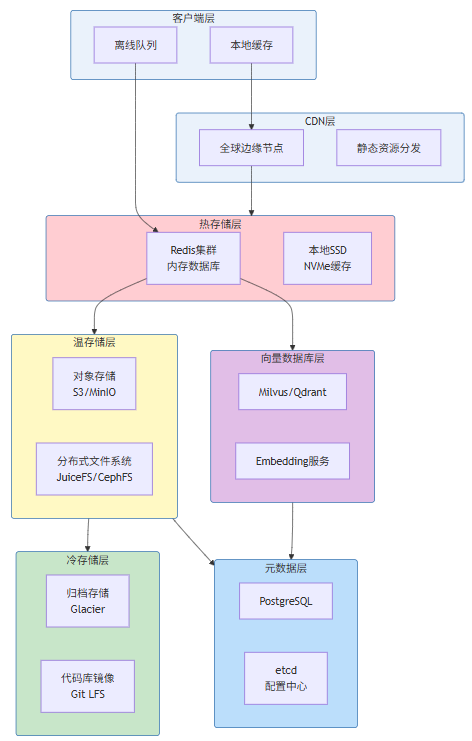
图6-1:存储层次架构图
表6-1:存储层次对比分析
存储层 | 技术选型 | 数据类型 | 延迟 | 成本 | 容量 |
|---|---|---|---|---|---|
热存储 | Redis Cluster | 会话状态、热点数据、缓存 | <1ms | $0.025/GB | 100GB-1TB |
温存储 | MinIO/S3 | 代码文件、构建产物、日志 | 10-50ms | $0.01/GB | TB-PB |
冷存储 | Glacier | 历史版本、归档数据 | 小时级 | $0.004/GB | PB+ |
向量存储 | Milvus | 代码Embedding、语义索引 | 5-20ms | $0.01/GB | TB |
元数据 | PostgreSQL | 用户数据、项目配置 | 1-5ms | $0.1/GB | GB-TB |
6.3 向量数据库与语义检索
向量数据库是云端AI IDE实现语义代码检索的关键组件。当用户询问"找到所有处理用户认证的代码"时,系统需要理解语义而非仅匹配关键词。向量数据库存储代码片段的语义embedding,支持高效的高维向量相似度搜索:
# 代码示例6-1:向量数据库服务实现
from typing import List, Dict, Optional, Any, Tuple
from dataclasses import dataclass
import numpy as np
import hashlib
from datetime import datetime

@dataclass
class CodeChunk:
    chunk_id: str
    content: str
    language: str
    file_path: str
    start_line: int
    end_line: int
    vector: Optional[np.ndarray] = None
    metadata: Dict[str, Any] = None

@dataclass
class SearchResult:
    chunk_id: str
    content: str
    file_path: str
    start_line: int
    end_line: int
    similarity: float
    metadata: Dict[str, Any]

class VectorStore:
    def __init__(self, config: dict):
        self.config = config
        self.embedding_dim = config.get("embedding_dim", 1536)
        self.index_type = config.get("index_type", "HNSW")

    def _initialize_collection(self):
        schema = {
            "name": "code_chunks",
            "fields": [
                {"name": "chunk_id", "type": "string", "is_primary": True},
                {"name": "content", "type": "string"},
                {"name": "embedding", "type": "float", "dim": self.embedding_dim},
                {"name": "file_path", "type": "string"},
                {"name": "language", "type": "string"},
                {"name": "start_line", "type": "int"},
                {"name": "end_line", "type": "int"},
                {"name": "workspace_id", "type": "string"},
                {"name": "updated_at", "type": "datetime"}
            ],
            "indexes": [
                {"field": "embedding", "index_type": self.index_type, "params": {"M": 16, "efConstruction": 200}},
                {"field": "file_path", "index_type": "inverted"},
                {"field": "workspace_id", "index_type": "hashed"}
            ]
        }

    async def add_chunks(self, chunks: List[CodeChunk], workspace_id: str):
        entities = []

        for chunk in chunks:
            chunk_id = self._generate_chunk_id(chunk, workspace_id)

            entity = {
                "chunk_id": chunk_id,
                "content": chunk.content,
                "embedding": chunk.vector.tolist() if chunk.vector is not None else None,
                "file_path": chunk.file_path,
                "language": chunk.language,
                "start_line": chunk.start_line,
                "end_line": chunk.end_line,
                "workspace_id": workspace_id,
                "updated_at": datetime.now()
            }
            entities.append(entity)

        return len(entities)

    async def search(
        self,
        query_vector: np.ndarray,
        workspace_id: str,
        language: Optional[str] = None,
        file_path: Optional[str] = None,
        limit: int = 10,
        similarity_threshold: float = 0.7
    ) -> List[SearchResult]:
        filter_expr = f'workspace_id == "{workspace_id}"'
        if language:
            filter_expr += f' and language == "{language}"'
        if file_path:
            filter_expr += f' and file_path like "{file_path}%"'

        search_params = {
            "collection": "code_chunks",
            "data": [query_vector.tolist()],
            "filter": filter_expr,
            "limit": limit,
            "param": {"M": 16, "ef": 128}
        }

        results = []

        for result in results:
            if result.get("score", 0) >= similarity_threshold:
                results.append(SearchResult(
                    chunk_id=result["entity"]["chunk_id"],
                    content=result["entity"]["content"],
                    file_path=result["entity"]["file_path"],
                    start_line=result["entity"]["start_line"],
                    end_line=result["entity"]["end_line"],
                    similarity=result["score"],
                    metadata={}
                ))

        return results

    def _generate_chunk_id(self, chunk: CodeChunk, workspace_id: str) -> str:
        content = f"{workspace_id}:{chunk.file_path}:{chunk.start_line}:{chunk.end_line}"
        return hashlib.sha256(content.encode()).hexdigest()[:16]
7. 交互协议:WebSocket、HTTP/2、gRPC的选择
本节为你提供的核心技术价值:深入理解三种主要通信协议在云端AI IDE中的适用场景,掌握协议选择的决策框架。
7.1 协议特性对比
云端AI IDE需要支持多种类型的通信,选择合适的协议至关重要:
表7-1:三大协议特性对比
特性维度 | WebSocket | HTTP/2 | gRPC |
|---|---|---|---|
连接模式 | 持久化双工 | 持久化单工 | 持久化双工 |
多路复用 | 需自行实现 | 原生支持 | 原生支持 |
流式支持 | 原生支持 | 受限 | 原生支持(双向流) |
二进制支持 | 可选 | 可选 | 原生Protocol Buffers |
浏览器原生支持 | 是 | 是 | 需要gRPC-Web |
自动重连 | 需自行实现 | 透明 | 通过HTTP/2 |
调试便利性 | 简单 | 简单 | 需要工具 |
生态系统 | 成熟广泛 | 成熟 | 云原生主流 |
延迟表现 | 低 | 低 | 最低 |
典型应用 | 实时协同、终端 | REST API、短连接 | 微服务间通信 |
7.2 协议选择决策框架
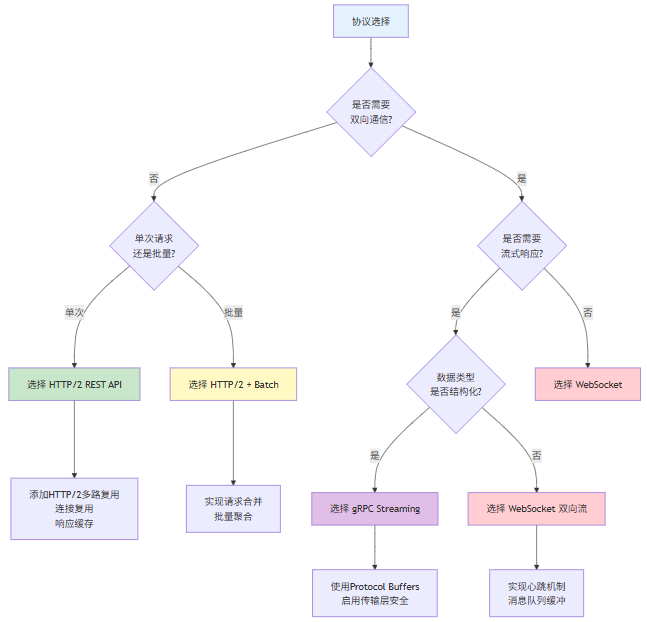
图7-1:协议选择决策流程图
7.3 云端AI IDE的协议分层策略
云端AI IDE通常采用分层协议策略,针对不同场景使用最适合的协议:
# 代码示例7-1:协议路由实现
from enum import Enum
from typing import Dict, Callable, Any
import asyncio

class Protocol(Enum):
    WEBSOCKET = "websocket"
    HTTP2 = "http2"
    GRPC = "grpc"

class Request:
    def __init__(self, path: str, method: str, headers: Dict, body: Any):
        self.path = path
        self.method = method
        self.headers = headers
        self.body = body

class ProtocolRouter:
    def __init__(self, config: dict):
        self.config = config

        self.route_rules: Dict[str, Protocol] = {
            "/ws/terminal": Protocol.WEBSOCKET,
            "/ws/ai-stream": Protocol.WEBSOCKET,
            "/ws/collab": Protocol.WEBSOCKET,
            "/ws/events": Protocol.WEBSOCKET,
            "/api/files/*": Protocol.HTTP2,
            "/api/projects/*": Protocol.HTTP2,
            "/api/user/*": Protocol.HTTP2,
            "/api/ai/completion": Protocol.HTTP2,
            "/api/search": Protocol.HTTP2,
            "/grpc.executor.v1.ExecutorService/*": Protocol.GRPC,
            "/grpc.storage.v1.StorageService/*": Protocol.GRPC,
            "/grpc.ai.v1.AgentService/*": Protocol.GRPC,
        }

        self.handlers: Dict[Protocol, Any] = {}

    def register_handler(self, protocol: Protocol, handler: Any):
        self.handlers[protocol] = handler

    async def route(self, request: Request) -> Any:
        protocol = self._match_route(request.path)

        if protocol is None:
            raise ValueError(f"No route for path: {request.path}")

        handler = self.handlers.get(protocol)
        if not handler:
            raise ValueError(f"No handler for protocol: {protocol}")

        return await self._dispatch(handler, protocol, request)

    def _match_route(self, path: str) -> Protocol:
        if path in self.route_rules:
            return self.route_rules[path]

        for pattern, protocol in self.route_rules.items():
            if pattern.endswith("*"):
                prefix = pattern[:-1]
                if path.startswith(prefix):
                    return protocol

        return None

    async def _dispatch(self, handler: Any, protocol: Protocol, request: Request) -> Any:
        if protocol == Protocol.WEBSOCKET:
            return await handler.handle_websocket(request)
        elif protocol == Protocol.HTTP2:
            return await handler.handle_http2(request)
        elif protocol == Protocol.GRPC:
            return await handler.handle_grpc(request)
8. 延迟优化:前端与后端的协作策略
本节为你提供的核心技术价值:掌握云端AI IDE端到端延迟优化的核心技术手段,包括预测性加载、本地缓存、流式处理等策略。
8.1 延迟优化的重要性
云端AI IDE的用户体验直接受延迟影响。根据Smashing Magazine的研究20,用户对延迟的感知阈值如下:
表8-1:延迟与用户体验关系
延迟范围 | 用户感知 | 影响 |
|---|---|---|
0-100ms | 即时 | 最佳用户体验 |
100-300ms | 可察觉延迟 | 可接受 |
300ms-1s | 明显延迟 | 开始影响效率 |
1-3s | 等待 | 明显影响效率 |
>3s | 严重等待 | 用户流失 |
对于代码编辑场景,打字到显示的延迟需要控制在50ms以内,AI响应首token延迟需要控制在500ms以内,全量响应延迟根据输出长度在1-10秒可接受。
8.2 端到端延迟优化策略
# 代码示例8-1:延迟优化策略实现
from typing import Optional, Dict, Any, List
from dataclasses import dataclass, field
import asyncio
import time
import hashlib
from collections import OrderedDict
import heapq

@dataclass
class CacheEntry:
    key: str
    value: Any
    created_at: float
    last_accessed: float
    access_count: int
    size_bytes: int
    ttl: Optional[float] = None

    def is_expired(self) -> bool:
        if self.ttl is None:
            return False
        return time.time() - self.created_at > self.ttl

class OptimisticCache:
    def __init__(self, config: dict):
        self.config = config
        self.max_size_mb = config.get("cache_size_mb", 100)
        self.default_ttl = config.get("default_ttl", 3600)

        self._cache: OrderedDict[str, CacheEntry] = OrderedDict()
        self._current_size = 0
        self._hits = 0
        self._misses = 0

    def get(self, key: str) -> Optional[Any]:
        entry = self._cache.get(key)

        if entry is None:
            self._misses += 1
            return None

        if entry.is_expired():
            self._remove(key)
            self._misses += 1
            return None

        entry.last_accessed = time.time()
        entry.access_count += 1

        self._cache.move_to_end(key)

        self._hits += 1
        return entry.value

    def set(self, key: str, value: Any, ttl: Optional[float] = None, size_bytes: int = 0):
        if key in self._cache:
            self._remove(key)

        size = size_bytes or self._estimate_size(value)
        max_size = self.max_size_mb * 1024 * 1024

        while self._current_size + size > max_size and self._cache:
            self._evict_lru()

        entry = CacheEntry(
            key=key,
            value=value,
            created_at=time.time(),
            last_accessed=time.time(),
            access_count=1,
            size_bytes=size,
            ttl=ttl or self.default_ttl
        )

        self._cache[key] = entry
        self._current_size += size

    def _evict_lru(self):
        if not self._cache:
            return

        key, entry = self._cache.popitem(last=False)
        self._current_size -= entry.size_bytes

    def _remove(self, key: str):
        entry = self._cache.pop(key, None)
        if entry:
            self._current_size -= entry.size_bytes

    def _estimate_size(self, value: Any) -> int:
        import sys
        return sys.getsizeof(value)

    def get_stats(self) -> dict:
        total = self._hits + self._misses
        hit_rate = self._hits / total if total > 0 else 0
        return {
            "hits": self._hits,
            "misses": self._misses,
            "hit_rate": hit_rate,
            "size_mb": self._current_size / (1024 * 1024),
            "entries": len(self._cache)
        }

class PrefetchEngine:
    def __init__(self, config: dict):
        self.config = config
        self.prefetch_queue: List[tuple] = []
        self.active_tasks: Dict[str, asyncio.Task] = {}

    async def predict_and_prefetch(self, user_context: Dict[str, Any]):
        current_file = user_context.get("current_file")
        cursor_position = user_context.get("cursor_position")
        open_files = user_context.get("open_files", [])

        predictions = await self._predict_resources(current_file, cursor_position, open_files)

        for priority, resource in predictions:
            asyncio.create_task(self._prefetch_resource(resource))

    async def _predict_resources(self, current_file: str, cursor: tuple, open_files: List[str]) -> List[tuple]:
        predictions = []

        if current_file:
            imports = await self._get_import_dependencies(current_file)
            for imp in imports:
                predictions.append((0.9, {"type": "file", "path": imp}))

        file_dir = current_file.rsplit("/", 1)[0] if "/" in current_file else ""
        adjacent_files = await self._list_directory(file_dir)
        for f in adjacent_files[:5]:
            predictions.append((0.7, {"type": "file", "path": f}))

        config_files = await self._get_related_configs(current_file)
        for cf in config_files:
            predictions.append((0.8, {"type": "config", "path": cf}))

        predictions.append((0.6, {"type": "ai_context", "file": current_file}))

        predictions.sort(key=lambda x: x[0], reverse=True)

        return predictions[:10]

    async def _prefetch_resource(self, resource: Dict[str, Any]):
        resource_type = resource.get("type")
        resource_id = f"{resource_type}:{resource.get('path', '')}"

        if resource_id in self.active_tasks:
            return

        task = asyncio.create_task(self._do_prefetch(resource))
        self.active_tasks[resource_id] = task

        try:
            await task
        finally:
            self.active_tasks.pop(resource_id, None)

    async def _do_prefetch(self, resource: Dict[str, Any]) -> Any:
        resource_type = resource.get("type")

        if resource_type == "file":
            path = resource.get("path")
            return await self._read_file_async(path)

        elif resource_type == "ai_context":
            file_path = resource.get("file")
            return await self._precompute_ai_context(file_path)

        return None

    async def _get_import_dependencies(self, file_path: str) -> List[str]:
        return []

    async def _list_directory(self, path: str) -> List[str]:
        return []

    async def _get_related_configs(self, file_path: str) -> List[str]:
        return []

    async def _read_file_async(self, path: str) -> str:
        import aiofiles
        async with aiofiles.open(path, 'r') as f:
            return await f.read()

    async def _precompute_ai_context(self, file_path: str) -> Dict:
        return {}
9. 安全性:认证、授权、传输加密
本节为你提供的核心技术价值:掌握云端AI IDE的完整安全体系设计,包括零信任架构、细粒度授权、端到端加密等。
9.1 安全架构概述
云端AI IDE的安全架构遵循零信任(Zero Trust)原则——“永不信任,始终验证”。与传统基于边界的安全模型不同,零信任模型假设网络内外都不可信,每次访问都需要验证。
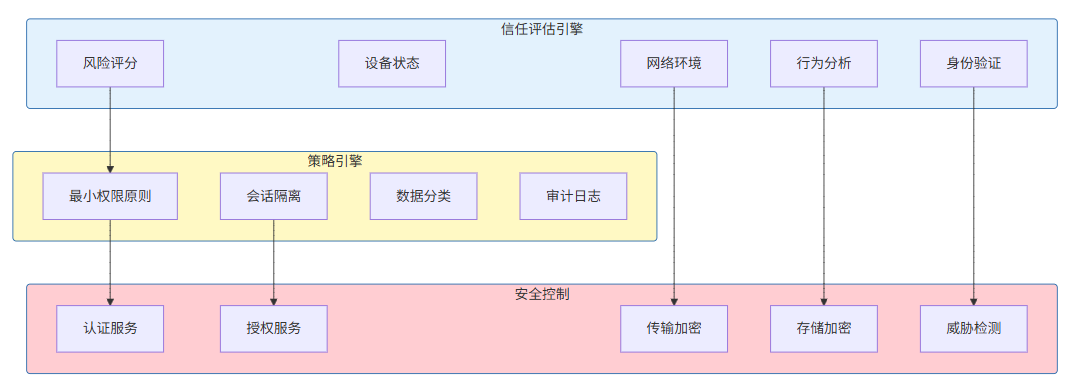
图9-1:零信任安全架构图
10. 成本模型:按使用量计费的设计
本节为你提供的核心技术价值:理解云端AI IDE的计费模型设计,包括资源计量、分层定价、成本优化策略。
10.1 计费模型概述
云端AI IDE的计费模型需要平衡用户体验与运营成本。主流云端AI IDE采用的计费模式包括:
表10-1:主流云端AI IDE计费模式对比
产品 | 订阅模式 | 按量计费 | 免费额度 |
|---|---|---|---|
GitHub Codespaces | $4-$21/月 | $0.036-$0.144/核心小时 | 60-120小时/月 |
JetBrains Fleet | $9.9-$25/月 | 暂无 | 14天试用 |
Cursor | $20-$100/月 | AI请求另计 | 500次AI请求 |
Replit | $7-$20/月 | 计算单元 | 100-500计算单元/月 |
Gitpod | $4-$27/月 | $0.036/核心小时 | 500小时/月 |
10.2 资源计量体系
# 代码示例10-1:资源计量服务实现
from typing import Dict, List, Optional
from dataclasses import dataclass
from datetime import datetime, timedelta
import asyncio

@dataclass
class ResourceUsage:
    user_id: str
    workspace_id: str
    resource_type: str
    quantity: float
    unit: str
    timestamp: datetime
    metadata: Dict

class BillingMeter:
    def __init__(self, config: dict):
        self.config = config
        self.usage_records: List[ResourceUsage] = []
        self.pricing_config = self._load_pricing_config()

    def _load_pricing_config(self) -> dict:
        return {
            "compute": {
                "unit": "core_hour",
                "tiers": [
                    {"limit": 100, "price": 0.05},
                    {"limit": 500, "price": 0.04},
                    {"limit": float('inf'), "price": 0.03}
                ]
            },
            "memory": {
                "unit": "gb_hour",
                "tiers": [
                    {"limit": 50, "price": 0.01},
                    {"limit": float('inf'), "price": 0.008}
                ]
            },
            "storage": {
                "unit": "gb_month",
                "tiers": [
                    {"limit": 10, "price": 0.10},
                    {"limit": 100, "price": 0.08},
                    {"limit": float('inf'), "price": 0.05}
                ]
            },
            "ai_requests": {
                "unit": "per_1k_tokens",
                "tiers": [
                    {"limit": 100, "price": 0.50},
                    {"limit": 1000, "price": 0.40},
                    {"limit": float('inf'), "price": 0.30}
                ]
            },
            "network": {
                "unit": "gb",
                "tiers": [
                    {"limit": 10, "price": 0.12},
                    {"limit": 100, "price": 0.10},
                    {"limit": float('inf'), "price": 0.08}
                ]
            }
        }

    async def record_usage(self, usage: ResourceUsage):
        self.usage_records.append(usage)

        await self._persist_usage_record(usage)

    async def calculate_cost(self, user_id: str, billing_period: tuple) -> Dict:
        start_date, end_date = billing_period

        user_usage = [
            u for u in self.usage_records
            if u.user_id == user_id and start_date <= u.timestamp <= end_date
        ]

        cost_by_type = {}

        for resource_type in self.pricing_config.keys():
            type_usage = [u for u in user_usage if u.resource_type == resource_type]
            total_quantity = sum(u.quantity for u in type_usage)

            if total_quantity > 0:
                unit_price = self._calculate_tiered_price(resource_type, total_quantity)
                cost_by_type[resource_type] = {
                    "quantity": total_quantity,
                    "unit": self.pricing_config[resource_type]["unit"],
                    "unit_price": unit_price,
                    "total": total_quantity * unit_price
                }

        return {
            "user_id": user_id,
            "billing_period": {"start": start_date, "end": end_date},
            "cost_by_type": cost_by_type,
            "total_cost": sum(c["total"] for c in cost_by_type.values())
        }

    def _calculate_tiered_price(self, resource_type: str, quantity: float) -> float:
        tiers = self.pricing_config[resource_type]["tiers"]

        remaining = quantity
        total_cost = 0

        for tier in tiers:
            tier_limit = tier["limit"]
            tier_price = tier["price"]

            if remaining <= 0:
                break

            tier_quantity = min(remaining, tier_limit)
            total_cost += tier_quantity * tier_price
            remaining -= tier_quantity

        return total_cost / quantity

    async def _persist_usage_record(self, usage: ResourceUsage):
        pass
11. 案例分析:GitHub Codespaces与JetBrains Fleet
本节为你提供的核心技术价值:通过实际产品案例理解云端AI IDE架构的工程实践。
11.1 GitHub Codespaces架构分析
GitHub Codespaces是微软与GitHub联合打造的云端开发环境,其架构设计代表了云端IDE的顶级工程实践。
核心架构特点:
容器化执行环境。Codespaces基于Kubernetes和Docker构建,每个Codespace运行在独立的容器中。容器镜像包含完整的开发环境(VS Code Server、运行时、工具链),用户可以在数秒内获得一致的开发环境。
VS Code Web架构。Codespaces的前端实际上是运行在浏览器中的VS Code(代号Monaco Editor),通过WebSocket与后端的VS Code Server通信。这种架构继承 了VS Code的全部功能,同时支持浏览器访问。
按需计费模型。Codespaces采用"订阅+按量"的混合计费模式,用户可以选择月度订阅或按实际使用量付费。
表11-1:GitHub Codespaces架构特性
架构维度 | 实现方式 | 技术选型 |
|---|---|---|
容器编排 | Kubernetes | K8s + DKP |
镜像构建 | Dev Container | docker.io |
前端编辑器 | Monaco Editor | TypeScript |
后端服务 | VS Code Server | Node.js |
状态同步 | WebSocket | CRDT |
存储 | 云存储 | Azure Blob Storage |
网络隔离 | VNet | Azure Virtual Network |
11.2 JetBrains Fleet架构分析
JetBrains Fleet是JetBrains推出的下一代IDE,其架构设计与Codespaces有显著不同。
分布式架构。Fleet采用"Smart IDE"架构,前端仅负责UI渲染,真正的编辑逻辑、代码分析、AI处理都发生在后端服务。这种架构使得低配设备也能获得流畅的编辑体验。
弹性后端。Fleet的后端服务可以根据负载自动伸缩,用户打开项目时动态分配计算资源,关闭时释放资源。
多语言支持。Fleet后端集成了JetBrains的语言服务器协议(LSP)实现,支持超过20种编程语言。
12. 总结与展望
本节为你提供的核心技术价值:回顾云端AI IDE架构的核心设计原则,展望未来发展趋势。
12.1 核心设计原则总结
本文详细阐述了云端AI IDE的五层架构设计,各层的核心设计原则如下:
Client层。采用Monaco Editor作为核心编辑器组件,通过WebSocket实现与后端的实时通信,采用虚拟滚动、增量渲染等技术优化前端性能。
Gateway层。实现统一的接入网关,负责负载均衡、协议转换、身份认证、流量治理等功能,是系统的安全门户。
Agent层。实现多模型路由、提示词引擎、工具调用编排等核心能力,是云端AI IDE的"大脑"。
Executor层。基于容器化技术实现安全隔离的代码执行环境,支持多语言、多场景的执行需求。
Storage层。采用分层存储架构,结合向量数据库实现语义检索,支持大规模代码的存储与检索。
12.2 未来发展趋势
表12-1:云端AI IDE未来发展趋势
趋势 | 描述 | 影响 |
|---|---|---|
AI Native IDE | IDE从"AI辅助"向"AI主导"演进,AI将承担更多开发任务 | Agent层将进一步强化 |
多模态交互 | 支持语音、图像、手势等多模态输入 | Client层将支持更多交互模态 |
边缘计算融合 | 边缘节点承担更多计算任务,降低延迟 | Gateway层将更加智能 |
Serverless架构 | 更细粒度的函数级计算,按需扩展 | Executor层将更加弹性 |
联邦学习 | 在保护隐私的前提下利用用户数据改进AI | 安全架构将更加复杂 |
参考链接
参考链接:
- 主要来源:JetBrains Developer Ecosystem Survey 2024 - 全球开发者工具使用趋势权威报告
- 主要来源:GitHub Codespaces Documentation - 云端开发环境工程实践参考
- 主要来源:Stanford AI Index Report 2024 - AI辅助软件工程研究报告
附录(Appendix):
架构设计参考模型
Client Layer (Port 3000-4000)
    │
    ▼
Gateway Layer (Port 8000-9000)
    │
    ├──▶ Agent Layer (Internal)
    │       │
    │       ├──▶ Model Router
    │       ├──▶ Prompt Engine
    │       └──▶ Tool Orchestrator
    │
    ├──▶ Executor Layer (Internal)
    │       │
    │       ├──▶ Container Pool
    │       └──▶ Code Runner
    │
    └──▶ Storage Layer (Internal)
            │
            ├──▶ File Service
            ├──▶ Vector Store
            └──▶ Object Storage
关键词: 云端IDE、AI编程、分布式架构、微服务、容器化、WebSocket、向量数据库、零信任安全、Serverless、实时协作

在这里插入图片描述
- JetBrains - Developer Ecosystem Survey 2024 - https://www.jetbrains.com/lp/devecosystem-2024/ ↩︎
- Cloud9 IDE - https://aws.amazon.com/cloud9/ ↩︎
- GitHub Copilot - https://github.com/features/copilot ↩︎
- Cursor - https://cursor.sh/ ↩︎
- Windsurf - https://codeium.com/windsurf ↩︎
- Devin - https://devin.ai/ ↩︎
- Cline - https://github.com/cline/cline ↩︎
- Stanford HAI - AI Index Report 2024 - https://aiindex.stanford.edu/report/ ↩︎
- Gartner - AI Foundation Model Technology成熟度曲线 ↩︎
- State of AI Report 2024 - https://stateof.ai/ ↩︎
- Monaco Editor - https://microsoft.github.io/monaco-editor/ ↩︎
- Figma - Building a collaborative text editor - https://www.figma.com/blog/ ↩︎
- Google - The Need for Speed - https://www.thinkwithgoogle.com/ ↩︎
- Tree-sitter - https://tree-sitter.github.io/tree-sitter/ ↩︎
- AWS Route 53 - https://aws.amazon.com/route53/ ↩︎
- GitHub Codespaces Architecture - https://docs.github.com/en/codespaces/ ↩︎
- Mozilla SSL Configuration Generator - https://ssl-config.mozilla.org/ ↩︎
- OpenAI - GPT-4 Technical Report - https://openai.com/research/gpt-4 ↩︎
- GitHub Codespaces - Development Container Configuration - https://docs.github.com/en/codespaces/ ↩︎
- Smashing Magazine - Performance and User Experience - https://www.smashingmagazine.com/ ↩︎
本文参与 腾讯云自媒体同步曝光计划,分享自作者个人站点/博客。
原始发表:2026-06-07,如有侵权请联系 cloudcommunity@tencent.com 删除
目录
腾讯云开发者

Copyright © 2013 - 2026 Tencent Cloud. All Rights Reserved. 腾讯云 版权所有
深圳市腾讯计算机系统有限公司 ICP备案/许可证号:粤B2-20090059  粤公网安备44030502008569号
腾讯云计算(北京)有限责任公司 京ICP证150476号 | 京ICP备11018762号