基于 PHP Agentic 框架构建智能 AI 聊天助手(附源码)

基于 PHP Agentic 框架构建智能 AI 聊天助手(附源码)

Tinywan
发布于 2026-07-01 14:42:31
发布于 2026-07-01 14:42:31
概述
本教程将手把手指导你从安装 Webman 框架入手,逐步集成 Neuron AI Agent 框架,并借助阿里云百炼大模型(兼容OpenAI接口)实现自定义AI提供商。
最后,我们还将创建支持 Server-Sent Events(SSE)的控制器,让你的AI助手实现流畅的实时响应。
Step.1 安装 webman
composer create-project workerman/webman:~2.0Step.2 安装 Neuron Agent 框架
composer require neuron-core/neuron-aiStep.3 创建阿里百炼提供商
创建 AI 提供商。BaiLianAI.php
<?php
/**
 * @desc 阿里云百炼大模型服务提供
 * @author Tinywan(ShaoBo Wan)
 */
declare(strict_types=1);

namespace app\common\agent\provider;

use GuzzleHttp\Client;
use NeuronAI\Providers\HttpClientOptions;
use NeuronAI\Providers\OpenAI\OpenAI;

class BaiLianAI extends OpenAI
{
    protected string $baseUri = 'https://api.openai.com/v1';
    /**
     * @param array<string, mixed> $parameters
     */
    public function __construct(
        protected string             $key,
        protected string             $model,
        protected array              $parameters = [],
        protected bool               $strict_response = false,
        protected ?HttpClientOptions $httpOptions = null,
        ?string                      $baseUri = null // 新增参数:自定义 API 地址
    )
    {
        if ($baseUri !== null) {
            $this->baseUri = $baseUri;
        }
        $config = [
            // https://dashscope.aliyuncs.com/compatible-mode/v1
            'base_uri' => rtrim($this->baseUri, '/') . '/',
            'headers' => [
                'Accept' => 'application/json',
                'Content-Type' => 'application/json',
                'Authorization' => 'Bearer ' . $this->key,
            ]
        ];
        if ($this->httpOptions instanceof HttpClientOptions) {
            $config = $this->mergeHttpOptions($config, $this->httpOptions);
        }
        $this->client = new Client($config);
    }
}
这里使用阿里云百炼大模型:https://bailian.console.aliyun.com
Step.4 创建 AssistantAgent
创建自己的一个 AI 助手 Agent
AssistantAgent.php
<?php
/**
 * @desc 阿里云百炼大模型服务提供
 * @author Tinywan(ShaoBo Wan)
 */
declare(strict_types=1);
namespace app\common\agent;
use app\common\agent\provider\BaiLianAI;
use NeuronAI\Agent;
use NeuronAI\Providers\AIProviderInterface;
use NeuronAI\SystemPrompt;
class AssistantAgent extends Agent
{
    /**
     * @desc provider
     * @author Tinywan(ShaoBo Wan)
     */
    protected function provider(): AIProviderInterface
    {
        // 这里的apiKey和model需要替换成自己的
        $apiKey = 'sk-xxxxxxxxxxxxxxx';
        $model = 'qwen-max';
        return new BaiLianAI(
            key: $apiKey,
            model: $model,
            baseUri: 'https://dashscope.aliyuncs.com/compatible-mode/v1',
        );
    }
    /**
     * @desc instructions
     * @author Tinywan(ShaoBo Wan)
     */
    public function instructions(): string
    {
        return (string) new SystemPrompt(
            background: [
                "你是通义千问,由阿里云开发的 AI 助手。",
                "你擅长回答各种问题,提供有用的建议和信息。",
                "请用中文回复用户的问题。"
            ],
        );
    }
}
Step.5 助手控制器
可以参考 Webman 在控制器中完成 SSE 实时流式输出
服务端
使用服务器发送事件(SSE)从服务器发送到客户端的数据必须是 UTF-8 编码的,返回的内容类型是 text/event-stream 。
AssistantController.php
<?php
/**
 * @desc AssistantController.php 描述信息
 * @author Tinywan(ShaoBo Wan)
 */
declare(strict_types=1);

namespace app\controller;

use app\common\agent\AssistantAgent;
use support\Request;
use Webman\Http\Response;
use Workerman\Connection\TcpConnection;
use Workerman\Protocols\Http\ServerSentEvents;
use Workerman\Timer;
use NeuronAI\Chat\Messages\UserMessage;

class AssistantController
{
    public function index(): Response
    {
        return view('assistant/index', ['name' => 'webman']);
    }
    /**
     * @desc
     * 1. stream
     * 2. See
     * @author Tinywan(ShaoBo Wan)
     */
    public function chat(Request $request): Response
    {
        $message = $request->input('message', '介绍一下webman');
        $connection = $request->connection;
        $id = Timer::add(0.1, function () use ($connection, &$id, $message) {
            if ($connection->getStatus() !== TcpConnection::STATUS_ESTABLISHED) {
                Timer::del($id);
            }
            $stream = AssistantAgent::make()->stream(
                new UserMessage($message)
            );
            foreach ($stream as $chunk) {
                $content = is_string($chunk) ? $chunk : $chunk->getContent();
                if (!empty($content)) {
                    $connection->send(new ServerSentEvents([
                        'event' => 'message',
                        'data' => $content,
                    ]));
                }
            }
            // 发送完成事件
            $connection->send(new ServerSentEvents([
                'event' => 'completed',
                'data' => 'done',
            ]));
            Timer::del($id);
            $connection->close();
        }, [], false);
        return response('', 200, [
            'Content-Type' => 'text/event-stream',
            'Cache-Control' => 'no-cache',
            'Connection' => 'keep-alive',
            'X-Accel-Buffering' => 'no',
        ]);
    }
}
客户端
这里客户端代码为了解决访问跨域问题,直接使用webman视图完成客户端页面。模板是使用的:think-template。
如何使用可以看这里哦!
https://www.workerman.net/doc/webman/view.html
index.html
<!DOCTYPE html>
<html lang="zh">
<head>
<meta charset="UTF-8">
<title>开源技术小栈 - AI 聊天</title>
<style>
* {
margin: 0;
padding: 0;
box-sizing: border-box;
}
body {
font-family: -apple-system, BlinkMacSystemFont, "Segoe UI", Roboto, "Helvetica Neue", Arial, sans-serif;
background: #fafafa;
height: 100vh;
display: flex;
align-items: center;
justify-content: center;
}
.chat-wrapper {
width: 100%;
max-width: 800px;
height: 100vh;
background: white;
display: flex;
flex-direction: column;
box-shadow: 0 0 1px rgba(0,0,0,0.1);
}
.header {
background: white;
padding: 18px 24px;
border-bottom: 1px solid #f3f4f6;
}
.header h3 {
font-size: 15px;
font-weight: 500;
color: #111827;
margin: 0;
}
.chat-container {
flex: 1;
overflow-y: auto;
padding: 24px;
background: #f9fafb;
display: flex;
flex-direction: column;
gap: 16px;
}
.chat-container::-webkit-scrollbar {
width: 6px;
}
.chat-container::-webkit-scrollbar-track {
background: transparent;
}
.chat-container::-webkit-scrollbar-thumb {
background: #d1d5db;
border-radius: 3px;
}
.message {
display: flex;
gap: 10px;
max-width: 70%;
animation: fadeIn 0.2s ease;
}
@keyframes fadeIn {
from { opacity: 0; transform: translateY(4px); }
to { opacity: 1; transform: translateY(0); }
}
.message.user {
align-self: flex-end;
flex-direction: row-reverse;
}
.message.assistant {
align-self: flex-start;
}
.message-avatar {
width: 28px;
height: 28px;
border-radius: 50%;
background: #f3f4f6;
color: #6b7280;
display: flex;
align-items: center;
justify-content: center;
font-size: 11px;
font-weight: 500;
flex-shrink: 0;
border: 1px solid #f3f4f6;
}
.message.user .message-avatar {
background: #111827;
color: white;
border: none;
}
.message-content {
background: white;
padding: 10px 14px;
border-radius: 10px;
border: 1px solid #f3f4f6;
word-wrap: break-word;
line-height: 1.6;
font-size: 13px;
color: #374151;
}
/* Markdown 样式 */
.message-content h1,
.message-content h2,
.message-content h3,
.message-content h4,
.message-content h5,
.message-content h6 {
margin: 12px 0 8px 0;
font-weight: 600;
line-height: 1.3;
}
.message-content h1 { font-size: 16px; }
.message-content h2 { font-size: 15px; }
.message-content h3 { font-size: 14px; }
.message-content h4 { font-size: 13px; }
.message-content h5 { font-size: 13px; }
.message-content h6 { font-size: 13px; }
.message-content p {
margin: 8px 0;
}
.message-content ul,
.message-content ol {
margin: 8px 0;
padding-left: 24px;
}
.message-content li {
margin: 4px 0;
}
.message-content code {
background: #f3f4f6;
padding: 2px 6px;
border-radius: 4px;
font-family: 'Consolas', 'Monaco', 'Courier New', monospace;
font-size: 12px;
}
.message-content pre {
background: #f3f4f6;
padding: 12px;
border-radius: 6px;
overflow-x: auto;
margin: 8px 0;
}
.message-content pre code {
background: none;
padding: 0;
}
.message-content blockquote {
border-left: 3px solid #d1d5db;
padding-left: 12px;
margin: 8px 0;
color: #6b7280;
}
.message-content strong {
font-weight: 600;
}
.message-content a {
color: #111827;
text-decoration: underline;
}
.message.user .message-content {
background: #111827;
color: white;
border: none;
}
.input-container {
background: white;
padding: 16px 24px;
border-top: 1px solid #f3f4f6;
display: flex;
gap: 10px;
}
#messageInput {
flex: 1;
padding: 10px 14px;
border: 1px solid #e5e7eb;
border-radius: 8px;
font-size: 13px;
outline: none;
font-family: inherit;
transition: border-color 0.15s;
}
#messageInput:focus {
border-color: #d1d5db;
}
#sendBtn {
padding: 10px 18px;
background: #111827;
color: white;
border: none;
border-radius: 8px;
cursor: pointer;
font-size: 13px;
font-weight: 500;
transition: background 0.15s;
}
#sendBtn:hover:not(:disabled) {
background: #1f2937;
}
#sendBtn:disabled {
background: #d1d5db;
cursor: not-allowed;
}
.typing-indicator {
display: none;
padding: 10px 14px;
background: white;
border-radius: 10px;
border: 1px solid #f3f4f6;
}
.typing-indicator.active {
display: block;
}
.typing-indicator span {
display: inline-block;
width: 5px;
height: 5px;
border-radius: 50%;
background: #9ca3af;
margin: 0 2px;
animation: typing 1.4s infinite;
}
.typing-indicator span:nth-child(2) {
animation-delay: 0.2s;
}
.typing-indicator span:nth-child(3) {
animation-delay: 0.4s;
}
@keyframes typing {
0%, 60%, 100% { transform: translateY(0); opacity: 0.4; }
30% { transform: translateY(-6px); opacity: 1; }
}
@media (max-width: 768px) {
.chat-wrapper {
max-width: 100%;
}
.message {
max-width: 80%;
}
}
</style>
</head>
<body>
<div class="chat-wrapper">
<div class="header">
<h3>开源技术小栈 - AI 聊天助手</h3>
</div>
<div class="chat-container" id="chatContainer">
<div class="message assistant">
<div class="message-avatar">AI</div>
<div class="message-content">你好!我是 AI 助手,有什么可以帮你的吗?</div>
</div>
</div>
<div class="input-container">
<input type="text" id="messageInput" placeholder="输入消息..." />
<button id="sendBtn">发送</button>
</div>
</div>
<script>
const chatContainer = document.getElementById('chatContainer');
const messageInput = document.getElementById('messageInput');
const sendBtn = document.getElementById('sendBtn');
let currentEventSource = null;
let isStreaming = false;
// Markdown 解析函数
function parseMarkdown(text) {
text = text.replace(/&/g, '&').replace(/</g, '<').replace(/>/g, '>');
// 代码块
text = text.replace(/```(\w+)?\n([\s\S]*?)```/g, (match, lang, code) => {
return '<pre><code>' + code.trim() + '</code></pre>';
});
// 行内代码
text = text.replace(/`([^`]+)`/g, '<code>$1</code>');
// 标题
text = text.replace(/^######\s+(.*)$/gm, '<h6>$1</h6>');
text = text.replace(/^#####\s+(.*)$/gm, '<h5>$1</h5>');
text = text.replace(/^####\s+(.*)$/gm, '<h4>$1</h4>');
text = text.replace(/^###\s+(.*)$/gm, '<h3>$1</h3>');
text = text.replace(/^##\s+(.*)$/gm, '<h2>$1</h2>');
text = text.replace(/^#\s+(.*)$/gm, '<h1>$1</h1>');
// 粗体
text = text.replace(/\*\*([^*]+)\*\*/g, '<strong>$1</strong>');
// 斜体
text = text.replace(/\*([^*]+)\*/g, '<em>$1</em>');
// 无序列表
text = text.replace(/^\*\s+(.+)$/gm, '<li>$1</li>');
text = text.replace(/(<li>.*?<\/li>\n?)+/g, '<ul>$&</ul>');
// 有序列表
text = text.replace(/^\d+\.\s+(.+)$/gm, '<li>$1</li>');
// 链接
text = text.replace(/\[([^\]]+)\]\(([^)]+)\)/g, '<a href="$2">$1</a>');
// 换行
text = text.replace(/\n\n/g, '</p><p>');
text = text.replace(/\n/g, '<br>');
// 包装段落
if (!text.startsWith('<')) {
text = '<p>' + text + '</p>';
}
// 清理
text = text.replace(/<p>(<[huploc])/g, '$1');
text = text.replace(/(<\/[huploc][^>]*>)<\/p>/g, '$1');
text = text.replace(/<p><\/p>/g, '');
return text;
}
function addMessage(role, content, isHtml = false) {
const messageDiv = document.createElement('div');
messageDiv.className = `message ${role}`;
const avatar = document.createElement('div');
avatar.className = 'message-avatar';
avatar.textContent = role === 'user' ? '我' : 'AI';
const contentDiv = document.createElement('div');
contentDiv.className = 'message-content';
if (isHtml) {
contentDiv.innerHTML = content;
} else {
contentDiv.textContent = content;
}
messageDiv.appendChild(avatar);
messageDiv.appendChild(contentDiv);
chatContainer.appendChild(messageDiv);
chatContainer.scrollTop = chatContainer.scrollHeight;
return contentDiv;
}
function addTypingIndicator() {
const messageDiv = document.createElement('div');
messageDiv.className = 'message assistant';
messageDiv.id = 'typingIndicator';
const avatar = document.createElement('div');
avatar.className = 'message-avatar';
avatar.textContent = 'AI';
const indicator = document.createElement('div');
indicator.className = 'typing-indicator active';
indicator.innerHTML = '<span></span><span></span><span></span>';
messageDiv.appendChild(avatar);
messageDiv.appendChild(indicator);
chatContainer.appendChild(messageDiv);
chatContainer.scrollTop = chatContainer.scrollHeight;
}
function removeTypingIndicator() {
const indicator = document.getElementById('typingIndicator');
if (indicator) {
indicator.remove();
}
}
function sendMessage() {
const message = messageInput.value.trim();
console.log('[sendMessage] Called with:', { message, isStreaming });
if (!message || isStreaming) {
console.log('[sendMessage] Blocked:', { hasMessage: !!message, isStreaming });
return;
}
addMessage('user', message, false);
messageInput.value = '';
addTypingIndicator();
isStreaming = true;
sendBtn.disabled = true;
console.log('[sendMessage] Started streaming');
const assistantContentDiv = document.createElement('div');
assistantContentDiv.className = 'message-content';
let assistantText = '';
let messageAdded = false;
currentEventSource = new EventSource(`http://127.0.0.1:8787/assistant/chat?message=${encodeURIComponent(message)}`);
currentEventSource.onopen = function(e) {
console.log('[SSE] Connection opened');
};
currentEventSource.onmessage = function(e) {
console.log('[SSE] Message received');
removeTypingIndicator();
if (!messageAdded) {
const messageDiv = document.createElement('div');
messageDiv.className = 'message assistant';
const avatar = document.createElement('div');
avatar.className = 'message-avatar';
avatar.textContent = 'AI';
messageDiv.appendChild(avatar);
messageDiv.appendChild(assistantContentDiv);
chatContainer.appendChild(messageDiv);
messageAdded = true;
}
try {
const data = JSON.parse(e.data);
assistantText += data.content || '';
} catch (err) {
assistantText += e.data;
}
assistantContentDiv.innerHTML = parseMarkdown(assistantText);
chatContainer.scrollTop = chatContainer.scrollHeight;
};
currentEventSource.addEventListener('completed', function(e) {
console.log('[SSE] Completed event received');
cleanup();
});
currentEventSource.onerror = function(e) {
console.log('[SSE] Error event:', e);
removeTypingIndicator();
if (isStreaming && !assistantText) {
addMessage('assistant', '抱歉,发生了错误,请重试。', false);
}
cleanup();
};
}
function cleanup() {
console.log('[cleanup] Called, isStreaming before:', isStreaming);
if (currentEventSource) {
currentEventSource.close();
currentEventSource = null;
}
removeTypingIndicator();
isStreaming = false;
sendBtn.disabled = false;
messageInput.focus();
console.log('[cleanup] Done, isStreaming after:', isStreaming);
}
sendBtn.addEventListener('click', sendMessage);
messageInput.addEventListener('keypress', function(e) {
if (e.key === 'Enter' && !e.shiftKey) {
e.preventDefault();
sendMessage();
}
});
messageInput.focus();
</script>
</body>
</html>浏览器会自动发送 HTTP 请求,携带特殊头信息(如:Accept: text/event-stream)。
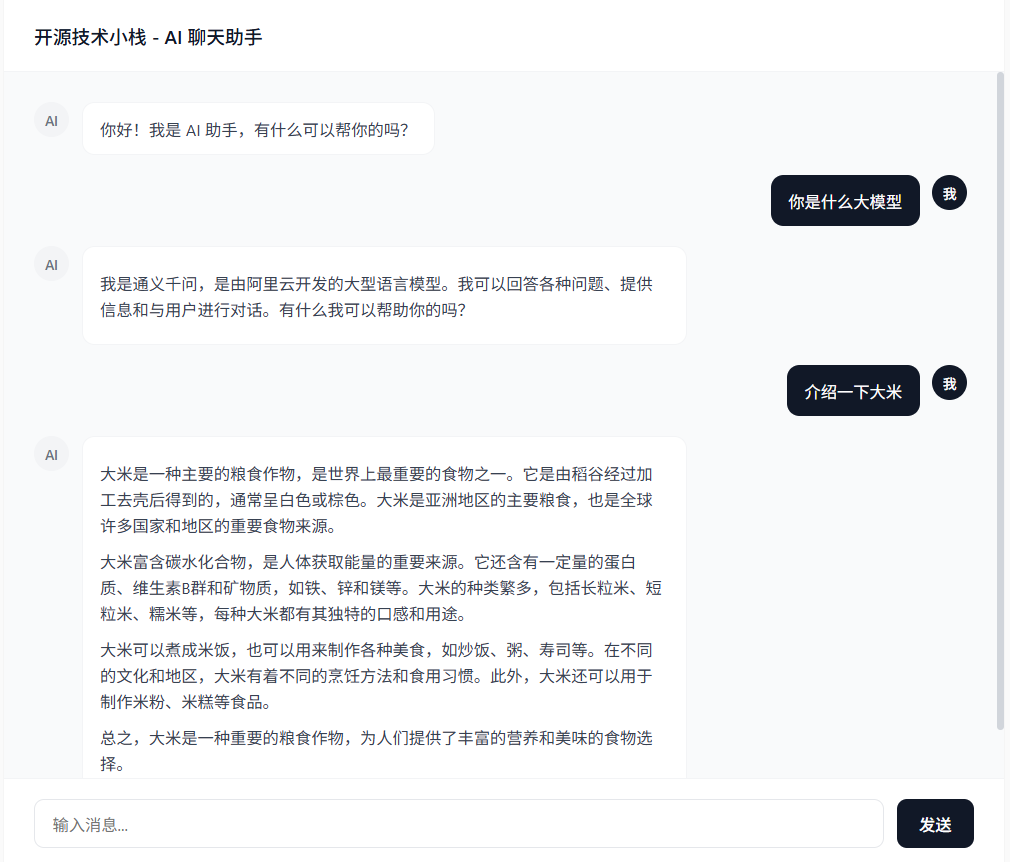
Step.6 访问预览
http://127.0.0.1:8787/assistant/chat
本文参与 腾讯云自媒体同步曝光计划,分享自微信公众号。
原始发表:2026-02-13,如有侵权请联系 cloudcommunity@tencent.com 删除
目录
腾讯云开发者

Copyright © 2013 - 2026 Tencent Cloud. All Rights Reserved. 腾讯云 版权所有
深圳市腾讯计算机系统有限公司 ICP备案/许可证号:粤B2-20090059  粤公网安备44030502008569号
腾讯云计算(北京)有限责任公司 京ICP证150476号 | 京ICP备11018762号