本地化部署 DeepSeek,构建单细胞与空间转录组 AI 分析平台
原创
本地化部署 DeepSeek,构建单细胞与空间转录组 AI 分析平台
原创
追风少年i
发布于 2026-11-12 09:51:28
发布于 2026-11-12 09:51:28
作者,Evil Genius
找工作挨打中。。。。。反正找工作各种恶心的事情都会发生。
现在什么都要AI了,我们也要与时俱进,构建单细胞空间分析服务站。
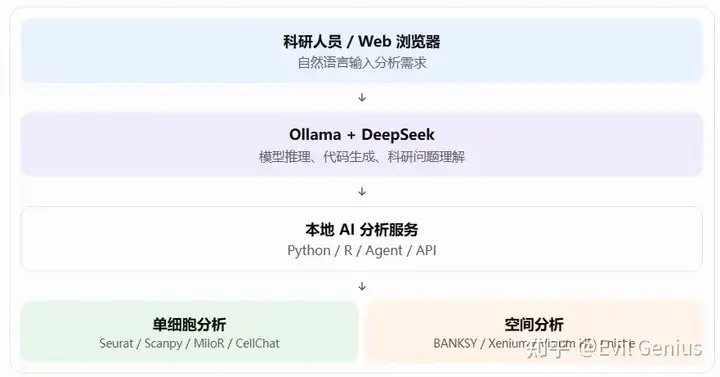
大家要注意:DeepSeek 负责理解分析需求、生成代码、解释结果、辅助科研决策;R/Python 分析引擎负责实际计算;本地数据库负责存储数据、文献和分析知识;最终通过一个 Web 界面形成可交互的单细胞与空间转录组 AI 分析平台。
今天我们在服务器上部署一下,整体框架如下
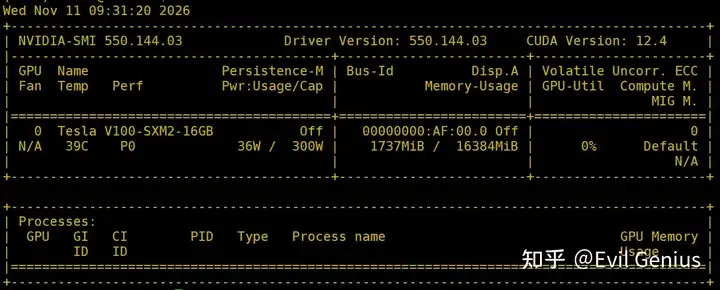
首先看一下我的服务器系统
硬件 | 配置 | 判断 |
|---|---|---|
CPU | 2 × Xeon Platinum 8280M,56 核 112 线程 | 充足 |
GPU | Tesla V100-SXM2 | 支持 CUDA 推理 |
显存 | 16GB | 适合优先尝试 14B 量化模型 |
NVIDIA 驱动 | 550.144.03 | 满足 Ollama 使用 NVIDIA GPU 的基本要求 |
CUDA | 12.4(驱动报告) | 无需为了 Ollama 先单独安装 CUDA Toolkit |
操作系统 | Ubuntu 22.04.5 LTS | 可直接使用官方 Linux 安装方式 |
部署方案
部署方案 | 模型方向 | 适合用途 |
|---|---|---|
个人工作站 | R1-Distill-Qwen-7B | 基础问答、代码辅助 |
高配置工作站 | R1-Distill-Qwen-14B | R/Python代码生成、常规分析解释 |
高性能GPU工作站 | R1-Distill-Qwen-32B | 复杂分析规划、代码调试、结果解读 |
多GPU服务器 | 70B级模型 | 更复杂的科研分析任务 |
集群部署 | 完整R1/V3等大型模型 | 大规模科研AI服务 |
第一步:安装 Ollama
curl -fsSL https://ollama.com/install.sh | sh
sudo systemctl status ollama
第二步:下载 DeepSeek-R1 模型
这里先部署 DeepSeek-R1-Distill-Qwen-14B,而不是直接部署完整参数规模的 DeepSeek-R1。
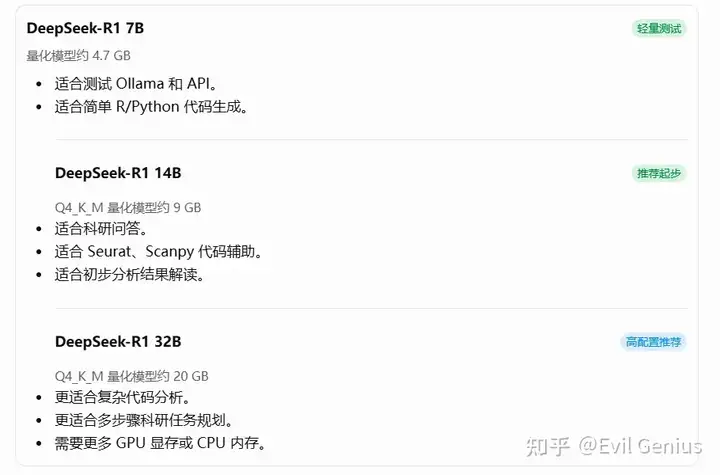
两者不是同一个模型:14B 是经过蒸馏的较小模型
ollama pull deepseek-r1:14b下载完后查看
ollama list
启动模型
ollama run deepseek-r1:14b进入交互界面,随便发一个指令
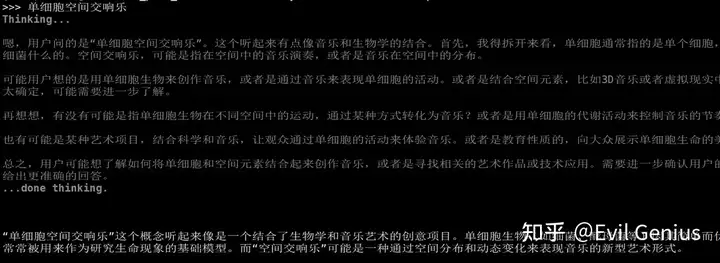
退出
/bye检查是否调用 GPU
watch -n 1 nvidia-smi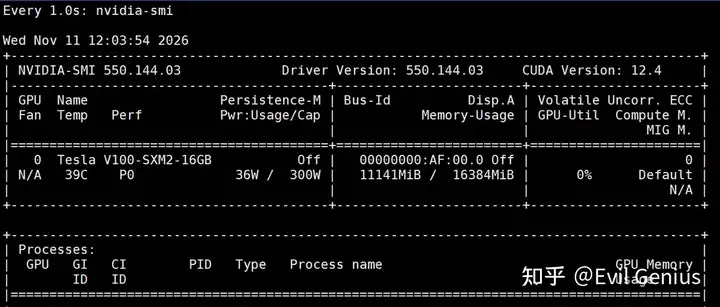
也可以执行
ollama ps
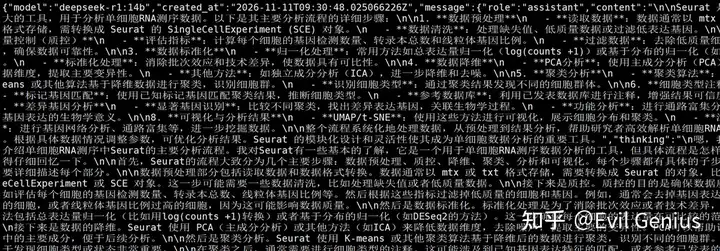
测试测试 Ollama API
curl http://127.0.0.1:11434/api/chat \
-H "Content-Type: application/json" \
-d '{
  "model": "deepseek-r1:14b",
  "messages": [
    {
      "role": "user",
      "content": "请介绍单细胞RNA测序中Seurat的主要分析流程。"
    }
  ],
  "stream": false
}'
创建测试脚本
import requests

url = "http://127.0.0.1:11434/api/chat"

payload = {
    "model": "deepseek-r1:14b",
    "messages": [
        {
            "role": "user",
            "content": "请介绍单细胞RNA测序中Seurat的主要分析流程。"
        }
    ],
    "stream": False,
    "options": {
        "num_ctx": 4096,
        "num_predict": 1024
    }
}

response = requests.post(
    url,
    json=payload,
    timeout=600
)

response.raise_for_status()

result = response.json()

print("DeepSeek回答:\n")
print(result["message"]["content"])
运行
python test.py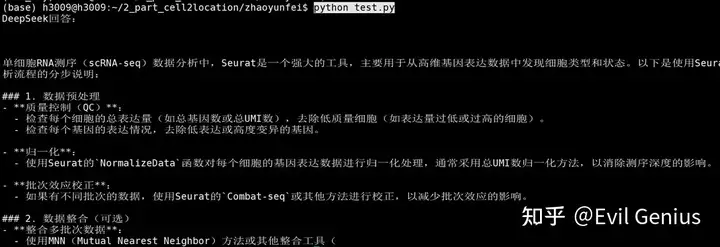
接下来部署Agent,以单细胞多样本整合为例
print(f"[INFO] Data directory: {data_dir}")
    print(f"[INFO] Output directory: {out_dir}")

    inventory = inspect_10x_tree(data_dir)
    print("\n[INFO] 10X directory inventory:\n" + inventory[:12000])

    system_prompt = """
You are an expert bioinformatics R programmer. Generate a complete, executable R script
for multi-sample 10X Genomics scRNA-seq integration using Seurat v5 and Harmony.

Requirements:
- The input root directory and output directory are supplied as commandArgs(trailingOnly=TRUE):
  args[1] = data root; args[2] = output directory.
- Infer the actual sample-folder layout from the supplied directory inventory. Support common
  Cell Ranger layouts: sample/filtered_feature_bc_matrix/, sample/outs/filtered_feature_bc_matrix/,
  and a sample folder containing matrix.mtx[.gz], features.tsv[.gz] and barcodes.tsv[.gz].
- Treat each independent 10X matrix directory as one sample. Use sample folder names as sample IDs.
  Do not mistakenly treat matrix subfolders as separate samples. Stop with a clear error if
  no valid samples or fewer than two samples are found.
- Use Read10X and CreateSeuratObject. Preserve orig.ident and sample metadata.
- Perform per-sample basic QC metrics including nFeature_RNA, nCount_RNA and percent.mt
  (recognize both human MT- and mouse mt- mitochondrial gene prefixes). Report cell counts
  before and after filtering. Use transparent, moderate default QC thresholds and make them
  easy to edit near the top of the R script; do not silently apply aggressive filtering.
- Merge samples, join Seurat v5 layers when needed, normalize, identify variable features,
  scale, and run PCA. Run Harmony using sample/orig.ident as the batch variable.
- Run UMAP using the Harmony reduction, FindNeighbors and FindClusters. Use a clearly stated
  default resolution and save the clustering metadata.
- Run FindAllMarkers with appropriate Seurat v5-compatible settings, and export marker tables.
- Save a final Seurat RDS object, QC summaries, sample cell-count tables, marker CSV, UMAP
  plots colored by cluster and sample, and a sessionInfo text file under output directory.
- Use only packages already installed. Do NOT install packages, invoke shell/system commands,
  download data, access the internet, or delete/overwrite anything outside output directory.
- Check required packages at startup and stop with an informative list if missing.
- Include set.seed, sensible error handling, progress messages, and comments.
- Ensure the script is compatible with Seurat v5 and the installed Harmony API; avoid deprecated
  arguments where possible. If API-version differences are likely, write explicit compatibility
  handling rather than guessing.
- Do not fabricate sample names, results, or file paths.
- Return ONLY the complete R script in one ```r code block. No explanations outside the code.
"""

    user_prompt = f"""
Generate the R script now.

Data root: {data_dir}
Output root: {out_dir}

Observed directory inventory:
{inventory}

Important: this is raw 10X matrix input, not an existing Seurat object. Generate the script
to match the observed layout. Do not run it yourself; I will execute it through Rscript.
"""

    messages = [
        {"role": "system", "content": system_prompt},
        {"role": "user", "content": user_prompt},
    ]

    r_file = out_dir / "deepseek_generated_seurat_harmony.R"
    log_file = out_dir / "seurat_run.log"
    last_error = ""

    for attempt in range(1, args.max_attempts + 1):
        print(f"\n[INFO] Asking {MODEL} to generate/repair R script (attempt {attempt}/{args.max_attempts})...")
        if attempt > 1:
            messages.append({
                "role": "user",
                "content": (
                    "The previous generated R script failed during execution. "
                    "Repair the complete script, preserving the original requirements. "
                    "Return ONLY one complete ```r code block.\n\n"
                    f"Execution error/log tail:\n{last_error[-12000:]}"
                )
            })

        try:
            model_text = ask_deepseek(messages)
            r_code = extract_r_code(model_text)
        except Exception as exc:
            sys.exit(f"ERROR while obtaining/parsing R script from Ollama: {exc}")

        r_file.write_text(r_code, encoding="utf-8")
        print(f"[INFO] Generated R script saved: {r_file}")
        print(f"[INFO] Executing generated R script with Rscript (attempt {attempt})...")

        try:
            proc = subprocess.run(
                [rscript, str(r_file), str(data_dir), str(out_dir)],
                cwd=str(out_dir),
                capture_output=True,
                text=True,
                timeout=R_TIMEOUT_SECONDS,
            )
        except subprocess.TimeoutExpired as exc:
            last_error = (
                f"R script exceeded {R_TIMEOUT_SECONDS} seconds.\n"
                f"STDOUT:\n{exc.stdout or ''}\nSTDERR:\n{exc.stderr or ''}"
            )
            log_file.write_text(last_error, encoding="utf-8")
            print("[ERROR] R execution timed out.")
            continue

        combined = (
            "===== STDOUT =====\n" + (proc.stdout or "") +
            "\n===== STDERR =====\n" + (proc.stderr or "") +
            f"\n===== EXIT CODE: {proc.returncode} =====\n"
        )
        log_file.write_text(combined, encoding="utf-8")
        print(proc.stdout or "")
        if proc.returncode == 0:
            print("\n[SUCCESS] R script completed.")
            print(f"[SUCCESS] R script: {r_file}")
            print(f"[SUCCESS] Run log: {log_file}")
            print(f"[SUCCESS] Results directory: {out_dir}")
            return

        last_error = combined
        print(f"[ERROR] Rscript exited with code {proc.returncode}.")
        print((proc.stderr or proc.stdout or "")[-8000:])

    sys.exit(
        f"\nFAILED after {args.max_attempts} attempts. "
        f"Review generated script: {r_file}\nRun log: {log_file}\n"
        "No further automatic execution attempts were made."
    )
然后运行
python ~/deepseek_sc/deepseek_seurat_agent.py \
  --data-dir /data/scRNA/10X \
  --out-dir /data/scRNA/DeepSeek_results
生成deepseek_generated_seurat_harmony.R脚本并且自动运行,生成Seurat_integrated.rds,以及各种分析图片。
生活很好,有你更好。
原创声明:本文系作者授权腾讯云开发者社区发表,未经许可,不得转载。
如有侵权,请联系 cloudcommunity@tencent.com 删除。
目录
腾讯云开发者

Copyright © 2013 - 2026 Tencent Cloud. All Rights Reserved. 腾讯云 版权所有
深圳市腾讯计算机系统有限公司 ICP备案/许可证号:粤B2-20090059  粤公网安备44030502008569号
腾讯云计算(北京)有限责任公司 京ICP证150476号 | 京ICP备11018762号