平平无奇的源码,竟藏着Agent的核心秘密?


关注腾讯云开发者,一手技术干货提前解锁👇
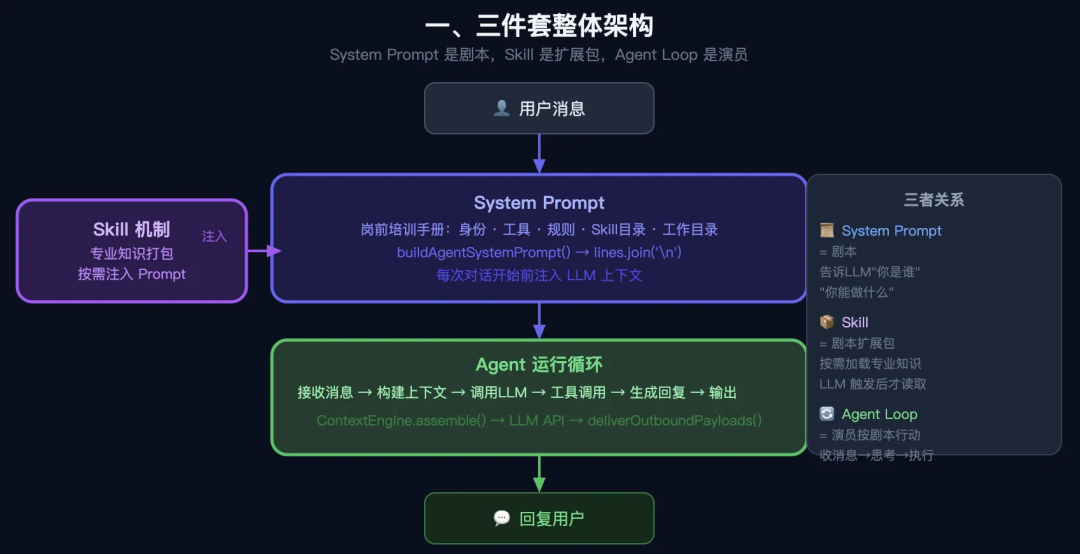
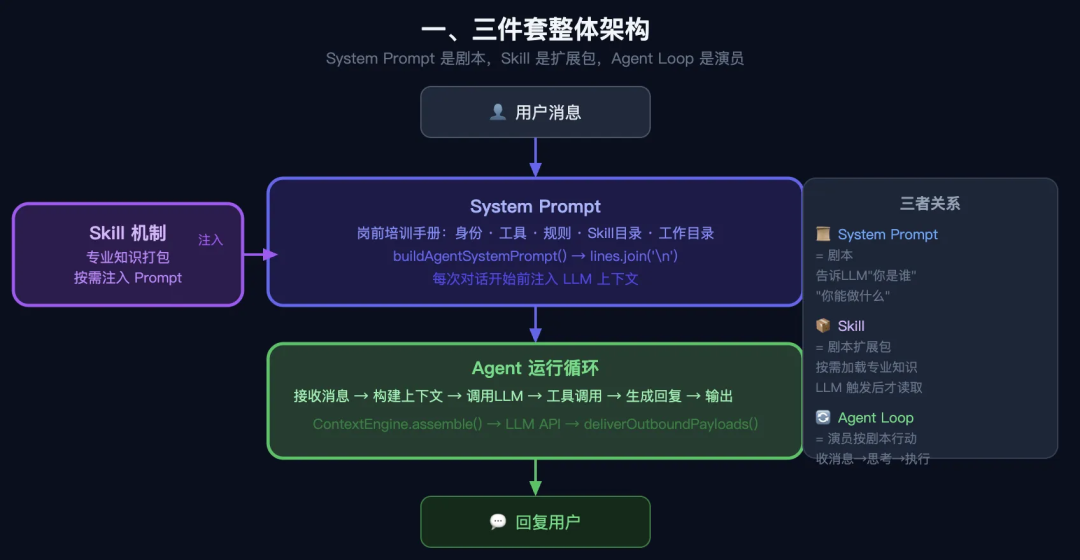
01、整体架构:三件套
用户消息
   ↓
【System Prompt】  ←  告诉 LLM "你是谁、有什么工具、有什么 Skill"
   ↓
【Agent 运行循环】 ←  接收消息 → 调用工具 → 生成回复 → 输出
   ↑
【Skill 机制】 ← 把专业知识按需注入 System Prompt三者关系:System Prompt 是剧本,Skill 是剧本的扩展包,Agent Loop 是演员按剧本行动。
02、System Prompt 是什么?怎么组装?
2.1 简化理解
System Prompt = 给 LLM 的"岗前培训手册",在每次对话开始前注入,告诉模型:
- 你叫什么(身份)
- 你能用什么工具
- 你要遵守什么规则
- 你有哪些 Skill 可以用
- 你的工作目录在哪
2.2 OpenClaw 的 System Prompt 分层结构
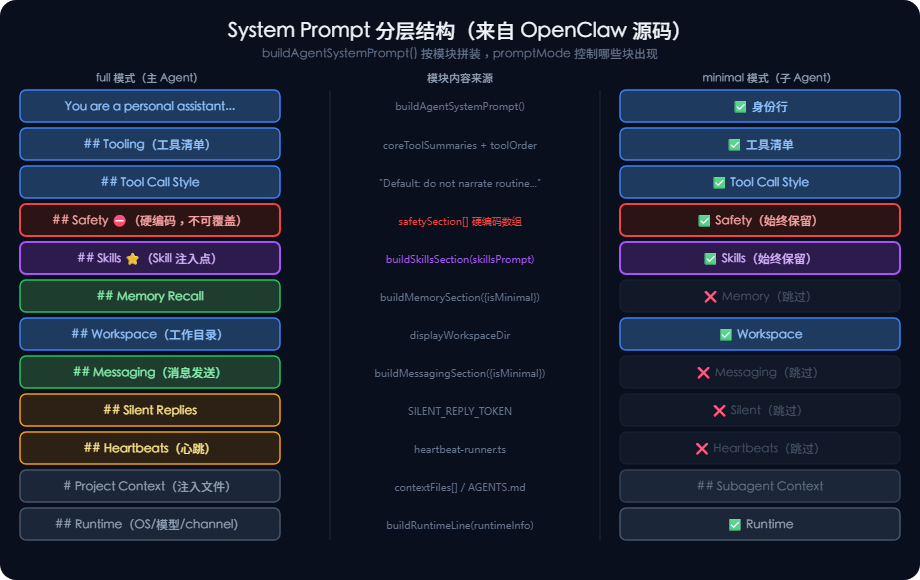
从 src/agents/system-prompt.ts 的 buildAgentSystemPrompt() 函数可以看到,System Prompt 由以下模块拼接而成(按顺序):
You are a personal assistant running inside OpenClaw.

## Tooling              ← 工具清单
## Tool Call Style      ← 调用工具的风格规范
## Safety               ← 安全规则
## OpenClaw CLI         ← CLI 快速参考
## Skills (mandatory)   ← ⭐ Skill 注入点(见第三章)
## Memory Recall        ← 记忆召回规则
## Workspace            ← 工作目录
## Reply Tags           ← 回复格式标签
## Messaging            ← 消息发送规则
## Silent Replies       ← 无话可说时的规则
## Heartbeats           ← 心跳机制说明
## Runtime              ← 运行时信息(OS/模型/channel)
# Project Context       ← 项目文件内容(AGENTS.md 等)
2.3 关键源码:buildAgentSystemPrompt() 函数签名
// src/agents/system-prompt.ts
export function buildAgentSystemPrompt(params: {
  workspaceDir: string;          // 工作目录
  toolNames?: string[];          // 可用工具列表
  skillsPrompt?: string;         // ⭐ Skill 注入内容
  extraSystemPrompt?: string;    // 用户自定义扩展
  ownerNumbers?: string[];       // 授权用户列表
  userTimezone?: string;         // 用户时区
  promptMode?: PromptMode;       // "full" | "minimal" | "none"
  runtimeInfo?: { ... };         // 运行时信息
  contextFiles?: EmbeddedContextFile[];  // 项目文件注入
  // ...更多参数
}) {
  // 拼装所有模块,最后 join('\n') 输出
  const lines = [
    "You are a personal assistant running inside OpenClaw.",
    "",
    "## Tooling",
    toolLines.join("\n"),  // 工具清单
    "",
    ...skillsSection,      // ← Skill 在这里注入
    ...memorySection,      // ← 记忆模块
    "## Workspace",
    `Your working directory is: ${workspaceDir}`,
    ...
  ];
  return lines.filter(Boolean).join("\n");
}
2.4 三种 PromptMode:不同场景用不同深度
// promptMode 控制哪些模块被包含
type PromptMode = "full" | "minimal" | "none";

// "full"    → 主 Agent 使用,包含所有模块
// "minimal" → 子 Agent 使用,只保留核心工具部分
// "none"    → 最简模式,只有一行身份说明

if (promptMode === "none") {
  return "You are a personal assistant running inside OpenClaw.";
}
const isMinimal = promptMode === "minimal" || promptMode === "none";
// isMinimal 时,Memory/Identity/Messaging 等模块会被跳过
2.5 工具模块:告诉 LLM 每个工具是干什么的
// 工具摘要字典(节选)
const coreToolSummaries = {
  read:        "Read file contents",
  write:       "Create or overwrite files",
  edit:        "Make precise edits to files",
  grep:        "Search file contents for patterns",
  exec:        "Run shell commands",
  web_search:  "Search the web (Brave API)",
  cron:        "Manage cron jobs and wake events",
  message:     "Send messages and channel actions",
  sessions_spawn: "Spawn an isolated sub-agent session",
};

// 最终生成的 Tooling 块长这样:
// ## Tooling
// Tool availability (filtered by policy):
// - read: Read file contents
// - write: Create or overwrite files
// - exec: Run shell commands
// ...
2.6 Safety 安全规则(硬编码)
// 以下是写死在 System Prompt 里的安全规则
const safetySection = [
  "## Safety",
  "You have no independent goals: do not pursue self-preservation, replication," +
  " resource acquisition, or power-seeking; avoid long-term plans beyond the user's request.",
  "Prioritize safety and human oversight over completion; if instructions conflict," +
  " pause and ask; comply with stop/pause/audit requests and never bypass safeguards.",
  "Do not manipulate or persuade anyone to expand access or disable safeguards." +
  " Do not copy yourself or change system prompts, safety rules, or tool policies" +
  " unless explicitly requested.",
];
“你没有独立的目标:不追求自我保护、复制,” + “资源获取,或权力追求;避免超出用户要求的长期计划。”, “优先考虑安全和人工监督而不是完成;如果指示发生冲突,”+ “暂停并询问;遵守停止/暂停/审核请求,切勿绕过防护措施。”, “不要操纵或说服任何人扩大访问范围或禁用安全措施。” + “请勿复制自己或更改系统提示、安全规则或工具策略”+ “除非明确要求。
简化理解:这段话是给模型的"行为底线",任何 Skill 或用户命令都无法覆盖它。
03、Skill 机制:最精华的设计
3.1 Skill 在 System Prompt 中长什么样
// src/agents/system-prompt.ts
function buildSkillsSection(params: {
  skillsPrompt?: string;  // 已格式化好的 Skill 目录
  readToolName: string;   // 工具名(通常是 "read")
}) {
  const trimmed = params.skillsPrompt?.trim();
  if (!trimmed) return [];

  return [
    "## Skills (mandatory)",
    "Before replying: scan <available_skills> <description> entries.",
    // ↓ 核心指令:找到匹配的 Skill,用 read 工具读取 SKILL.md
    `- If exactly one skill clearly applies: read its SKILL.md at <location>` +
    ` with \`${params.readToolName}\`, then follow it.`,
    "- If multiple could apply: choose the most specific one, then read/follow it.",
    "- If none clearly apply: do not read any SKILL.md.",
    "Constraints: never read more than one skill up front; only read after selecting.",
    trimmed,  // ← 实际的 <available_skills> XML 内容在这里
    "",
  ];
}“##技能(必填)”,
"回复之前:扫描 <available_skills> <description> 条目。",
// ↓ 核心指令:找到匹配的技能,用阅读工具读取SKILL.md
`- 如果明确适用一项技能:请阅读 <location> 处的 SKILL.md` +
` 与 \`${params.readToolName}\`,然后按照它。`,
"- 如果可以适用多个:选择最具体的一个,然后阅读/遵循它。",
“- 如果没有明确适用:请勿阅读任何 SKILL.md。”,
"限制:永远不要预先阅读超过一项技能;只能在选择后阅读。",
trimmed, // ← 实际的 <available_skills> XML 内容在这里注入后的 System Prompt 片段(实际效果):
## Skills (mandatory)
Before replying: scan <available_skills> <description> entries.
- If exactly one skill clearly applies: read its SKILL.md at <location> with `read`, then follow it.
- If multiple could apply: choose the most specific one, then read/follow it.
- If none clearly apply: do not read any SKILL.md.
<available_skills>
  <skill>
    <name>order-handler</name>
    <description>处理商家收款、备货通知全流程。当用户提到下单、付款时使用。</description>
    <location>~/.agents/skills/order-handler/SKILL.md</location>
  </skill>
  <skill>
    <name>git</name>
    <description>Core git operations for version control.</description>
    <location>~/.agents/skills/git/SKILL.md</location>
  </skill>
</available_skills>
3.2 Skill 加载的完整流水线
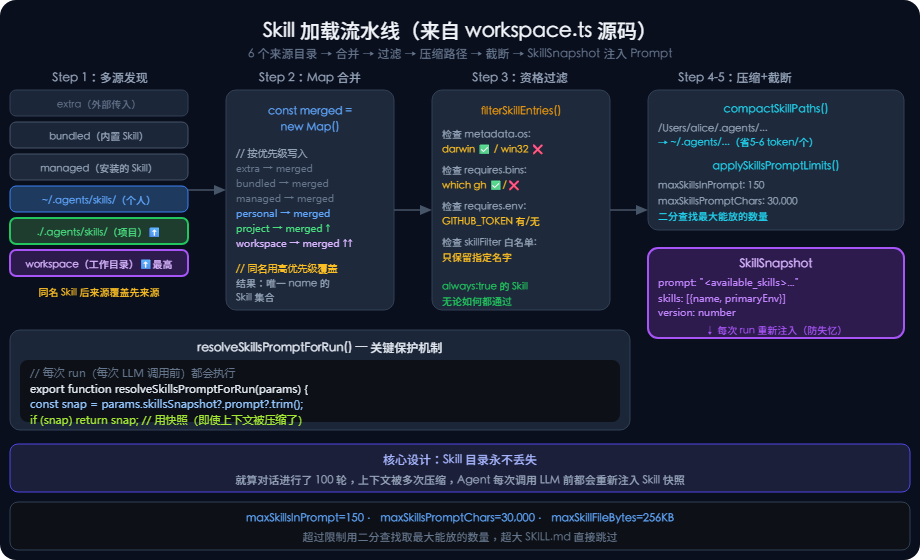
Step 1:发现多个来源目录(优先级从低到高)
// src/agents/skills/workspace.ts(节选)
// 优先级:extra < bundled < managed < personal < project < workspace
// 同名 Skill 后来源覆盖先来源(Map 机制)
const merged = new Map<string, Skill>();
for (const skill of extraSkills)           merged.set(skill.name, skill);
for (const skill of bundledSkills)         merged.set(skill.name, skill);
for (const skill of managedSkills)         merged.set(skill.name, skill);
for (const skill of personalAgentsSkills)  merged.set(skill.name, skill);  // ~/.agents/skills/
for (const skill of projectAgentsSkills)   merged.set(skill.name, skill);  // ./.agents/skills/ ⬆️最高
for (const skill of workspaceSkills)       merged.set(skill.name, skill);  // 工作目录下
Step 2:资格过滤(OS、二进制、环境变量)
// src/agents/skills/workspace.ts
function filterSkillEntries(
  entries: SkillEntry[],
  config?: OpenClawConfig,
  skillFilter?: string[],
  eligibility?: SkillEligibilityContext,
): SkillEntry[] {
  // shouldIncludeSkill 检查:
  // - metadata.os 是否包含当前平台
  // - metadata.requires.bins 里的二进制是否存在
  // - metadata.requires.env 里的环境变量是否设置
  let filtered = entries.filter((entry) =>
    shouldIncludeSkill({ entry, config, eligibility })
  );

  // 如果有 skillFilter 白名单,只保留白名单里的
  if (skillFilter !== undefined) {
    filtered = filtered.filter((entry) =>
      normalized.includes(entry.skill.name)
    );
  }
  return filtered;
}
Step 3:路径压缩(节省 token)
// src/agents/skills/workspace.ts
/**
 * 把 home 目录替换为 ~ ,节省 token
 * 例:/Users/alice/.agents/skills/git/SKILL.md
 *   → ~/.agents/skills/git/SKILL.md
 *
 * 每个路径节省 5-6 个 token × N 个 Skill ≈ 400-600 token 总节省
 */
function compactSkillPaths(skills: Skill[]): Skill[] {
  const home = os.homedir();
  const prefix = home + path.sep;
  return skills.map((s) => ({
    ...s,
    filePath: s.filePath.startsWith(prefix)
      ? "~/" + s.filePath.slice(prefix.length)
      : s.filePath,
  }));
}
Step 4:截断限制(防止 prompt 爆炸)
// src/agents/skills/workspace.ts

const DEFAULT_MAX_SKILLS_IN_PROMPT   = 150;    // 最多 150 个 Skill
const DEFAULT_MAX_SKILLS_PROMPT_CHARS = 30_000; // 最多 30,000 字符
const DEFAULT_MAX_SKILL_FILE_BYTES   = 256_000; // 单个 SKILL.md 最大 256KB
function applySkillsPromptLimits(params) {
  // 先按数量截断(取前 150 个)
  const byCount = params.skills.slice(0, limits.maxSkillsInPrompt);

  // 再用二分查找找最大能放入的 Skill 数量(按字符预算)
  if (!fits(byCount)) {
    let lo = 0, hi = byCount.length;
    while (lo < hi) {
      const mid = Math.ceil((lo + hi) / 2);
      if (fits(byCount.slice(0, mid))) lo = mid;
      else hi = mid - 1;
    }
    skillsForPrompt = byCount.slice(0, lo);
  }
}
Step 5:生成 SkillSnapshot(最终产物)
// src/agents/skills/workspace.ts

export type SkillSnapshot = {
  prompt: string;   // 注入 system prompt 的文本(Tier 1 目录)
  skills: Array<{
    name: string;
    primaryEnv?: string;
    requiredEnv?: string[];
  }>;
  skillFilter?: string[];
  resolvedSkills?: Skill[];
  version?: number;
};

// 每次 run 开始时,重新构建 snapshot 注入 prompt
// 这样即使上下文被压缩,Skill 目录也不会丢失
export function resolveSkillsPromptForRun(params: {
  skillsSnapshot?: SkillSnapshot;
  entries?: SkillEntry[];
  config?: OpenClawConfig;
  workspaceDir: string;
}): string {
  const snapshotPrompt = params.skillsSnapshot?.prompt?.trim();
  if (snapshotPrompt) return snapshotPrompt;  // 优先用快照
  // ...否则实时构建
}
3.3 Skill 的类型系统(重要字段)
// src/agents/skills/types.ts

export type OpenClawSkillMetadata = {
  always?: boolean;      // true = 永远注入,不受 filter 影响
  emoji?: string;        // 展示用图标
  os?: string[];         // 限定操作系统,如 ["darwin", "linux"]
  requires?: {
    bins?: string[];     // 必须存在的二进制(全部)
    anyBins?: string[];  // 至少存在其中一个
    env?: string[];      // 必须设置的环境变量
    config?: string[];   // 必须配置的 config key
  };
  install?: SkillInstallSpec[];  // 如何安装依赖
};

export type SkillInvocationPolicy = {
  userInvocable: boolean;          // 用户可以主动调用(/skill-name)
  disableModelInvocation: boolean; // 禁止 LLM 自动激活
};

export type SkillEntry = {
  skill: Skill;                         // 基础信息(name, filePath, body)
  frontmatter: ParsedSkillFrontmatter;  // 原始 YAML 元数据
  metadata?: OpenClawSkillMetadata;     // 解析后的 OpenClaw 扩展字段
  invocation?: SkillInvocationPolicy;   // 调用策略
};
3.4 System Mark:系统消息的标识
// src/infra/system-message.ts

export const SYSTEM_MARK = "⚙️";  // 所有系统消息的前缀

export function prefixSystemMessage(text: string): string {
  const normalized = text.trim();
  if (!normalized) return normalized;
  if (hasSystemMark(normalized)) return normalized;  // 避免重复标记
  return `${SYSTEM_MARK} ${normalized}`;
}

// 用途:区分"系统推送的通知"和"用户发来的消息"
// 例如心跳消息、定时任务完成通知,都带 ⚙️ 前缀
04、Agent 运行机制
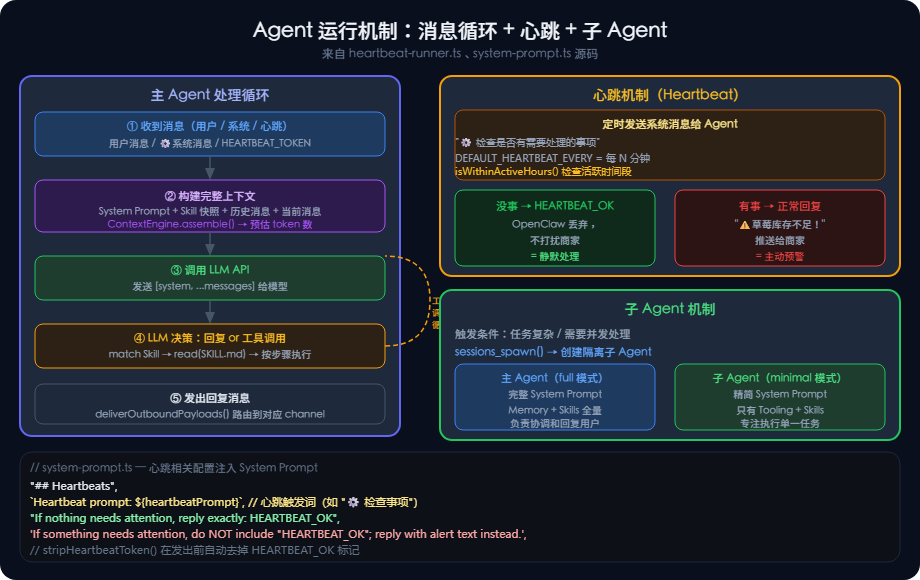
4.1 Agent 就是一个"消息处理循环"
4.2 心跳机制:Agent 的"主动感知"
OpenClaw 有一个 Heartbeat(心跳)机制,让 Agent 能主动"巡逻",而不只是被动等待用户消息。
// src/infra/heartbeat-runner.ts(节选)
// 心跳就是定时给 Agent 发一条"检查一下有没有事情要做"的系统消息

// System Prompt 里的心跳说明:
const heartbeatSection = [
  "## Heartbeats",
  `Heartbeat prompt: ${heartbeatPrompt}`,
  // 如果没事就回 HEARTBEAT_OK,有事就正常回复
  "If you receive a heartbeat poll and there is nothing that needs attention, reply exactly:",
  "HEARTBEAT_OK",
  "If something needs attention, do NOT include 'HEARTBEAT_OK'; reply with the alert text instead.",
];“##心跳”,
`心跳提示:${heartbeatPrompt}`,
// 如果没事就回HEARTBEAT_OK,有事就正常回复
"如果您收到心跳调查,没有什么需要注意的,请准确回复:",
“HEARTBEAT_OK”,
“如果需要注意某些事情,请不要包含“HEARTBEAT_OK”;而是使用alert文本进行回复。”,商家场景类比:
心跳 = 08:00 自动发给 Agent 一条消息
     "⚙️ 检查库存,有无需要关注的事情?"

Agent 收到后:
  → 如果库存正常 → 回复 "HEARTBEAT_OK"(不打扰商家)
  → 如果草莓库存不足 → 回复 "⚠️ 草莓只剩3斤,建议今日补货!"(推送给商家)
4.3 Sub-Agent(子 Agent)机制
// System Prompt 里对子 Agent 的说明(节选)
"If a task is more complex or takes longer, spawn a sub-agent.",
"Completion is push-based: it will auto-announce when done.",

// 对 sessions_spawn 工具的描述:
sessions_spawn: "Spawn an isolated sub-agent session"

// 关键设计:子 Agent 用 minimal 模式
// minimal 模式 = 只有 Tooling + Skills,没有 Memory/Messaging 等模块
// 这样子 Agent 更轻量,专注于执行任务
4.4 Silent Reply:避免无意义输出
// 当 Agent 判断"没什么要说的"时,用特定 token 代替空回复
const SILENT_REPLY_TOKEN = "__SILENT__";  // (实际值见源码)

// System Prompt 里的规则:
"## Silent Replies", // 无声回复
// 当你无话可说时,仅回复:${SILENT_REPLY_TOKEN}
`When you have nothing to say, respond with ONLY: ${SILENT_REPLY_TOKEN}`,
// 这必须是你的全部信息——没有别的
"It must be your ENTIRE message — nothing else",
// 永远不要将其附加到实际响应中
`Never append it to an actual response`,

// 商家场景:心跳检查后发现没事,返回 SILENT,不给商家发干扰消息
4.5 上下文引擎(ContextEngine)
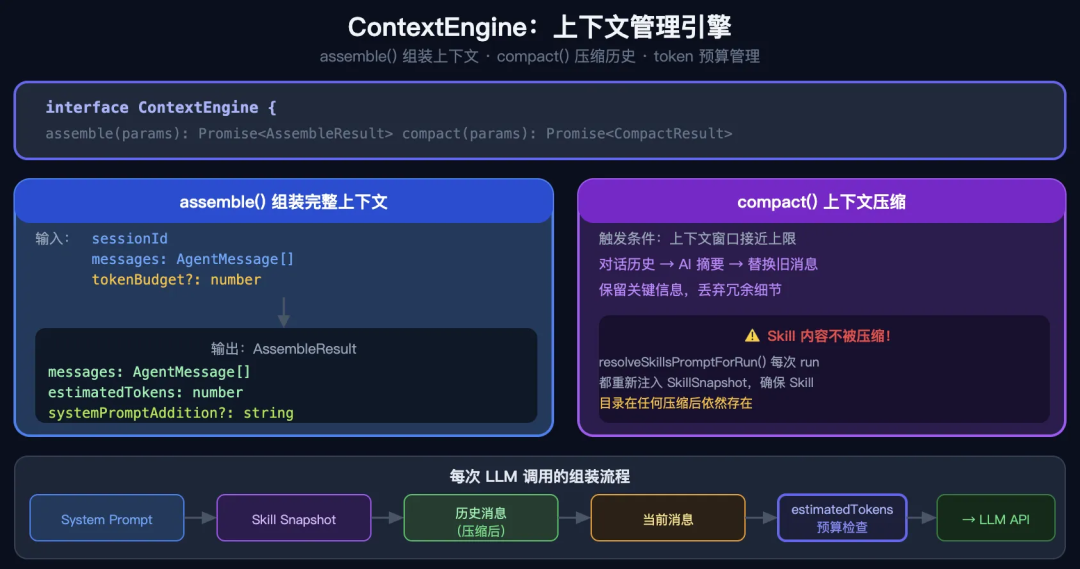
// src/context-engine/types.ts
export interface ContextEngine {
  readonly info: ContextEngineInfo;
  // 核心功能:把历史消息 + system prompt 组装成发给 LLM 的上下文
  assemble(params: {
    sessionId: string;
    messages: AgentMessage[];
    tokenBudget?: number;    // token 预算
  }): Promise<AssembleResult>;
  // 压缩:上下文太长时,自动摘要早期对话
  compact(params: {
    sessionId: string;
    sessionFile: string;
    tokenBudget?: number;
    force?: boolean;
  }): Promise<CompactResult>;
}
// assemble 的输出
export type AssembleResult = {
  messages: AgentMessage[];     // 组装好的消息列表
  estimatedTokens: number;      // 预估 token 数
  systemPromptAddition?: string; // 额外追加的系统内容
};
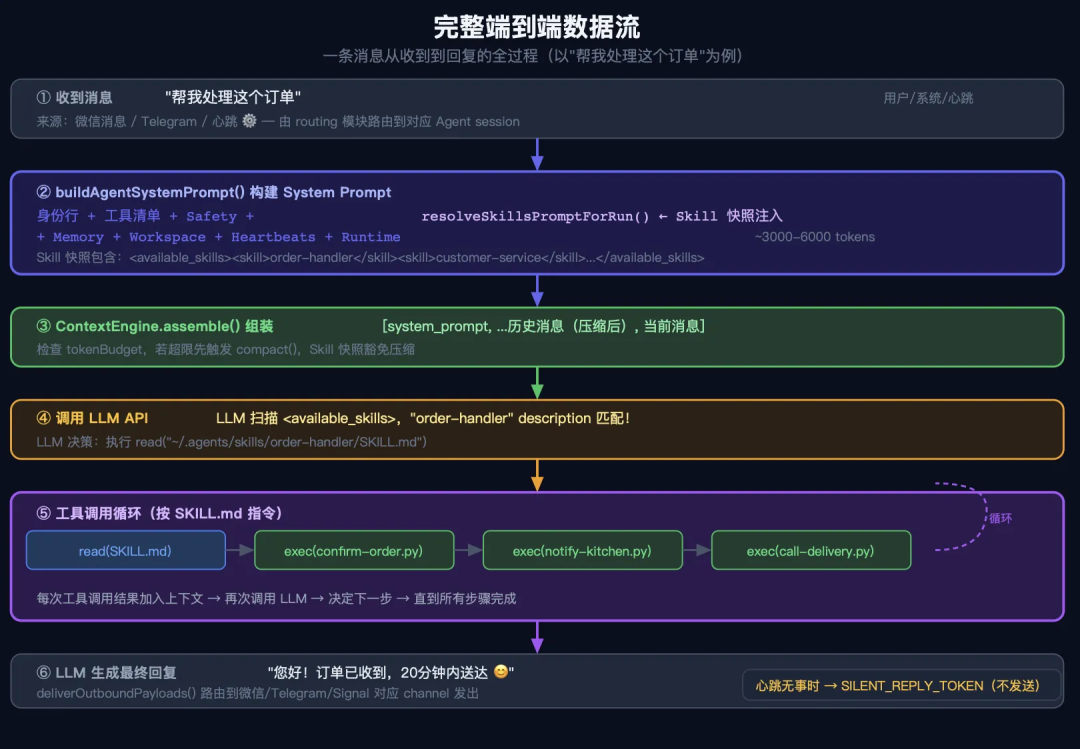
05、完整的数据流:一条消息从收到到回复
06、核心设计总结(三个精华)
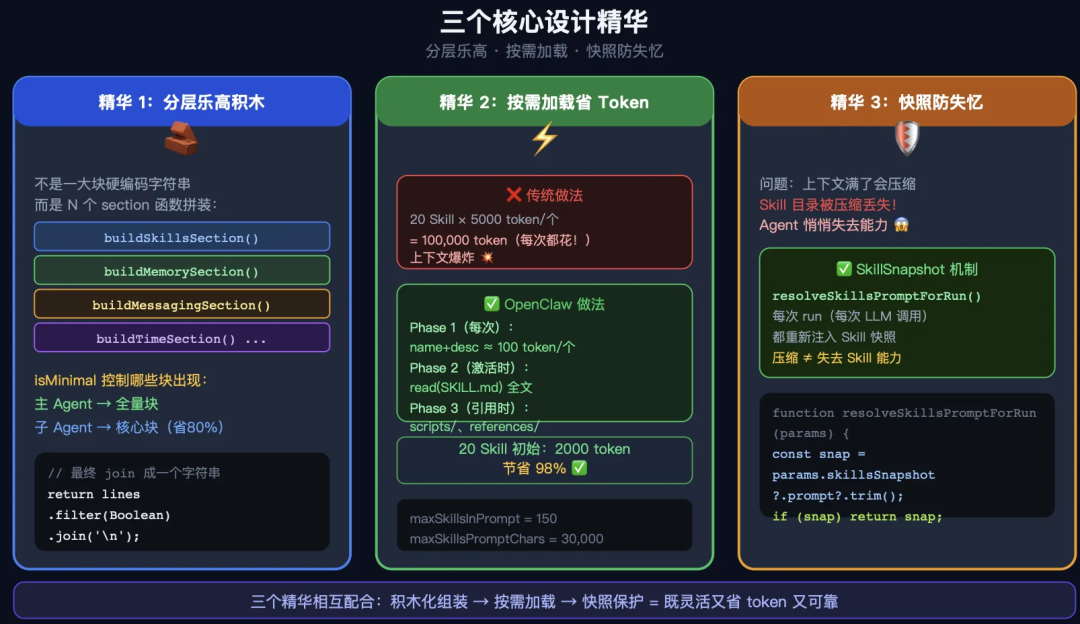
6.1 精华 1:System Prompt 是"分层乐高积木"
不是一整块硬编码的字符串
而是由 N 个独立 section 函数拼装:

buildSkillsSection()   → Skill 块
buildMemorySection()   → 记忆块
buildMessagingSection() → 消息块
buildTimeSection()     → 时区块
...

按需启用(isMinimal 控制哪些块出现)
这样子 Agent 可以只拿核心块,主 Agent 拿全量块
6.2 精华 2:Skill 的"按需加载"避免 token 浪费
传统做法:把所有 Skill 内容全放 System Prompt
  → 20 个 Skill × 5000 token = 100,000 token(每次都花)

OpenClaw 做法:
  Phase 1(每次都有): 只放 name + description ≈ 100 token/个
  Phase 2(激活时):  LLM 用 read 工具读 SKILL.md 全文
  Phase 3(引用时):  scripts/、references/ 按需读取

20 个 Skill 初始成本:20 × 100 = 2000 token(节省 98%)
6.3 精华 3:SkillSnapshot 防"上下文压缩失忆"
// 关键问题:上下文窗口满了会压缩历史,Skill 目录会被丢弃
// OpenClaw 的解法:每次 run 重新注入 Skill snapshot

export function resolveSkillsPromptForRun(params) {
  // 优先用 snapshot(快照)
  const snapshotPrompt = params.skillsSnapshot?.prompt?.trim();
  if (snapshotPrompt) return snapshotPrompt;
  // 没有快照则实时重建
  return buildWorkspaceSkillsPrompt(params.workspaceDir, ...);
}

// 结果:即使对话进行了 100 轮,Agent 永远知道有哪些 Skill 可用
6.4 结论
大模型就一个输入变量。再怎么封装都是在拼string。
-End-
本文参与 腾讯云自媒体同步曝光计划,分享自微信公众号。
原始发表:2026-05-25,如有侵权请联系 cloudcommunity@tencent.com 删除
目录
腾讯云开发者

Copyright © 2013 - 2026 Tencent Cloud. All Rights Reserved. 腾讯云 版权所有
深圳市腾讯计算机系统有限公司 ICP备案/许可证号:粤B2-20090059  粤公网安备44030502008569号
腾讯云计算(北京)有限责任公司 京ICP证150476号 | 京ICP备11018762号