基于 DolphinDB 搭建微服务的 SpringBoot 项目
原创
基于 DolphinDB 搭建微服务的 SpringBoot 项目
原创
DolphinDB
发布于 2026-05-27 14:59:38
发布于 2026-05-27 14:59:38
SpringBoot 是一个基于 Spring 的快速开发框架,也是 SpringCloud 构建微服务分布式系统的基础设施。本文主要介绍如何通过 SpringBoot 快速搭建 DolphinDB 微服务,并且基于 Mybatis 操作 DolphinDB 数据库。本项目中 Mybatis 框架对 DolphinDB 的支持:所有 DolphinDB 基础数据类型的增删改查;部分类型需要 Mybatis 框架提供的 handler 进行转换。
1. 创建 SpringBoot 项目
1.1 环境配置
1.2 新建项目
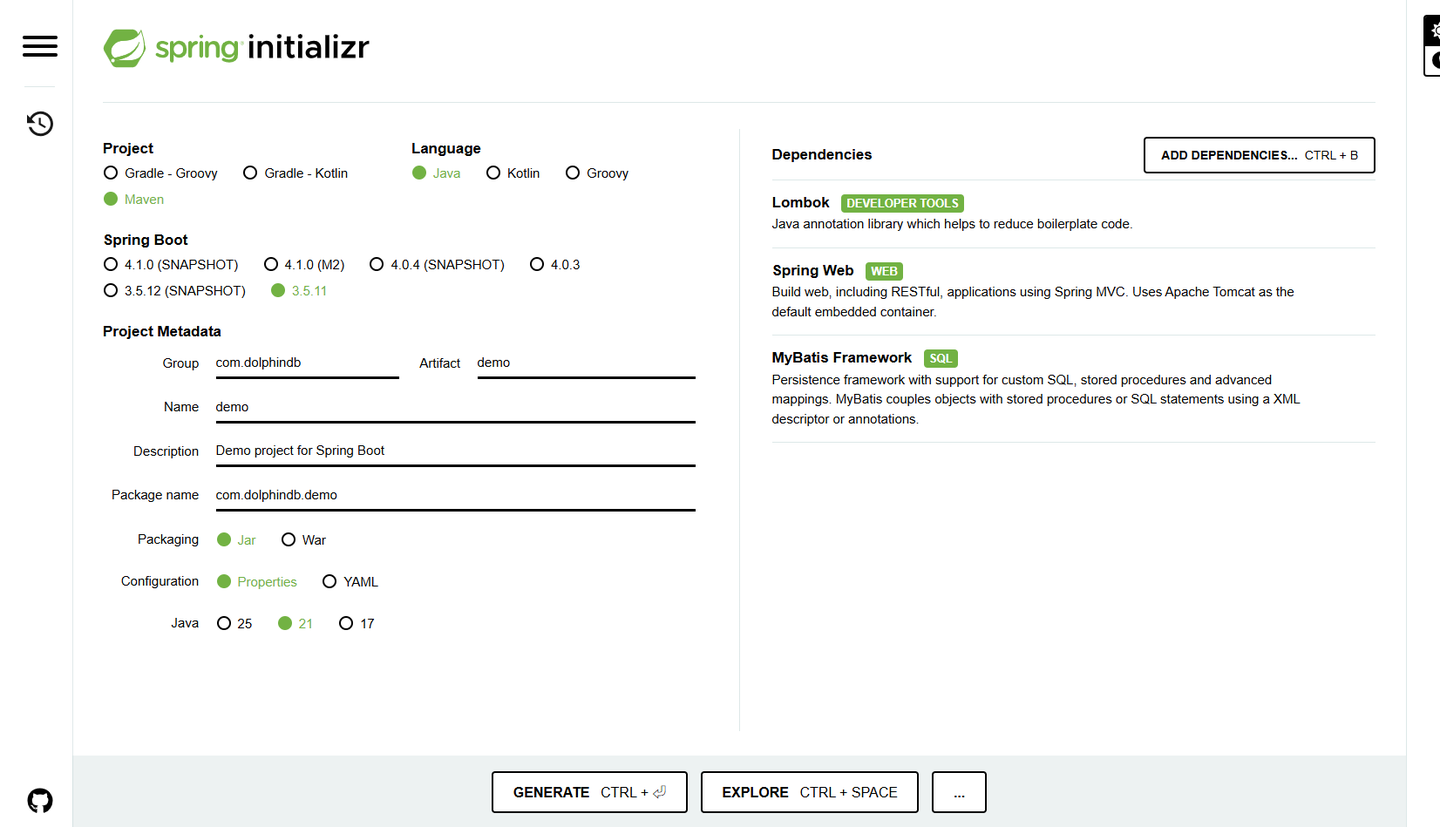
进入 Spring Initializr,Project 选择 Maven,Language 选择 Java,Spring Boot 选择 3.5.11 及以上,Project Metadata 的 Group 改成 com.dolphindb,Dependencies 添加 Lombok,Spring Web 和 MyBatis Framework。单击下方的 GENERATE 生成 SpringBoot 项目。
1.3 打开项目
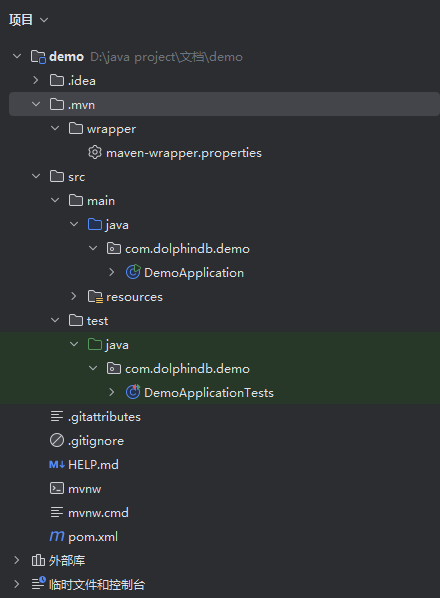
将 1.2 下载的安装包解压后,使用 IEDA 打开项目。
1.4 新建目录
新建目录,构建标准的 Spring MVC 目录结构:
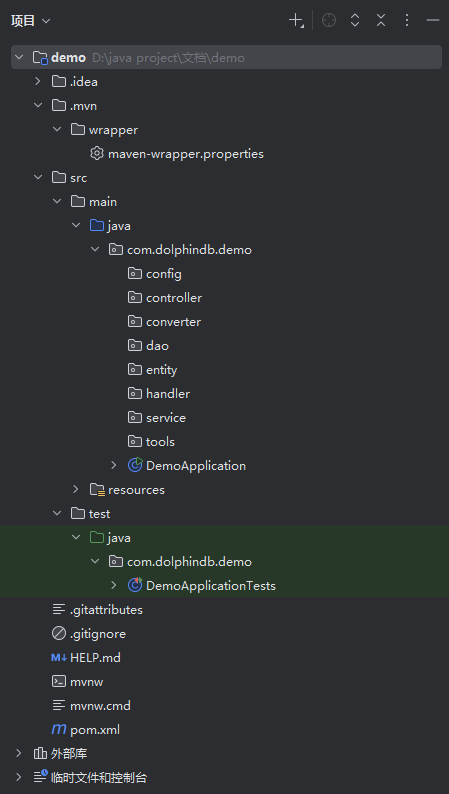
项目整体框架搭建好后,下面进行数据库的准备工作。
2. 创建 DolphinDB 数据库
2.1 创建数据库,建立 包含基础数据类型 的数据表
在 DolphinDB 中执行以下脚本,创建数据库表。
colName = `BoolValue`CharValue`ShortValue`IntValue`LongValue`Date`Time`Second`Datetime`Timestamp`Nanotime`Nanotimestamp`Minute`FloatValue`DoubleValue`Symbol`String`DateHour`Blob
colType = [BOOL,CHAR,SHORT,INT,LONG,DATE,TIME,SECOND,DATETIME,TIMESTAMP,NANOTIME,NANOTIMESTAMP,MINUTE,FLOAT,DOUBLE,SYMBOL,STRING,DATEHOUR,BLOB]
t = table(100:0,colName,colType)
engine = "TSDB"
dbName = "dfs://example"
tbName = "example"
years = sort(distinct(yearBegin(1985.01.01..2055.01.01)))
directory = dbName
db = database(directory, RANGE, years, engine=engine)
createPartitionedTable(db,t,tbName,`Timestamp,,`Date)
构建完成的库表如图所示:

包含了 DolphinDB 的基础数据类型,之后将对该表进行增删改查操作。
2.2 添加 DolphinDB JDBC 依赖
在 pom 文件中添加 DolphinDB 的 JDBC 依赖并且刷新 Maven。
<dependency>
    <groupId>com.dolphindb</groupId>
    <artifactId>jdbc</artifactId>
    <version>3.00.5.0</version>
</dependency>
2.3 项目配置
在 application.properties 中配置连接 DolphinDB 数据库所需的参数。本文只配了几个必要的配置,其他参数可自行配置,参数说明详见官方配置文档。请注意,以下参数中
spring.datasource.url 请调整为用户实际使用的地址。
server.port=18888
spring.datasource.url=jdbc:dolphindb://127.0.0.1:8848?user=admin&password=123456&databasePath=dfs://example
spring.datasource.username=admin
spring.datasource.password=123456
spring.datasource.driver-class-name=com.dolphindb.jdbc.Driver
mybatis.mapper-locations=classpath:/mapper/*.xml
mybatis.configuration.auto-mapping-behavior=full
mybatis.configuration.log-impl=org.apache.ibatis.logging.stdout.StdOutImpl
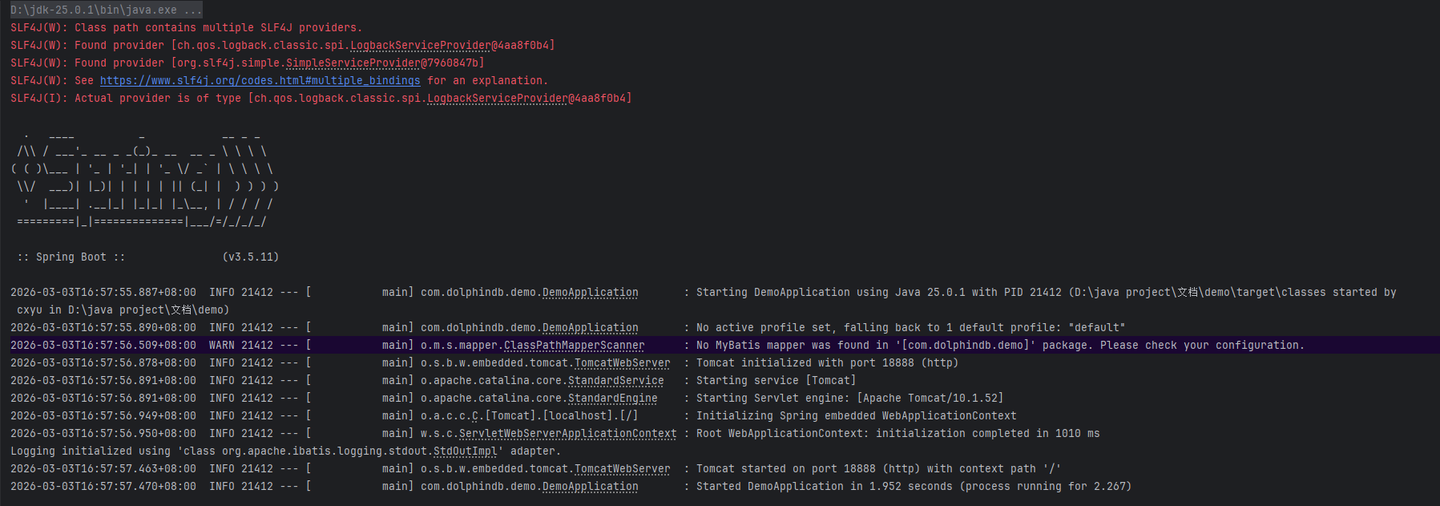
运行项目,启动后控制台输出如下:
完成前面的准备步骤后,就可以编写具体的代码了。
3. 基础类型的增删改查
本章节将编写代码实现基础数据类型的增删改查接口,需要注意 DolphinDB JDBC 的数据类型与 Java 原生类型的对应关系。
3.1 entity 目录
ExampleEntity 是实体类,对应 dfs://example 数据库中的 example 表。其中 DolphinDB JDBC 的数据类型与 Java 原生类型的对应关系需要参照 DolphinDB 官网 Java 手册的数据类型章节。
创建 src/main/java/com/dolphindb/demo/entity/ExampleEntity.java 实体类。
package com.dolphindb.demo.entity;
import java.time.LocalDate;
import java.time.LocalDateTime;
import java.time.LocalTime;
import java.util.Date;
import lombok.Data;
@Data
public class ExampleEntity {
    private Boolean boolValue;
    private Byte charValue;
    private Short shortValue;
    private Integer intValue;
    private Long longValue;
    private LocalDate date;
    private Date time;
    private LocalTime second;
    private LocalDateTime datetime;
    private LocalDateTime timestamp;
    private LocalDateTime nanotime;
    private LocalDateTime nanotimestamp;
    private LocalTime minute;
    private Float floatValue;
    private Double doubleValue;
    private String symbol;
    private String string;
    private LocalDateTime dateHour;
    private String blob;
}
3.2 增删改查
定义实体类后,即可开始编写代码实现针对 DolphinDB 数据库的增删改查接口。
3.2.1 插入
- dao 目录:在 dao 目录下创建一个接口
ExampleDao。并定义insertExampleData(ExampleEntity ExampleEntity)作为插入数据的方法。 创建src/main/java/com/dolphindb/demo/dao/ExampleDao.java接口。
package com.dolphindb.demo.dao;
import com.dolphindb.demo.entity.ExampleEntity;
import org.apache.ibatis.annotations.Mapper;
@Mapper
public interface ExampleDao {
    void insertExampleData(ExampleEntity ExampleEntity);
}- service 目录:创建服务的接口
ExampleService。 创建src/main/java/com/dolphindb/demo/service/ExampleService.java接口。
package com.dolphindb.demo.service;
import com.dolphindb.demo.entity.ExampleEntity;
public interface ExampleService {
    void insertExampleData(ExampleEntity exampleEntity);
}
在 service 目录下面创建 impl 文件夹,创建服务的业务层实现:ExampleServiceImpl。
创建src/main/java/com/dolphindb/demo/service/impl/ExampleServiceImpl.java类。
package com.dolphindb.demo.service.impl;
import com.dolphindb.demo.dao.ExampleDao;
import com.dolphindb.demo.entity.ExampleEntity;
import com.dolphindb.demo.service.ExampleService;
import jakarta.annotation.Resource;
import org.springframework.stereotype.Service;
@Service
public class ExampleServiceImpl implements ExampleService {
    @Resource
    ExampleDao exampleDao;
    @Override
    public void insertExampleData(ExampleEntity exampleEntity) {
        exampleDao.insertExampleData(exampleEntity);
    }
}- controller 目录:ExampleController 文件
创建
src/main/java/com/dolphindb/demo/controller/ExampleController.java类。
package com.dolphindb.demo.controller;
import com.dolphindb.demo.entity.ExampleEntity;
import com.dolphindb.demo.service.ExampleService;
import jakarta.annotation.Resource;
import org.springframework.http.ResponseEntity;
import org.springframework.web.bind.annotation.PostMapping;
import org.springframework.web.bind.annotation.RequestBody;
import org.springframework.web.bind.annotation.RestController;
import java.io.IOException;
@RestController
public class ExampleController {
    @Resource
    ExampleService exampleService;
    @PostMapping("/insertExampleData")
    public ResponseEntity<String> insertExampleData(@RequestBody ExampleEntity exampleEntity) throws IOException {
        exampleService.insertExampleData(exampleEntity);
        return ResponseEntity.ok("insert");
    }
}
mapper 目录:ExampleMapper.xml 文件
创建 src/main/resources/mapper/ExampleMapper.xml 文件。
<?xml version="1.0" encoding="UTF-8" ?>
<!DOCTYPE mapper PUBLIC "-//mybatis.org//DTD Mapper 3.0//EN" "http://mybatis.org/dtd/mybatis-3-mapper.dtd" >
<mapper namespace="com.dolphindb.demo.dao.ExampleDao" >
    <insert id="insertExampleData">
        insert into loadTable("dfs://example", "example")
        values(
        #{boolValue},
        #{charValue},
        #{shortValue},
        #{intValue},
        #{longValue},
        #{date},
        #{time},
        #{second},
        #{datetime},
        #{timestamp},
        #{nanotime},
        #{nanotimestamp},
        #{minute},
        #{floatValue},
        #{doubleValue},
        #{symbol},
        #{string},
        #{dateHour},
        #{blob}
        )
    </insert>
</mapper>
全部代码编写完成后,目录结构如下:
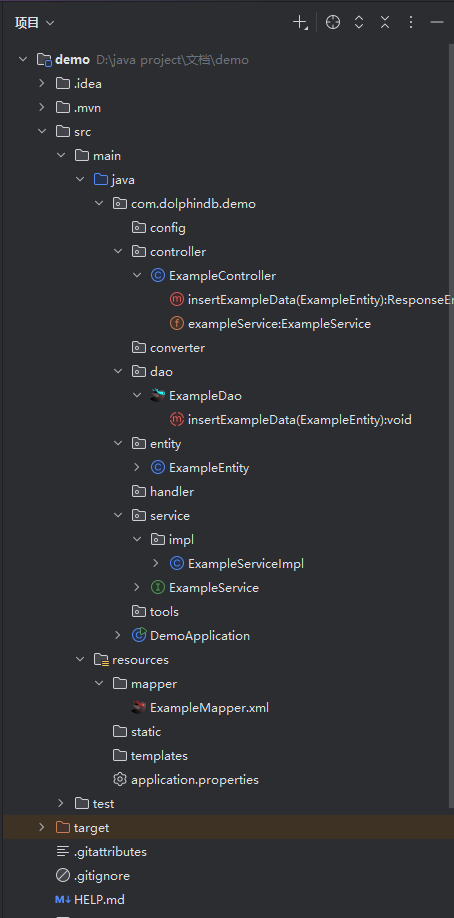
重启项目后,可以使用 Postman 来测试接口,请求方式选择 POST,URL 填写
127.0.0.1:18888/insertExampleData,Header 中必要的参数是key:Content-Type,Value:application/json。Body 选择 raw,并且选择 JSON。
JSON 字符串的内容:
{
  "boolValue": true,
  "charValue": 99,
  "shortValue": 56,
  "intValue": 2048,
  "longValue": -1603669167,
  "date": "2015-10-05",
  "time": "1970-01-01T11:38:10.000+00:00",
  "second": "01:06:31",
  "datetime": "2014-11-11T11:07:53",
  "timestamp": "2000-06-18T07:05:29",
  "nanotime": "1970-01-01T07:50:31.075101949",
  "nanotimestamp": "2014-06-13T18:06:58.061041998",
  "minute": "1970-01-01T10:54:10.000",
  "floatValue": 7.3313475,
  "doubleValue": 0.685568745069626,
  "symbol": "Zb",
  "string": "j4RAJ",
  "dateHour": "0552-06-13T20:00:00",
  "blob": "iD"
}
发送 POST 请求后,如果插入成功,会在 Body 中收到 insert 的返回。

此时,到数据库查询 loadTable("dfs://example","example") 表。
select * from loadTable("dfs://example", "example")结果如下:

可以看到数据已经成功插入了。
3.2.2 查询
继续编写数据库的查询代码,可以使用多种 where 条件来查询数据库。
ExampleDao文件 在ExampleDao文件中添加数据查询方法。
import java.time.LocalDate;
import java.util.List;
List<ExampleEntity> getExampleData(); // 查询所有数据
List<ExampleEntity> getExampleDataByDate(LocalDate date); // 根据日期查询
List<ExampleEntity> getExampleDataBetweenIntValue(int startIntValue, int endIntValue); // 使用 between and 查询
List<ExampleEntity> getExampleDataByIds(int[] intValues); // 使用 in 查询ExampleMapper.xml文件 在ExampleMapper.xml文件实现这些方法。
<resultMap id="ExampleEntityMap" type="com.dolphindb.demo.entity.ExampleEntity">
</resultMap>
<select id="getExampleData" resultMap="ExampleEntityMap">
    select * from loadTable("dfs://example", "example")
</select>
<select id="getExampleDataByDate" resultMap="ExampleEntityMap">
    select * from loadTable("dfs://example", "example") where Date = #{date}
</select>
<select id="getExampleDataBetweenIntValue" resultMap="ExampleEntityMap">
    select * from loadTable("dfs://example", "example") where IntValue between #{startIntValue} and #{endIntValue}
</select>
<select id="getExampleDataByIds" resultMap="ExampleEntityMap">
    SELECT * FROM example
    WHERE IntValue IN
    <foreach collection="intValues" item="intValue" open="[" separator="," close="]">
        #{intValue}
    </foreach>
</select>
可以看到 getExampleDataByIds这个方法,我们直接使用的表名来查询,这是因为我们在spring.datasource.url 配置项中配置了
databasePath=dfs://example,该配置项可以自动加载库表,因此这里不需要使用
loadTable 的方式来加载表。
ExampleService文件
import java.io.IOException;
import java.time.LocalDate;
import java.util.List;
List<ExampleEntity> getExampleData() throws IOException;
List<ExampleEntity> getExampleDataByDate(LocalDate date);
List<ExampleEntity> getExampleDataBetweenIntValue(int startIntValue, int endIntValue);
List<ExampleEntity> getExampleDataByIds(int[] intValues);
在 ExampleServiceImpl 文件中实现这些方法。
import java.io.IOException;
import java.time.LocalDate;
import java.util.List;
@Override
public List<ExampleEntity> getExampleData() throws IOException {
    return exampleDao.getExampleData();
}
@Override
public List<ExampleEntity> getExampleDataByDate(LocalDate date) {
    return exampleDao.getExampleDataByDate(date);
}
@Override
public List<ExampleEntity> getExampleDataBetweenIntValue(int startIntValue, int endIntValue) {
    return exampleDao.getExampleDataBetweenIntValue(startIntValue, endIntValue);
}
@Override
public List<ExampleEntity> getExampleDataByIds(int[] intValues) {
    return exampleDao.getExampleDataByIds(intValues);
}ExampleController文件
import java.time.LocalDate;
import java.util.List;
import org.springframework.format.annotation.DateTimeFormat;
import org.springframework.web.bind.annotation.*;
//http://127.0.0.1:18888/getExampleData
@GetMapping("/getExampleData")
public List<ExampleEntity> getExampleData() throws IOException {
    return exampleService.getExampleData();
}
//http://127.0.0.1:18888/getExampleDataByDate?Date=2015-10-03
@GetMapping("/getExampleDataByDate")
public List<ExampleEntity> getExampleDataByDate(@RequestParam("Date") @DateTimeFormat(iso = DateTimeFormat.ISO.DATE) LocalDate date) throws IOException {
    return exampleService.getExampleDataByDate(date);
}
//http://127.0.0.1:18888/getExampleDataBetweenIntValue?startIntValue=0&endIntValue=2049
@GetMapping("/getExampleDataBetweenIntValue")
public List<ExampleEntity> getExampleDataBetweenIntValue(
        @RequestParam("startIntValue") int startIntValue,
        @RequestParam("endIntValue") int endIntValue) throws IOException {
    return exampleService.getExampleDataBetweenIntValue(startIntValue, endIntValue);
}
//http://127.0.0.1:18888/getExampleDataByIds?IntValues=2048,2049
@GetMapping("/getExampleDataByIds")
public List<ExampleEntity> getExampleDataByIds(@RequestParam("IntValues") int[] IntValues){
    return exampleService.getExampleDataByIds(IntValues);
}
这样就添加了四个接口:
- getExampleData:查询所有数据。例如:GET 请求
http://127.0.0.1:18888/getExampleData - getExampleDataByDate:根据 Date 字段查询数据。例如:GET 请求
http://127.0.0.1:18888/getExampleDataByDate?Date=2015-10-05 - getExampleDataBetweenIntValue:根据 IntValue 字段查询数据,查询条件是 between and。例如:GET 请求
http://127.0.0.1:18888/getExampleDataBetweenIntValue?startIntValue=0&endIntValue=2049 - getExampleDataByIds:根据 IntValue 字段查询数据,查询条件是 in。例如:GET请求
http://127.0.0.1:18888/getExampleDataByIds?IntValues=2048,2049
3.2.3 更新和删除
同样的,我们也可以进行更新与删除的操作。
ExampleDao文件 在ExampleDao文件中添加数据更新和删除的方法。
import java.util.HashMap;
long deleteExampleDataByDate(LocalDate date);
long updateExampleDataByDate(LocalDate startDate, LocalDate endDate, HashMap<String, Object> updateFields);
分别是根据日期删除数据以及根据实际范围进行数据更新。
ExampleMapper.xml文件 在ExampleMapper.xml文件中实现这些方法。
<update id="updateExampleDataByDate">
    UPDATE loadTable("dfs://example", "example")
    <set>
        <foreach collection="updateFields" index="key" item="value" separator=",">
            ${key} = #{value}
        </foreach>
    </set>
    WHERE Date BETWEEN #{startDate} AND #{endDate}
</update>
<delete id="deleteExampleDataByDate">
    delete from loadTable("dfs://example", "example") where Date = #{date}
</delete>ExampleService文件
import java.util.HashMap;
long deleteExampleDataByDate(LocalDate date);
long updateExampleDataByDate(LocalDate startDate, LocalDate endDate, HashMap<String, Object> updateFields);
并在 ExampleServiceImpl 文件中实现这些方法。
import java.util.HashMap;
@Override
public long deleteExampleDataByDate(LocalDate date) {
    return exampleDao.deleteExampleDataByDate(date);
}
@Override
public long updateExampleDataByDate(LocalDate startDate, LocalDate endDate, HashMap<String, Object> updateFields) {
    return exampleDao.updateExampleDataByDate(startDate, endDate, updateFields);
}ExampleController文件
import com.dolphindb.demo.converter.GenericEntityConverter;
import java.util.HashMap;
//http://127.0.0.1:18888/deleteExampleDataByDate?Date=2015-10-03
@DeleteMapping("/deleteExampleDataByDate")
public ResponseEntity<String> deleteExampleDataByDate(@RequestParam("Date") @DateTimeFormat(iso = DateTimeFormat.ISO.DATE) LocalDate date) throws IOException {
    long deleteNum = exampleService.deleteExampleDataByDate(date);
    return ResponseEntity.ok("删除行数: " + deleteNum);
}
@PutMapping("/updateExampleDataByDate")
public ResponseEntity<String> updateExampleDataByDate(@RequestParam @DateTimeFormat(iso = DateTimeFormat.ISO.DATE) LocalDate startDate,
                                                      @RequestParam @DateTimeFormat(iso = DateTimeFormat.ISO.DATE) LocalDate endDate,
                                                      @RequestBody HashMap<String, Object> updateFields
){
    HashMap<String, Object> updateFieldsConvertByExampleEntity = GenericEntityConverter.convertToTypedMap(updateFields, ExampleEntity.class);
    long updateNum = exampleService.updateExampleDataByDate(startDate, endDate, updateFieldsConvertByExampleEntity);
    return ResponseEntity.ok("更新行数: " + updateNum);
}
可以看到,在 updateExampleDataByDate 方法中,用到了GenericEntityConverter.convertToTypedMap
方法。这个方法的作用是根据提供的实体类,来更改 HashMap 中的数据的类型,使得数据可以和 DolphinDB 的数据类型对应。
需要在 converter 文件夹中创建 GenericEntityConverter 类。其具体内容如下:
package com.dolphindb.demo.converter;
import java.lang.reflect.Field;
import java.time.*;
import java.time.format.DateTimeFormatter;
import java.util.*;
import java.util.stream.Collectors;
public class GenericEntityConverter {
    private static final DateTimeFormatter DATE_FORMATTER =
            DateTimeFormatter.ISO_LOCAL_DATE;
    private static final DateTimeFormatter DATETIME_FORMATTER =
            DateTimeFormatter.ISO_LOCAL_DATE_TIME;
    private static final DateTimeFormatter TIME_FORMATTER =
            DateTimeFormatter.ofPattern("HH:mm:ss"); // 匹配 "09:16:32" 格式
    private static final DateTimeFormatter[] DATE_TIME_FORMATTERS = {
            DateTimeFormatter.ofPattern("yyyy-MM-dd'T'HH:mm:ss.SSSXXX"),  // 带毫秒和时区:1970-01-01T11:38:10.000+00:00
            DateTimeFormatter.ofPattern("yyyy-MM-dd'T'HH:mm:ss.SSS"),    // 带毫秒无时区:1970-01-01T11:38:10.000
            DateTimeFormatter.ISO_OFFSET_DATE_TIME,                      // 标准带时区格式(无毫秒)
            DateTimeFormatter.ISO_LOCAL_DATE_TIME,                        // 标准无时区格式
            DateTimeFormatter.ofPattern("yyyy-MM-dd HH:mm:ss")            // 空格分隔格式
    };
    /**
     * 将实体对象转换为HashMap,并确保字段类型与目标实体类定义一致
     * @param entity 实体对象
     * @param targetEntityClass 目标实体类的Class对象(用于获取字段类型)
     * @return 转换后的HashMap
     */
    public static <T> HashMap<String, Object> convertToTypedMap(Object entity, Class<T> targetEntityClass) {
        HashMap<String, Object> resultMap = new HashMap<>();
        try {
            Field[] targetFields = targetEntityClass.getDeclaredFields();
            Map<String, Field> fieldMap = Arrays.stream(targetFields)
                    .collect(Collectors.toMap(
                            field -> field.getName().toLowerCase(), // 统一转为小写匹配
                            field -> field
                    ));
            for (Map.Entry<String, Object> entry: ((HashMap<String, Object>) entity).entrySet()) {
                String fieldName = entry.getKey().toLowerCase(); // 统一小写
                if (fieldMap.containsKey(fieldName)) {
                    Field targetField = fieldMap.get(fieldName);
                    targetField.setAccessible(true);
                    Object convertedValue = convertValue(entry.getValue(), targetField.getType());
                    resultMap.put(targetField.getName(), convertedValue); // 使用原始字段名存入Map
                }
            }
        } catch (Exception e) {
            throw new RuntimeException("实体转Map失败: " + e.getMessage(), e);
        }
        return resultMap;
    }
    /**
     * 类型转换核心逻辑
     */
    private static Object convertValue(Object rawValue, Class<?> targetType) {
        if (rawValue == null) return null;
        try {
            String strValue = rawValue.toString();
            if (targetType == boolean.class || targetType == Boolean.class) {
                return Boolean.parseBoolean(strValue);
            } else if (targetType == short.class || targetType == Short.class) {
                return Short.parseShort(strValue);
            } else if (targetType == int.class || targetType == Integer.class) {
                return Integer.parseInt(strValue);
            } else if (targetType == long.class || targetType == Long.class) {
                return Long.parseLong(strValue);
            } else if (targetType == float.class || targetType == Float.class) {
                return Float.parseFloat(strValue);
            } else if (targetType == double.class || targetType == Double.class) {
                return Double.parseDouble(strValue);
            } else if (targetType == LocalDate.class) {
                return LocalDate.parse(strValue, DATE_FORMATTER);
            } else if (targetType == LocalDateTime.class) {
                return LocalDateTime.parse(strValue, DATETIME_FORMATTER);
            } else if (targetType == LocalTime.class) {
                return LocalTime.parse(strValue, TIME_FORMATTER); // 使用自定义格式
            } else if (targetType == YearMonth.class) {
                return YearMonth.parse(strValue);
            } else if (targetType == Date.class) {
                for (DateTimeFormatter formatter: DATE_TIME_FORMATTERS) {
                    try {
                        if (formatter == DateTimeFormatter.ISO_OFFSET_DATE_TIME) {
                            // 处理带时区的格式(包括毫秒)
                            return Date.from(Instant.from(formatter.parse(strValue)));
                        } else {
                            // 处理无时区的格式
                            LocalDateTime localDateTime = LocalDateTime.parse(strValue, formatter);
                            return Date.from(localDateTime.atZone(ZoneId.systemDefault()).toInstant());
                        }
                    } catch (Exception ignored) {
                        // 继续尝试下一个格式
                    }
                }
                throw new IllegalArgumentException("无法解析时间格式: " + strValue);
            } else if (targetType == int[].class) {
                return ((ArrayList<?>) rawValue).stream()
                        .mapToInt(o -> Integer.parseInt(o.toString()))
                        .toArray();
            }
            return rawValue; // 其他类型保持原样
        } catch (Exception e) {
            throw new IllegalArgumentException(
                    "字段类型转换失败: " + rawValue + " -> " + targetType.getSimpleName(), e);
        }
    }
}
我们新创建了数据更新和删除的接口。
- 数据更新,使用 Postman 测试:
请求方式选择 PUT,URL 填写
127.0.0.1:18888/updateExampleDataByDate?startDate=2015-10-04&endDate=2015-10-05,Header 中必要的参数是 key:Content-Type,Value:application/json。Body 选择 raw,并且选择 JSON。
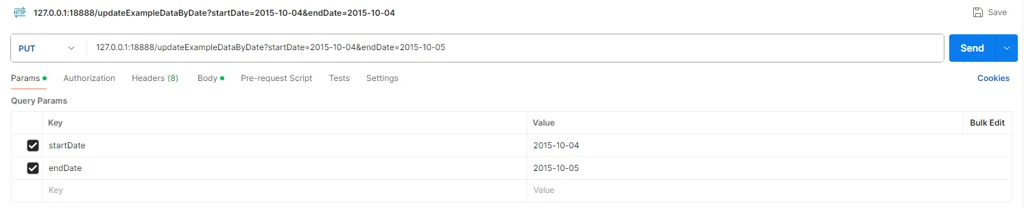
JSON 字符串的内容:
{
    "boolValue": true,
    "charValue": 98,
    "shortValue": 12,
    "intValue": 205,
    "longValue": 160566267,
    "time": "1970-01-01T12:36:10.100+00:00",
    "second": "02:07:31",
    "datetime": "2015-11-11T11:07:53",
    "nanotime": "1970-01-01T07:50:31.075101949",
    "nanotimestamp": "2014-06-13T18:06:58.061041998",
    "floatValue": 9.3313475,
    "minute": "05:17:10",
    "doubleValue": 0.685568745069626,
    "symbol": "Zb",
    "string": "j4RAJ",
    "dateHour": "0552-06-13T20:00:00",
    "blob": "iD"
}
发送 PUT 请求后,如果更新成功,会在 Body 中收到更新行数的返回。
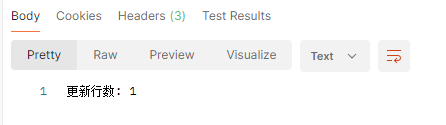
此时,到数据库查询 loadTable("dfs://example","example") 表。
select * from loadTable("dfs://example", "example")
可以发现数据已经更新成功了。
2.删除接口 deleteExampleDataByDate,可以删除指定日期的数据
请求方式选择 DELETE,URL 填写http://127.0.0.1:18888/deleteExampleDataByDate?Date=2015-10-05,Header 中必要的参数是 key:Content-Type,Value:application/json。
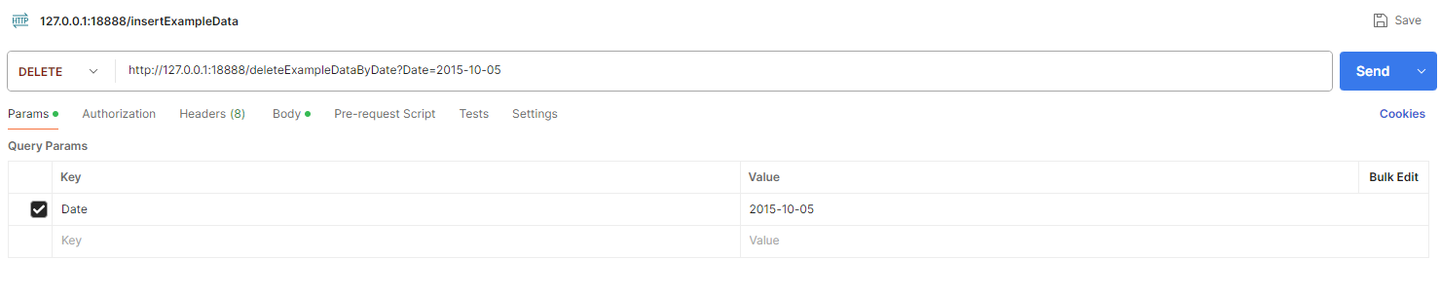
结果如下:

3.3 实现 DolphinDB 特殊的插入方法:upsert!
upsert! 的作用是将新数据写入索引内存表、键值内存表,或者 DFS 表。若新数据的主键值已存在,更新该主键值的数据;否则添加数据。
ExampleDao文件: 添加批量 upsert 插入数据的方法。
void upsertExampleData(List<ExampleEntity> exampleEntityList);ExampleMapper.xml文件:
<insert id="upsertExampleData">
    exampleTmpTable = table(1:0, loadTable("dfs://example", "example").schema().colDefs.name, loadTable("dfs://example", "example").schema().colDefs.typeString);
    <foreach collection="list" item="item">
        insert into exampleTmpTable
        values(
        #{item.boolValue},
        #{item.charValue},
        #{item.shortValue},
        #{item.intValue},
        #{item.longValue},
        #{item.date},
        #{item.time},
        #{item.second},
        #{item.datetime},
        #{item.timestamp},
        #{item.nanotime},
        #{item.minute},
        #{item.nanotimestamp},
        #{item.floatValue},
        #{item.doubleValue},
        #{item.symbol},
        #{item.string},
        #{item.dateHour},
        #{item.blob});
    </foreach>
    upsert!(loadTable("dfs://example", "example"), exampleTmpTable,,["Date", "IntValue"]);
    select 1;
</insert>
该代码的逻辑是首先根据 loadTable("dfs://example", "example") 创建一个空表
exampleTmpTable,并且将数据全部插入到这个空表中,之后使用upsert! 函数将数据插入到分布式表中。
ExampleService文件:
void upsertExampleData(List<ExampleEntity> exampleEntityList);- 在
ExampleServiceImpl文件中实现这个方法。
@Override
public void upsertExampleData(List<ExampleEntity> exampleEntityList) {
    exampleDao.upsertExampleData(exampleEntityList);
}ExampleController文件:
@PostMapping("/upsertExampleData")
public ResponseEntity<String> upsertExampleData(@RequestBody List<ExampleEntity> exampleEntityList) throws IOException {
    exampleService.upsertExampleData(exampleEntityList);
    return ResponseEntity.ok("Upsert");
}
可以使用 Postman 来测试接口,请求方式选择 POST,URL 填写 127.0.0.1:18888/upsertExampleData,Header 中必要的参数是 key:Content-Type,Value:application/json。Body 选择 raw,并且选择 JSON。可以连续发送两次 JSON,验证数据是否会更新。
第一个 JSON 字符串:
[
    {
        "boolValue": false,
        "charValue": 99,
        "shortValue": 56,
        "intValue": 2049,
        "longValue": -1603669167,
        "date": "2015-10-04",
        "time": "1970-01-01T11:38:10.000+00:00",
        "second": "01:06:31",
        "datetime": "2014-11-11T11:07:53",
        "timestamp": "2000-06-18T07:05:29",
        "nanotime": "1970-01-01T07:50:31.075101949",
        "nanotimestamp": "2014-06-13T18:06:58.061041998",
        "minute": "02:03:25",
        "floatValue": 7.3313475,
        "doubleValue": 0.685568745069626,
        "symbol": "Zb",
        "string": "j4RAJ",
        "dateHour": "0552-06-13T20:00:00",
        "blob": "iD"
    },
    {
        "boolValue": true,
        "charValue": 99,
        "shortValue": 56,
        "intValue": 2048,
        "longValue": 1603669167,
        "date": "2015-10-05",
        "time": "1970-01-01T11:38:10.000+00:00",
        "second": "01:06:31",
        "datetime": "2014-11-11T11:07:53",
        "timestamp": "2000-06-18T07:05:29",
        "nanotime": "1970-01-01T07:50:31.075101949",
        "nanotimestamp": "2014-06-13T18:06:58.061041998",
        "minute": "03:04:25",
        "floatValue": 7.3313475,
        "doubleValue": 0.685568745069626,
        "symbol": "Zb",
        "string": "j4RAJ",
        "dateHour": "0552-06-13T20:00:00",
        "blob": "iD"
    }
]
当 Postman 返回 Upsert 表示成功,此时查看数据库也成功插入了两条数据。

然后再发送第二条 POST 请求,第一行数据完全更改 date 和intValue,而第二条数据保持 date 和
intValue 不变,仅更改其他值。
JSON 字符串:
[
    {
        "boolValue": true,
        "charValue": 99,
        "shortValue": 56,
        "intValue": 2050,
        "longValue": 6669167,
        "date": "2015-10-07",
        "time": "1970-01-01T11:38:10.000+00:00",
        "second": "01:06:31",
        "datetime": "2014-11-11T11:07:53",
        "timestamp": "2000-06-18T07:05:29",
        "nanotime": "1970-01-01T07:50:31.075101949",
        "nanotimestamp": "2014-06-13T18:06:58.061041998",
        "minute": "02:03:25",
        "floatValue": 7.3313475,
        "doubleValue": 0.685568745069626,
        "symbol": "Zb",
        "string": "j4RAJ",
        "dateHour": "0552-06-13T20:00:00",
        "blob": "new"
    },
    {
        "boolValue": true,
        "charValue": 99,
        "shortValue": 56,
        "intValue": 2048,
        "longValue": 16516221,
        "date": "2015-10-05",
        "time": "1970-01-01T11:38:10.000+00:00",
        "second": "01:06:31",
        "datetime": "2014-11-11T11:07:53",
        "timestamp": "2000-06-18T07:05:29",
        "nanotime": "1970-01-01T07:50:31.075101949",
        "nanotimestamp": "2014-06-13T18:06:58.061041998",
        "minute": "03:04:25",
        "floatValue": 8.3313475,
        "doubleValue": 0.685568745069626,
        "symbol": "Zb",
        "string": "j4RAJ",
        "dateHour": "0552-06-13T20:00:00",
        "blob": "old"
    }
]
发送 POST 请求后,再次查看数据库可以看到有三条数据,达成了不存在就插入,存在即更新的需求。

4. 特殊类型
除了基础类型外,DolphinDB 还有许多其他的特殊类型,接下来将编写针对 DolphinDB 特殊类型的增删改查接口。
4.1 DECIMAL
Decimal 类型在 DolphinDB JDBC 中对应的类型是 String,但在 DolphinDB 中无法使用 STING 类型对 DECIMAL 类型进行操作,所以我们要设置成在插入的时候使用 String,在其他操作时使用 double。
4.1.1 DolphinDB 建表
db = database("dfs://example")
t = table(1:0, ["Date", "Decimal32", "Decimal64", "Decimal128"], [DATE, DECIMAL32(6), DECIMAL64(6), DECIMAL128(6)])
createPartitionedTable(db, t, "decimalTable","Date",,"Date")
4.1.2 DECIMAL 增删改查
- entity 文件夹
创建
src/main/java/com/dolphindb/demo/entity/DecimalTableEntity.java类。
package com.dolphindb.demo.entity;
import lombok.Data;
import java.time.LocalDate;
@Data
public class DecimalTableEntity {
    private LocalDate date;
    private String decimal32;
    private String decimal64;
    private String decimal128;
}
可以看到,我们将 DECIMAL 类型设置为了 String 类型,在查询和插入的时候会作为 String 类型插入。
- dao 文件夹
创建
src/main/java/com/dolphindb/demo/dao/DecimalTableDao.java类。
package com.dolphindb.demo.dao;
import com.dolphindb.demo.entity.DecimalTableEntity;
import org.apache.ibatis.annotations.Mapper;
import java.time.LocalDate;
import java.util.HashMap;
import java.util.List;
@Mapper
public interface DecimalTableDao {
    void insertDecimalTableData(DecimalTableEntity entity);
    List<DecimalTableEntity> getDecimalTableDataByDate(LocalDate date);
    long updateDecimalTableDataByDate(LocalDate date, HashMap<String, Object> updateFields);
    long deleteDecimalTableDataByDate(LocalDate date);
}- mapper 文件夹
创建
src/main/resources/mapper/DecimalTableMapper.xml文件实现这些方法。
<?xml version="1.0" encoding="UTF-8" ?>
<!DOCTYPE mapper PUBLIC "-//mybatis.org//DTD Mapper 3.0//EN" "http://mybatis.org/dtd/mybatis-3-mapper.dtd" >
<mapper namespace="com.dolphindb.demo.dao.DecimalTableDao" >
    <insert id="insertDecimalTableData">
        insert into decimalTable values(#{date}, #{decimal32}, #{decimal64}, #{decimal128})
    </insert>
    <update id="updateDecimalTableDataByDate">
        UPDATE decimalTable
        <set>
            <foreach collection="updateFields" index="key" item="value" separator=",">
                ${key} = #{value}
            </foreach>
        </set>
        WHERE Date = #{date}
    </update>
    <select id="getDecimalTableDataByDate" resultType="com.dolphindb.demo.entity.DecimalTableEntity">
        select * from loadTable("dfs://example", "decimalTable") where Date = #{date}
    </select>
    <delete id="deleteDecimalTableDataByDate">
        delete from loadTable("dfs://example", "decimalTable") where Date = #{date}
    </delete>
</mapper>- service 文件夹
创建
src/main/java/com/dolphindb/demo/service/DecimalTableService.java接口。
package com.dolphindb.demo.service;
import com.dolphindb.demo.entity.DecimalTableEntity;
import java.time.LocalDate;
import java.util.HashMap;
import java.util.List;
public interface DecimalTableService {
    void insertDecimalTableData(DecimalTableEntity entity);
    List<DecimalTableEntity> getDecimalTableDataByDate(LocalDate date);
    long updateDecimalTableDataByDate(LocalDate date, HashMap<String, Object> updateFields);
    long deleteDecimalTableDataByDate(LocalDate date);
}并且创建src/main/java/com/dolphindb/demo/service/impl/DecimalTableServiceImpl.java类实现这些方法。
package com.dolphindb.demo.service.impl;
import com.dolphindb.demo.dao.DecimalTableDao;
import com.dolphindb.demo.entity.DecimalTableEntity;
import com.dolphindb.demo.service.DecimalTableService;
import jakarta.annotation.Resource;
import org.springframework.stereotype.Service;
import java.time.LocalDate;
import java.util.HashMap;
import java.util.List;
@Service
public class DecimalTableServiceImpl implements DecimalTableService {
    @Resource
    DecimalTableDao decimalTableDao;
    @Override
    public void insertDecimalTableData(DecimalTableEntity decimalTableEntity) {
        decimalTableDao.insertDecimalTableData(decimalTableEntity);
    }
    @Override
    public List<DecimalTableEntity> getDecimalTableDataByDate(LocalDate date) {
        return decimalTableDao.getDecimalTableDataByDate(date);
    }
    @Override
    public long updateDecimalTableDataByDate(LocalDate date, HashMap<String, Object> updateFields) {
        return decimalTableDao.updateDecimalTableDataByDate(date, updateFields);
    }
    @Override
    public long deleteDecimalTableDataByDate(LocalDate date) {
        return decimalTableDao.deleteDecimalTableDataByDate(date);
    }
}- controller 文件夹
创建
src/main/java/com/dolphindb/demo/controller/DecimalTableController.java类。
package com.dolphindb.demo.controller;
import com.dolphindb.demo.converter.GenericEntityConverter;
import com.dolphindb.demo.entity.DecimalTableEntity;
import com.dolphindb.demo.service.DecimalTableService;
import jakarta.annotation.Resource;
import org.springframework.format.annotation.DateTimeFormat;
import org.springframework.http.ResponseEntity;
import org.springframework.web.bind.annotation.*;
import java.io.IOException;
import java.time.LocalDate;
import java.util.HashMap;
import java.util.List;
@RestController
public class DecimalTableController {
    @Resource
    DecimalTableService decimalTableService;
    @PostMapping("/insertDecimalTableData")
    public ResponseEntity<String> insertDecimalTableData(@RequestBody DecimalTableEntity decimalTableEntity) throws IOException {
        decimalTableService.insertDecimalTableData(decimalTableEntity);
        return ResponseEntity.ok("insert");
    }
    //http://127.0.0.1:18888/getDecimalTableDataByDate?Date=2015-10-03
    @GetMapping("/getDecimalTableDataByDate")
    public List<DecimalTableEntity> getDecimalTableDataByDate(@RequestParam("Date") @DateTimeFormat(iso = DateTimeFormat.ISO.DATE) LocalDate date) throws IOException {
        return decimalTableService.getDecimalTableDataByDate(date);
    }
    @PutMapping("/updateDecimalTableDataByDate")
    public ResponseEntity<Long> updateDecimalTableDataByDate(@RequestParam @DateTimeFormat(iso = DateTimeFormat.ISO.DATE) LocalDate date,
                                                             @RequestBody HashMap<String, Object> updateFields
    ){
        HashMap<String, Object> updateFieldsConvertByDecimalTableEntity = GenericEntityConverter.convertToTypedMap(updateFields, DecimalTableEntity.class);
        long updateNum = decimalTableService.updateDecimalTableDataByDate(date, updateFieldsConvertByDecimalTableEntity);
        return ResponseEntity.ok(updateNum);
    }
    @DeleteMapping("/deleteDecimalTableDataByDate")
    public ResponseEntity<Long> deleteDecimalTableDataByDate(@RequestParam("Date") @DateTimeFormat(iso = DateTimeFormat.ISO.DATE) LocalDate date){
        long deleteNum = decimalTableService.deleteDecimalTableDataByDate(date);
        return ResponseEntity.ok(deleteNum);
    }
}
至此,增删改查四个接口定义完成。
- 插入:POST 请求,URL:
127.0.0.1:18888/insertDecimalTableData,JSON 字符串:
{
    "date": "2015-10-03",
    "decimal32": 32.4,
    "decimal64": 64.406,
    "decimal128": 128.158
}- 查询:GET 请求,URL:
127.0.0.1:18888/getDecimalTableDataByDate?Date=2015-10-03 - 更新:PUT 请求,URL:
127.0.0.1:18888/updateDecimalTableDataByDate?date=2015-10-03,JSON 字符串:
{
    "decimal32": 32.1,
    "decimal64": 64.68,
    "decimal128": 128.15
}- 删除:DELETE 请求,URL:
127.0.0.1:18888/deleteDecimalTableDataByDate?Date=2015-10-03
4.2 ArrayVector
4.2.1 DolphinDB 建表
db = database("dfs://example")
t = table(1:0, ["DateValue", "arrayInt", "arrayDouble", "arrayTimeStamp"], [DATE,INT[],DOUBLE[],TIMESTAMP[]])
createPartitionedTable(db, t, "arrayTable", "DateValue",,"DateValue")
4.2.2 arrayVector 类型的读和写
arrayVector 类型需要使用 Mybatis 的 handler 功能来支持读和写。
handler 文件夹:
创建src/main/java/com/dolphindb/demo/handler/DolphinDBIntArrayTypeHandler.java类。
package com.dolphindb.demo.handler;
import com.dolphindb.jdbc.DolphinDBArray;
import com.xxdb.data.BasicIntVector;
import org.apache.ibatis.type.BaseTypeHandler;
import org.apache.ibatis.type.JdbcType;
import java.sql.*;
public class DolphinDBIntArrayTypeHandler extends BaseTypeHandler<int[]> {
    @Override
    public void setNonNullParameter(PreparedStatement ps, int i, int[] parameter, JdbcType jdbcType) throws SQLException {
        ps.setObject(i, parameter, Types.ARRAY);
    }
    @Override
    public int[] getNullableResult(ResultSet rs, String columnName) throws SQLException {
        // 从ResultSet获取BasicIntVector并转为int[]
        DolphinDBArray vector = (DolphinDBArray) rs.getObject(columnName);
        return vector != null ? ((BasicIntVector) vector.getVector()).getdataArray(): null; // 使用getdataArray()方法
    }
    @Override
    public int[] getNullableResult(ResultSet rs, int columnIndex) throws SQLException {
        DolphinDBArray vector = (DolphinDBArray) rs.getObject(columnIndex);
        return vector != null ? ((BasicIntVector) vector.getVector()).getdataArray(): null;
    }
    @Override
    public int[] getNullableResult(CallableStatement cs, int columnIndex) throws SQLException {
        DolphinDBArray vector = (DolphinDBArray) cs.getObject(columnIndex);
        return vector != null ? ((BasicIntVector) vector.getVector()).getdataArray(): null;
    }
}创建src/main/java/com/dolphindb/demo/handler/DolphinDBDoubleArrayTypeHandler.java类。
package com.dolphindb.demo.handler;
import com.dolphindb.jdbc.DolphinDBArray;
import com.xxdb.data.BasicDoubleVector;
import com.xxdb.data.BasicIntVector;
import org.apache.ibatis.type.BaseTypeHandler;
import org.apache.ibatis.type.JdbcType;
import java.sql.*;
public class DolphinDBDoubleArrayTypeHandler extends BaseTypeHandler<double[]> {
    @Override
    public void setNonNullParameter(PreparedStatement ps, int i, double[] parameter, JdbcType jdbcType) throws SQLException {
        ps.setObject(i, parameter, Types.ARRAY);
    }
    @Override
    public double[] getNullableResult(ResultSet rs, String columnName) throws SQLException {
        DolphinDBArray vector = (DolphinDBArray) rs.getObject(columnName);
        return vector != null ? ((BasicDoubleVector) vector.getVector()).getdataArray(): null; // 使用getdataArray()方法
    }
    @Override
    public double[] getNullableResult(ResultSet rs, int columnIndex) throws SQLException {
        DolphinDBArray vector = (DolphinDBArray) rs.getObject(columnIndex);
        return vector != null ? ((BasicDoubleVector) vector.getVector()).getdataArray(): null;
    }
    @Override
    public double[] getNullableResult(CallableStatement cs, int columnIndex) throws SQLException {
        DolphinDBArray vector = (DolphinDBArray) cs.getObject(columnIndex);
        return vector != null ? ((BasicDoubleVector) vector.getVector()).getdataArray(): null;
    }
}创建src/main/java/com/dolphindb/demo/handler/DolphinDBTimeStampArrayTypeHandler.java类。
package com.dolphindb.demo.handler;
import com.dolphindb.jdbc.DolphinDBArray;
import com.xxdb.data.BasicTimestampVector;
import org.apache.ibatis.type.BaseTypeHandler;
import org.apache.ibatis.type.JdbcType;
import java.sql.*;
import java.time.Instant;
import java.time.LocalDateTime;
import java.time.ZoneId;
public class DolphinDBTimeStampArrayTypeHandler extends BaseTypeHandler<LocalDateTime[]> {
    @Override
    public void setNonNullParameter(PreparedStatement ps, int i, LocalDateTime[] parameter, JdbcType jdbcType) throws SQLException {
        ps.setObject(i, parameter, Types.ARRAY);
    }
    @Override
    public LocalDateTime[] getNullableResult(ResultSet rs, String columnName)
            throws SQLException {
        DolphinDBArray vector = (DolphinDBArray) rs.getObject(columnName);
        return convertToLocalDateTimeArray(vector);
    }
    @Override
    public LocalDateTime[] getNullableResult(ResultSet rs, int columnIndex)
            throws SQLException {
        DolphinDBArray vector = (DolphinDBArray) rs.getObject(columnIndex);
        return convertToLocalDateTimeArray(vector);
    }
    @Override
    public LocalDateTime[] getNullableResult(CallableStatement cs, int columnIndex)
            throws SQLException {
        DolphinDBArray vector = (DolphinDBArray) cs.getObject(columnIndex);
        return convertToLocalDateTimeArray(vector);
    }
    private LocalDateTime[] convertToLocalDateTimeArray(DolphinDBArray vector) {
        if (vector == null) {
            return null;
        }
        long[] timestamps = ((BasicTimestampVector) vector.getVector()).getdataArray();
        LocalDateTime[] result = new LocalDateTime[timestamps.length];
        for (int i = 0; i < timestamps.length; i++) {
            result[i] = parseTimestamp(timestamps[i]);
        }
        return result;
    }
    public static long countMilliseconds(LocalDateTime dt) {
        // 实现将LocalDateTime转换为毫秒时间戳的逻辑
        return dt.atZone(ZoneId.systemDefault()).toInstant().toEpochMilli();
    }
    public static LocalDateTime parseTimestamp(long timestamp) {
        // 实现将毫秒时间戳转换为LocalDateTime的逻辑
        return LocalDateTime.ofInstant(Instant.ofEpochMilli(timestamp), ZoneId.systemDefault());
    }
}
更改 application.properties 配置文件,添加配置:
mybatis.type-handlers-package=com.dolphindb.demo.handler添加 type-handlers 后,这样就支持了 int[],double[],timestamp[] 类型。
- entity 文件夹:
创建
src/main/java/com/dolphindb/demo/entity/ArrayTableEntity.java类。
package com.dolphindb.demo.entity;
import lombok.Data;
import java.time.LocalDate;
import java.time.LocalDateTime;
@Data
public class ArrayTableEntity {
    private LocalDate dateValue;
    private int[] arrayInt;
    private double[] arrayDouble;
    private LocalDateTime[] arrayTimeStamp;
}- dao 文件夹:
创建
src/main/java/com/dolphindb/demo/dao/ArrayTableDao.java接口。
package com.dolphindb.demo.dao;
import com.dolphindb.demo.entity.ArrayTableEntity;
import org.apache.ibatis.annotations.Insert;
import org.apache.ibatis.annotations.Mapper;
import org.apache.ibatis.annotations.Select;
import org.apache.ibatis.annotations.Update;
import java.time.LocalDate;
import java.time.LocalDateTime;
import java.util.List;
@Mapper
public interface ArrayTableDao {
    @Insert("INSERT INTO arrayTable(dateValue, arrayInt, arrayDouble, arrayTimeStamp) " +
            "VALUES (#{dateValue}, #{arrayInt}, #{arrayDouble}, #{arrayTimeStamp})")
    void insertArrayTableData(ArrayTableEntity arrayTableEntity);
    @Select("SELECT * FROM arrayTable WHERE DateValue = #{date}")
    List<ArrayTableEntity> getArrayTableDataByDate(LocalDate date);
    @Update("UPDATE arrayTable SET arrayInt = #{arrayInt}, arrayDouble = #{arrayDouble} WHERE DateValue = #{date}")
    long updateArrayTableDataByDate(LocalDate date, int[] arrayInt, double[] arrayDouble);
}
可以使用 @Insert,@Select 等注解,这样就可以省略 mapper 文件。
- service 文件夹
新建
src/main/java/com/dolphindb/demo/service/ArrayTableService.java接口。
package com.dolphindb.demo.service;
import com.dolphindb.demo.entity.ArrayTableEntity;
import java.time.LocalDate;
import java.time.LocalDateTime;
import java.util.List;
public interface ArrayTableService {
    void insertArrayTableData(ArrayTableEntity arrayTableEntity);
    List<ArrayTableEntity> getArrayTableDataByDate(LocalDate date);
    long updateArrayTableDataByDate(LocalDate date, int[] arrayInt, double[] arrayDouble);
}新建src/main/java/com/dolphindb/demo/service/impl/ArrayTableServiceImpl.java类。
package com.dolphindb.demo.service.impl;
import com.dolphindb.demo.dao.ArrayTableDao;
import com.dolphindb.demo.entity.ArrayTableEntity;
import com.dolphindb.demo.service.ArrayTableService;
import jakarta.annotation.Resource;
import org.springframework.stereotype.Service;
import java.time.LocalDate;
import java.time.LocalDateTime;
import java.util.List;
@Service
public class ArrayTableServiceImpl implements ArrayTableService {
    @Resource
    ArrayTableDao arrayTableDao;
    @Override
    public void insertArrayTableData(ArrayTableEntity arrayTableEntity) {
        arrayTableDao.insertArrayTableData(arrayTableEntity);
    }
    @Override
    public List<ArrayTableEntity> getArrayTableDataByDate(LocalDate date) {
        return arrayTableDao.getArrayTableDataByDate(date);
    }
    @Override
    public long updateArrayTableDataByDate(LocalDate date, int[] arrayInt, double[] arrayDouble) {
        return arrayTableDao.updateArrayTableDataByDate(date, arrayInt, arrayDouble);
    }
}- controller 文件夹:
新建
src/main/java/com/dolphindb/demo/controller/ArrayTableController.java类。
package com.dolphindb.demo.controller;
import com.dolphindb.demo.entity.ArrayTableEntity;
import com.dolphindb.demo.service.ArrayTableService;
import jakarta.annotation.Resource;
import org.springframework.format.annotation.DateTimeFormat;
import org.springframework.http.ResponseEntity;
import org.springframework.web.bind.annotation.*;
import java.time.LocalDate;
import java.util.List;
@RestController
public class ArrayTableController {
    @Resource
    ArrayTableService arrayTableService;
    @PostMapping("/insertArrayTableData")
    public ResponseEntity<String> insertArrayTableData(@RequestBody ArrayTableEntity arrayTableEntity){
        arrayTableService.insertArrayTableData(arrayTableEntity);
        return ResponseEntity.ok("insert");
    }
    @GetMapping("/getArrayTableDataByDate")
    public List<ArrayTableEntity> getArrayTableDataByDate(@RequestParam("Date") @DateTimeFormat(iso = DateTimeFormat.ISO.DATE) LocalDate date){
        return arrayTableService.getArrayTableDataByDate(date);
    }
    @PutMapping("/updateArrayTableDataByDate")
    public ResponseEntity<Long> updateArrayTableDataByDate(@RequestParam("Date") @DateTimeFormat(iso = DateTimeFormat.ISO.DATE) LocalDate date,
                                                           @RequestBody ArrayTableEntity arrayTableEntity){
        long updateNum = arrayTableService.updateArrayTableDataByDate(date, arrayTableEntity.getArrayInt(), arrayTableEntity.getArrayDouble());
        return ResponseEntity.ok(updateNum);
    }
}
至此,我们实现了 arrayVector 类型的查询、写入和更新三个接口。
写入:POST 请求,URL:127.0.0.1:18888/insertArrayTableData,JSON 字符串:
{
    "dateValue": "2015-10-03",
    "arrayInt": [1,2,3],
    "arrayDouble": [1.2,3.4,5.6],
    "arrayTimeStamp": ["2000-06-16T07:05:29", "2000-06-18T07:05:29", "2000-06-19T07:05:29"]
}
查询:GET 请求,URL:127.0.0.1:18888/getArrayTableDataByDate?Date=2015-10-03
更新:PUT 请求,URL:127.0.0.1:18888/updateArrayTableDataByDate?Date=2015-10-03,JSON
字符串:
{
    "arrayInt": [1,2,3,4],
    "arrayDouble": [1.2,3.4,5.6,7.8]
}
5. 总结
本文成功构建了一个基于 Spring Boot 框架、整合 MyBatis 操作 DolphinDB 数据库的微服务示例。通过系统的开发实践,我们实现了以下核心成果:
- 完整的开发框架与流程
- 从零开始搭建了标准的 Spring Boot 项目结构,包括 MVC 分层架构(Controller、Service、Dao、Mapper)。
- 配置了 DolphinDB JDBC 连接,确保应用能够与 DolphinDB 数据库正常通信。
- 实现了对 DolphinDB 分布式表的基本操作,包括数据的插入、查询、更新和删除。
- 全面的数据类型支持
- 基础类型:完整支持 DolphinDB 的 BOOL、CHAR、SHORT、INT、LONG、DATE、TIME、SECOND、DATETIME、TIMESTAMP、NANOTIME、NANOTIMESTAMP、MINUTE、FLOAT、DOUBLE、SYMBOL、STRING、DATEHOUR、BLOB 等基础数据类型的 CRUD 操作。
- 特殊类型处理:
- Decimal 类型:针对 DolphinDB 的高精度 DECIMAL 类型,采用 String 类型在 Java 层映射,实现与数据库的准确交互。
- ArrayVector 类型:通过自定义 MyBatis Type Handler(
DolphinDBIntArrayTypeHandler、DolphinDBDoubleArrayTypeHandler、DolphinDBTimeStampArrayTypeHandler),解决数组类型在 JDBC 层与 Java 对象间的转换,实现对 INT[]、DOUBLE[]、TIMESTAMP[] 等数组类型的完整支持。
- 高级功能实现
- upsert! 操作:实现了 DolphinDB 特有的
upsert!功能,支持“存在则更新,不存在则插入”的批量数据处理模式,提高了数据操作的灵活性。 - 动态类型转换:开发了
GenericEntityConverter工具类,自动处理 HTTP 请求中 JSON 数据到实体类对象的类型转换,增强了接口的健壮性。 - 灵活查询:支持多种查询条件,包括等值查询、范围查询(BETWEEN)和 IN 查询,满足了不同的业务场景需求。
- upsert! 操作:实现了 DolphinDB 特有的
6. 附录
代码文件:https://docs.dolphindb.cn/zh/tutorials/data/build_springboot_ddb_micro/demo.zip
原创声明:本文系作者授权腾讯云开发者社区发表,未经许可,不得转载。
如有侵权,请联系 cloudcommunity@tencent.com 删除。
目录
腾讯云开发者

Copyright © 2013 - 2026 Tencent Cloud. All Rights Reserved. 腾讯云 版权所有
深圳市腾讯计算机系统有限公司 ICP备案/许可证号:粤B2-20090059  粤公网安备44030502008569号
腾讯云计算(北京)有限责任公司 京ICP证150476号 | 京ICP备11018762号